

A platform dedicated to providing unbiased reviews of newly launched applications, analyzing everything from their features to their full potential.
info@scoutforge.net© 2026 Scoutforge. All rights reserved.
A platform dedicated to providing unbiased reviews of newly launched applications, analyzing everything from their features to their full potential.
info@scoutforge.net© 2026 Scoutforge. All rights reserved.
A platform dedicated to providing unbiased reviews of newly launched applications, analyzing everything from their features to their full potential.
info@scoutforge.net© 2026 Scoutforge. All rights reserved.
Cycling through all six. Tap any point to stop.
Measured on six things
One-click autofill extension for repeated form filling on...
No a11y claims, English-only, Chrome desktop only; limited platform and language support.
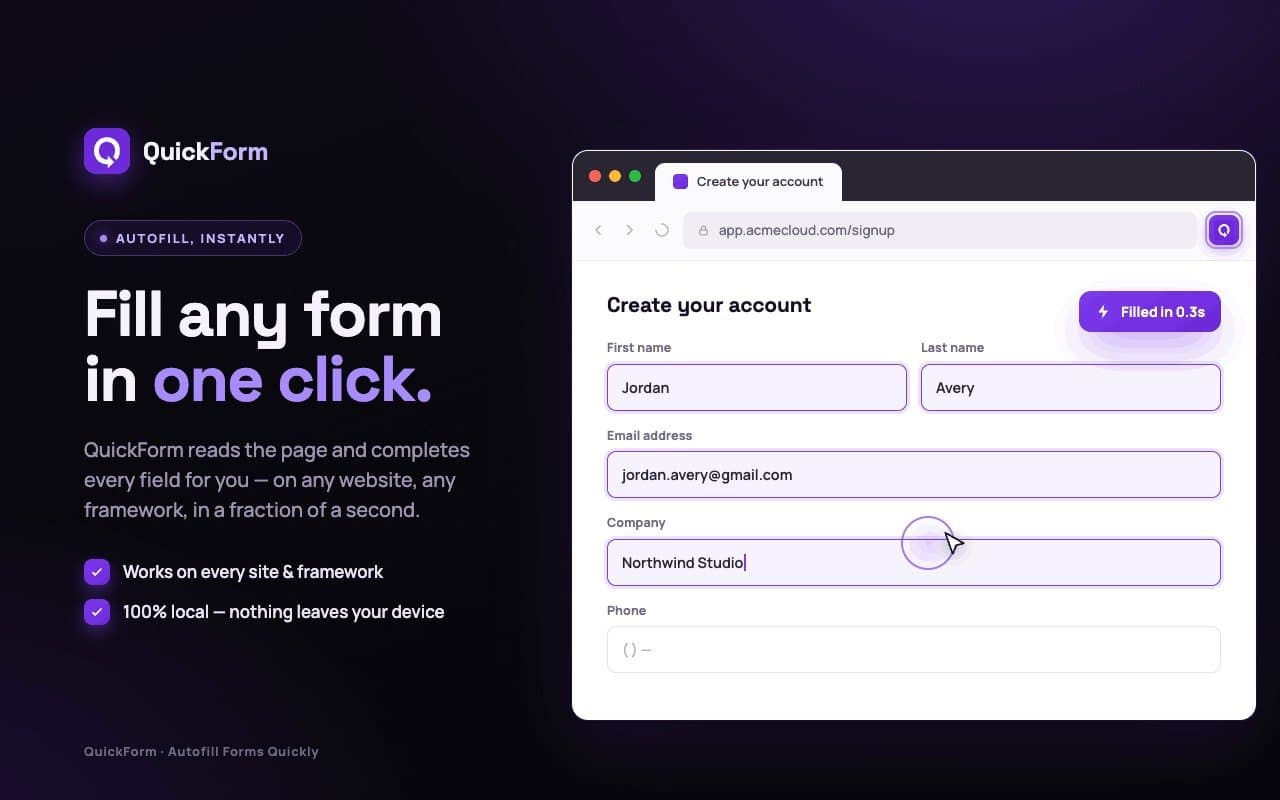
QuickForm is a Chrome extension that intelligently autofills online forms with a single click. Unlike generic autofill tools, it creates precise profiles for specific form structures, making it perfect for QA testers, developers, and professionals who repeatedly fill out similar forms on internal tools, staging environments, or admin panels. Features include Record Mode to capture inputs instantly, advanced profile options like auto-click and custom delays, and local data storage for privacy. It works across all frameworks (React, Vue, Angular) and supports a wide range of form fields. Whether you're testing or just want to save time, QuickForm streamlines your workflow.
Drawn from the product itself, not from a survey.
Demographic
QA Testers and Developers
Pain points
Manually filling the same test forms repeatedly, wasting time and risking errors
Primary needs
Fast, repeatable, and accurate form filling for debugging and testing
Demographic
Power Users and Admin Panel Operators
Pain points
Daily repetitive data entry into internal tools, CRM, or staging environments
Primary needs
Customizable autofill profiles with advanced options (delays, auto-click)
Demographic
Freelancers and Professionals with High Form Volume
Pain points
Filling similar client forms, registrations, or applications day after day
Primary needs
Time-saving automation that works across different websites and frameworks
Written by AI from measured evidence, scored out of 100.
QuickForm excels as a specialized Chrome extension for precise, repeatable form autofilling in complex web apps. It shines for QA testers, developers, and power users needing custom profiles beyond generic password managers. Strengths in usability and targeted features outweigh basic design and accessibility gaps. Free, private, and actively maintained, it's a practical time-saver for repetitive workflows.
Strong Record Mode and profile tools make repetitive filling effortless for target users; easy install, no signup.
Basic but clean landing page and standard store listing focused on functionality over polish.
Lightweight extension with quick toolbar access and local execution; handles dynamic SPAs effectively per claims.
Local-first with privacy policy and no-account model; basic Chrome disclosures but no enterprise audits.
No a11y claims, English-only, Chrome desktop only; limited platform and language support.
50k users, steady ratings, recent updates, and niche YouTube traction; free model aids adoption but no viral community.
QuickForm's design is utilitarian—a straightforward homepage and store page that prioritizes features over flair. The real strength lies in usability: Record Mode lets users capture complex forms on React or Angular apps instantly, with advanced options like auto-click and delays. This makes it far more precise than generic tools for QA testers and devs repeatedly hitting the same staging forms. No signup friction and profile management (duplicate, import/export) keep workflows smooth. While the UI won't win design awards, it delivers exactly what power users need without unnecessary complexity.
Speed is solid for an extension—lightweight at 2.54MiB with local processing and instant toolbar access, handling dynamic SPAs effectively. Security is privacy-oriented with local storage emphasis, a clear policy, and no mandatory accounts, though it collects some usage data for improvements. Lacking formal audits or bug bounties keeps it in the competent-but-not-enterprise tier. Overall, it balances performance and safety well for individual professionals, outperforming basic browser autofill in targeted scenarios while staying transparent.
Accessibility is a weak point: no mentions of WCAG compliance, screen reader support, or multi-language options, and it's limited to desktop Chrome. Growth shows promise with 50,000 users, 4.4/5 from 154 ratings, recent updates through mid-2026, and YouTube traction, indicating steady niche adoption among QA and dev communities. The free model and focused marketing help, but it lacks broad community or review platform presence compared to bigger players. Trajectory looks positive for its stage.
Conclusion
If you're tired of retyping the same test data across staging environments, QuickForm is worth installing—simple, effective, and free. Just don't expect it to revolutionize accessibility or scale to enterprise compliance.
Named competitors, point by point. Nobody paid to appear here or to be left out.
 QuickForm QuickForm |  LastPass LastPass |  Dashlane Dashlane |  Google Autofill Google Autofill | |
|---|---|---|---|---|
| Specialized for repetitive test/admin forms | Yes - Record Mode + advanced profiles | Basic autofill only | Basic autofill only | Basic address/payment info only |
| Works on complex SPAs (React/Vue/Angular) | Yes - explicitly supported | Limited / often fails | Limited / often fails | Limited / often fails |
| Pricing model | Free forever | Freemium + paid plans | Freemium + paid plans | Free (built-in) |
LastPass
A password manager that also offers basic form autofill, but focuses more on credentials and less on advanced profile management.
Dashlane
Includes autofill for passwords and personal information, but lacks specialized features for repetitive form testing.
Google Autofill
Built into Chrome for basic address/payment info, but not designed for complex or repeated form profiles.
Comparing options? See QuickForm alternatives, scored side by side
What the review was written against. A verdict with no sources is an opinion.

An all-in-one hospitality software for restaurants and ba...

A weekly newsletter delivering curated tech jobs, intervi...

White-label reputation management software for agencies s...

Privacy-first open source journal app with a continuous t...

Puzzly is an all-in-one B2B lead generation platform that...

All-in-one AI workspace for docs, projects, and knowledge...

A free, open-source platform offering 110 AI agent skills...

Open-source desktop app for switching AI coding providers...

One verified handle for your online identity, readable by...

Frame-perfect video-to-GIF maker that runs entirely in yo...

White-label website audits that close deals for digital a...

Automated quote follow-up for trades and service businesses.
A platform dedicated to providing unbiased reviews of newly launched applications, analyzing everything from their features to their full potential.
info@scoutforge.net© 2026 Scoutforge. All rights reserved.
