Cycling through all six. Tap any point to stop.
Measured on six things
It learns your business, catches every commitment and decision, and moves the right work forward.
Growth
32Four-month-old domain with zero discoverable reviews, community, or traction signals. Beta positioning and 'free for now' is the entire current footprint.
Screenshots
1 / 1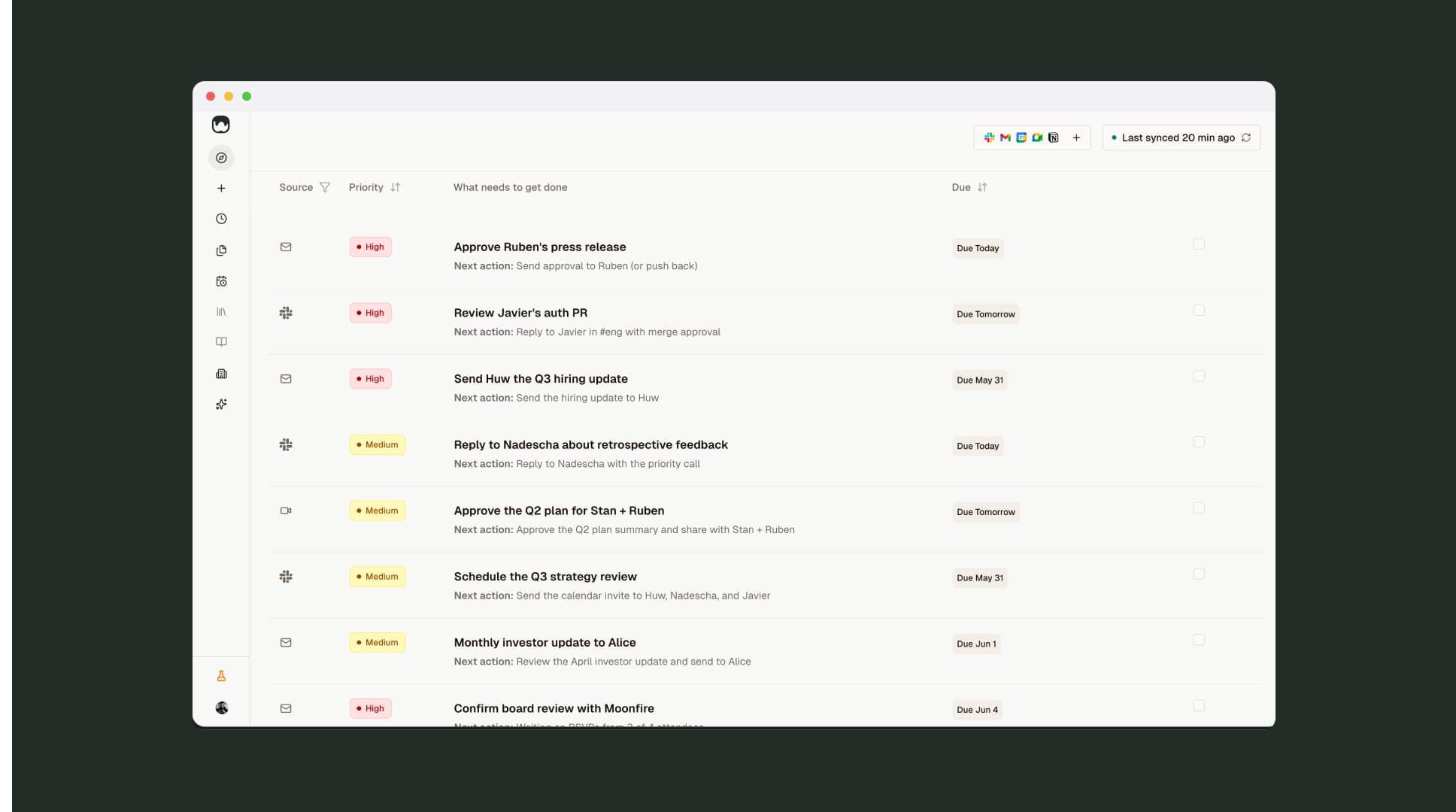
About this app
Your head is no place to run a business. The thing you promised in Slack. The follow-up from this morning's call. The update three people are waiting on. A promise made in a conversation has no home, so following through depends on you remembering. AI has given every business unlimited interns: highly capable, endlessly willing, but you do the training. You brief them, hand them the context and check what comes back, and next time they start from scratch. readywhen works like the most senior person in your business. It never starts from scratch: it knows what you've promised and where you're heading, and it has an opinion about what that means. “Not that, this first.” Here's how it works. Connect your tools and it learns your business on its own: how you write, what you sell, who your customers are. You maintain nothing. It catches every commitment you make, every decision and promise from every call, meeting, note and Slack thread, the moment it's made. Nothing lives only in you
Key features
- 1Auto-captures commitments from Slack, email, meetings, and docs without manual input
- 2Drafts next actions (briefs, emails, updates) for user approval only
- 3Zero maintenance learning from existing tools and workflows
Target customer profile
Drawn from the product itself, not from a survey.
Demographic
Startup founders and CEOs
Pain points
Overwhelmed by scattered tasks across Slack, email, and meetings; frequently miss follow-ups
Primary needs
Automated commitment capture and task execution without manual input
Demographic
Sales leaders and account executives
Pain points
Post-meeting follow-ups fall through cracks; losing deals due to missed commitments
Primary needs
Seamless integration with CRM and communication tools to auto-generate next steps
Demographic
Operations executives (COOs, Heads of Ops)
Pain points
Juggling multiple projects and people; manual tracking is time-consuming
Primary needs
A reliable system to catch and act on commitments without extra effort
Scout Review
Written by AI from measured evidence, scored out of 100.
readywhen positions itself as the senior operator that never forgets a commitment across Slack, email, and meetings, then drafts the next action for approval. The product vision is sharp for busy founders and ops leaders, the UI is polished for its age, and the beta is generous. Everything else is still early.
Measure by measure
Usability
62Claims zero setup and learning curve with minutes-to-value beta flow. Strong CTAs and source context in UI, but no public docs or verified onboarding details available yet.
Design
68Clean, modern flat UI with disciplined table layout and scannable priority pills. Split hero and accurate product screenshots stand out, but arbitrary 3D tentacle graphic clashes with the aesthetic.
Speed
58Mobile Lighthouse 61/100 dragged by 8.0s LCP; desktop near-perfect at 98/100. Typical early-stage SPA behavior with no published benchmarks or complaints.
Security
48Basic HTTPS + email auth signals present; missing HSTS, CSP and most headers. No compliance certifications or security documentation found.
Accessibility
78Strong 96/100 Lighthouse score with only one contrast failure. No explicit WCAG claims or multi-language support found; responsive layout appears functional.
Growth
32Four-month-old domain with zero discoverable reviews, community, or traction signals. Beta positioning and 'free for now' is the entire current footprint.
Improvement areas
- Add visible security/compliance documentation and stronger HTTP headers
- Publish onboarding flow, docs, or changelog to support the 'zero learning curve' claim
- Build early traction through reviews, community, or case studies
Design & Usability
The homepage nails a clean, modern aesthetic with a disciplined task table that actually previews the real product instead of generic mockups. Priority pills and source context make the UI feel immediately useful. Usability leans on bold claims of minutes-to-value and zero maintenance, which fits the target overwhelmed founders, though the lack of public docs keeps it from feeling fully battle-tested.
Speed & Security
Performance splits sharply between excellent desktop scores and a mobile LCP of 8 seconds that will frustrate on-the-go users. Security is table-stakes HTTPS with SPF/DMARC but missing the full header suite and any compliance signals, normal for a young beta but worth watching as commitments from Slack and email start flowing through.
Accessibility & Growth
Accessibility clears automated checks at 96/100 with only a single contrast issue, putting it ahead of many early-stage tools. Growth is the clear weak spot: a four-month-old product with no reviews, community, or traction yet, which is expected but means real validation is still ahead.
Conclusion
If the commitment capture actually works as advertised without constant babysitting, this could carve out a real niche. Right now it feels like a promising beta that needs users and feedback more than anything else.
Suggestions for improvement
- Publish a short public changelog and basic docs page to reduce the 'beta black box' feeling
- Add at least HSTS and a basic CSP to close the most obvious header gaps
- Run a small founder beta cohort and collect 3-5 public testimonials before wider launch
Alternatives comparison
Named competitors, point by point. Nobody paid to appear here or to be left out.
 readywhen readywhen |  Motion Motion |  Mem Mem |  Notion AI Notion AI | |
|---|---|---|---|---|
| Auto commitment capture from Slack/email/meetings | Yes - catches every commitment automatically | No - focuses on auto-scheduling tasks | Partial - organizes notes but less commitment focus | No - summarization within Notion only |
| Requires manual setup or context input | No - zero building, learns on its own | Yes - requires more setup per description | Yes - user provides context for organization | Yes - needs prompts inside Notion |
| Drafts actionable next steps for approval | Yes - drafts briefs, emails, updates automatically | Partial - auto-schedules but not content drafts | No - primarily organizes existing notes | Partial - helps with writing/summaries only |
Motion
AI-powered calendar and task management that auto-schedules work, but requires more setup.
Mem
AI note-taking and knowledge management that organizes ideas, but less focused on commitment capture.
Notion AI
AI assistant within Notion for summarization and writing, but doesn't automatically capture commitments from other apps.
Comparing options? See readywhen alternatives, scored side by side
Sources
What the review was written against. A verdict with no sources is an opinion.
More Productivity apps
View all Productivity
Qamarero
92An all-in-one hospitality software for restaurants and ba...

The Stack Newsletter
92A weekly newsletter delivering curated tech jobs, intervi...

EmbedMyReviews
92White-label reputation management software for agencies s...

StoryPad
92Privacy-first open source journal app with a continuous t...

Puzzly – B2B Lead Generation & Sales Intelligence Platform
92Puzzly is an all-in-one B2B lead generation platform that...

Notion
92All-in-one AI workspace for docs, projects, and knowledge...

Vibe Coding Agent Skills
92A free, open-source platform offering 110 AI agent skills...

CC Switch
91Open-source desktop app for switching AI coding providers...

username.md
90One verified handle for your online identity, readable by...

What the GIF
89Frame-perfect video-to-GIF maker that runs entirely in yo...

AuditCloser
89White-label website audits that close deals for digital a...

NudgeWin
89Automated quote follow-up for trades and service businesses.


A platform dedicated to providing unbiased reviews of newly launched applications, analyzing everything from their features to their full potential.
info@scoutforge.net© 2026 Scoutforge. All rights reserved.
