

A platform dedicated to providing unbiased reviews of newly launched applications, analyzing everything from their features to their full potential.
info@scoutforge.net© 2026 Scoutforge. All rights reserved.
A platform dedicated to providing unbiased reviews of newly launched applications, analyzing everything from their features to their full potential.
info@scoutforge.net© 2026 Scoutforge. All rights reserved.
A platform dedicated to providing unbiased reviews of newly launched applications, analyzing everything from their features to their full potential.
info@scoutforge.net© 2026 Scoutforge. All rights reserved.
Cycling through all six. Tap any point to stop.
Measured on six things
Back up Zoom cloud recordings to Google Drive automatically. Optional auto-delete frees Zoom storage. 60-second setup, then forget it.
Brand-new beta with only curated testimonials; no external reviews, GitHub, or community traction found.
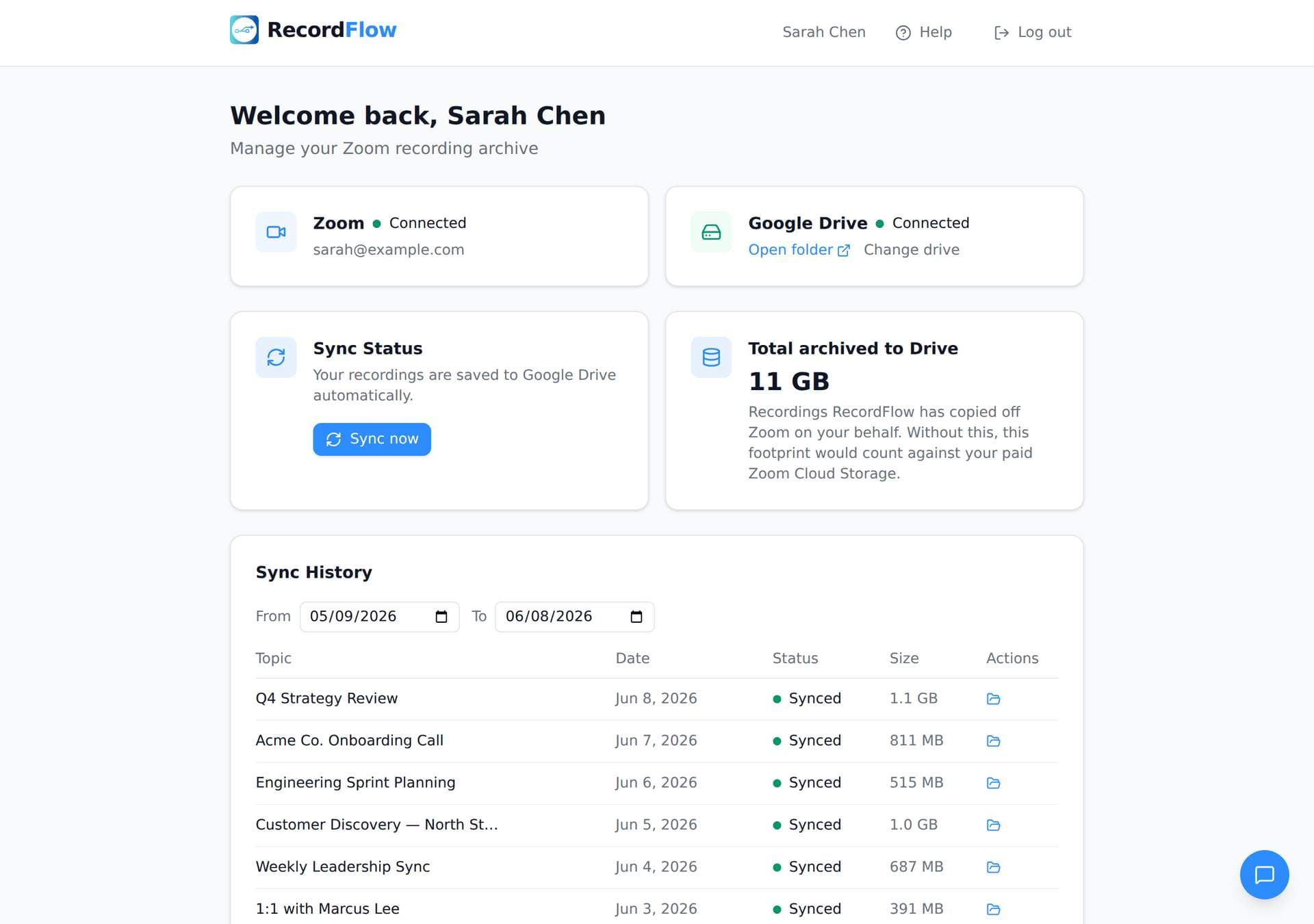
RecordFlow automatically archives every Zoom cloud recording to your Google Drive — the moment a meeting ends, plus a backfill of the past 2 years. No manual downloads, no forgotten files, no paying for Zoom storage you don't need. Setup takes 60 seconds: sign in with Zoom, connect your Drive, pick a folder. New recordings then sync within minutes — automatically, forever. Every file transfers: video (MP4), audio (M4A), transcripts (VTT plus a formatted Google Doc), and chat logs — organized by year and date. Optional auto-delete clears recordings from Zoom on a safe delay once the Drive copy is verified, freeing storage automatically. Reliable by design: chunked transfers that never choke on large files, smart deduplication so it's safe to re-run, and automatic retries. Recordings stream straight to your Drive — we never store them. OAuth 2.0, AES-256 encryption. Made for coaches, consultants, therapists, professors, and small teams who can't afford to lose a recording.
Drawn from the product itself, not from a survey.
Demographic
Coaches and consultants recording client sessions
Pain points
Zoom storage fills up quickly; manual download and upload is time-consuming; recordings are client deliverables that must be reliable.
Primary needs
Automatic backup to Google Drive; no storage limits; easy sharing with clients.
Demographic
Education teams (teachers, lecturers) recording classes
Pain points
Lectures need permanent storage; students require easy access; Zoom storage is limited.
Primary needs
Reliable archiving to Google Drive; shared folder access; ability to handle many recordings.
Demographic
IT and operations admins managing Zoom accounts
Pain points
Manual backup for team members is tedious; risk of data loss; need centralized control.
Primary needs
Admin-level installation; automatic backup for all opted-in members; single Drive folder for easy management.
Written by AI from measured evidence, scored out of 100.
RecordFlow is a purpose-built, reliable Zoom-to-Drive archiver that excels in security and ease for its target users. The beta is free and functional, with strong design and usability foundations. However, it lacks maturity signals in accessibility, independent validation, and growth metrics, making it a promising but unproven option versus more established automation tools.
Fast OAuth setup and free beta lower barriers; solid docs and responsive founder support noted in testimonials.
Polished, modern landing page with strong visual hierarchy and professional Zoom Marketplace presence.
Webhook-driven sync in minutes plus hourly fallback and chunked uploads for reliability on large files.
Strong OAuth + encryption model, Zoom approval, and explicit no-storage policy; privacy docs and DPA available.
Zero mentions of WCAG, alt text, or a11y features; mobile layout appears standard but unverified.
Brand-new beta with only curated testimonials; no external reviews, GitHub, or community traction found.
RecordFlow delivers a clean, modern homepage and Marketplace listing that makes the value proposition instantly clear. The 60-second OAuth setup and free beta remove friction effectively, with early users praising how quickly recordings appear in Drive. Documentation and founder responsiveness add to the approachable feel. While the UI isn't revolutionary, it hits the right notes for a focused automation tool aimed at coaches and small teams.
Technical claims around chunked transfers, webhooks, hourly backups, and automatic retries suggest solid reliability for large files. Security stands out with direct streaming to Drive, AES-256, OAuth-only access, and Zoom's own approval—plus published privacy and DPA docs. No third-party audits exist yet, but the architecture avoids common pitfalls of storing user data. Speed and security feel above-average for an indie beta product.
Accessibility is essentially absent—no WCAG references, alt text details, or multi-language support mentioned anywhere. Growth is the weakest area: the product launched recently in beta with only hand-picked testimonials on the site. No independent reviews on G2 or elsewhere, no GitHub activity, and minimal community signals. It's early days, but traction remains near zero compared to established alternatives.
Conclusion
If you're tired of manual Zoom recording management and want something that just works without storing your data, RecordFlow is worth trying while it's free. Just temper expectations around long-term support and polish until it exits beta.
Named competitors, point by point. Nobody paid to appear here or to be left out.
 RecordFlow RecordFlow |  Zapier Zapier |  CloudHQ CloudHQ | Manual download | |
|---|---|---|---|---|
| Automatic Zoom to Google Drive backup with transcripts | Yes - full MP4/M4A/VTT/Doc/TXT sync with auto-delete option | Yes - via Zaps, but requires manual configuration and may need extra steps for transcripts | Yes - cloud-to-cloud backup with subscription; supports multiple platforms | No - manual process only |
| Admin/team-wide archiving | Yes - admin app for whole Zoom account into single Drive folder | Possible with multi-user Zaps but complex setup | Yes - supports team/organization backups | No - per-user manual effort only |
| Pricing model | Free during beta; founding pricing planned post-beta | Freemium with paid plans starting ~$20/mo for multi-step Zaps | Subscription-based (~$10-70+/mo depending on users/storage) | Free but time-intensive |
Zapier
Automation tool that can connect Zoom and Google Drive, but requires setup and manual configuration.
CloudHQ
Cloud-to-cloud backup service that supports many platforms, but has a subscription fee.
Manual download
Free but extremely time-consuming; no automation.
Comparing options? See RecordFlow alternatives, scored side by side
What the review was written against. A verdict with no sources is an opinion.

Privacy-first open source journal app with a continuous t...

A free, open-source platform offering 110 AI agent skills...

An all-in-one hospitality software for restaurants and ba...

All-in-one AI workspace for docs, projects, and knowledge...

White-label reputation management software for agencies s...

A weekly newsletter delivering curated tech jobs, intervi...

Puzzly is an all-in-one B2B lead generation platform that...

Open-source desktop app for switching AI coding providers...

One verified handle for your online identity, readable by...

Frame-perfect video-to-GIF maker that runs entirely in yo...

White-label website audits that close deals for digital a...

PERM Processing Time is an independent data analysis platform that helps users navigate the U.S. Department of Labor’s permanent labor certification process.
A platform dedicated to providing unbiased reviews of newly launched applications, analyzing everything from their features to their full potential.
info@scoutforge.net© 2026 Scoutforge. All rights reserved.
