Cycling through all six. Tap any point to stop.
Measured on six things
Securely back up entire Gmail accounts to 35+ formats & c...
Design
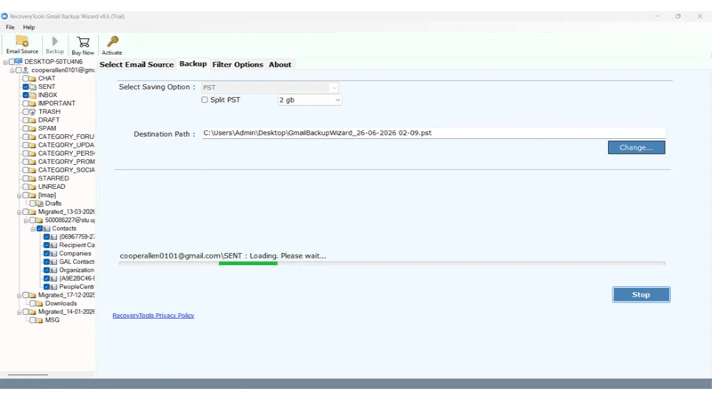
44Legacy WinForms app UI and a dense, dated landing page. Green-check feature lists and a clear format-icon grid help, but clashing banner/header colors and wall-of-text sections undercut polish.
Screenshots
1 / 5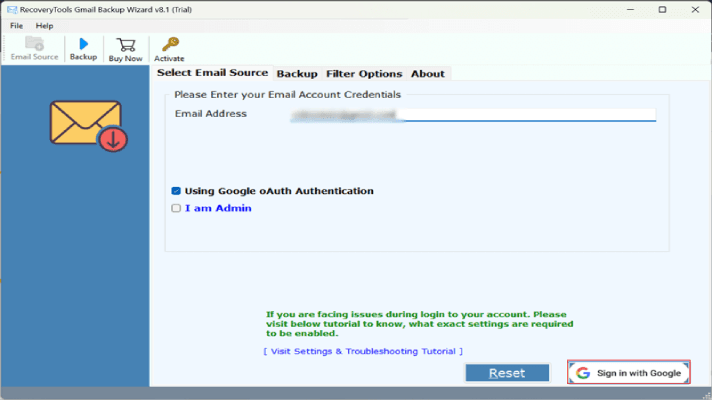
About this app
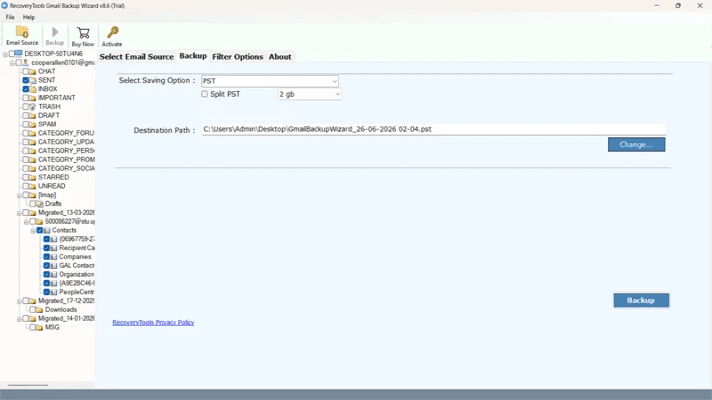
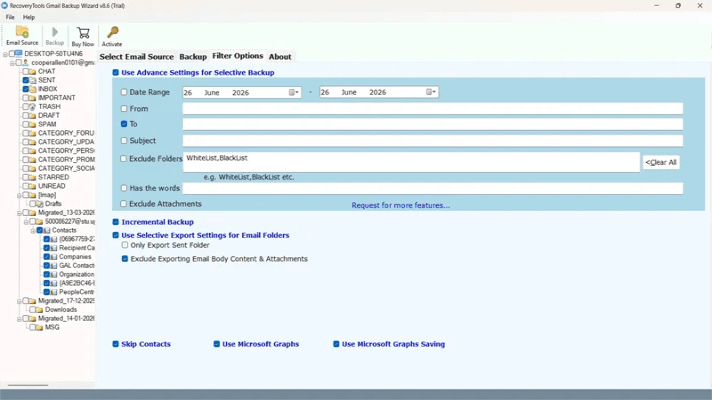
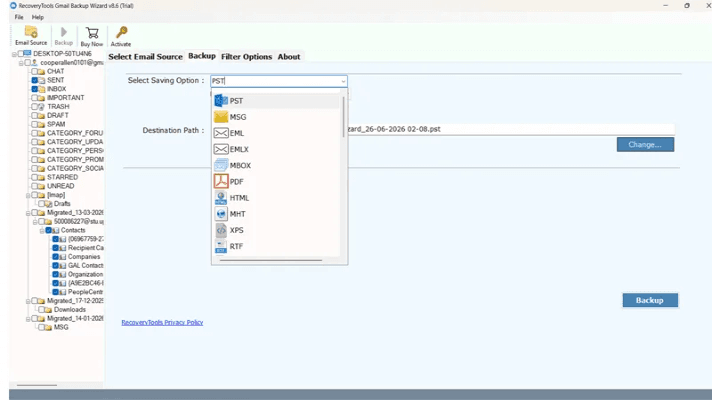
RecoveryTools Gmail Backup Tool is a specialized utility for Windows and Mac that creates complete, local backups of Gmail mailboxes. It handles emails, attachments, contacts, and folder structures, exporting to over 35 destinations including PST, MBOX, EML, MSG, PDF, and directly to cloud services like Office 365, Yahoo, and IMAP. Key features include advanced filters (date, sender, subject), incremental backup, batch mode for multiple accounts, and admin option for Google Workspace. It uses OAuth for secure authentication and preserves metadata and folder hierarchy. The tool offers unique extras like extracting email addresses, phone numbers, and redirect links, plus splitting large PST files. With a user-friendly interface and 24/7 support, it's designed for both personal and professional use. A free demo backs up 25 emails per folder.
Key features
- 1Backup Gmail emails, attachments, contacts and folder hierarchy to 35+ formats and cloud targets
- 2OAuth authentication with automatic MFA support — no app password required
- 3Advanced filters (date, sender, subject, keywords) plus incremental and selective backup
- 4Admin mode with CSV batch backup for Google Workspace multiple accounts
- 5PST splitting, metadata preservation, and unique extras (email/phone/link extraction)
Target customer profile
Drawn from the product itself, not from a survey.
Demographic
IT administrators in organizations using Google Workspace
Pain points
Need to back up data for multiple users; compliance and legal hold requirements; risk of data loss
Primary needs
Bulk backup of all user accounts; admin option via CSV; secure and reliable export to multiple formats
Demographic
Legal professionals and compliance officers
Pain points
Must preserve email evidence for litigation; need to share specific emails securely; regulatory retention policies
Primary needs
Selective backup with filters; export to PDF for sharing; maintain metadata integrity
Demographic
Individuals and small business owners
Pain points
Fear of losing important emails; accidental deletion; switching email providers
Primary needs
Easy, one-click backup of entire Gmail; migration to other platforms; local copy for archiving
Scout Review
Written by AI from measured evidence, scored out of 100.
RecoveryTools Gmail Backup Tool is a mature, feature-dense Windows/Mac utility with a dated UI and a fast, if cluttered, website. It backs up emails, attachments, contacts and folder structure to 35+ destinations, supports OAuth with MFA, incremental backup, advanced filters, CSV admin batch mode and PST splitting. The 6-step guide and 25-email demo make it approachable; the legacy WinForms interface and dense landing page hold the design back. Security fundamentals are strong but no formal audit is published. Against free Google Takeout and MailStore Home, its case rests on the admin/compliance segment — which it should lead with.
Measure by measure
Usability
62A real 6-step guide, OAuth login with no app password, and a 25-email free demo make onboarding legible. The crowded landing page and desktop-only wizard keep it from feeling effortless.
Design
44Legacy WinForms app UI and a dense, dated landing page. Green-check feature lists and a clear format-icon grid help, but clashing banner/header colors and wall-of-text sections undercut polish.
Speed
79Lighthouse mobile 91/100 with 2.3s LCP and near-zero CLS; desktop 83/100. The marketing site is genuinely snappy, though the desktop app's own performance is unmeasured.
Security
74Strong header hygiene (HSTS, CSP, frame protection, SPF, DMARC) and OAuth with MFA support. Missing X-Content-Type-Options and no published SOC 2/ISO or audit evidence.
Accessibility
80Lighthouse a11y 95/100. Contrast failures, a missing main landmark, and mismatched accessible names are real but narrow issues; no WCAG statement published.
Growth
58Real problem (Gmail backup, compliance hold) with concrete differentiators — 35+ targets, CSV admin batch, PST splitting. But free Takeout and MailStore Home cap the ceiling.
Improvement areas
- Legacy WinForms interface needs modernization and consistent theming
- No published SOC 2 / ISO / pen-test evidence for compliance buyers
- Three accessibility failures: contrast, missing main landmark, accessible names
- Missing X-Content-Type-Options header; landing page is visually over-dense
Design & Usability
The product's design story is split in two: a dated WinForms desktop app and a dense, over-stuffed marketing site. The homepage does communicate breadth well — green-check feature lists, a clean format-icon grid, a clear 6-step guide — but the clashing yellow/navy/green palette and wall-of-text sections read as 2011. Usability is the stronger half: OAuth login with automatic MFA, no app password, a step-by-step illustrated guide, and a 25-email free demo lower the barrier meaningfully. The wizard's tree views and tab navigation assume desktop familiarity, so first-timers lean on the guide. Competent, not delightful.
Speed & Security
Speed is a genuine bright spot: Lighthouse mobile 91/100 with 2.3s LCP and 0.011 CLS, desktop 83/100 — the marketing site is fast and stable. Security is solid on the fundamentals: HTTPS enforced, HSTS, CSP, frame protection, Referrer-Policy, Permissions-Policy, plus SPF and DMARC (11/12 header checks). Gmail login runs through OAuth with MFA, so credentials never touch the tool. The gaps are the missing X-Content-Type-Options header and the absence of any published SOC 2, ISO, or pen-test evidence — notable for a tool aimed at compliance and legal-hold customers who will ask for exactly that.
Accessibility & Growth
Accessibility scores 95/100 on Lighthouse, with three narrow failures: insufficient color contrast, no main landmark, and visible labels without matching accessible names. No WCAG statement is published, but the automated baseline is strong. Growth is the interesting question: the problem — backing up Gmail for compliance, legal hold, and migration — is real and worth paying for, and the product has concrete differentiators (35+ export targets, CSV admin batch mode, incremental backup, PST splitting, metadata preservation). The ceiling is set by free alternatives: Google Takeout and MailStore Home cover the individual case at zero cost, so the durable wedge is the Workspace admin and legal/compliance segment, which the site under-sells relative to its consumer-facing feature grid.
Conclusion
If you're an IT admin backing up a Google Workspace tenant, or a legal team that needs metadata-preserving exports with filters and PST splitting, this tool earns its keep and the free demo lets you test it first. If you're an individual who just wants a copy of your inbox, Google Takeout does that for free — start there. The product is competent and clearly built by people who know email migration; the next step is modernizing the interface and publishing a security attestation to match the compliance customers it targets.
Suggestions for improvement
- Modernize the WinForms UI — consistent theming, spacing, and a modern control set would lift perceived quality immediately.
- Publish a security page with SOC 2 / ISO status or a pen-test summary; compliance buyers will ask for it.
- Fix the three a11y failures: color contrast, add a <main> landmark, and align accessible names with visible labels.
- Add the missing X-Content-Type-Options: nosniff header — a one-line fix that completes the 12/12 checklist.
Alternatives comparison
Named competitors, point by point. Nobody paid to appear here or to be left out.
 RecoveryTools Gmail Backup Tool |  Google Takeout |  MailStore Home | |
|---|---|---|---|
| Cost | Paid license; free demo limited to 25 emails per folder | Free | Free for personal use |
| Export formats | 35+ targets: PST, MBOX, EML, MSG, PDF, CSV, HTML, cloud services | MBOX archive only | Local archive; limited export formats |
| Advanced filtering | Date range, sender/recipient, subject, keywords, exclude folders/attachments | Label-based selection only | Basic folder/date selection |
| Admin / multi-account batch | Yes — CSV batch mode for Google Workspace admins | Per-account only | No admin batch mode |
| Platform support | Windows and Mac desktop app | Browser-based, any OS | Windows only |
Google Takeout
Google's official data export tool that lets you download a copy of your Gmail data, but it's less flexible in formats and lacks advanced filtering.
MailStore Home
A free email archiving solution for Windows that can back up Gmail and other email accounts, but it's limited to local storage and fewer export formats.
Comparing options? See RecoveryTools Gmail Backup Tool alternatives, scored side by side
More Productivity apps
View all Productivity
Notion
92All-in-one AI workspace for docs, projects, and knowledge...

Qamarero
92An all-in-one hospitality software for restaurants and ba...

EmbedMyReviews
92White-label reputation management software for agencies s...

StoryPad
92Privacy-first open source journal app with a continuous t...

Puzzly – B2B Lead Generation & Sales Intelligence Platform
92Puzzly is an all-in-one B2B lead generation platform that...

The Stack Newsletter
92A weekly newsletter delivering curated tech jobs, intervi...

Vibe Coding Agent Skills
92A free, open-source platform offering 110 AI agent skills...

QRBliss
91Branded QR codes with AI Brand Sync, 15 free dynamic code...

Gerty
91Private, local AI assistant for Mac that runs offline

CC Switch
91Open-source desktop app for switching AI coding providers...

username.md
90One verified handle for your online identity, readable by...

PitchWhip
90AI cold call scripts & direct dials from LinkedIn


A platform dedicated to providing unbiased reviews of newly launched applications, analyzing everything from their features to their full potential.
info@scoutforge.net© 2026 Scoutforge. All rights reserved.
