Cycling through all six. Tap any point to stop.
Measured on six things
Find local recycling centers, scrap yards, and e-waste dr...
Speed
46Lighthouse mobile 57/100 with an 8.1s LCP and 4.7s FCP; desktop is a healthy 79/100. Mobile users on a phone at the curb wait a long time.
Screenshots
1 / 1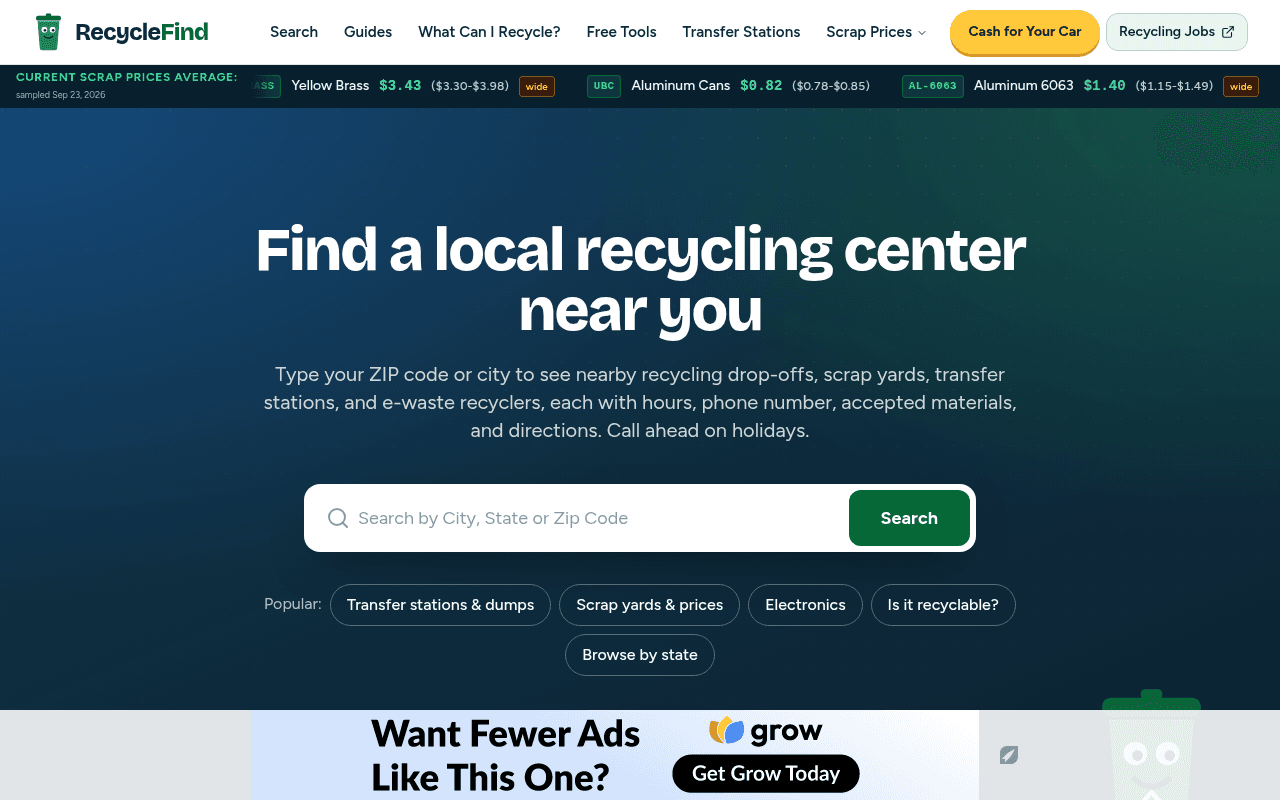
About this app
RecycleFind is a comprehensive directory and toolkit for anyone looking to recycle, scrap, or responsibly dispose of materials in the United States. Covering over 5,900 recycling centers, scrap yards, transfer stations, and e-waste facilities, it lets you search by ZIP code, city, or material to find nearby drop-offs with hours, phone numbers, accepted items, and directions. For scrappers and side-hustlers, it publishes regularly updated scrap metal prices (copper, brass, aluminum, steel) plus calculators for scrap value, junk car value, and e-waste worth. Environmentally minded users get carbon savings and waste diversion calculators, while businesses can estimate ROI on commercial recycling programs. An AI regulation checker helps decode local rules by item and location, and extensive material guides cover everything from plastics #1-5 to batteries, paint, and automotive fluids. It's a one-stop hub that blends practical logistics, market data, and sustainability insights.
Key features
- 1Directory of 6,073+ US recycling centers, scrap yards, transfer stations and e-waste facilities searchable by ZIP, city or material
- 2Scrap metal price table with per-grade ranges (bare bright, #1/#2 copper, brass, aluminum) and a visible sample date
- 3Free calculators for scrap value, junk car value, carbon savings, waste diversion and commercial recycling ROI
Target customer profile
Drawn from the product itself, not from a survey.
Demographic
Homeowners and renters decluttering or moving
Pain points
Unsure where to take old electronics, furniture, or renovation debris; don't know local rules or fees
Primary needs
Fast lookup of nearby drop-offs by ZIP, accepted materials, hours, and disposal instructions
Demographic
Scrappers, hobbyists, and side-income earners
Pain points
Metal prices vary wildly and are hard to track; finding a yard that buys specific grades is tedious
Primary needs
Real-time scrap prices, value calculators, and a directory of scrap yards that pay by weight
Demographic
Small business owners and facility managers
Pain points
Setting up or improving a commercial recycling program feels costly and complicated
Primary needs
ROI calculator, waste diversion tracking, and reliable commercial recycling partners
Demographic
Environmentally conscious households
Pain points
Want to reduce landfill waste but lack clear guidance on what's recyclable locally
Primary needs
Carbon savings calculator, material guides, and an AI checker for local recycling rules
Scout Review
Written by AI from measured evidence, scored out of 100.
RecycleFind is a US recycling directory and toolkit that covers a lot of ground: 6,073+ centers, scrap metal prices sampled and date-stamped, value calculators for scrap, junk cars and e-waste, carbon and diversion calculators, a business ROI estimator, an AI regulation checker and 13 material categories with 94+ items. The homepage is visually cohesive and search-first, the guides hub is organized by the question a user actually has, and the calculators are free. The measured results are mixed. Lighthouse mobile performance is 57/100 with an 8.1-second LCP, while desktop sits at 79/100. Accessibility scores 93/100 with two real failures around aria-hidden focusables and contrast. Security is above average at 9 of 12 header checks, missing CSP and DMARC. Design is good but repetitive, and the state grid is the weakest visual element on the page. Growth is the strongest dimension: the scrap price data plus calculators is a real differentiator against Earth911, iScrap App and WM, even if the site spreads itself thin across four audiences.
Measure by measure
Usability
71Search-first layout, free calculators, and goal-organized guides make the core job fast. Dense bullet lists and two-column blocks slow mobile scanning.
Design
68Cohesive green system, strong hero and clear hierarchy, but the 50-state grid reads as a spreadsheet and repeated calculator cards flatten a long page.
Speed
46Lighthouse mobile 57/100 with an 8.1s LCP and 4.7s FCP; desktop is a healthy 79/100. Mobile users on a phone at the curb wait a long time.
Security
74HTTPS enforced with HSTS and most hardening headers present, but no CSP and no DMARC. No published audits, pen-tests or bug bounty found.
Accessibility
70Lighthouse a11y 93/100 with two real failures: aria-hidden containers holding focusable elements and contrast misses. No WCAG statement or a11y page published.
Growth
63Real problem, real wedge: dated scrap price sampling plus value calculators that Earth911 and WM don't publish. Directory breadth is the moat if it stays accurate.
Improvement areas
- Mobile performance: 8.1s LCP and 57/100 Lighthouse score need payload cuts and lazy-loading below the fold
- Security headers: add Content-Security-Policy and a DMARC record to complete an otherwise strong header set
- Accessibility: fix aria-hidden focusable descendants and low-contrast text, and publish a WCAG conformance statement
Design & Usability
RecycleFind's homepage opens with a dark teal-to-green hero, a big white search field and a green button — the right call for a lookup tool, and the visual audit confirms the green accent carries consistently through tags, cards and CTAs. Below the fold it gets crowded: the 50-state directory renders as a dense six-column grid of green text with no hover states or card treatment, and the three calculator cards (Savings, Carbon, Business ROI) reuse the same icon, bullet list and button, so a long page starts to feel like one card repeated. Usability is stronger than design. The ZIP/city search is the first actionable element, listings claim hours, phone numbers, accepted materials and directions, and the calculators are published free. The guides hub organizes content by goal — scrap metal, junk cars, household, electronics, construction debris — with read-time labels, which is genuinely good information architecture. The cost is density: two-column bullet lists and accepted/not-accepted checklists inside every category card slow scanning on a phone, and the sponsored blocks break the flow between functional sections.
Speed & Security
Speed is the weak spot. Google Lighthouse puts mobile performance at 57/100 with an 8.1-second LCP, 4.7-second FCP and 298ms TBT; desktop scores a much healthier 79/100. CLS is essentially perfect at 0.003, so the problem is payload and render time, not layout jank — consistent with a homepage that ships a 50-state grid, multiple card sections and a scrap price table in one view. For a tool people reach for while standing in a garage, that mobile number matters. Security is solidly above average for an indie directory. The probe confirms HTTPS enforced with HSTS, plus frame protection, X-Content-Type-Options, Referrer-Policy and Permissions-Policy — 9 of 12 checklist points. The two gaps are real: no Content-Security-Policy header and no DMARC record, which leaves the domain spoofable and the page without a script-injection backstop. There is no SOC 2, ISO certification, pen-test summary or bug bounty published anywhere in the collected content, which is normal for a site at this stage but caps how high this can go.
Accessibility & Growth
Accessibility lands at 93/100 on the Lighthouse audit, which is a strong automated result, but the two failing checks are the kind that actually bite: aria-hidden containers holding focusable descendants (keyboard users can tab into elements that are invisible) and insufficient background/foreground contrast. Automated tooling covers only part of WCAG, and there is no accessibility statement, no WCAG conformance claim and no multi-language support in the collected content, so the real-world picture is less certain than the score suggests. Growth is the more interesting question. The problem is real and the target is specific: people with a dead fridge and no idea where it goes, plus scrappers who want to know what copper is fetching this week. The wedge is the scrap price table — sampled and date-stamped, with ranges per grade — plus the value calculators. Earth911 has the directory but not the prices; iScrap App has the prices but not the household recycling breadth; WM is a hauler's service lookup, not a neutral directory. That combination is a genuine reason to pick RecycleFind. The limit is that directory accuracy is expensive to maintain across 6,073 listings, and the site is trying to serve four audiences at once.
Conclusion
The honest read is that RecycleFind is a competent, genuinely useful directory with one standout feature and a mobile performance problem. The scrap price table with a visible sample date is the thing worth building the brand around — it is the only part of the site that gives a user a reason to come back weekly rather than once per move. The calculators are a smart retention hook for the same reason. What holds it back is breadth without depth: four audiences, dozens of card sections, and a homepage that ships everything at once and pays for it with an 8.1-second mobile LCP. The fixes are unglamorous and cheap. Cut the homepage payload and lazy-load the state grid. Add a CSP and a DMARC record. Publish an accessibility statement and fix the two failing audits. Then pick one audience — scrappers, most likely — and make that the front door instead of the eleventh section down.
Suggestions for improvement
- Cut mobile LCP from 8.1s: lazy-load the 50-state grid and below-fold card sections, and serve responsive images.
- Add a Content-Security-Policy header and a DMARC record to close the two gaps in an otherwise solid header set.
- Fix the two failing a11y audits: remove focusable descendants from aria-hidden containers and raise low-contrast text.
- Give the state directory real card treatment with hover states and dividers instead of a dense six-column text grid.
Alternatives comparison
Named competitors, point by point. Nobody paid to appear here or to be left out.
 RecycleFind RecycleFind |  Earth911 Earth911 |  iScrap App iScrap App |  Waste Management (WM) Website Waste Management (WM) Website | |
|---|---|---|---|---|
| Recycling center directory breadth | 6,073+ centers across all 50 states, with hours, phone, accepted materials and directions | Long-running national drop-off database; the category benchmark for breadth | Scrap yard directory focused on buyers by metal, not general household recycling | Local service lookup for WM customers only; not a neutral directory |
| Scrap metal price data | Per-grade price table with ranges and a visible sample date (bare bright, #1/#2 copper, brass, UBC, 6063) | Not published; material guides only | Core feature: scrap price tracking by metal and region | Not offered |
| Value and impact calculators | Scrap value, junk car, carbon savings, waste diversion and business ROI calculators, free | Limited; no scrap value or ROI tooling | Scrap value estimation tied to tracked prices | Not offered |
| Local recycling rule guidance | AI regulation checker by item and location, plus 13 material categories and 94+ item guides | Extensive static material guides; no location-aware rule checker | Minimal; focused on scrap yard logistics | Local accepted-materials info for WM service areas only |
| Commercial / business recycling support | Business ROI calculator and waste diversion tracking for facility managers | Consumer-oriented; no commercial ROI tooling | Serves scrap sellers, not commercial program planning | Commercial hauling services sold directly, not a neutral planning tool |
Earth911
Long-running recycling search engine with a national database of drop-off locations and material guides, though pricing data and calculators are limited.
iScrap App
Scrap metal price tracking and yard directory focused on the scrapping community, with less emphasis on general household recycling.
Waste Management (WM) Website
Major hauler's local service lookup for curbside pickup and drop-off, but not a neutral directory and doesn't cover independent scrap yards.
Comparing options? See RecycleFind alternatives, scored side by side
More Home & Living apps
View all Home & Living
Factory Direct Mattress Overland Park
92A locally-owned mattress store in Overland Park, KS offer...

RoomCreator
92An AI-powered interior and exterior design tool that tran...

Efficienco
88Free construction and home improvement calculators for ma...

InviteVia
87InviteVia is a digital invitation platform for creating beautiful online invitations for weddings, birthdays, engagements, parties, and special events. Choose a template, customize your invitation, collect RSVPs, and share it instantly through WhatsApp, Instagram, SMS, or a simple link. No guest accounts or app downloads required.

Melipo
83Family recipe keeper with meal journal and smart suggestions

Drugwars Online
82Classic 1984 drug trading game reborn in browser

Art&See
82Art&See offers museum-quality, hand-painted oil painting ...

Rael Miracle Patch Pimple Patches
82Top-rated hydrocolloid and microneedle pimple patches for...

Oh Yah! - Daily Routines for Kids
80A family task management app that helps parents assign chores and track routines for children with strong privacy features.

Chore Quest
80A gamified app that turns household chores into fun quests for families.

August
80An all-in-one rental management app for small landlords, streamlining rent collection, compliance, maintenance, and documents.

Home Agent Guru
80Data-backed negotiating reports for home buyers. See how much room you have to negotiate with a 0–100 Buyer Negotiability Index.


A platform dedicated to providing unbiased reviews of newly launched applications, analyzing everything from their features to their full potential.
info@scoutforge.net© 2026 Scoutforge. All rights reserved.
