

Is this your app?

Claim Remnus to manage its page, add your badge and see your traffic — free, and it stays free.

Usability80Design85Speed87Security78Accessibility70Growth60

Cycling through all six. Tap any point to stop.

Measured on six things

MCP-native workspace for vibe coders and AI agents

Growth

60

Domain only 0.2 years old; early access with active blog and open-source GitHub option. Zero third-party reviews or community metrics located.

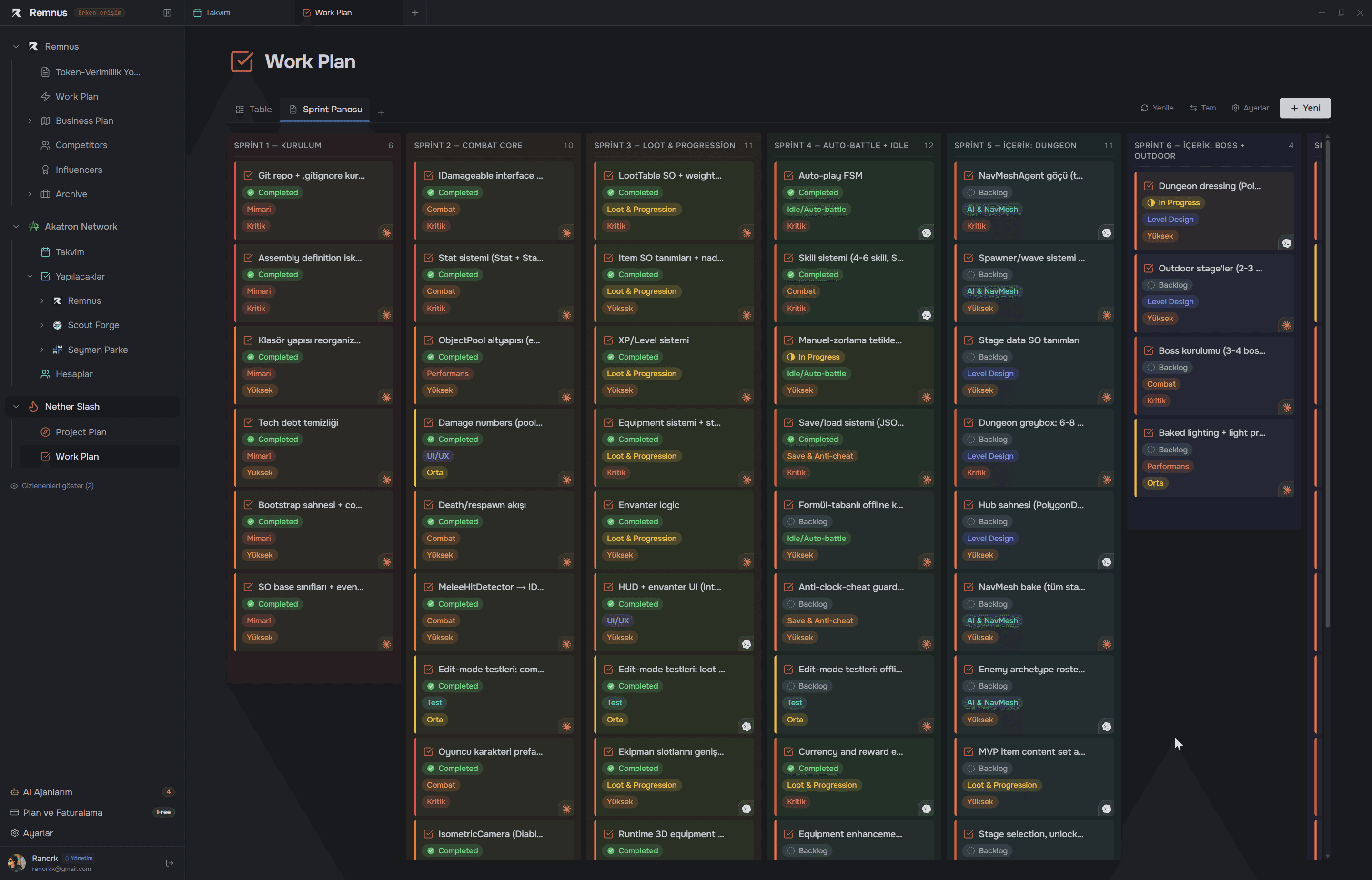
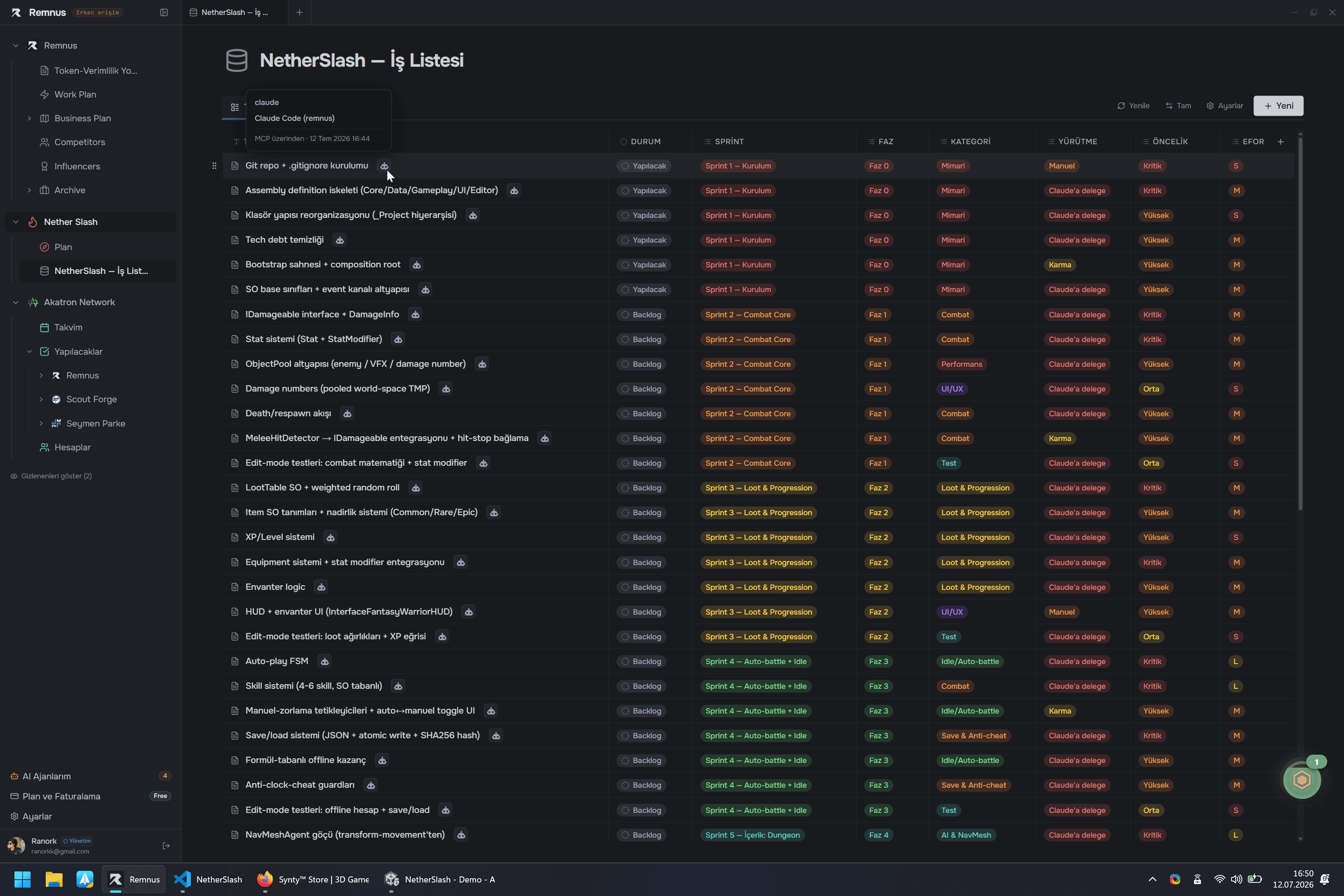
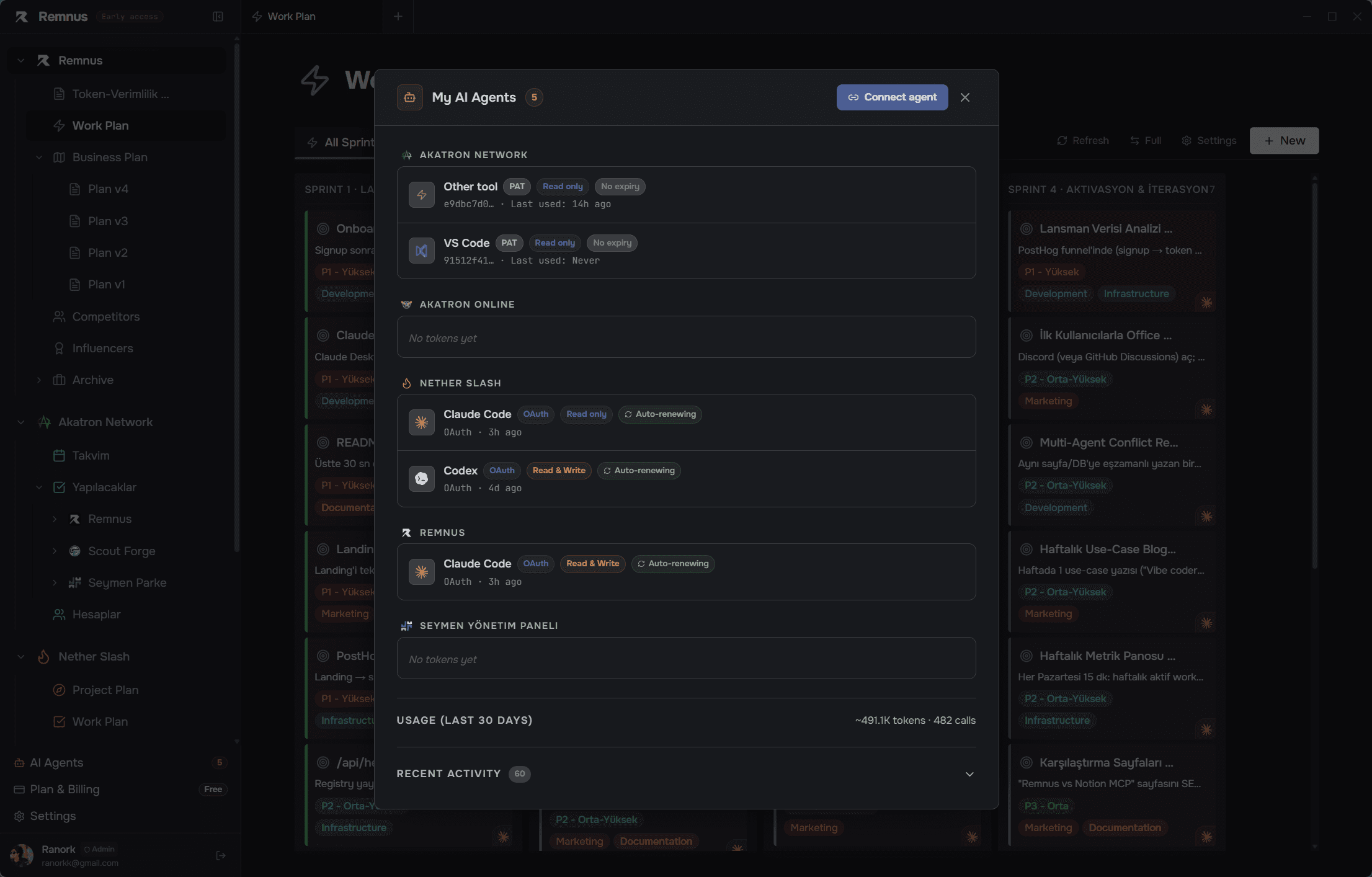
Screenshots

1 / 3

About this app

Remnus is a fresh take on team workspaces—think Notion or Linear, but built from the ground up for the AI era. It gives you pages, databases, kanban boards, and calendars that your AI tools (Claude, Cursor, Windsurf, etc.) can read and write to directly via the MCP protocol. No copy-paste, no API keys to configure. Just sign up, mint a token, and your AI agent can search, create, update, and organize your workspace items. The interface is clean and snappy, and the ability to flip between table, board, and calendar views on the same data is a game-changer for teams that want flexibility without tool switching. It's still in early access (v0.1.2), but the MCP toolset is impressive: 12 tools, 4 resources, 5 prompts. Pricing is transparent with a free tier and affordable paid plans. If you vibe-code or rely on AI agents for project management, this is worth a look.

Key features

  • 1Native MCP protocol support letting AI agents read/write pages, boards, calendars with same auth as UI
  • 2Three interchangeable views (table, kanban, calendar) on the same underlying data with drag-and-drop
  • 3OAuth-based 3-step onboarding with no API keys; free tier plus flat $10/$29 startup/professional plans

Target customer profile

Drawn from the product itself, not from a survey.

Demographic

Vibe coders and solo developers using AI coding assistants

Pain points

Manual context switching between AI chat and project management tools; copy-pasting tasks and updates

Primary needs

Seamless AI integration; ability for AI to read/write workspace data autonomously

Demographic

Small engineering teams using Claude, Cursor, or Windsurf

Pain points

Lack of native AI collaboration in existing project management tools; overhead of maintaining separate workflows

Primary needs

Unified workspace where AI and humans collaborate on tasks, docs, and agile boards

Demographic

Open-source maintainers and agent builders

Pain points

Need a flexible, self-hostable workspace with programmable APIs for multi-agent setups

Primary needs

MCP-native, self-hosted, with full tool/resource access for custom agents

Human reviews

What people found in Remnus

Written by Scout Forge members. We do not verify that a reviewer purchased or installed the app.How we handle reviews
H

Hakan TEMUR

Aug 30, 2026

I spent some time testing Remnus with a small project to see how it actually works in practice. First, I created a few pages for project notes and requirements, then turned some of the tasks into a database. The table view was simple to work with, and switching the same data into a Kanban board was probably my favorite part. I could move tasks between statuses and still keep all the related information in the same place. I also tried the calendar view and added deadlines to a few tasks. Being able to switch between table, board and calendar without duplicating the data felt really convenient. The most interesting part for me was the MCP integration. I connected Remnus to an AI coding tool and tested whether the agent could actually read my project notes and update tasks instead of just using Remnus as a reference. It worked much closer to how I would expect an AI-native workspace to work — the agent could access the same pages and task data I was working with. I also liked that the AI's changes remain visible in the workspace rather than disappearing into some hidden AI memory. That makes it much easier to review what the agent actually did. There are still a few areas where I think the product could use more polish, especially around some workflows, but overall the concept is very solid. The combination of a normal project workspace with native MCP support makes Remnus much more interesting to me than a standard Notion-style productivity tool.

Paid review

Funded by the developer, who could not block publication — and the reviewer was paid the same either way.

15credits
Tomer Bar-Meir

Tomer Bar-Meir

Oct 09, 2026

I tried the public demo, which needs no sign-up. It opens a ready-made workspace for a small Paint-clone project with a start page, dashboard, map and sprint board. I switched the sprint board between Board and Table views; the backlog cards show priority and category clearly and the page loaded fast. The best part is the agent audit log on the start page, which shows what the AI agent actually did and made the product easy to understand in about two minutes. Also good: an honest note that demo changes are temporary, a clear three-step setup, and a token-saving comparison with a 'how we measured' link. Weak spots: the pitch assumes you already use coding agents, so non-technical teams may feel lost, and the demo shows only one example project. Limits of this review: I did not create an account or connect a real agent, so I cannot judge setup reliability. Clear idea and a strong first impression.

Paid review

Funded by the developer, who could not block publication — and the reviewer was paid the same either way.

15credits
Nikolaos Iliopoulos

Nikolaos Iliopoulos

Sep 24, 2026

Used it to update a DB automatically. Worked quite well, but it had a bit of a learning curve so a better tutorial is needed.

Paid review

Funded by the developer, who could not block publication — and the reviewer was paid the same either way.

15credits
T

tempqr

Oct 15, 2026

I spent about 10 minutes testing Remnus. My first impression was positive. The interface is clean and modern, with a dark theme that's easy on the eyes. I explored the dashboard and tried connecting a simple task to see how the MCP integration works. The setup was straightforward, and I appreciated that there were no errors during my session. The workspace feels organized, and I can see how this would be useful for developers juggling multiple AI tools. That said, as a first-time user, I wasn't immediately sure where to start. A short onboarding tour or a "getting started" checklist would help new users understand the value faster. Also, the empty state on some screens coulduse placeholder examples or suggested actions. Overall, Remnus looks promising for developers working with AI agents. Nice job.

Test an app and get paid in credits

Developers fund these. You keep the credits whatever your verdict.

Scout Review

Written by AI from measured evidence, scored out of 100.

Remnus carves a distinct niche as an MCP-native workspace that lets AI agents read and write pages, boards, and calendars without glue code. The three-step onboarding and transparent pricing (free tier plus flat startup/professional plans) lower barriers for solo developers and small teams already living in Claude or Cursor. Visual and accessibility rough edges plus minimal security headers keep it from feeling production-hardened, while its two-month age explains the lack of third-party validation. For vibe coders who want their AI to own project state, it is one of the few purpose-built options available today.

Measure by measure

Usability

80

Fast 3-step OAuth onboarding, live demo, and native MCP connections to six major AI tools with zero config. Clear pricing tiers and extensive setup guides lower the learning curve.

Design

85

Clean dark theme and prominent blue CTAs on a modern landing page, but product screenshots suffer from overlapping elements, overcrowded kanbans, and dense unreadable tables.

Speed

87

Strong Lighthouse scores (mobile 86, desktop 98) with solid LCP and zero CLS. No user-reported lag found; site feels responsive on measured run.

Security

78

HTTPS and HSTS present, but missing CSP, frame protection, and most recommended headers. No SOC 2, audits, or bug bounty listed anywhere.

Accessibility

70

Lighthouse 81/100 undercut by four concrete failures: unnamed buttons, contrast issues, viewport scaling locked, and undersized touch targets. No a11y statement or keyboard claims found.

Growth

60

Domain only 0.2 years old; early access with active blog and open-source GitHub option. Zero third-party reviews or community metrics located.

Improvement areas

  • Visual polish: overlapping mockups, overcrowded kanban cards, sub-11px table text
  • Security headers and compliance attestations still absent despite handling agent tokens and audit logs
  • Accessibility failures (contrast, button names, touch targets, viewport scaling) and lack of a11y documentation

Design & Usability

Remnus presents a clean dark-mode interface with strong blue CTAs and a clear value proposition around AI-native workspaces. The multi-view system (table, board, calendar) on shared data is well executed in concept. However, the product screenshots reveal layout issues—overlapping hero cards, overcrowded kanban columns, and dense tables with tiny text—that undermine the polish. Usability benefits from a frictionless three-step OAuth flow and native integrations with Claude, Cursor, Windsurf and others, eliminating copy-paste. Documentation exists as a growing blog rather than a structured help center, which works for early adopters but may frustrate users needing deeper guidance. Overall the product feels purpose-built for AI-assisted workflows but still shows early-stage roughness in visual execution.

Speed & Security

Performance is a bright spot. Lighthouse metrics place the site comfortably above average (mobile 86, desktop 98) with excellent CLS and reasonable LCP, suggesting a lightweight, well-optimized experience. Security is more basic: HTTPS and HSTS are in place, yet critical headers such as CSP are absent and no compliance attestations (SOC 2, ISO) appear on the site or pricing page. For an early-access tool handling AI agent access and audit logs, this is table-stakes rather than enterprise-ready. The combination of solid speed and minimal security surface is typical of a young indie product focused on rapid iteration over compliance theater.

Accessibility & Growth

Accessibility scores 55 after automated checks reveal four concrete failures around button labeling, contrast, viewport scaling, and touch-target size. No manual WCAG statement or keyboard-navigation claims are published. Growth is constrained by the product's youth—domain registered only two months ago—with an active blog and open-source GitHub presence but no visible review footprint on major platforms. Trajectory looks promising for a niche AI-tooling play, yet absolute traction remains low. The open-source self-host option and MCP focus differentiate it from Notion/Linear clones, but community signals are still nascent.

Conclusion

If your workflow already revolves around AI coding agents and you are tired of copy-paste tax, Remnus is worth the five-minute signup. Just keep expectations calibrated to early-access reality.

Suggestions for improvement

  • Tighten screenshot layouts and increase font sizes in table/kanban views to improve perceived polish
  • Add CSP and remaining security headers plus publish a basic security page
  • Expand docs into a searchable help center instead of relying solely on blog posts
  • Publish an accessibility statement and fix the four Lighthouse failures before wider launch
How we score

Alternatives comparison

Named competitors, point by point. Nobody paid to appear here or to be left out.

RemnusNotionObsidianLinear
Native MCP AI agent read/write accessYes - 19 tools, 5 resources, 7 promptsNo - requires custom API or ZapierNo - limited AI via API onlyNo - local plugins only, no MCP
Multiple views on same data (table/board/calendar)Yes - seamless flip between all threeYes - databases support multiple viewsPartial - boards and lists, no calendarNo - plugins required for boards/calendar
OAuth signup, no API keys neededYes - 3-step OAuth for AI clientsYes - but API keys still required for agentsYes - API tokens required for automationN/A - local app, no cloud auth
Open-source self-host optionYes - AGPL-3.0 on GitHubNo - closed sourceNo - closed sourceNo - closed source core

Comparing options? See Remnus alternatives, scored side by side

View all Productivity
Scout Forge

A platform dedicated to providing unbiased reviews of newly launched applications, analyzing everything from their features to their full potential.

info@scoutforge.net

© 2026 Scoutforge. All rights reserved.
