Is this your app?
Claim RemoteDrive by FileZilla Pro to manage its page, add your badge and see your traffic — free, and it stays free.
Cycling through all six. Tap any point to stop.
Measured on six things
Integrates cloud storage into macOS Finder for seamless file management across services like Google Drive and Dropbox.
Accessibility
70Relies entirely on macOS built-in accessibility tools. Limited to English, German, and French language support with no app-specific enhancements.
Screenshots
1 / 3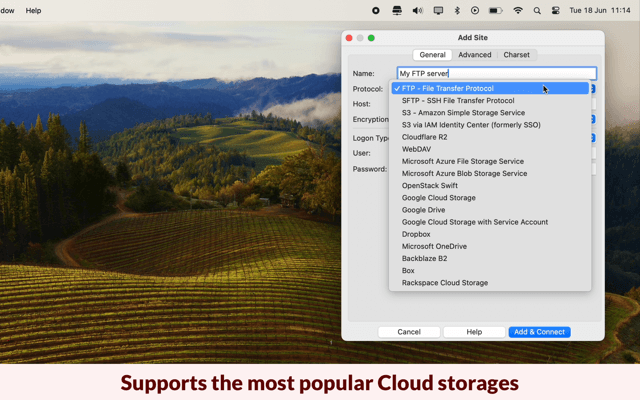
About this app
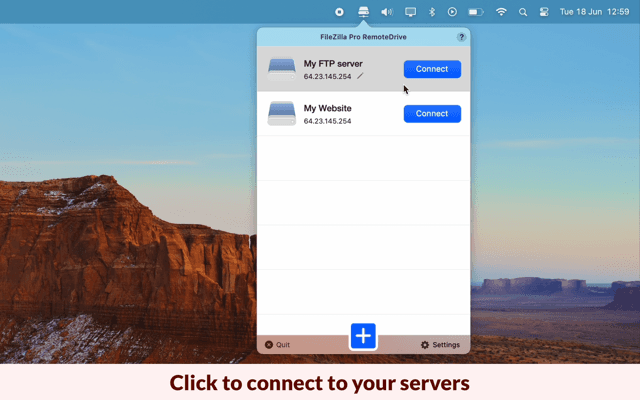
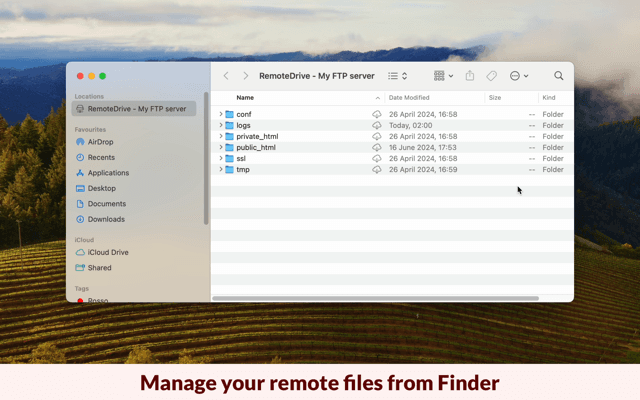
RemoteDrive by FileZilla Pro is a macOS application that embeds remote cloud storage services directly into Finder, allowing users to manage files across platforms such as FTP, Google Drive, Amazon S3, and more as if they were local. It targets professionals like developers, designers, and remote workers who need efficient, unified file handling without the hassle of multiple apps. Key features include native integration, drag-and-drop functionality, support for encrypted protocols, and a minimalist UI that mirrors macOS aesthetics. While praised for its simplicity and time-saving benefits, some users report minor issues with activation on Apple Silicon Macs and limitations in advanced controls. Priced at $24.99, it offers an affordable alternative to more expensive tools, making it ideal for those prioritizing ease of use and seamless workflows in their daily tasks.
Key features
- 1Seamless macOS Finder integration with minimalist UI that mirrors native aesthetics for intuitive navigation.
- 2Drag-and-drop simplicity eliminating download-edit-reupload cycles, enhancing workflow efficiency.
- 3Supports encrypted protocols (SFTP, FTPS, S3) with TLS for secure data transfers.
Target customer profile
Drawn from the product itself, not from a survey.
Demographic
MacOS power users (e.g., developers, designers, remote workers)
Pain points
Fragmented workflows across multiple cloud services, manual file transfers, reliance on various apps for different storage needs
Primary needs
Unified file management, native Finder integration, improved time efficiency and productivity
Demographic
Small businesses and freelancers
Pain points
High costs of enterprise solutions, complex setup processes for accessing cloud storage, need for budget-friendly tools
Primary needs
Affordable pricing, ease of use, support for multiple protocols without technical overhead
Demographic
Tech-savvy individuals managing personal and professional files
Pain points
Inconvenience of download-edit-reupload cycles, desire for a streamlined, all-in-one solution
Primary needs
Simplicity in file handling, secure data transfer, integration with familiar macOS environment
Scout Review
Written by AI from measured evidence, scored out of 100.
RemoteDrive by FileZilla Pro delivers exactly what it promises: seamless cloud storage integration directly within macOS Finder. It eliminates the frustrating download-edit-reupload workflow that plagues many professionals working across multiple cloud services. The application excels at making remote storage feel local, with intuitive drag-and-drop functionality and a clean, native-looking interface. While it has some limitations - particularly in advanced controls, performance on Apple Silicon, and accessibility features - it represents exceptional value at $24.99 compared to more expensive alternatives.
Measure by measure
Usability
90Drag-and-drop simplicity eliminates download-edit-reupload cycles. Perfect for users who prioritize workflow efficiency over advanced controls.
Design
90Seamless macOS Finder integration with minimalist UI that mirrors native aesthetics. Remote folders appear as local volumes for intuitive navigation.
Speed
80Performance depends on connection quality, but limited by Finder's native file-copy restrictions. Some reports of sluggishness on M1/M2 chips.
Security
90Supports encrypted protocols (SFTP, FTPS, S3) with TLS for data in transit. Industry-standard security measures for protected file transfers.
Accessibility
70Relies entirely on macOS built-in accessibility tools. Limited to English, German, and French language support with no app-specific enhancements.
Growth
85High demand for cloud integration tools with competitive pricing. Limited by macOS-only availability and some performance issues on newer hardware.
Improvement areas
- Implement pause/resume functionality for large transfers to overcome Finder's limitations.
- Optimize performance specifically for Apple Silicon Macs to resolve sluggishness issues.
- Expand language support beyond English, German, and French to increase global accessibility.
Design & Usability
RemoteDrive's design philosophy centers on invisibility - it integrates so seamlessly into macOS Finder that you might forget you're using a third-party application. The minimalist approach pays off with remote folders appearing exactly like local volumes, maintaining the familiar macOS aesthetic throughout. Drag-and-drop functionality works exactly as expected, eliminating the cognitive load of learning new interfaces. However, this seamless experience comes with a trade-off: advanced settings and configuration require jumping to a separate standalone application, creating a slight disconnect in the user experience. The UI prioritizes simplicity over granular control, which works perfectly for the target audience but might frustrate power users wanting more customization options directly within Finder.
Speed & Security
Security is where RemoteDrive truly shines, supporting industry-standard encrypted protocols including SFTP, FTPS, and S3 with TLS protection for all data in transit. Your files remain secure during transfers, meeting professional security requirements. Performance, however, presents a mixed bag. Transfer speeds are largely dependent on your internet connection quality, but they're bottlenecked by Finder's inherent limitations - notably the lack of pause/resume functionality for large file transfers. Some users report performance issues specifically on Apple Silicon Macs (M1/M2), which is concerning given the target macOS user base. The application handles multiple simultaneous connections well, but heavy workloads might reveal the constraints of working within Finder's native framework rather than a dedicated transfer manager.
Accessibility & Growth
Accessibility represents RemoteDrive's most significant area for improvement. The application relies entirely on macOS's built-in accessibility features without offering any app-specific enhancements. Language support is limited to just English, German, and French, which restricts its global appeal. For a tool priced at $24.99, the lack of dedicated accessibility options feels like a missed opportunity. Growth potential remains strong due to increasing demand for cloud integration solutions and competitive pricing compared to alternatives like Mountain Duck ($49). However, expansion is limited by the macOS-only approach and performance issues on newer Apple hardware. The market clearly wants these solutions, but RemoteDrive needs to address platform limitations and hardware compatibility to capitalize fully on growth opportunities.
Conclusion
If you're a macOS user tired of juggling multiple cloud storage apps and willing to trade some advanced features for sheer convenience, RemoteDrive is absolutely worth trying. It's particularly ideal for developers, designers, and remote workers who prioritize workflow efficiency over granular control. The one-time purchase price makes it accessible for freelancers and small businesses looking for enterprise-level cloud integration without enterprise-level costs. Just be aware of the potential performance issues on newer Mac hardware before purchasing.
Suggestions for improvement
- Implement pause/resume functionality for large transfers to overcome Finder's limitations.
- Expand language support beyond the current three options to increase global accessibility.
- Develop app-specific accessibility features rather than relying solely on macOS tools.
- Optimize performance specifically for Apple Silicon Macs to resolve activation and sluggishness issues.
- Consider developing Windows and Linux versions to significantly expand market reach beyond the macOS ecosystem.
Alternatives comparison
Named competitors, point by point. Nobody paid to appear here or to be left out.
 RemoteDrive by FileZilla Pro RemoteDrive by FileZilla Pro |  Mountain Duck Mountain Duck |  Cyberduck Cyberduck | |
|---|---|---|---|
| Price | $24.99 one-time | $49 one-time | Free |
| Finder Integration | Native integration | Mounts as local disks | Limited integration |
| Platform Support | macOS only | macOS & Windows | macOS & Windows |
| Protocol Support | FTP, Google Drive, Amazon S3, Dropbox | Similar protocol range | FTP/SFTP focus |
Mountain Duck
Mounts cloud storage as local disks but is more expensive at $49, offering similar functionality with potentially more features.
Cyberduck
A free FTP/SFTP client with limited Finder integration compared to RemoteDrive, better suited for basic file transfers without deep macOS integration.
Comparing options? See RemoteDrive by FileZilla Pro alternatives, scored side by side
More Productivity apps
View all Productivity
Notion
92All-in-one AI workspace for docs, projects, and knowledge...

Qamarero
92An all-in-one hospitality software for restaurants and ba...

EmbedMyReviews
92White-label reputation management software for agencies s...

StoryPad
92Privacy-first open source journal app with a continuous t...

Puzzly – B2B Lead Generation & Sales Intelligence Platform
92Puzzly is an all-in-one B2B lead generation platform that...

The Stack Newsletter
92A weekly newsletter delivering curated tech jobs, intervi...

Vibe Coding Agent Skills
92A free, open-source platform offering 110 AI agent skills...

QRBliss
91Branded QR codes with AI Brand Sync, 15 free dynamic code...

Gerty
91Private, local AI assistant for Mac that runs offline

CC Switch
91Open-source desktop app for switching AI coding providers...

username.md
90One verified handle for your online identity, readable by...

PitchWhip
90AI cold call scripts & direct dials from LinkedIn


A platform dedicated to providing unbiased reviews of newly launched applications, analyzing everything from their features to their full potential.
info@scoutforge.net© 2026 Scoutforge. All rights reserved.
