Cycling through all six. Tap any point to stop.
Measured on six things
Turn iPhone & Android into a wireless keyboard, trackpad ...
Growth
62A real, specific problem with a genuine wedge: Android Bluetooth zero-install mode and an open-source host, aimed at named segments like presenters and locked-down work PCs. Early stage (no ratings yet), but the idea has a clear reason to exist.
Screenshots
1 / 3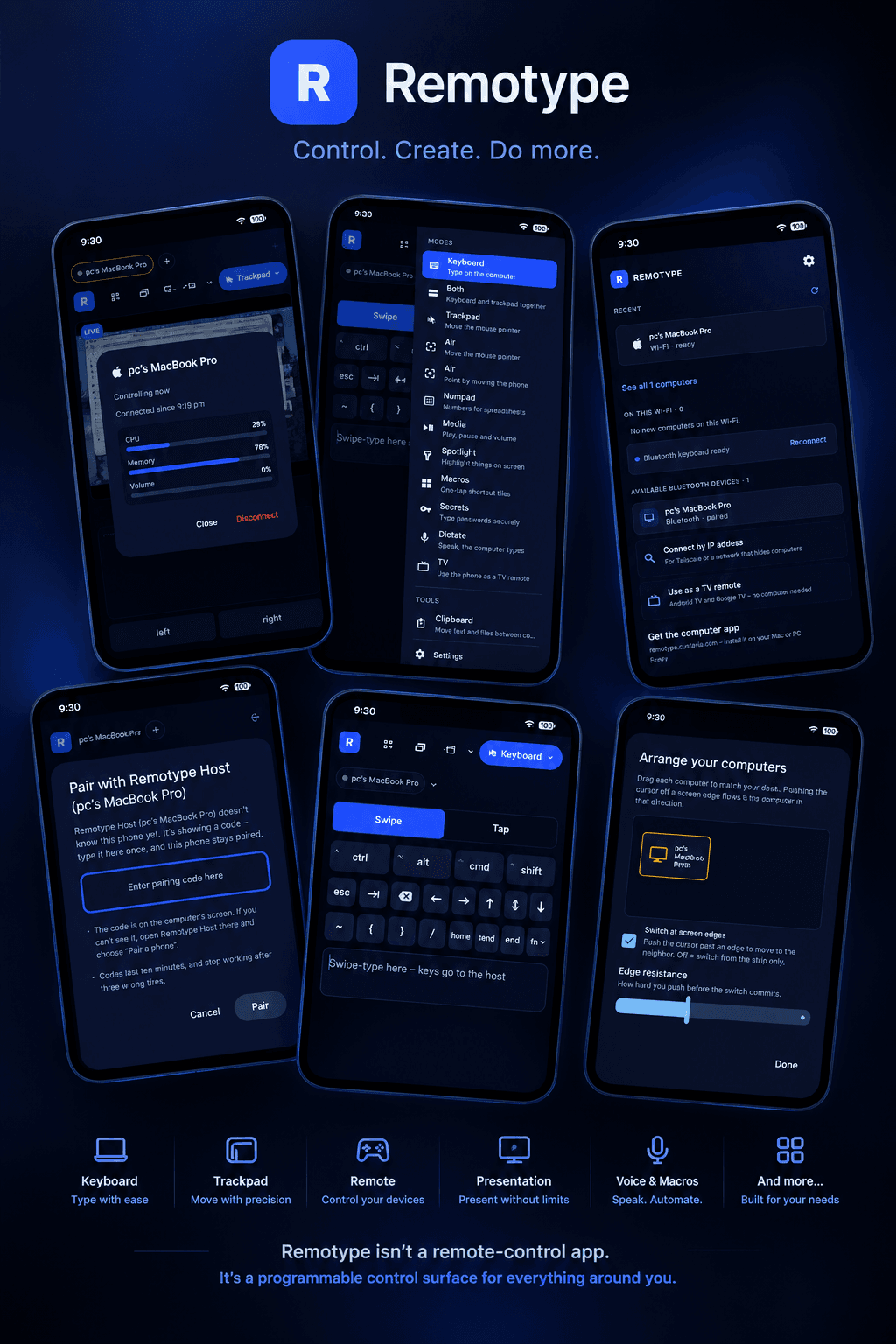
About this app
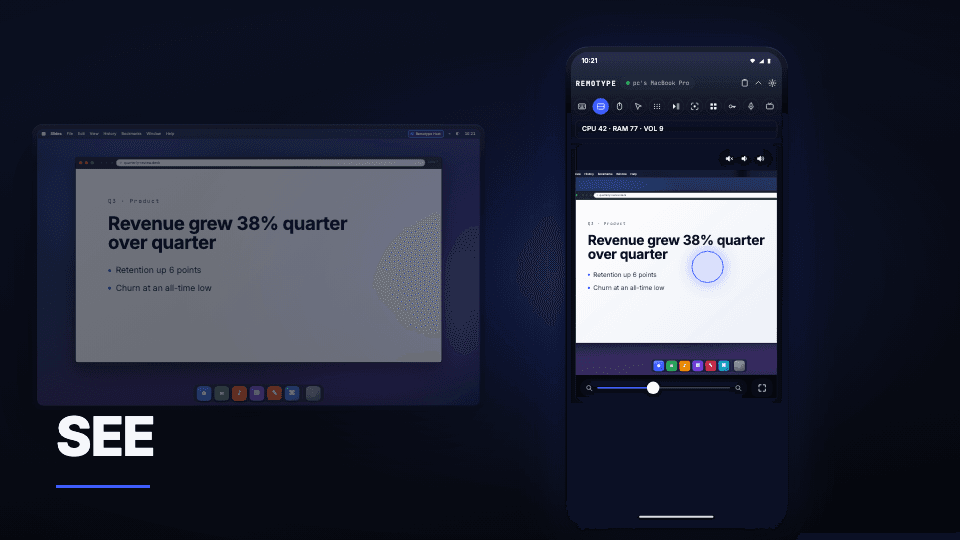
Remotype turns your phone into a versatile control surface for your computer and TV. Use it as a wireless keyboard with swipe typing and autocorrect, a multi-touch trackpad, a TV remote, or a presentation controller. Go further with air mouse, macros, numpad, dictation, clipboard sharing, screen mirroring, and more. Connect over Wi-Fi for the full experience, or use Android’s Bluetooth mode for keyboard and mouse control without installing software on the target device. With a free companion app for Mac, Windows, and Linux, Remotype brings your everyday controls together in one device you already carry: your phone. No account, no ads, no telemetry. Host apps are open source on github.
Key features
- 1Wireless keyboard with swipe typing, shortcuts and multi-touch trackpad over Wi-Fi or Bluetooth.
- 2Android Bluetooth zero-install mode — no software needed on the target computer.
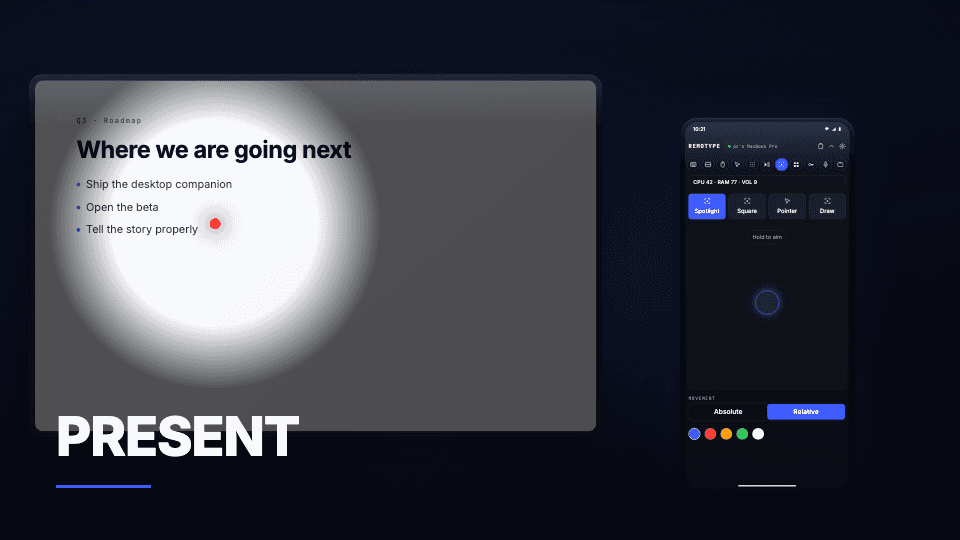
- 3Presenter tools: laser, spotlight, ink, timer that appear in Zoom/Meet/Teams screen shares.
- 4Free open-source host (Apache-2.0) for Mac, Windows and Linux; no account, no tracking.
Target customer profile
Drawn from the product itself, not from a survey.
Demographic
Home-theatre & living-room media users
Pain points
Laptop under the TV needs a keyboard; TV remote is clunky for typing searches
Primary needs
Quick typing and pointer control from the sofa without buying hardware
Demographic
Presenters, teachers and meeting facilitators
Pain points
Hardware clickers can't draw spotlight/ink into screen shares; awkward cursor control
Primary needs
Laser, spotlight, ink and timer that appear in Zoom/Meet/Teams recordings
Demographic
IT-constrained office & field workers
Pain points
Work PCs block software installs; headless mini-PCs/NUCs have no keyboard attached
Primary needs
Zero-install Bluetooth input from Android; reliable keyboard for headless machines
Demographic
Privacy-conscious power users & tinkerers
Pain points
Uncomfortable typing passwords into apps that phone home or require accounts
Primary needs
Local-only connection, open-source host, biometric-protected password typing
Scout Review
Written by AI from measured evidence, scored out of 100.
Remotype turns your phone into a keyboard, trackpad, TV remote and presentation clicker, with a free open-source host for Mac, Windows and Linux. The app UI is polished and the compatibility tagging is genuinely helpful. Speed is excellent and the privacy model is a real selling point. Security headers are partial and there's no published audit; accessibility is perfect on automated checks but thin on statements and localization. The idea is specific and differentiated, especially the Android Bluetooth zero-install path.
Measure by measure
Usability
68Store material shows a clear modes menu and use-case tags that telegraph 'Needs Host' vs 'Free forever' up front. The site's short-answers block handles the iPhone/Android/host questions directly. Secondary GitHub CTA is low-contrast and the FAQ list is dense.
Design
71Judging the app UI and store material: consistent dark theme, high-contrast blue accents, clean modes list and realistic promo mockups. Homepage is busier than it needs to be, and the tiny modifier keys on the keyboard screenshot are a real targeting concern.
Speed
88Lighthouse mobile 95/100 with 2.6s LCP, 0ms TBT and 0.014 CLS; desktop a flat 100/100. A static, lightweight marketing site that loads fast on both profiles, with no lag complaints in the collected evidence.
Security
63HTTPS enforced, SPF/DMARC and several security headers present, plus a no-account, no-tracking, local-connection model with an open-source Apache-2.0 host. Missing HSTS, CSP and frame protection; no SOC 2/ISO/pen-test claims found.
Accessibility
79Lighthouse accessibility audit scores a clean 100/100, and the app ships on both iOS and Android. No WCAG statement or a11y page found, and the app is localized in only one language, which caps it below the top of the band.
Growth
62A real, specific problem with a genuine wedge: Android Bluetooth zero-install mode and an open-source host, aimed at named segments like presenters and locked-down work PCs. Early stage (no ratings yet), but the idea has a clear reason to exist.
Improvement areas
- Missing HSTS, CSP and frame protection; no published security audit or compliance claim.
- No accessibility statement or WCAG conformance page; store localized in only one language.
- Homepage hero and FAQ list are visually noisy; secondary GitHub CTA is low-contrast.
- Tiny modifier keys on the keyboard screenshot may be hard to target on smaller phones.
Design & Usability
The app itself is the product here, and the store screenshots show a coherent dark UI with a clear modes list separating keyboard, trackpad and tools. Use-case tags like 'Needs Host' and 'Free forever' do real work, telling you compatibility before you download. The homepage is the weak link: footnotes and small links crowd the hero, and the FAQ list is a wall of blue text. The keyboard screenshot's tiny modifier keys are a genuine usability question on smaller phones, and the secondary GitHub CTA is easy to miss.
Speed & Security
Speed is the standout: Lighthouse mobile 95/100 with 2.6s LCP and 0ms TBT, desktop a perfect 100. The site is static and light, and nothing in the collected evidence suggests lag. Security is competent but not exceptional: HTTPS enforced, SPF/DMARC and several headers present, and a privacy model that's actually appealing — no account, no tracking, local connection, open-source Apache-2.0 host. But HSTS, CSP and frame protection are missing, and there's no published audit or compliance claim to point at.
Accessibility & Growth
Automated accessibility is a perfect 100/100, and dual iOS/Android coverage helps. What's missing is the human layer: no WCAG statement, no a11y page, and only one language in the store listing. Growth is the interesting one. Remotype names real segments — presenters who need spotlight in screen shares, IT-constrained workers who can't install software, headless-PC owners — and its Android Bluetooth zero-install mode plus open-source host is a concrete differentiator against Unified Remote's server requirement. It's early (no store ratings yet), but the idea has a defensible wedge.
Conclusion
If you've ever typed a Wi-Fi password into a TV with a D-pad, Remotype is aimed squarely at you. The free keyboard-and-trackpad tier plus an open-source host lowers the risk of trying it, and the $99.99 lifetime option is a reasonable hedge against subscription fatigue. The gaps — missing security headers, no a11y statement, one language — are fixable and don't undermine the core. Worth a download if your setup matches one of its named situations.
Suggestions for improvement
- Add HSTS, a Content-Security-Policy and frame-ancestors to close the header gaps.
- Publish a short accessibility statement and expand store localization beyond one language.
- Enlarge the ctrl/alt/cmd modifier keys or offer a compact-keyboard layout option.
- Simplify the homepage hero and FAQ list; raise contrast on the secondary GitHub CTA.
Alternatives comparison
Named competitors, point by point. Nobody paid to appear here or to be left out.
 Remotype Remotype |  Unified Remote Unified Remote |  Logitech Spotlight / hardware presenters Logitech Spotlight / hardware presenters | |
|---|---|---|---|
| Pricing model | Free keyboard/trackpad; Premium $4.99/mo, $39.99/yr, $99.99 lifetime | Ad-supported free tier; paid upgrade for full features | One-time hardware purchase, no subscription |
| Software required on target device | None for Android Bluetooth; free host for iPhone/Wi-Fi | Server app must be installed on the computer | None — plug-and-play USB receiver |
| Full keyboard and trackpad | Yes — swipe typing, shortcuts, multi-touch trackpad | Yes — keyboard and mouse control over Wi-Fi | No — presentation controls only |
| Presentation laser/spotlight in screen shares | Yes — laser, spotlight, ink, timer rendered by host | Limited presentation controls; no in-share spotlight | Physical laser/spotlight on screen, not in digital shares |
| Open source host | Yes — Apache-2.0 on GitHub | No — proprietary server | No — closed hardware/firmware |
Unified Remote
Popular cross-platform app for controlling PC media, keyboard and mouse from a phone over Wi-Fi; broad feature set but ad-supported free tier and needs a server app installed.
Logitech Spotlight / hardware presenters
Dedicated presentation clickers that work with no software, offering laser/spotlight on the physical screen but no full keyboard or trackpad capability.
Comparing options? See Remotype alternatives, scored side by side
More Productivity apps
View all Productivity
Qamarero
92An all-in-one hospitality software for restaurants and ba...

The Stack Newsletter
92A weekly newsletter delivering curated tech jobs, intervi...

EmbedMyReviews
92White-label reputation management software for agencies s...

StoryPad
92Privacy-first open source journal app with a continuous t...

Puzzly – B2B Lead Generation & Sales Intelligence Platform
92Puzzly is an all-in-one B2B lead generation platform that...

Notion
92All-in-one AI workspace for docs, projects, and knowledge...

Vibe Coding Agent Skills
92A free, open-source platform offering 110 AI agent skills...

CC Switch
91Open-source desktop app for switching AI coding providers...

username.md
90One verified handle for your online identity, readable by...

What the GIF
89Frame-perfect video-to-GIF maker that runs entirely in yo...

AuditCloser
89White-label website audits that close deals for digital a...

NudgeWin
89Automated quote follow-up for trades and service businesses.


A platform dedicated to providing unbiased reviews of newly launched applications, analyzing everything from their features to their full potential.
info@scoutforge.net© 2026 Scoutforge. All rights reserved.
