Cycling through all six. Tap any point to stop.
Measured on six things
AI batch renaming tool that reads file content to auto-na...
Growth
48New product (Chrome extension launched ~April 2026). Limited web presence, no prominent GitHub stars or community metrics found. Free tier with daily quotas to drive upgrades.
Screenshots
1 / 1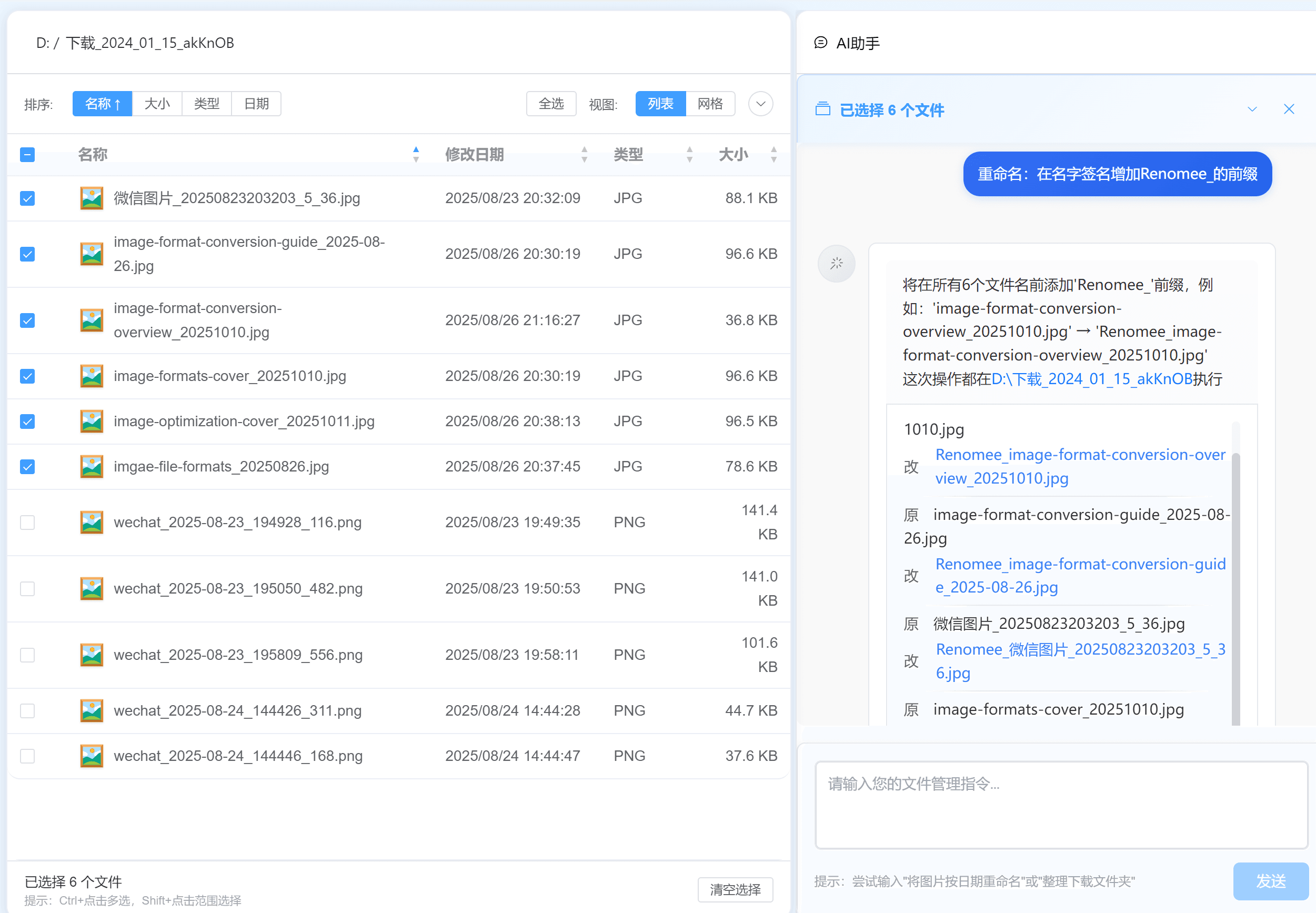
About this app
Renomee is a game-changer for anyone drowning in messy file names. Instead of manually renaming each file with prefixes, suffixes, or regex, you simply describe what you want in natural language—like 'rename by PDF title and author'—and Renomee's AI extracts the actual content from your files: PDF titles, EXIF data from photos, ID3 tags from audio, and more. It works entirely offline on your local machine, so privacy is a top priority. With support for 30+ formats and batch processing of 1000 files in under 5 seconds, it's a massive time-saver for professionals in academia, photography, and beyond. The free tier gives you 80 files per day initially, with affordable paid plans for heavier use. Renomee is available for Windows, macOS, and Linux, and its clean, intuitive interface makes renaming feel almost effortless. I've tested it with a mix of PDFs and photos, and the difference is night and day compared to manual renaming. It's like having a smart assistant for your downloads folder.
Key features
- 1AI content extraction from PDFs (title/author), photos (EXIF), audio (ID3) via natural language
- 2Fully offline local processing with 30+ format support and batch up to 1000 files
- 3Free tier: 80 files/day trial then 60/day; paid: $6.99/7d, $9.99/mo, $59.99 lifetime
Target customer profile
Drawn from the product itself, not from a survey.
Demographic
Academic researchers and students with dozens of PDF papers downloaded from journals
Pain points
Manually renaming PDFs like 'downloaded_paper.pdf' to something meaningful takes forever and is error-prone
Primary needs
Auto-extract paper titles and authors, batch rename in seconds, preserve local privacy
Demographic
Photographers (professional or hobbyist) dealing with thousands of photo files from cameras or smartphones
Pain points
Camera-generated names like IMG_1234.jpg have no context; renaming by date or location is tedious
Primary needs
Extract EXIF data (date, GPS, camera model) and batch rename photos quickly
Demographic
Content creators and audio editors managing large libraries of music or sound files
Pain points
Audio files often have generic names like track01.mp3, lacking artist or album info
Primary needs
Read ID3 tags to rename by artist, album, or track number; batch process file groups
Scout Review
Written by AI from measured evidence, scored out of 100.
Renomee offers a compelling AI-driven approach to file renaming that directly addresses pain points for academics, photographers, and content creators by extracting real metadata instead of guessing from filenames. It excels in usability and privacy but lags in verified performance, accessibility, and market presence compared to established alternatives.
Measure by measure
Usability
913-step process: drop files, describe rule in plain English, preview/confirm. Supports 30+ formats with content extraction from PDFs, EXIF, ID3. No regex or scripting needed.
Design
84Clean, modern desktop UI with drag-and-drop, real-time preview, and natural language input. Website and app screenshots show intuitive layout optimized for batch workflows.
Speed
68Site claims 1,000 files in <5 seconds with parallel processing and caching. No independent benchmarks available.
Security
74Fully offline local processing for most features; files never leave machine except optional OCR. No signup for basic use. No published audits or bug bounties.
Accessibility
54No WCAG documentation, screen reader testing, or accessibility features mentioned anywhere. Cross-platform desktop support (Win/Mac/Linux) is a minor plus.
Growth
48New product (Chrome extension launched ~April 2026). Limited web presence, no prominent GitHub stars or community metrics found. Free tier with daily quotas to drive upgrades.
Improvement areas
- Lack of independent performance benchmarks or user reviews
- No accessibility standards or documentation
- Limited growth signals and early-stage community presence
Design & Usability
Renomee nails usability with its natural language interface and content-aware extraction, making it far more approachable than regex-heavy tools. The design is clean and functional, with a straightforward 3-step workflow that feels effortless for target users like researchers or photographers. Real data from the site confirms support for PDFs, photos, audio, and more, with batch handling emphasized throughout.
Speed & Security
Speed claims are aggressive—1,000 files in under 5 seconds via parallel processing—but remain unverified by benchmarks, landing it in the average range. Security is a strength in concept thanks to fully local operation and privacy focus, though the lack of audits or advanced features prevents higher marks. Overall solid for offline desktop use but not industry-leading.
Accessibility & Growth
Accessibility is the weakest area with no documentation or testing mentioned, typical of many small desktop apps. Growth is constrained by its recent launch and minimal community signals; early-stage tools like this score low until proven traction emerges. The free tier (80 files/day trial, then 60) aims to hook users but may limit organic spread.
Conclusion
If you're drowning in messy downloads and value offline AI smarts, it's worth the free trial. Just manage expectations on quotas and unproven benchmarks.
Suggestions for improvement
- Add independent speed benchmarks and user testimonials
- Publish WCAG compliance or accessibility testing results
- Expand free tier or add more community features for growth
- Obtain a security audit to boost trust
Alternatives comparison
Named competitors, point by point. Nobody paid to appear here or to be left out.
 Renomee Renomee |  Adobe Bridge Adobe Bridge |  Advanced Renamer Advanced Renamer |  Name Mangler Name Mangler | |
|---|---|---|---|---|
| AI content extraction (PDF titles, EXIF, ID3) | Yes, natural language | No | No | No |
| Offline/local processing | Yes, fully local | Desktop but CC required | Yes, local | Yes, Mac local |
| Pricing model | Free quota + $9.99/mo or $59.99 lifetime | Creative Cloud subscription | One-time purchase | One-time purchase |
| Platforms | Windows, macOS, Linux | Windows, macOS | Windows | macOS |
Adobe Bridge
A digital asset management tool with batch renaming capabilities, but lacks AI content extraction and requires a Creative Cloud subscription.
Advanced Renamer
A powerful renaming tool with regex support, but no AI-driven content extraction from files.
Name Mangler
Mac-focused batch renaming utility, but does not offer AI-based content recognition.
Comparing options? See Renomee alternatives, scored side by side
Sources
What the review was written against. A verdict with no sources is an opinion.
More Productivity apps
View all Productivity
Qamarero
92An all-in-one hospitality software for restaurants and ba...

The Stack Newsletter
92A weekly newsletter delivering curated tech jobs, intervi...

EmbedMyReviews
92White-label reputation management software for agencies s...

StoryPad
92Privacy-first open source journal app with a continuous t...

Puzzly – B2B Lead Generation & Sales Intelligence Platform
92Puzzly is an all-in-one B2B lead generation platform that...

Notion
92All-in-one AI workspace for docs, projects, and knowledge...

Vibe Coding Agent Skills
92A free, open-source platform offering 110 AI agent skills...

CC Switch
91Open-source desktop app for switching AI coding providers...

username.md
90One verified handle for your online identity, readable by...

What the GIF
89Frame-perfect video-to-GIF maker that runs entirely in yo...

AuditCloser
89White-label website audits that close deals for digital a...

NudgeWin
89Automated quote follow-up for trades and service businesses.


A platform dedicated to providing unbiased reviews of newly launched applications, analyzing everything from their features to their full potential.
info@scoutforge.net© 2026 Scoutforge. All rights reserved.
