Cycling through all six. Tap any point to stop.
Measured on six things
Riffloop turns any YouTube song into a practice studio: split it into stems, loop the hard bars, slow it down and change key, right under the video.
Growth
32Domain registered June 2026, so roughly two months old. Zero reviews, community signals, or traction metrics found.
Screenshots
1 / 1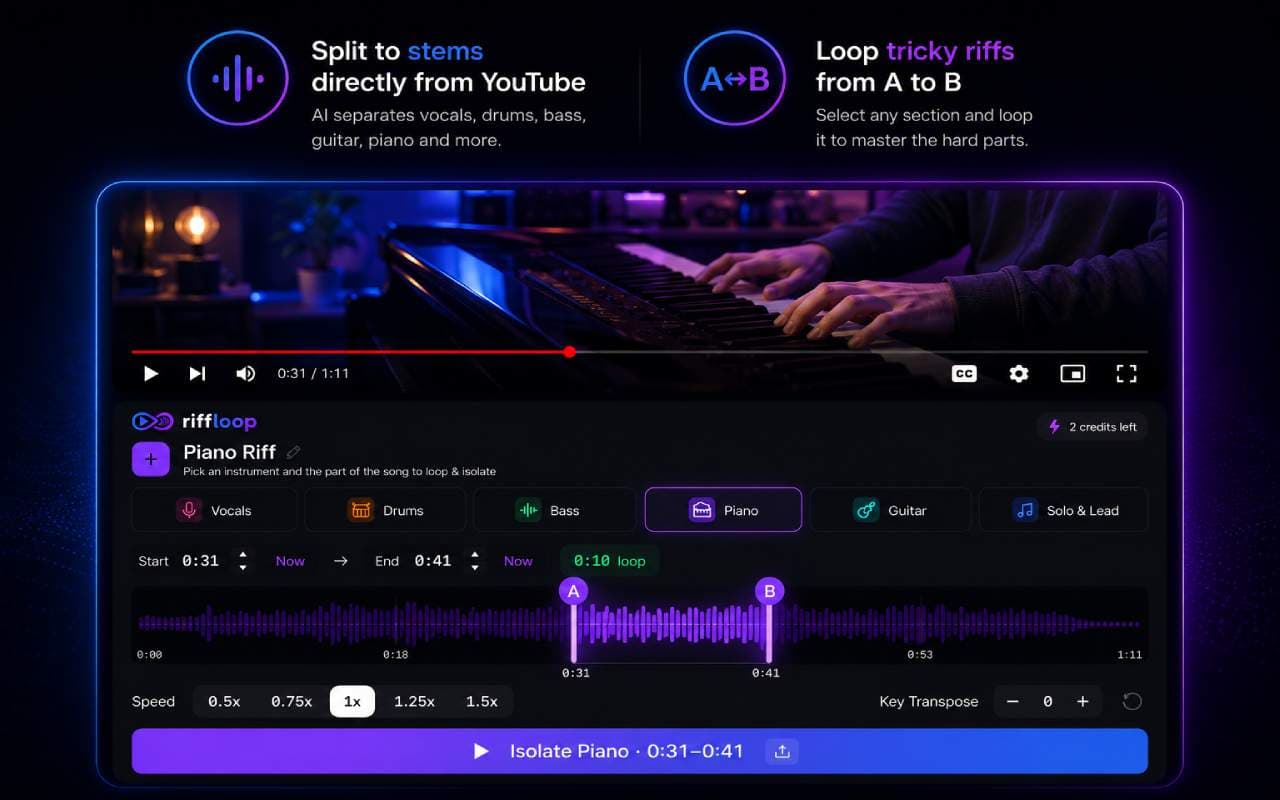
About this app
Riffloop is an all-in-one music practice studio that runs right under the YouTube video you are already watching. AI stem separation splits any song into six parts: vocals, drums, bass, guitar, piano and more. Solo the guitar to learn a riff note for note, or mute the vocal and sing it yourself. Drag a region over the bar that trips you up and loop it, snapped to the beat, until it sticks. Pull the tempo down to 25% to catch every note with the pitch held steady, then walk it back up to full speed. Shift the whole track up or down by as much as 12 semitones to fit your voice or instrument. It works on your own files too. Upload an MP3, WAV or FLAC to the web Studio and get the same stems, loops, speed and key controls. Most tools give you half of this. A stem splitter hands you files and walks away. A looper forgets the stems. Riffloop keeps all of it in one place, on the song you are already learning. Free to start, no signup needed to try it.
Key features
- 1AI stem separation into 6 parts (vocals, drums, bass, guitar, piano, other) directly on YouTube or uploaded files
- 2A-B beat-snapped looping, pitch-preserving speed from 25% to 2x, and ±12 semitone key shift
- 3On-device processing with no upload required for YouTube videos; free tier available with no signup
Target customer profile
Drawn from the product itself, not from a survey.
Scout Review
Written by AI from measured evidence, scored out of 100.
Riffloop delivers a genuinely useful all-in-one practice studio that sits directly under YouTube videos, combining six-stem separation, A-B looping, pitch-preserving speed changes, and key transposition in one on-device experience. The product is polished enough to feel premium while remaining free to try. Its main limitations are mobile performance, minimal security headers, and the complete absence of third-party validation after only two months live.
Measure by measure
Usability
78No signup friction, works instantly on YouTube, and surfaces stem, loop, speed, and key controls clearly. Free tier is genuinely usable without configuration.
Design
70Polished dark theme with purposeful purple/blue accents and color-coded instrument tags that map directly to the waveform UI. Embedded hero demo provides immediate proof of the core workflow.
Speed
58Desktop Lighthouse 96/100 is excellent. Mobile scores 66/100 with LCP at 6.2s, which drags real-world feel on slower connections.
Security
40HTTPS is enforced and DMARC exists. Only 3 of 12 security headers present; no SOC 2, ISO, or public audits mentioned anywhere.
Accessibility
80Lighthouse 96/100 with only one contrast failure. Dark theme and high-contrast tags help, but no a11y statement or keyboard details published.
Growth
32Domain registered June 2026, so roughly two months old. Zero reviews, community signals, or traction metrics found.
Improvement areas
- Mobile performance (LCP 6.2s) needs optimization for acceptable first-interaction speed
- Security headers and public compliance documentation are minimal
- Zero external reviews or community signals after two months live
Design & Usability
Riffloop's design nails the music-tool aesthetic with a near-black panel, neon purple/blue outlines, and instrument tags in distinct colors that match the waveform. The embedded hero demo immediately shows the YouTube player plus the actual interface with A/B loop markers and speed pills. Usability wins big on zero-friction entry: open any YouTube video, split stems, loop, transpose, and slow down without signing up or uploading. The free tier is genuinely free and runs on-device. Minor friction comes from the tiny hero product card making some labels hard to read and repeated identical CTAs that don't differentiate primary from secondary actions.
Speed & Security
Speed is split: desktop Lighthouse hits 96/100 while mobile lands at 66/100 with a 6.2-second LCP, so the first interaction on phones feels sluggish. Security is table-stakes only: HTTPS and DMARC are present, but the site carries just 3 of 12 recommended headers and publishes no SOC 2, ISO, or audit results. For a brand-new music tool that processes audio locally this is acceptable, yet the lack of transparency keeps the score in the low 40s.
Accessibility & Growth
Accessibility scores well at 80 thanks to a 96/100 Lighthouse result and only one contrast failure. The dark theme and high-contrast instrument tags support readability, though no public a11y statement or keyboard navigation details appear. Growth is the weakest dimension at 32 because the domain is only two months old with no reviews, community, or external traction signals yet. Early indie products often start this way; trajectory matters more than absolute numbers right now.
Conclusion
For guitarists, singers, and producers who already live inside YouTube tabs, Riffloop removes the usual friction of exporting, uploading, and switching apps. It is early, but the core loop of isolate-loop-slow-transpose works exactly as advertised and runs where the music already lives.
Suggestions for improvement
- Add a visible security or compliance page even if it just lists the current headers and local-processing promise.
- Increase hero demo card size or add a second larger screenshot so waveform labels stay legible.
- Publish a short changelog or roadmap to give early users something to follow while the product grows.
Alternatives comparison
Named competitors, point by point. Nobody paid to appear here or to be left out.
 Riffloop Riffloop | ||
|---|---|---|
| AI stem separation (6 stems) on YouTube | Yes - 6 stems directly on YouTube video | Varies by category |
| A-B looping + speed + key change | Yes - beat-snapped loop, 25% speed, ±12 semitones | Varies by category |
| Works on own uploaded files | Yes - MP3/WAV/FLAC support in web Studio | Varies by category |
| No signup required to try | Yes - free tier, no signup | Varies by category |
Comparing options? See Riffloop alternatives, scored side by side
More Productivity apps
View all Productivity
Qamarero
92An all-in-one hospitality software for restaurants and ba...

The Stack Newsletter
92A weekly newsletter delivering curated tech jobs, intervi...

EmbedMyReviews
92White-label reputation management software for agencies s...

StoryPad
92Privacy-first open source journal app with a continuous t...

Puzzly – B2B Lead Generation & Sales Intelligence Platform
92Puzzly is an all-in-one B2B lead generation platform that...

Notion
92All-in-one AI workspace for docs, projects, and knowledge...

Vibe Coding Agent Skills
92A free, open-source platform offering 110 AI agent skills...

CC Switch
91Open-source desktop app for switching AI coding providers...

username.md
90One verified handle for your online identity, readable by...

What the GIF
89Frame-perfect video-to-GIF maker that runs entirely in yo...

AuditCloser
89White-label website audits that close deals for digital a...

NudgeWin
89Automated quote follow-up for trades and service businesses.


A platform dedicated to providing unbiased reviews of newly launched applications, analyzing everything from their features to their full potential.
info@scoutforge.net© 2026 Scoutforge. All rights reserved.
