Cycling through all six. Tap any point to stop.
Measured on six things
Local AI meeting transcription with speaker detection
Growth
67Local-first transcription, user-owned Markdown files, offline processing, and the Rhai scripting API give Samurai Scribe a genuinely differentiated position in a crowded meeting-transcription market. The target audience is relatively focused—privacy-conscious professionals, developers, and users who prefer local workflows—but that focus also gives the product a clear wedge rather than competing solely on generic transcription features.
Screenshots
1 / 4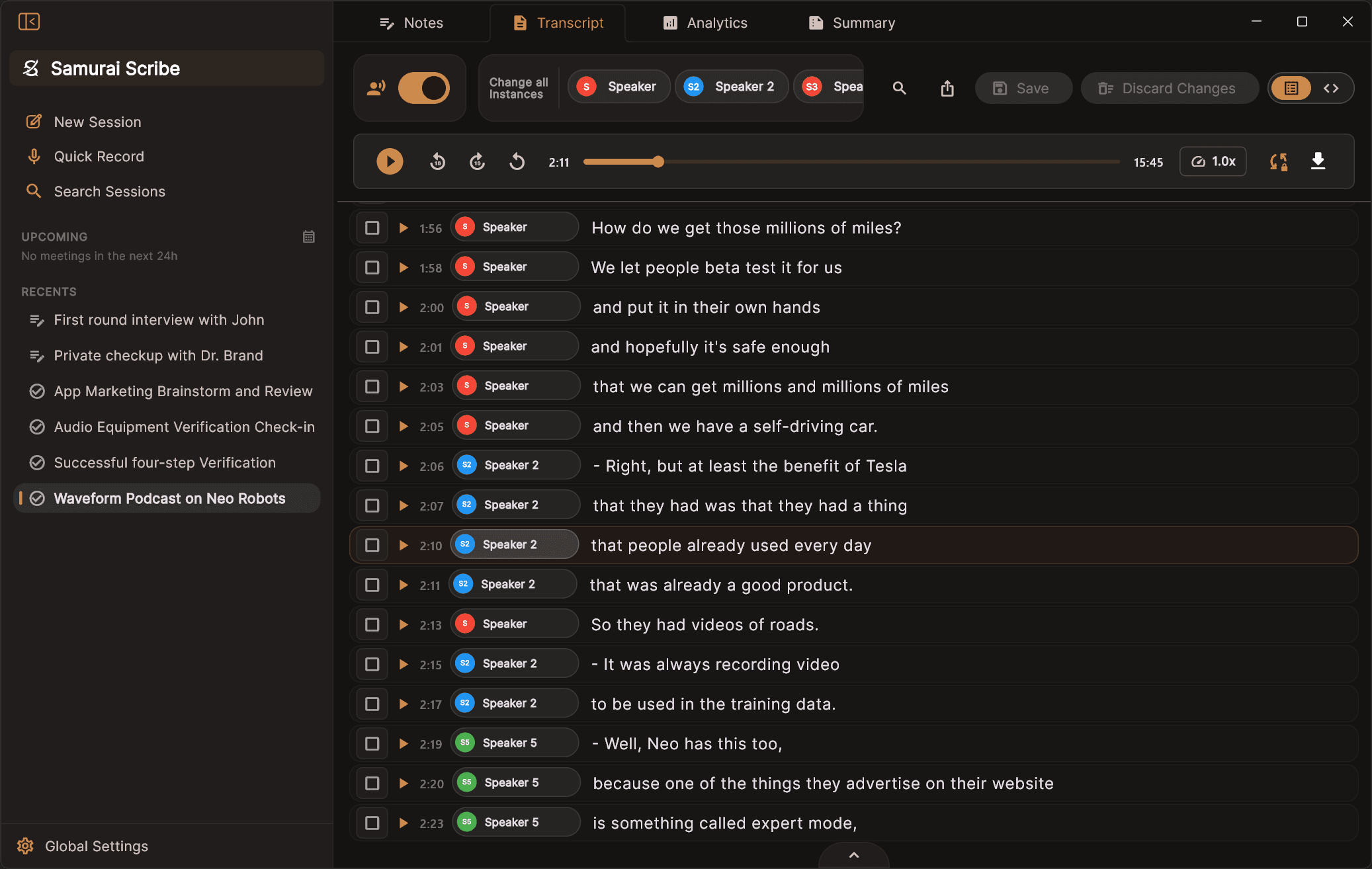

About this app
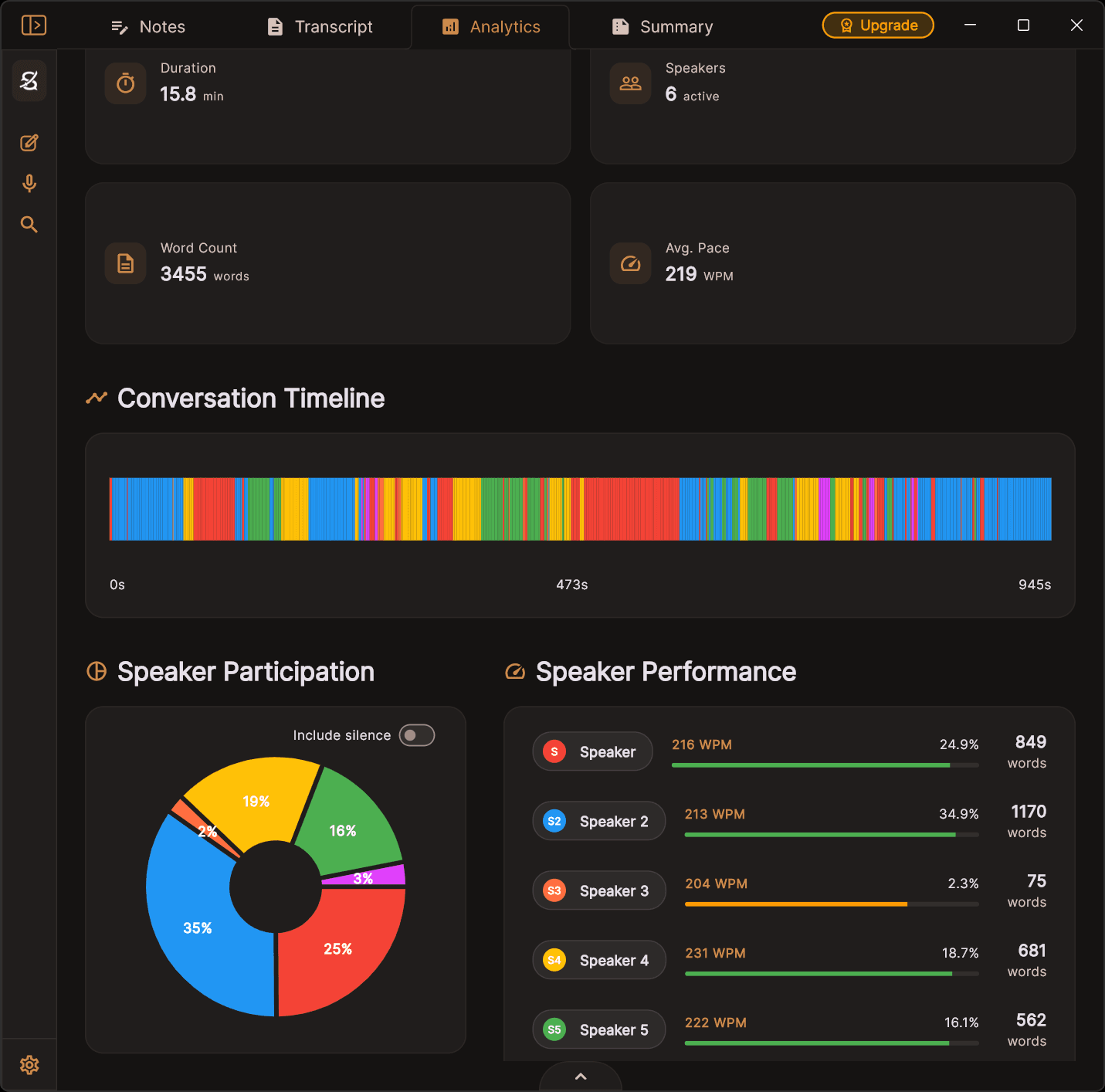
Samurai Scribe is a privacy-first meeting transcription app that runs entirely on your device. It converts both online and in-person meetings into speaker-labeled transcripts, with AI-powered summaries, all without sending audio or text to the cloud. You get on-device speaker detection, echo cancellation, and a powerful scripting API (using Rhai) to create custom summary templates. Your meetings are stored as Markdown files in a folder you control, making them easy to view, edit, and back up. With a one-time payment model and no subscription, it's designed for individuals and teams who value privacy and ownership of their data. The free version includes unlimited transcription and summaries with smaller Whisper models, while the Pro version unlocks larger models for better accuracy on accented or noisy audio.
Key features
- 1On-device speaker detection and echo cancellation
- 2Scripting API with Rhai for custom summaries
- 3Meetings stored as Markdown files in a user-controlled folder
Target customer profile
Drawn from the product itself, not from a survey.
Demographic
Privacy-conscious professionals
Pain points
Concerned about cloud-based transcription services that store meeting recordings and potentially expose sensitive business information.
Primary needs
A transcription tool that keeps all data local and never uploads audio, with no account required.
Demographic
Freelancers and small business owners
Pain points
Tired of subscription fees for meeting transcription tools and want a one-time purchase that gives lifetime access.
Primary needs
Affordable, one-time payment software with full features and no recurring costs.
Demographic
Tech-savvy individuals and developers
Pain points
Dislike being locked into a platform's ecosystem and want to customize their meeting summaries, perhaps using scripts or integrating with their existing tools.
Primary needs
A flexible, scriptable API and integration with Obsidian or other Markdown-based workflows.
Demographic
Remote teams and organizations with strict compliance requirements
Pain points
Need to comply with data protection regulations by keeping all meeting data on-premises, but still want AI-powered transcription and summaries.
Primary needs
A solution that runs 100% locally, with no cloud processing and full control over data.
Scout Review
Written by AI from measured evidence, scored out of 100.
Samurai Scribe is a privacy-first desktop transcription app with a strong local-processing architecture, user-owned Markdown workflows, and a distinctive Rhai scripting API. The product has clear potential, with the main opportunities being documentation, website mobile performance, security hardening, and a few accessibility improvements.
Measure by measure
Usability
68The application provides clear navigation between notes, transcripts, analytics, and summaries, with speaker labels and playback controls that are easy to identify. The product also exposes useful workflows around Markdown files, profiles, calendar integration, and customizable summaries. The main usability gap is documentation depth, particularly for the scripting API and advanced workflows, which are powerful but may require some experimentation for new users.
Design
72The automated visual audit captured the homepage in an incomplete black/blank rendering state, which appears to have been a transient loading or rendering issue rather than the current state of the site. The live landing page now clearly presents the product, its local-first positioning, core features, pricing, and download options. The desktop app UI also uses a consistent dark/light visual system with clear speaker color coding and data visualizations.
Speed
70Desktop web performance is reasonably strong, with a Lighthouse performance score of 76 and an LCP of 1.4s. The automated mobile test scored 48 with a 7.1s LCP, which indicates room for improvement in the public website's mobile rendering. Since Samurai Scribe is a desktop application, this should be treated primarily as a mobile-web optimization opportunity rather than a limitation of the product itself.
Security
76HTTPS is enforced, but the website is missing several standard hardening headers, including HSTS, CSP, and frame protection. These are meaningful website-level security improvements, although they should be distinguished from the application's privacy architecture. Samurai Scribe processes transcription, speaker detection, and summarization locally, while recordings, transcripts, summaries, and notes remain on the user's device. The product also publishes a detailed network disclosure and privacy policy explaining what limited network requests exist and what data they carry. Enterprise certifications are not presented, so larger organizations may still want additional assurance before adoption.
Accessibility
70Lighthouse score is 90/100, but failing audits include contrast and heading order. No a11y statement or multi-language support. Keyboard navigation seems possible but not verified.
Growth
67Local-first transcription, user-owned Markdown files, offline processing, and the Rhai scripting API give Samurai Scribe a genuinely differentiated position in a crowded meeting-transcription market. The target audience is relatively focused—privacy-conscious professionals, developers, and users who prefer local workflows—but that focus also gives the product a clear wedge rather than competing solely on generic transcription features.
Improvement areas
- Homepage rendering issues need immediate fix
- Mobile performance optimization required
- Security headers and compliance certifications missing
Design & Usability
Samurai Scribe presents a much stronger product experience than the automated homepage snapshot initially suggested. The live landing page clearly explains the local-first value proposition and showcases transcription, speaker detection, Markdown-based storage, scripting, analytics, pricing, and download options. Inside the application, navigation and speaker-oriented visualizations are straightforward. The main remaining usability opportunity is deeper documentation for advanced scripting and customization workflows.
Speed & Security
Desktop web performance is solid, while the mobile Lighthouse result is significantly weaker and could be improved for mobile visitors. Because Samurai Scribe is a desktop application, the mobile result should be treated as a website optimization issue rather than an application limitation. On security, the website is missing several standard hardening headers, but the product's actual privacy architecture is substantially stronger than the header score alone suggests: meeting audio, transcripts, summaries, and notes remain local, and the developer publishes a detailed network disclosure describing the limited requests the app can make.
Accessibility & Growth
Accessibility is generally strong according to Lighthouse, although contrast, heading order, link distinguishability, and table semantics still need attention. Growth potential is credible because Samurai Scribe combines local processing with user-owned Markdown workflows and a scriptable Rhai-based customization layer. Its audience is narrower than that of mainstream cloud meeting assistants, but the product has a clear positioning rather than an undifferentiated feature set.
Conclusion
If you want meeting transcription without handing your recordings and transcripts to a cloud service, Samurai Scribe offers a compelling local-first approach. Its biggest opportunities are improving documentation, tightening website security headers, and optimizing the landing page for mobile visitors.
Suggestions for improvement
- Fix the homepage rendering issue—ensure all sections display properly.
- Consider improving mobile-web performance and LCP for visitors browsing the landing page on phones.
- Add HSTS, CSP, frame protection, and other standard security headers to further harden the public website.
- Publish an accessibility statement and fix contrast issues.
Alternatives comparison
Named competitors, point by point. Nobody paid to appear here or to be left out.
 Samurai Scribe |  Fireflies.ai |  Granola |  Meetily |  Otter.ai | |
|---|---|---|---|---|---|
| Data storage | Local files on user's disk | Cloud storage | Cloud storage | Cloud storage | Local (open-source) |
| Pricing model | One-time payment | Subscription | Subscription | Subscription | Free (open-source) |
| Customization | Scripting API (Rhai) | Limited | Limited | Limited | Limited |
Fireflies.ai
Another cloud meeting assistant that records, transcribes, and analyzes meetings, but with a monthly fee and cloud storage.
Granola
A note-taking app that uses AI to summarize meetings, but it relies on a bot that joins calls and stores data in the cloud.
Meetily
Open-source speech recognition model that runs locally, but lacks a lot of modern features
Otter.ai
Popular cloud-based transcription service that offers real-time transcription and summaries, but requires a subscription and uploads audio to the cloud.
Comparing options? See Samurai Scribe alternatives, scored side by side
More Productivity apps
View all Productivity
Puzzly – B2B Lead Generation & Sales Intelligence Platform
92Puzzly is an all-in-one B2B lead generation platform that...

Qamarero
92An all-in-one hospitality software for restaurants and ba...

EmbedMyReviews
92White-label reputation management software for agencies s...

StoryPad
92Privacy-first open source journal app with a continuous t...

Notion
92All-in-one AI workspace for docs, projects, and knowledge...

The Stack Newsletter
92A weekly newsletter delivering curated tech jobs, intervi...

Vibe Coding Agent Skills
92A free, open-source platform offering 110 AI agent skills...

QRBliss
91Branded QR codes with AI Brand Sync, 15 free dynamic code...

Gerty
91Private, local AI assistant for Mac that runs offline

Strukchad Property Management
91Property management for Kenyan letting agents: rent invoices raised every month, M-Pesa rent prompts to tenants, arrears tracking and landlord statements.

CC Switch
91Open-source desktop app for switching AI coding providers...

PitchWhip
90AI cold call scripts & direct dials from LinkedIn


A platform dedicated to providing unbiased reviews of newly launched applications, analyzing everything from their features to their full potential.
info@scoutforge.net© 2026 Scoutforge. All rights reserved.
