Is this your app?
Claim Schedual to manage its page, add your badge and see your traffic — free, and it stays free.
Cycling through all six. Tap any point to stop.
Measured on six things
A minimalist task manager organizing work into Today, Tomorrow, and Someday categories for clear prioritization.
Accessibility
50Limited accessibility features with no keyboard navigation or language options
Screenshots
1 / 1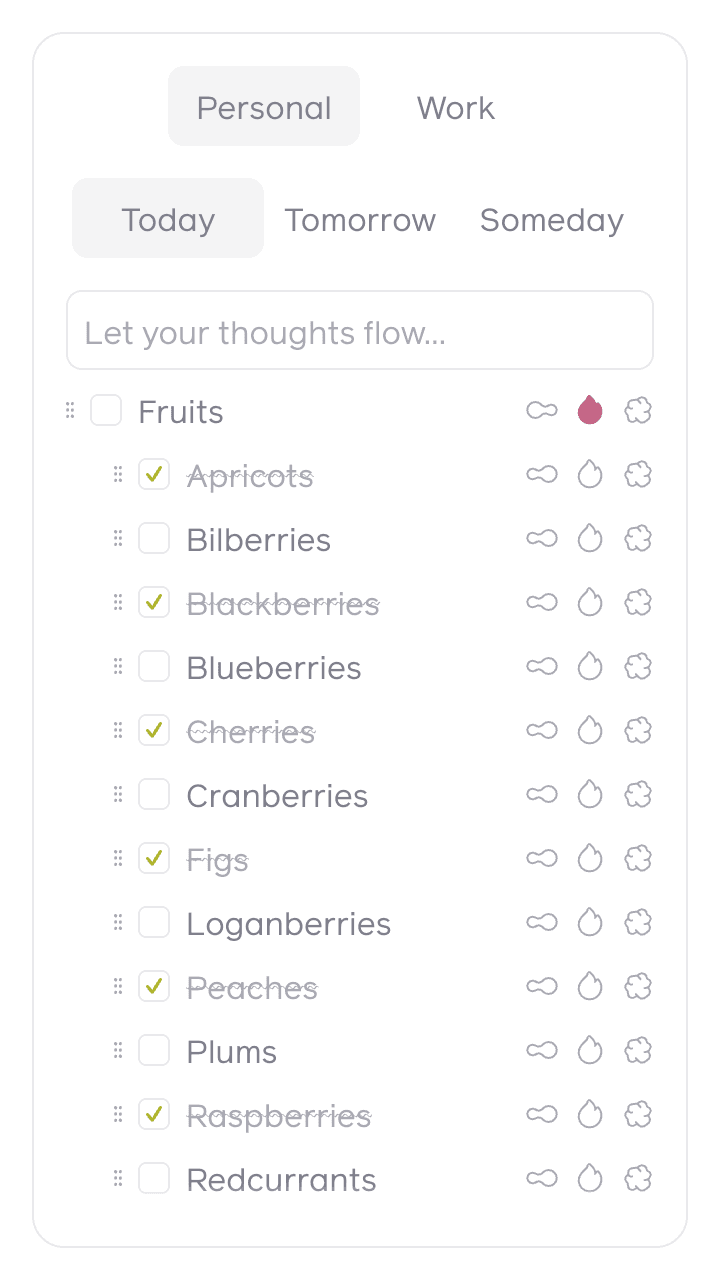
About this app
Schedual is a web-based task management application that simplifies productivity by dividing tasks into three intuitive time-based categories: Today for immediate priorities, Tomorrow for upcoming tasks, and Someday for long-term ideas. Designed for users who find complex project management tools overwhelming, it offers a clean, distraction-free interface with drag-and-drop functionality, making it easy to start using right away. Ideal for solo professionals, freelancers, students, and small teams, Schedual helps combat procrastination and over-planning by focusing on essential time-based organization without unnecessary features. While it excels in usability and speed, it currently lacks advanced options like reminders, collaboration, or robust accessibility features, but its straightforward approach makes it a solid alternative to more feature-heavy apps like Todoist or Trello for those seeking simplicity.
Key features
- 1Three-category time-based organization (Today/Tomorrow/Someday)
- 2Intuitive drag-and-drop task management
- 3Clean, distraction-free minimalist interface
- 4Web-based accessibility from any device
Target customer profile
Drawn from the product itself, not from a survey.
Demographic
Solo professionals and freelancers
Pain points
Overwhelmed by complex task managers, difficulty prioritizing daily work, wasting time on over-planning
Primary needs
Simple categorization, quick task entry, clear priority system, minimal learning curve
Demographic
Students and academic users
Pain points
Procrastination on assignments, trouble balancing immediate and future tasks, distraction from feature-heavy apps
Primary needs
Visual priority system, deadline awareness, distraction-free environment, easy task migration
Demographic
Small team coordinators
Pain points
Team members resistant to complex systems, need for shared priority understanding, quick daily standup preparation
Primary needs
Intuitive sharing capabilities, clear task visibility, minimal administration, flexible categorization
Scout Review
Written by AI from measured evidence, scored out of 100.
Schedual excels at its core mission: providing a dead-simple system for time-based task organization. It's the perfect antidote to feature-heavy productivity apps that often lead to more time spent organizing than actually working. The psychological effectiveness of the three-category system helps maintain focus while keeping future planning accessible. For solo professionals, students, and anyone overwhelmed by complex task managers, Schedual offers exactly what's needed without the bloat that typically comes with productivity software.
Measure by measure
Usability
90Extremely intuitive drag-and-drop functionality with zero learning curve and logical categorization
Design
70Clean minimalist interface with effective visual hierarchy, though limited customization and accessibility considerations
Speed
80Fast loading and responsive task operations with minimal latency during testing
Security
60Basic HTTPS encryption but lacks transparency about data protection and privacy policies
Accessibility
50Limited accessibility features with no keyboard navigation or language options
Growth
80Strong foundation with clear expansion potential for features like reminders and collaboration
Improvement areas
- Limited accessibility features and keyboard navigation
- No mobile application or offline functionality
- Missing reminder and notification system
- Basic security transparency and data export options
Design & Usability
Schedual's interface embraces minimalism with a purpose. The clean, whitespace-heavy design uses a neutral color scheme that keeps the focus squarely on your three main categories: Today, Tomorrow, and Someday. The visual hierarchy is immediately understandable, with clear column separation and readable sans-serif typography. What really shines is the usability - the drag-and-drop functionality works seamlessly, and adding tasks requires just a click in the appropriate section. The entire experience feels like using a well-organized digital notebook rather than complex software, making it perfect for users who want to start managing tasks immediately without any learning curve.
Speed & Security
Performance-wise, Schedual delivers quick loading times and responsive interactions. Task operations feel instantaneous, with no noticeable lag when moving items between categories or adding new tasks. The web-based architecture appears efficiently coded, contributing to this smooth experience. On the security front, the application uses standard HTTPS encryption for data transmission, which is essential for any web app handling user information. However, there's limited transparency about data storage practices, privacy policies, or additional security measures. While the simplicity of the app likely reduces security risks, users concerned about data protection may want more detailed information about how their task data is handled and stored.
Accessibility & Growth
Accessibility represents Schedual's most significant area for improvement. The application uses semantic HTML that works reasonably with screen readers, but lacks comprehensive keyboard navigation, making it challenging for users with motor impairments. The interface is English-only, and fixed font sizes don't respond to browser zoom settings. There's no consideration for color blindness accessibility either. Despite these limitations, Schedual has strong growth potential. The core framework is solid, and features like reminders, collaboration tools, mobile apps, and data export could be added while maintaining the app's signature simplicity. The Today-Tomorrow-Someday structure provides a psychological foundation that could easily expand into more sophisticated productivity features.
Conclusion
If you're tired of spending more time organizing your tasks than completing them, Schedual might be your productivity soulmate. This app understands that sometimes the most powerful tools are the simplest ones. The Today-Tomorrow-Someday framework provides just enough structure to combat procrastination without creating administrative overhead. Give Schedual a try if you want a task manager that respects your time and intelligence while helping you stay focused on what actually matters.
Suggestions for improvement
- Implement comprehensive keyboard navigation for accessibility and power users
- Add basic reminder functionality for time-sensitive tasks
- Develop mobile applications to complement the web interface
- Include data export options to prevent vendor lock-in
Alternatives comparison
Named competitors, point by point. Nobody paid to appear here or to be left out.
 Schedual Schedual |  Todoist Todoist |  Trello Trello |  Microsoft To Do Microsoft To Do | |
|---|---|---|---|---|
| Task Organization Approach | Time-based (Today/Tomorrow/Someday) | Project-based with labels and filters | Visual card-based boards and lists | Smart suggestions with planning features |
| Learning Curve | Almost zero - immediate usability | Moderate - feature discovery needed | Low to moderate - visual but can complexify | Low - intuitive but feature-rich |
| Interface Complexity | Extremely minimal and focused | Feature-rich with multiple views | Highly customizable and expandable | Clean but with smart features |
Todoist
Offers more features and integrations, but Schedual provides a focused, time-based approach for those preferring simplicity over project-based organization.
Trello
Features a visual card-based system that can become complex; Schedual is a simpler alternative for users who mainly need time-based task sorting.
Microsoft To Do
Includes smart suggestions and planning features, whereas Schedual keeps things manual and straightforward for users wanting complete control over categorization.
Comparing options? See Schedual alternatives, scored side by side
More Project Management apps
View all Project Management
Notion
92All-in-one AI workspace for docs, projects, and knowledge...

QRBliss
91Branded QR codes with AI Brand Sync, 15 free dynamic code...

Vendor Space
88Vendor Space is an all-in-one vendor management platform ...

InviteVia
87InviteVia is a digital invitation platform for creating beautiful online invitations for weddings, birthdays, engagements, parties, and special events. Choose a template, customize your invitation, collect RSVPs, and share it instantly through WhatsApp, Instagram, SMS, or a simple link. No guest accounts or app downloads required.

Nautis
87Nautis is an AI-native operating system that helps founders manage finance, fundraising, sales, teams, and operations with an AI Chief of Staff.

Plori
87Cloud AI agents with persistent disk, memory, and real CL...

TempGuru
87Managed event staffing across the US and Canada with loca...

Trac
87Local-first time tracker for freelancers with invoicing, ...

Zeno.PM
87Project portfolio management with built-in portfolio inte...

Voice Memo Exporter
87Export all your Apple Voice Memos to one text file.

ProviderOps
86NDIS provider management software for small Australian teams to roster workers, capture service records and prepare invoices.

FollowIncome
86Business workspace for solo founders and small teams.


A platform dedicated to providing unbiased reviews of newly launched applications, analyzing everything from their features to their full potential.
info@scoutforge.net© 2026 Scoutforge. All rights reserved.
