Cycling through all six. Tap any point to stop.
Measured on six things
AI-powered study tools: mindmaps, flashcards, memory palaces & timers
Speed
46Lighthouse mobile performance 54/100 with LCP at 14.4s — severely slow initial load. Desktop scores 55/100. CLS is 0, so no layout shift, but the 14-second LCP will lose impatient students.
Screenshots
1 / 1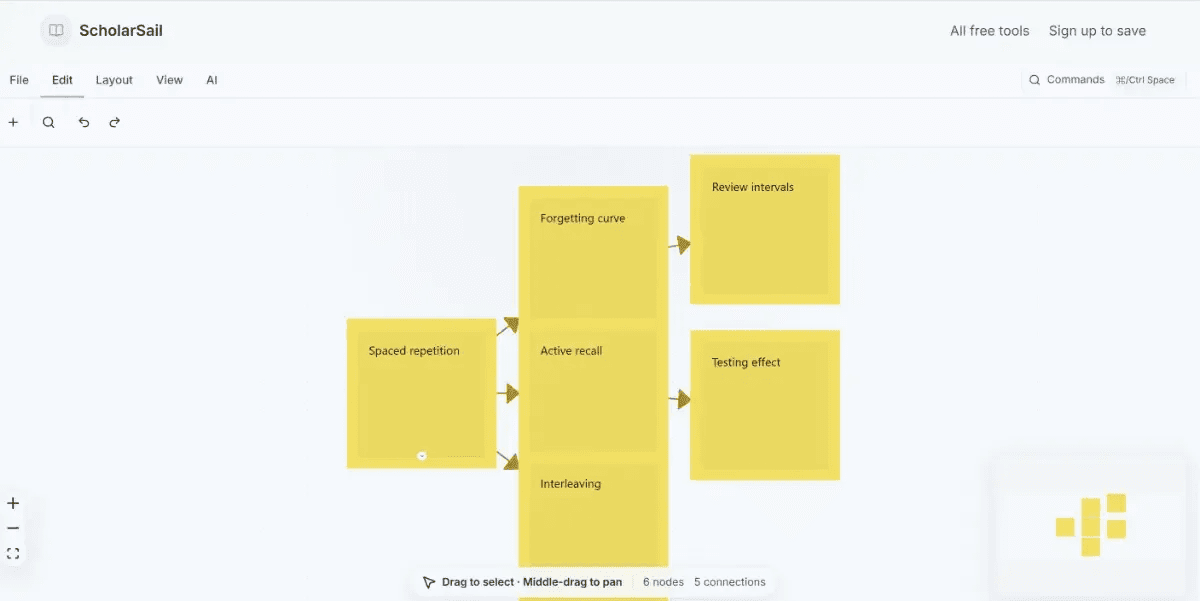
About this app
ScholarSail is an AI-powered learning platform that transforms note-taking into effective study techniques. It automatically converts your notes into mindmaps, spaced-repetition flashcards, and 3D memory palaces — scientifically-proven methods for retention and recall. Features include a rich text editor for flexible note input and an integrated Pomodoro timer to help you study in focused sessions. Designed for students and lifelong learners who want to study smarter, not harder. FEATURES • Note Converter: Automatically turns your notes into helpful study materials. • Mindmaps: Creates visual maps of your notes to help you see the big picture. • Flashcards: Generates study cards that use spaced repetition to help you remember things longer. • Memory Palaces: Builds 3D spaces to help you store and recall information more easily. • Text Editor: Provides a flexible space for you to type and organize your notes. • Pomodoro Timer: Keeps you focused with built-in study sessions.
Key features
- 1AI flashcard generator with spaced-repetition scheduling and cloze deletion support
- 23D memory palaces with flashcard placement along walkable routes for spatial encoding
- 3Connected workspace: mindmaps link to source text, flashcards generate from notes, all tools share the same study materials
- 4Integrated Pomodoro timer with circadian-aligned auto-start and session rating logging
- 5Kanban task boards with dependencies, calendar/Gantt/timeboxed views
- 6Read Flow browser extension with bionic reading, reading ruler, and typography controls
Target customer profile
Drawn from the product itself, not from a survey.
Demographic
College and university students (18-30) preparing for exams in demanding fields like medicine, law, or engineering
Pain points
Struggle to retain large volumes of information, lack efficient study tools, overwhelmed by scattered notes
Primary needs
Want proven memorization techniques, time management, and a centralized platform for notes, flashcards, and planning
Demographic
Lifelong learners and professionals (25-45) taking online courses or acquiring new skills for career advancement
Pain points
Limited time, need to balance work and study, difficulty in making learning stick
Primary needs
Seek flexible, AI-driven tools that adapt to their schedule, offer quick review options, and integrate seamlessly into a busy lifestyle
Demographic
Educators and tutors (28-60) designing study materials for students or creating engaging learning experiences
Pain points
Need to facilitate effective learning, engage diverse students, and reduce administrative workload
Primary needs
Desire interactive visualization tools, track student progress, and provide accessible resources that cater to different learning styles
Scout Review
Written by AI from measured evidence, scored out of 100.
ScholarSail is an ambitious all-in-one study platform that combines spaced-repetition flashcards, mind maps, 3D memory palaces, and productivity tools in a single connected workspace. The design is polished with a coherent dark-navy aesthetic, and the study-guide library demonstrates genuine domain expertise. Performance is the critical weakness — a 14.4-second LCP on mobile will test student patience. Security is solid with strong header configuration, though missing CSP and no published certifications leave room for improvement. Accessibility is good but has fixable gaps. The product's differentiator — connecting notes to multiple study methods — is compelling and addresses a real need in the education technology space. For students juggling demanding coursework, the free tier is worth exploring despite the load-time frustrations.
Measure by measure
Usability
72Clear CTAs, short tool descriptions with distinct icons, and an extensive study-guide library. Navigation lacks active states and search, but the workspace concept is well-explained. Free tier with no card required lowers friction.
Design
70Polished dark-navy UI with consistent card styling and clear accent colors. Hero is strong, but below-fold is text-dense with repetitive cards. Generic mindmap demo image and 2026 copyright date detract slightly.
Speed
46Lighthouse mobile performance 54/100 with LCP at 14.4s — severely slow initial load. Desktop scores 55/100. CLS is 0, so no layout shift, but the 14-second LCP will lose impatient students.
Security
72Strong baseline: HTTPS, HSTS, frame protection, X-Content-Type-Options, Referrer-Policy, Permissions-Policy, SPF, and DMARC all present. Missing CSP header. No SOC 2 or ISO certifications published; no privacy policy page found in fetched content.
Accessibility
68Lighthouse accessibility score 91/100, but two failing audits: missing alt attributes on images and links without discernible names. No WCAG statement or multi-language support. Automated score is solid but these are fixable gaps.
Growth
68Differentiated all-in-one study workspace with real wedge: connected tools (mindmaps→flashcards→memory palaces) plus circadian tracking. Category has headroom; execution and marketing will determine ceiling.
Improvement areas
- Mobile performance: LCP of 14.4s is severely slow; needs code splitting and asset optimization
- Missing Content Security Policy header and no published privacy policy page
- Accessibility gaps: images missing alt attributes, links without discernible names
- Below-fold homepage is text-dense with repetitive card layouts; demo images lack product polish
Design & Usability
ScholarSail presents a cohesive dark-navy design language with clear accent colors and consistent card styling across the homepage. The hero section is visually strong, featuring a bold headline with a light-blue accent on 'connected.' Tool cards use distinct colored icons (green, purple, blue, orange) for quick scanning. However, the below-fold section becomes text-dense with six similar cards creating visual repetition, and the demo mindmap image uses generic yellow nodes lacking product polish. Usability is generally solid: primary CTAs are prominent, tool descriptions are concise, and the extensive study-guide library (20+ articles) demonstrates deep domain knowledge. Navigation lacks active states and search functionality, which would improve orientation in a tool with this many features. The free tier with no card requirement lowers the adoption barrier significantly.
Speed & Security
Performance is the weakest link. Lighthouse mobile performance scores 54/100 with an LCP of 14.4 seconds — far beyond the 2.5-second 'good' threshold. Desktop performance is similarly mediocre at 55/100. The CLS of 0 is a positive, indicating no layout shift, but the slow initial load will frustrate students on older devices or slower connections. Security posture is notably stronger: HTTPS is enforced with HSTS, frame protection, X-Content-Type-Options, Referrer-Policy, and Permissions-Policy all present. SPF and DMARC are configured. The absence of a CSP header is a gap, and no SOC 2 or ISO certifications are published. A privacy policy page wasn't found in the fetched site content, which is a concern for a platform handling study data.
Accessibility & Growth
Accessibility is above average with a Lighthouse score of 91/100, though two failing audits — missing alt attributes on images and links without discernible names — are straightforward fixes. No WCAG conformance statement or multi-language support was found. Growth potential is the most interesting dimension. ScholarSail targets a real problem: students in demanding fields need efficient retention tools. Its wedge is the connected workspace — mindmaps that link to source text, flashcards generated from notes, and 3D memory palaces — plus productivity features like kanban boards and circadian rhythm tracking. This differentiates it from Anki (pure flashcards), Notion AI (general workspace), and Quizlet (basic flashcards). The category has headroom, but the 2026 copyright date and lack of visible traction signals suggest the product is still early. The free tier and study guides are smart acquisition plays.
Conclusion
ScholarSail has the bones of a genuinely useful study platform. The connected workspace concept — where notes, mindmaps, flashcards, and memory palaces all reference the same source material — is a meaningful step beyond siloed tools like Anki or Quizlet. The study guides are a thoughtful touch that builds trust through evidence-based explanations. However, the 14-second load time is a serious adoption barrier, and the missing privacy policy and CSP header are gaps that need addressing for a tool handling student data. If the team can optimize performance and publish clearer security documentation, ScholarSail could carve out a strong niche among medical, law, and engineering students who need more than basic flashcards. For now, it's a promising platform with real potential held back by technical debt and polish issues.
Suggestions for improvement
- Optimize initial load: implement code splitting, lazy-load below-fold content, and consider a static shell with progressive enhancement to cut LCP from 14.4s to under 3s.
- Add a dedicated privacy policy page and implement a Content Security Policy header to strengthen security posture and build trust with education-sector users.
- Fix the two accessibility audit failures: add descriptive alt text to all images and ensure every link has a discernible name for screen reader users.
- Replace the generic yellow-node mindmap demo image with a polished, product-specific visual that showcases the actual UI and its design language.
Alternatives comparison
Named competitors, point by point. Nobody paid to appear here or to be left out.
 ScholarSail ScholarSail |  Anki Anki |  Notion AI Notion AI |  Quizlet Quizlet | |
|---|---|---|---|---|
| Spaced repetition flashcards | AI-generated from notes, cloze deletion, spaced-repetition scheduling built-in | Open-source, highly customizable, mature spaced-repetition algorithm (SM-2/FSRS) | No native flashcard or spaced-repetition system | Basic spaced repetition, limited customization, no cloze deletion |
| Mind mapping | Online canvas with auto-layout, AI brainstorming, bidirectional link to source text | Not supported | No native mind mapping; requires third-party embeds or workarounds | Not supported |
| 3D memory palace / spatial learning | Pre-built 3D scenes, place flashcards at fixed points along walkable routes | Not supported | Not supported | Not supported |
| Productivity tools (Pomodoro, task boards) | Integrated Pomodoro with circadian alignment, kanban boards with dependencies, Gantt/calendar views | Not supported | Kanban boards, calendar, and task management; no Pomodoro or circadian tracking | Not supported |
| Study guides and evidence-based documentation | 20+ articles covering spaced repetition, memory palaces, mind mapping, with cited research | Community wiki and manual; no structured evidence-based guides | Template gallery and help center; no study-method-specific guides | Help center and blog; limited evidence-based study method documentation |
| Pricing model | Free tier available, no card required to begin | Free and open-source | Freemium with paid plans starting ~$10/month | Freemium with Plus plan ~$7.99/month |
Anki
Open-source flashcard app using spaced repetition; less interactive but highly customizable.
Notion AI
All-in-one workspace with AI features for notes and tasks; lacks specialized study tools and memory palace.
Quizlet
Popular study app with flashcards and games; offers basic spaced repetition but no mind maps or spatial features.
Comparing options? See ScholarSail alternatives, scored side by side
More Education apps
View all Education
The Stack Newsletter
92A weekly newsletter delivering curated tech jobs, intervi...

TranscriptYou
88Free YouTube transcript generator with timestamps and AI ...

Startup Science
88A unified platform replacing 12-20 disconnected tools for...

Coloring Pages Pro
87A massive collection of free printable coloring pages for...

CertWorthIt
87Data-driven tool revealing which certifications actually ...

RBQ Exam
87Online practice for the RBQ contractor licence exams in Québec: original questions, timed mock exams and lessons, in French or English.

HireVue Practice
85AI-powered HireVue practice with timed mock interviews, role-specific questions, transcripts, scoring, and actionable feedback.

Case Cub
85AI-powered law school study platform with 20,000+ case br...

Ciroexam
84All-in-one CIRO exam prep for CIRE and 8 other exams, wit...

Aptitude Test Prep
84Free timed practice for SHL, numerical, and logical tests...

PageCub
84Custom illustrated children's books created around your c...

WellWired
84AI explained simply for older adults, with safety lessons...


A platform dedicated to providing unbiased reviews of newly launched applications, analyzing everything from their features to their full potential.
info@scoutforge.net© 2026 Scoutforge. All rights reserved.
