Cycling through all six. Tap any point to stop.
Measured on six things
AI audio & video transcription with speaker labels, times...
Security
52HTTPS + HSTS and a transparent retention policy, but no CSP, frame protection, Referrer-Policy or Permissions-Policy, no SPF, and no SOC 2/ISO/pen-test claim. Table stakes only.
Screenshots
1 / 4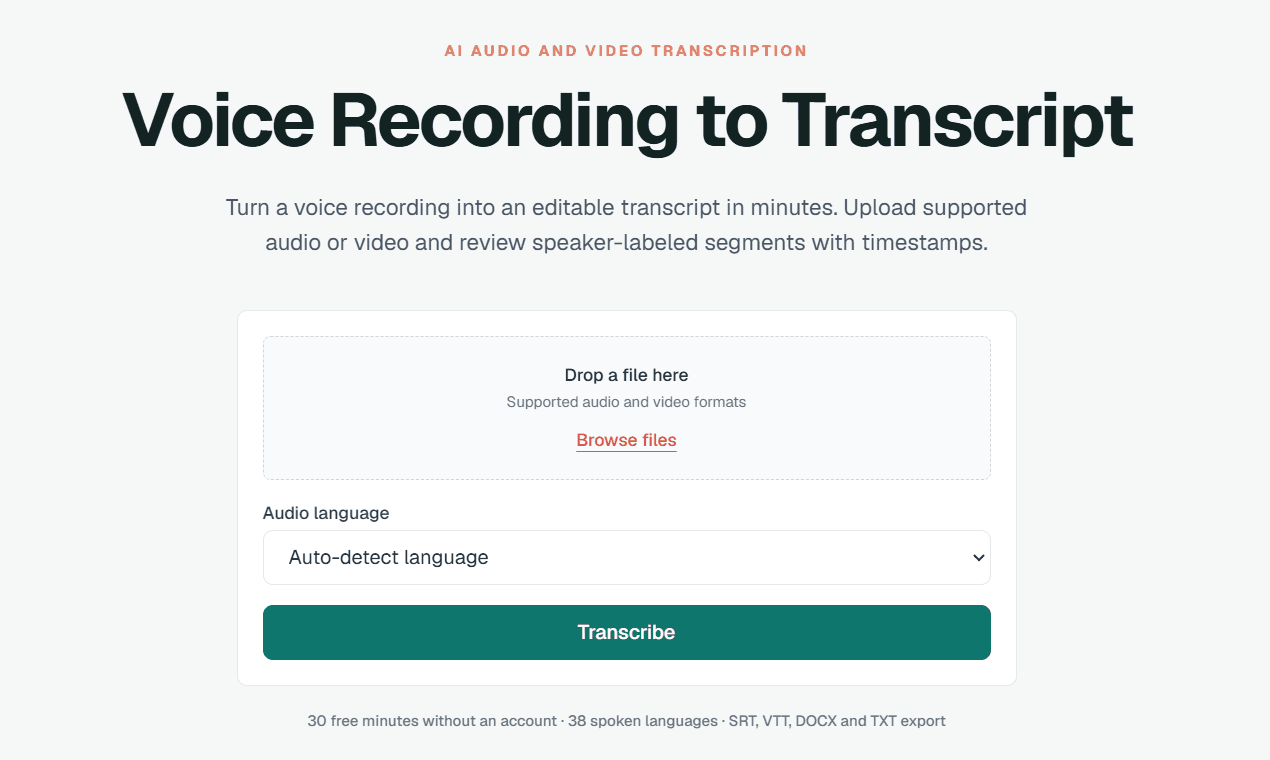
About this app
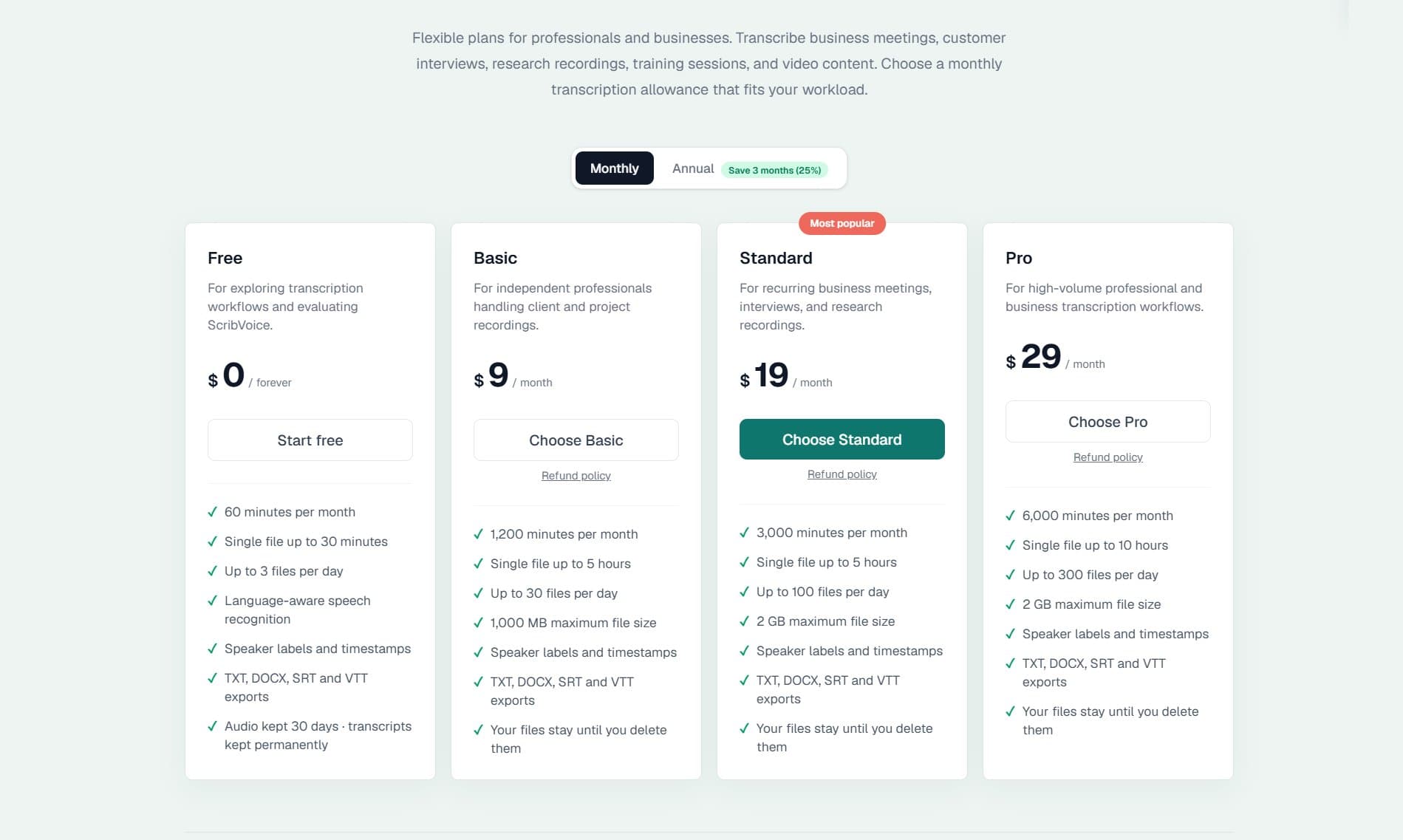
ScribVoice is a browser-based AI transcription tool that converts voice recordings and video files into editable, speaker-labeled transcripts with timestamps. Upload MP3, WAV, M4A, MP4, or dozens of other audio/video formats, pick from 38 spoken languages or let auto-detect handle it, and the background engine processes the file while you do something else. The built-in editor lets you correct segments and export as TXT, DOCX, SRT, or VTT — handy for subtitles, meeting notes, and research. I like that you can try it without an account: 30 free minutes once, or a Free account with 60 minutes per UTC month and up to 3 files per day. Paid plans (Basic $9, Standard $19, Pro $29) lift file-size caps and keep audio until you delete it. Privacy is straightforward: free-plan audio is removed after 30 days while transcripts stay, and anonymous trial files are deleted after 30 days.
Key features
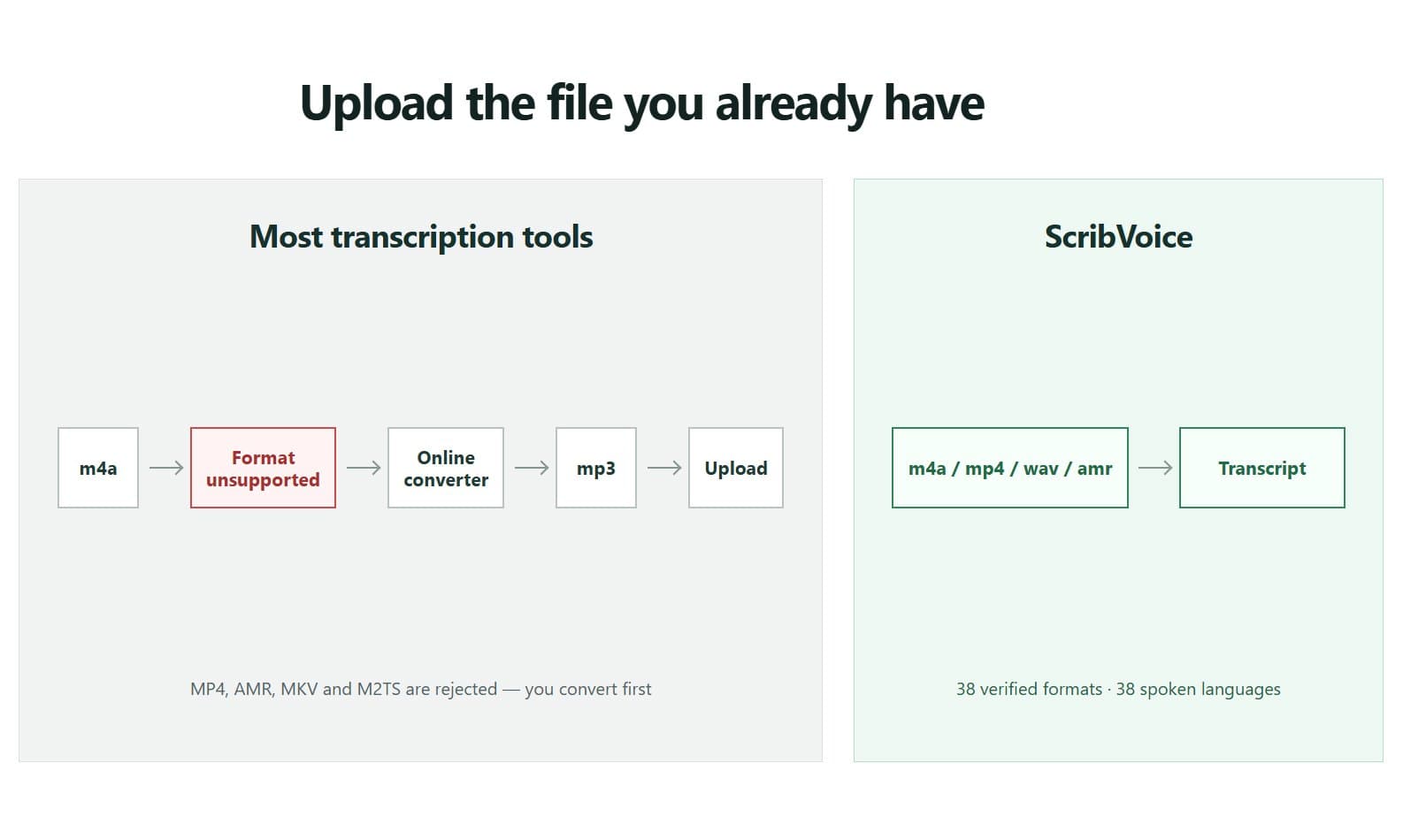
- 1Upload MP3, WAV, M4A, MP4 and dozens of other audio/video formats for AI transcription.
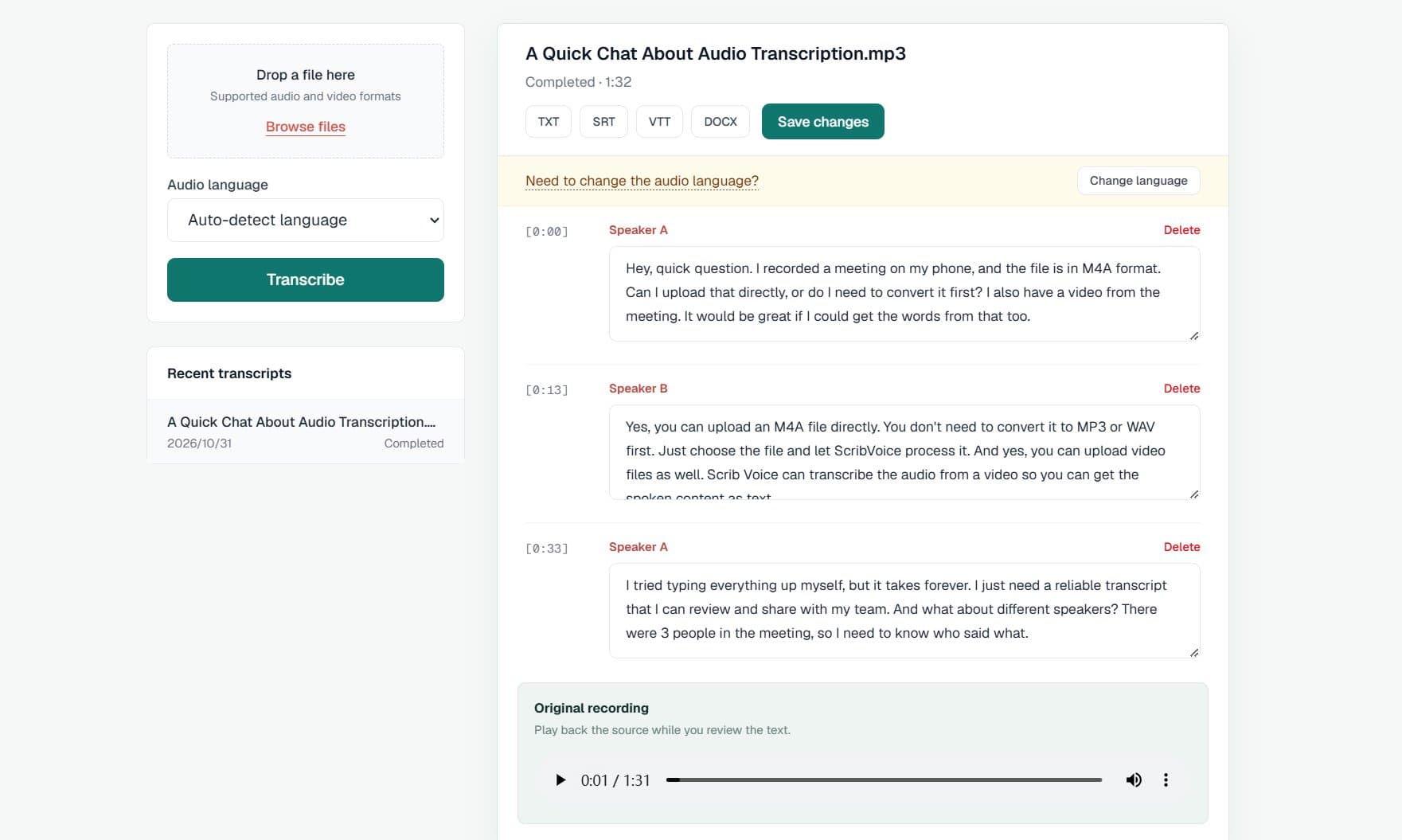
- 2Speaker-labeled, timestamped transcripts editable segment-by-segment in a built-in editor.
- 3Export as TXT, DOCX, SRT or VTT for docs, subtitles and research notes.
- 438 spoken languages with auto-detect, plus a 30-minute no-account trial and 60 free minutes/month.
Target customer profile
Drawn from the product itself, not from a survey.
Demographic
Journalists, researchers, and podcasters (25–45)
Pain points
Long interview recordings take hours to manually transcribe; names and numbers get missed
Primary needs
Fast, accurate speaker-labeled transcripts with editable segments and SRT/VTT export
Demographic
Students and academics recording lectures or field notes
Pain points
Re-listening to hours of lecture audio is slow; note-taking distracts from listening
Primary needs
Affordable or free transcription with timestamps and searchable text references
Demographic
Remote teams and meeting-heavy professionals
Pain points
Meeting recordings pile up unread; follow-up actions get lost in audio
Primary needs
Searchable meeting notes with speaker separation and DOCX/TXT export for sharing
Scout Review
Written by AI from measured evidence, scored out of 100.
ScribVoice is a browser-based transcription tool that turns audio and video into speaker-labeled, timestamped, editable transcripts with TXT, DOCX, SRT and VTT export across 38 languages. The free tier is unusually generous and honest: 30 minutes once without an account, or 60 minutes per UTC month and 3 files per day with a Free account. Paid plans at $9, $19 and $29 lift file-size caps (1GB to 2GB), raise per-file length to 5–10 hours and keep audio until you delete it. The landing page is fast and the core action is obvious; the pricing page is thin and the security posture is table stakes at best. It is a solid, affordable option for individuals and small teams who want transcripts without a subscription commitment — less so for anyone who needs compliance paperwork.
Measure by measure
Usability
63Clear above-the-fold path from dropzone to Transcribe, a solid 10-question FAQ, and a review-then-export editor flow. Pricing cards are too sparse to compare without a second click.
Design
58Clean typographic hierarchy and a focused hero upload card, but thin text-only use-case/pricing sections, low-contrast gray body copy and a clipped editor screenshot keep it mid-pack.
Speed
88Lighthouse mobile 99/100 (LCP 906ms, CLS 0, TBT 133ms) and desktop 100/100. Genuinely fast, lightweight landing page with no visible bloat.
Security
52HTTPS + HSTS and a transparent retention policy, but no CSP, frame protection, Referrer-Policy or Permissions-Policy, no SPF, and no SOC 2/ISO/pen-test claim. Table stakes only.
Accessibility
70Lighthouse a11y 91/100 with two real fails: insufficient color contrast and unlabeled form elements. 38-language support and responsive layout help, but no WCAG statement.
Growth
58Real problem, clear self-serve wedge (no-account trial, 38 languages, $9 entry), but crowded category and no segment it clearly owns over Otter, Descript or Rev.
Improvement areas
- Missing security headers (CSP, frame protection, Referrer-Policy, Permissions-Policy, SPF) and no compliance certifications.
- Two Lighthouse accessibility fails: insufficient color contrast and unlabeled form elements.
- Pricing page is too sparse to compare plans without clicking through to a second page.
- Thin use-case and supported-formats sections with low-contrast, hard-to-scan text.
Design & Usability
The homepage does the hard part right: a dark grotesque headline, a single teal Transcribe button, and a dropzone that tells you exactly what to do. The coral eyebrow labels are consistent and the editor screenshot shows speaker labels, timestamps and export chips in one view — the product promise is legible in five seconds. Where it slips is below the fold: use cases are two columns of bold labels and one gray line each, pricing is three cards with no feature detail, and the supported-formats block is a run-on list of ~50 containers in tiny low-contrast type. A clipped text area and a 'Scrib Voice' vs 'ScribVoice' mismatch in the editor shot undercut the polish. Usability is stronger: the primary path is unambiguous, the ten-question FAQ answers the real objections (free minutes, retention, formats, accuracy), and the editor separates controls from the transcript pane with export chips next to the title. The one friction point is pricing — you have to click through to compare plans.
Speed & Security
Speed is the standout. Lighthouse mobile scores 99/100 with LCP at 906ms, CLS at 0 and TBT at 133ms; desktop hits 100/100. That is a genuinely lean landing page, not a heavy SPA pretending to be fast, and it matters for a tool whose pitch is 'upload and get on with your day'. Security is the weak flank. HTTPS and HSTS are enforced and the retention policy is unusually clear — free-plan audio removed after 30 days, transcripts kept, paid files kept until deleted, anonymous trials purged after 30 days. But the header probe found no CSP, no frame protection, no X-Content-Type-Options, no Referrer-Policy and no Permissions-Policy, SPF is missing, and the checklist lands at 5/12. There is no SOC 2, ISO 27001, pen-test summary or bug-bounty program anywhere on the site. For a product that ingests confidential interviews and meeting recordings, that is a real gap, not just a missing badge.
Accessibility & Growth
Accessibility lands at 91/100 on Lighthouse with two concrete fails: background/foreground contrast is insufficient (consistent with the small gray body copy the visual audit flagged) and form elements lack associated labels — a fixable, embarrassing miss on a page whose whole job is a file input and a language select. On the plus side, the site supports 38 spoken languages and a responsive layout, but there is no WCAG conformance statement or keyboard-navigation documentation. Growth is a judgement call on the idea. The problem is real and expensive: hours of interview, lecture and meeting audio that nobody wants to re-listen to. The target is specific enough (journalists, researchers, podcasters, students, meeting-heavy teams) and the wedge is concrete — a 30-minute no-account trial, 38 languages, SRT/VTT/DOCX/TXT export and a $9 entry price undercutting Otter, Descript and Rev. What it lacks is a segment it clearly owns: Otter owns live meetings, Descript owns editing, Rev owns human-verified accuracy. ScribVoice is a competent cheaper alternative in a crowded room, which caps how far the wedge carries it.
Conclusion
If you are a journalist, researcher or podcaster who needs a cheap, fast way to get a labeled transcript out of a long recording, ScribVoice is worth the free trial — the no-account 30 minutes costs you nothing but a file upload, and the export formats cover subtitles and docs alike. If you are a team that needs SSO, audit trails or a SOC 2 report before procurement will sign off, this is not the tool yet. The gap between what it does well (speed, price, language coverage) and what it has not built (security headers, compliance certifications, a real pricing comparison) is the whole story. Try it, export something, and decide whether the savings justify the missing paperwork.
Suggestions for improvement
- Publish a security page with SOC 2 roadmap, pen-test summary and a vulnerability disclosure contact.
- Add CSP, frame protection, Referrer-Policy, Permissions-Policy and SPF to close the 5/12 header gap.
- Fix the two Lighthouse a11y fails: raise body-text contrast and associate labels with the file and language inputs.
- Expand the pricing page with a full feature-comparison table so users don't need a second click to decide.
Alternatives comparison
Named competitors, point by point. Nobody paid to appear here or to be left out.
 ScribVoice |  Otter.ai |  Descript |  Rev | |
|---|---|---|---|---|
| Free tier | 30 min no-account trial + 60 min/month Free account, 3 files/day | 300 min/month free, 30 min per conversation | 1 hour/month free transcription | No free tier; pay-per-minute from ~$0.25/min |
| Entry paid price | $9/month Basic (1,200 min) | ~$8.33/month billed annually (Pro) | ~$12/month billed annually (Hobbyist) | Pay-per-use, ~$1.50/min human, ~$0.25/min AI |
| Speaker labels & timestamps | Yes, on all plans | Yes, live speaker ID | Yes, speaker labels in transcript | Yes, on human and AI transcripts |
| Export formats | TXT, DOCX, SRT, VTT | TXT, DOCX, PDF, SRT | TXT, SRT, VTT, DOCX, PDF, and video export | TXT, DOCX, SRT, VTT, PDF |
| Language support | 38 spoken languages + auto-detect | Mostly English; limited multilingual | ~20+ languages | ~30+ languages |
| Compliance / security certifications | None published; HTTPS + HSTS only | SOC 2 Type 2, GDPR, HIPAA options | SOC 2 Type 2, GDPR | SOC 2, HIPAA, GDPR |
Otter.ai
AI meeting transcription and notes with live captions, speaker identification, and team collaboration features.
Descript
Audio/video editing platform with AI transcription, text-based editing, and podcast production tools.
Rev
Transcription and captioning service combining AI with human review, popular for interviews and media workflows.
Comparing options? See ScribVoice alternatives, scored side by side
More Productivity apps
View all Productivity
Puzzly – B2B Lead Generation & Sales Intelligence Platform
92Puzzly is an all-in-one B2B lead generation platform that...

Qamarero
92An all-in-one hospitality software for restaurants and ba...

EmbedMyReviews
92White-label reputation management software for agencies s...

StoryPad
92Privacy-first open source journal app with a continuous t...

Notion
92All-in-one AI workspace for docs, projects, and knowledge...

The Stack Newsletter
92A weekly newsletter delivering curated tech jobs, intervi...

Vibe Coding Agent Skills
92A free, open-source platform offering 110 AI agent skills...

QRBliss
91Branded QR codes with AI Brand Sync, 15 free dynamic code...

Gerty
91Private, local AI assistant for Mac that runs offline

Strukchad Property Management
91Property management for Kenyan letting agents: rent invoices raised every month, M-Pesa rent prompts to tenants, arrears tracking and landlord statements.

CC Switch
91Open-source desktop app for switching AI coding providers...

PitchWhip
90AI cold call scripts & direct dials from LinkedIn


A platform dedicated to providing unbiased reviews of newly launched applications, analyzing everything from their features to their full potential.
info@scoutforge.net© 2026 Scoutforge. All rights reserved.
