Cycling through all six. Tap any point to stop.
Measured on six things
Free game sensitivity converter for CS2, VALORANT, Fortnite
Growth
58Real, specific pain for competitive FPS players, with documented yaw profiles and FOV matching as a genuine wedge over a free desktop matcher. Niche ceiling, no network effects.
Screenshots
1 / 1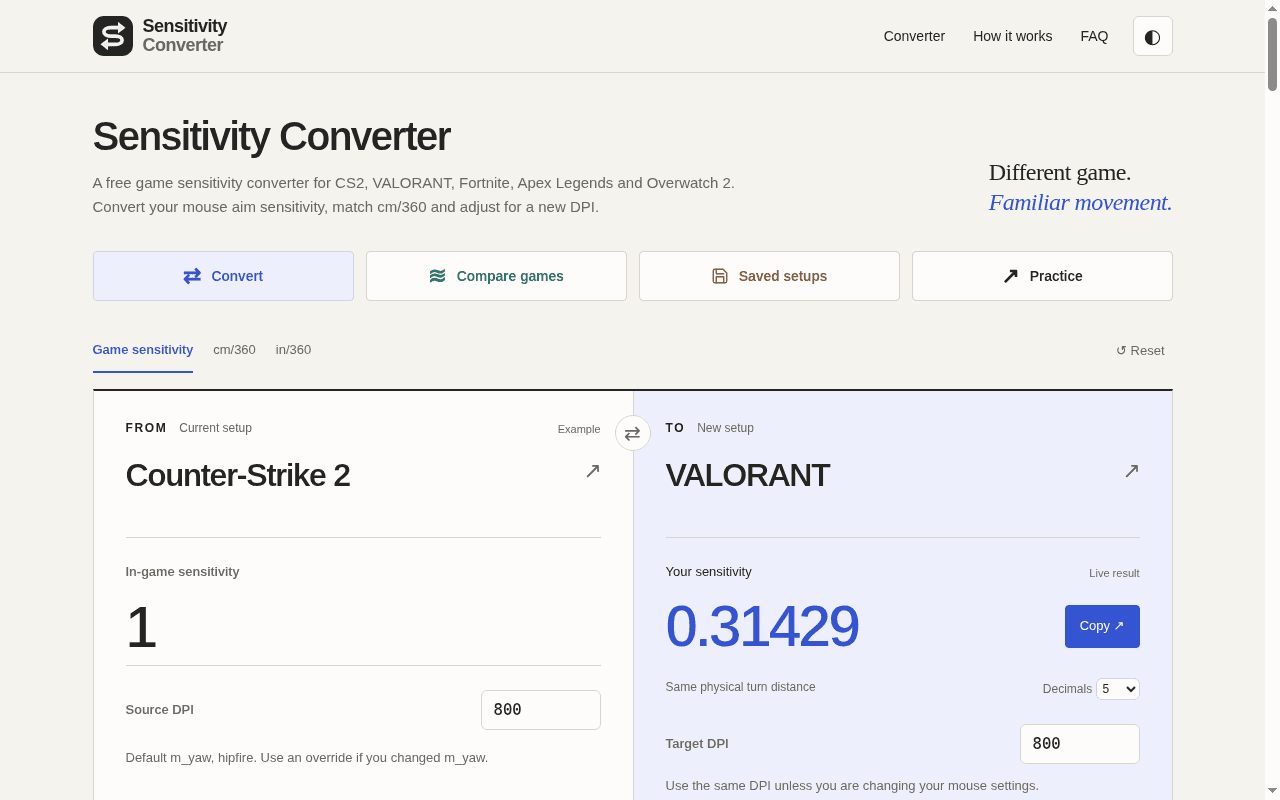
About this app
Sensitivity Converter converts in-game mouse sensitivity between popular FPS titles using documented yaw profiles. Match physical turn distance (cm/360), adjust for DPI changes, optional FOV/monitor-distance matching, ADS measurement helper, and saved setups. Linear PC hipfire references—verify results in-game. Reference coefficients; verify settings and feel in your game.
Key features
- 1Converts in-game sensitivity between CS2, VALORANT, Fortnite, Apex and Overwatch 2 using documented yaw profiles.
- 2Matches physical turn distance (cm/360) and adjusts for DPI changes, with eDPI and in/360 readouts.
- 3Optional FOV convention conversion and horizontal monitor-distance matching for visual consistency.
- 4ADS measurement helper and custom yaw calibration for unlisted or nonlinear games.
- 5Saved setups in-browser plus shareable links and downloadable/printable reports.
Target customer profile
Drawn from the product itself, not from a survey.
Demographic
Competitive FPS players (CS2, VALORANT, Apex)
Pain points
Inconsistent aim when switching games; manual math for sensitivity conversion
Primary needs
Quick, accurate sensitivity matching across titles to preserve muscle memory
Scout Review
Written by AI from measured evidence, scored out of 100.
Sensitivity Converter is a focused, fast, well-built free tool for a real and specific problem: keeping your aim consistent when you switch FPS titles. The math is transparent — it shows the yaw formula, the exact cm/360, the retained-precision check and the rounding error — which is exactly the credibility a competitive player needs. Design is above average with a clear result hierarchy, though the low-contrast guide text and mismatched accent colours keep it from feeling finished. Usability nails the core task and then buries it under documentation. Security and accessibility are solid table stakes with no published audits or a11y statement. Growth is limited by a niche, free, no-network-effect category, but the wedge over a desktop matcher is real.
Measure by measure
Usability
68Core convert-and-copy flow is fast and clearly labelled, with advanced FOV/yaw tools tucked into collapsibles. The wall of documentation and comparison table below the calculator buries the next step.
Design
71Clean, precision-tooling aesthetic with a strong result hierarchy and disciplined monospace numerics. Undermined by low-contrast grey body copy and four competing accent colours on the mode row.
Speed
90Lighthouse 98 mobile / 100 desktop, LCP 944ms, CLS 0, TBT 19ms. A genuinely fast static-feeling page with no layout shift and no lag complaints in the evidence.
Security
64HTTPS with HSTS plus frame, content-type, referrer and permissions headers — solid baseline. Missing CSP, SPF and DMARC, and no published audit or security page. Fine for a free browser tool, unremarkable otherwise.
Accessibility
82Lighthouse accessibility 100/100 with labelled inputs, a skip link and responsive layout. No published a11y statement or multi-language support, which caps it below the top of the band.
Growth
58Real, specific pain for competitive FPS players, with documented yaw profiles and FOV matching as a genuine wedge over a free desktop matcher. Niche ceiling, no network effects.
Improvement areas
- Low-contrast grey body copy in the field guide hurts readability on long reads.
- Inconsistent accent colours and button weights across the mode and utility rows.
- Missing CSP, SPF and DMARC; no published security or accessibility statement.
- Documentation and comparison panels crowd the page below the calculator.
Design & Usability
The homepage is built like precision instrumentation and mostly earns it: the oversized blue monospace result is the unmistakable focal point, numerics stay monospace across the stat strip and equation panels, and the field guide uses a sticky sidebar index that suits a technical audience. The cracks are cosmetic but real — light grey body copy on cream makes the long guide tiring to read, and four different accent colours on the mode buttons make the action row feel like four products stitched together. Usability is strong where it counts: labelled inputs, a swap control between FROM and TO, and an immediate Copy button keep the core task to seconds. Below the fold, though, the guide, saved setups and comparison table all compete, so a user who wanted one number has to scroll past a lot of documentation to find the next step.
Speed & Security
Speed is the standout: Lighthouse reports 98/100 on mobile (LCP 944ms, CLS 0, TBT 19ms) and a perfect 100 on desktop, with no lag complaints in the collected evidence. For a page this dense with equations and tables, that is genuinely well-built. Security is competent but stops short of thorough: HTTPS is enforced with HSTS, and frame protection, X-Content-Type-Options, Referrer-Policy and Permissions-Policy are all present, but there is no Content-Security-Policy and no SPF or DMARC records — 8 of 12 checklist points. There is no published SOC 2, ISO or bug-bounty program, which is normal for a free browser tool but keeps the score in the middle of the band. Settings live in the browser and share links carry your setup, which is disclosed on the page.
Accessibility & Growth
Accessibility is a genuine strength: Lighthouse's axe-based audit returns 100/100, inputs are labelled, a skip-to-content link exists and the layout is responsive. What holds it below the top of the band is the absence of a published accessibility statement and any multi-language support — the tool is English-only. On growth, the idea is sharper than most: competitive FPS players genuinely lose muscle memory switching between CS2, VALORANT and Apex, and this site answers that with documented yaw profiles, cm/360 matching, FOV and monitor-distance matching, an ADS measurement helper and saved setups. Against the only listed alternative — KovaaK's free desktop matcher — the browser-based, no-install, no-account angle is a real wedge. The honest limit is the category: a free niche utility with no network effects and no data advantage, so it can win its corner but not compound.
Conclusion
If you bounce between CS2 and VALORANT and your aim feels off every time, this does the job in seconds and shows its work while doing it. The transparency around yaw coefficients and retained precision is the differentiator — it tells you to verify in-game rather than pretending the number is gospel. Where it needs work: tighten the contrast on the field guide, unify the button styling, and move the saved-setups and comparison panels behind a tab so the calculator stays the hero. Add a CSP and DMARC records, publish a short accessibility statement, and this moves from 'good free tool' to 'the one you bookmark.'
Suggestions for improvement
- Raise body-copy contrast in the field guide — light grey on cream fails long-read comfort.
- Unify the mode-button and utility-row styling into one consistent action group.
- Add a Content-Security-Policy header and SPF/DMARC records to complete the security baseline.
- Collapse the guide, saved setups and comparison table behind tabs so the calculator stays the focus.
Alternatives comparison
Named competitors, point by point. Nobody paid to appear here or to be left out.
 Sensitivity Converter |  KovaaK's Sensitivity Matcher | |
|---|---|---|
| Platform | Browser-based web tool, no install | Free desktop application |
| Conversion method | Documented yaw profiles plus cm/360 matching | Measures actual cm/360 by counting mouse counts during a full turn |
| FOV / monitor-distance matching | Yes — FOV convention conversion and horizontal monitor matching | Not a primary feature |
| ADS / scoped sensitivity helper | Yes — measured scoped cm/360 helper | Not offered |
| Saved setups / sharing | In-browser saved profiles, share links, downloadable reports | Not offered |
| Price | Free | Free |
Comparing options? See Sensitivity Converter alternatives, scored side by side
More Productivity apps
View all Productivity
Puzzly – B2B Lead Generation & Sales Intelligence Platform
92Puzzly is an all-in-one B2B lead generation platform that...

Qamarero
92An all-in-one hospitality software for restaurants and ba...

EmbedMyReviews
92White-label reputation management software for agencies s...

StoryPad
92Privacy-first open source journal app with a continuous t...

Notion
92All-in-one AI workspace for docs, projects, and knowledge...

The Stack Newsletter
92A weekly newsletter delivering curated tech jobs, intervi...

Vibe Coding Agent Skills
92A free, open-source platform offering 110 AI agent skills...

QRBliss
91Branded QR codes with AI Brand Sync, 15 free dynamic code...

Gerty
91Private, local AI assistant for Mac that runs offline

Strukchad Property Management
91Property management for Kenyan letting agents: rent invoices raised every month, M-Pesa rent prompts to tenants, arrears tracking and landlord statements.

CC Switch
91Open-source desktop app for switching AI coding providers...

PitchWhip
90AI cold call scripts & direct dials from LinkedIn


A platform dedicated to providing unbiased reviews of newly launched applications, analyzing everything from their features to their full potential.
info@scoutforge.net© 2026 Scoutforge. All rights reserved.
