Cycling through all six. Tap any point to stop.
Measured on six things
Put your shifts on a calendar and the app sets your iPhone alarms for the next 60 days. When the roster changes, the alarms follow. Made for shift workers.
Security
52HTTPS enforced with frame protection, X-Content-Type-Options, Referrer-Policy and Permissions-Policy, but no HSTS, no CSP, no SPF/DMARC, and no published audit. On-device data claim is a plus but unverified.
Screenshots
1 / 2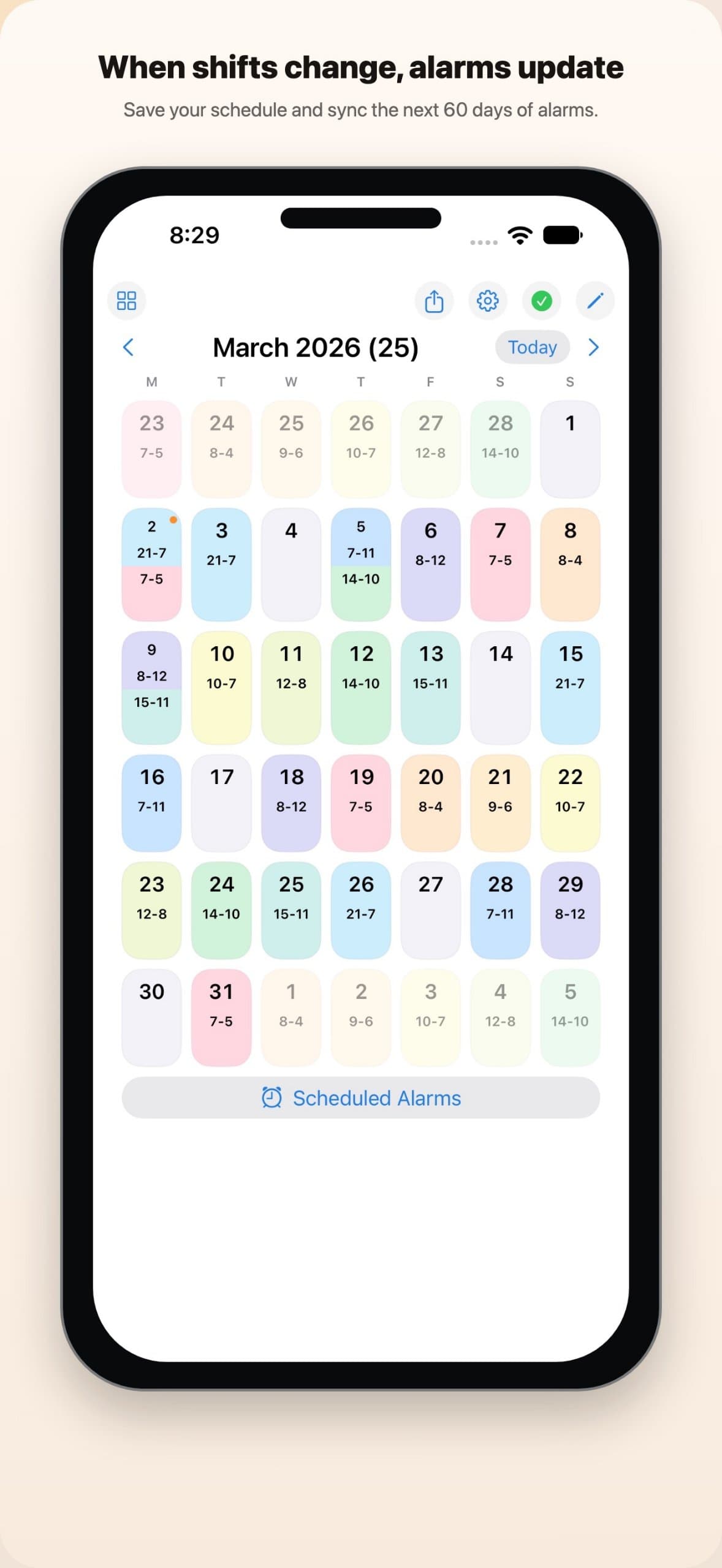
About this app
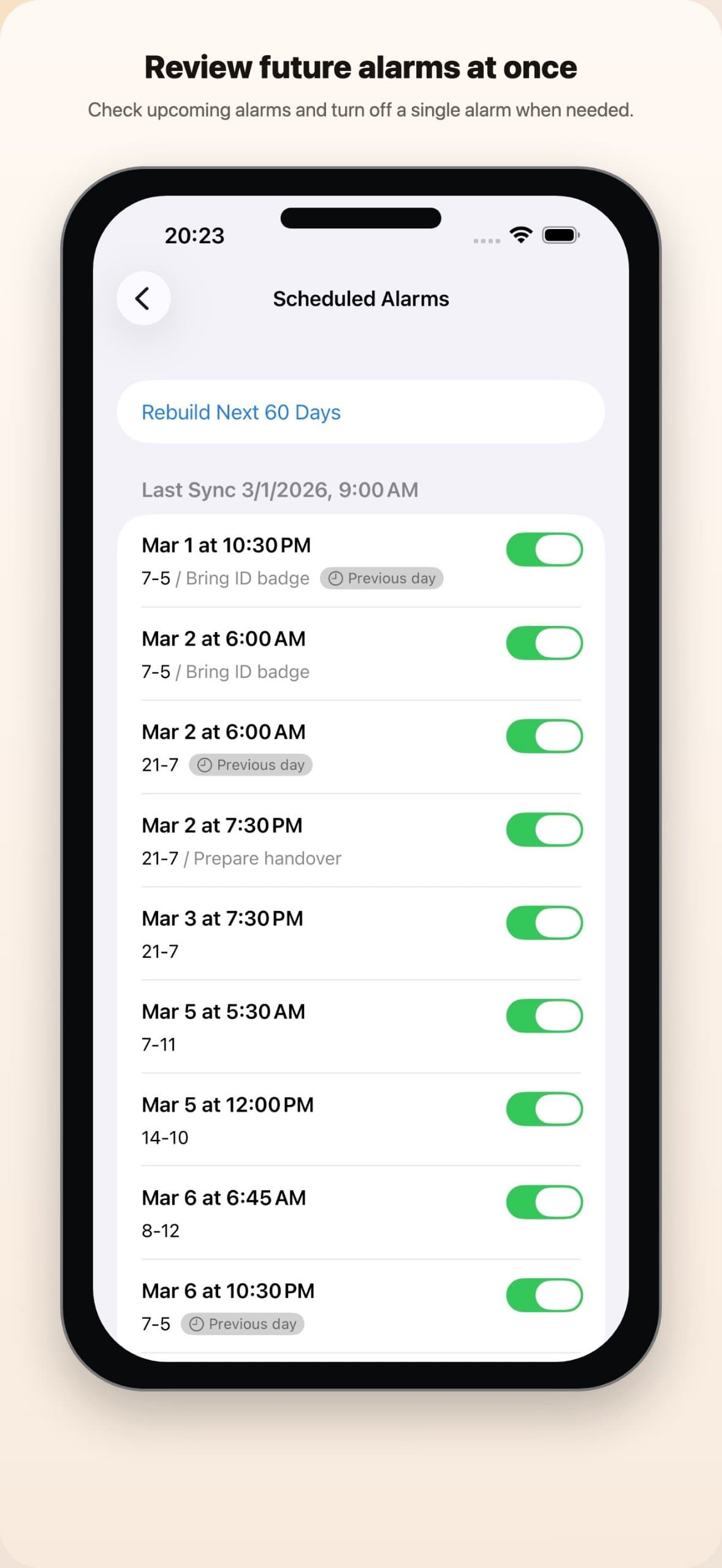
When your shifts move every week, you end up resetting alarms again and again. Shift Calendar Alarm puts your schedule and alarms in one place. Save the shifts you work most, like early, late, night or on-call, each with up to three alarms on the day or the evening before. Tap dates on the calendar to schedule them, and the app sets the built-in iPhone alarms for the next 60 days. When the roster changes, edit the calendar and the alarms update too. You can skip a single alarm, add a note to any day, and use Patterns to drop a repeating run of shifts onto the calendar in one go. A Home Screen widget shows today's and tomorrow's shifts. Free to download: the free version includes 3 Shift Types, 1 pattern and 8 scheduled shifts, and Premium removes those limits. Requires iOS 26 or later. Available in 9 languages.
Key features
- 1Shift Types with up to three alarms each, on the day or the evening before.
- 2Patterns to drop a repeating run of shifts onto the calendar in one step.
- 3Automatic sync of the next 60 days of built-in iPhone alarms, plus a Home Screen widget.
Target customer profile
Drawn from the product itself, not from a survey.
Scout Review
Written by AI from measured evidence, scored out of 100.
Shift Calendar Alarm is a focused, well-executed utility for people whose wake-up time follows a roster instead of a weekday. The app UI is clean and native, the flow is clear, and the site is genuinely fast. The main risks are the iOS 26 requirement, a free tier that will feel tight for real shift workers, and a thin security posture with no published audit. It's a solid niche tool with a real problem to solve — it just needs to widen its install base and tighten its security story.
Measure by measure
Usability
68Three-step flow is spelled out on the homepage, bulk alarm review and per-alarm toggles are visible in screenshots, and Patterns cut repetitive entry. The iOS 26 requirement is a real onboarding wall for most users.
Design
71Judging the app UI from store screenshots: pastel color-coded calendar cells, clear alarm-card hierarchy, and a calm cream homepage. Native iOS feel, consistent spacing, but the March 2026 screenshots date the demo.
Speed
88Lighthouse mobile 96/100 (LCP 2.8s, CLS 0, TBT 0ms) and desktop 100/100. Static Cloudflare Pages site loads fast; no lag complaints found in available evidence.
Security
52HTTPS enforced with frame protection, X-Content-Type-Options, Referrer-Policy and Permissions-Policy, but no HSTS, no CSP, no SPF/DMARC, and no published audit. On-device data claim is a plus but unverified.
Accessibility
80Lighthouse accessibility 100/100 and 9-language localization are strong. No public WCAG statement, so the score sits at the top of the measured band rather than above it.
Growth
62Real, specific pain (rotating shift alarms) with a native-iPhone-alarm wedge and Patterns. Clear niche, but a crowded calendar-alarm category and no ratings yet.
Improvement areas
- iOS 26 requirement excludes most current iPhone users at launch.
- Security headers incomplete (no HSTS, CSP, SPF/DMARC) and no published audit.
- Free tier capped at 8 scheduled shifts, tight for real shift workers.
Design & Usability
The app itself is the product here, and the store screenshots show a clean native iOS calendar with pastel-coded shift cells, bold alarm times, and per-alarm toggles that make bulk review easy. The homepage mirrors that calm with a cream background and clear CTAs. Usability is well thought out: three-step onboarding, Patterns for repeating rosters, and a widget for today/tomorrow. The catch is the iOS 26 requirement, which locks out most current iPhones, and a free tier capped at 8 scheduled shifts that will push real shift workers to Premium fast.
Speed & Security
Speed is the standout: Lighthouse mobile 96/100 with 2.8s LCP, zero CLS, and 0ms TBT, plus a perfect 100 on desktop — the static Cloudflare Pages site is genuinely snappy. Security is the weak spot: HTTPS and several headers are in place, but there's no HSTS, no CSP, no SPF/DMARC, and no published audit or compliance page. The on-device data claim and optional iCloud sync are reassuring, but they're marketing copy, not verified controls. For a utility that touches your wake-up alarms, that gap is worth closing.
Accessibility & Growth
Accessibility is a genuine strength: a perfect 100/100 Lighthouse score and localization in 9 languages. There's no public WCAG statement, so the score stays at the top of the measured band rather than above it. Growth is a judgment on the idea: rotating-shift workers resetting alarms weekly is a real, specific pain, and native integration with built-in iPhone alarms plus Patterns and a widget is a credible wedge. But the category is crowded, the store listing has no ratings yet, and nothing here creates a moat beyond 'it works well.'
Conclusion
If you work rotating shifts and live on an iPhone 26-capable device, this is a genuinely useful app that solves a weekly annoyance. If you're on older iOS or want enterprise-grade security assurances, wait. The idea is sound and the execution is above average; the next step is broadening compatibility and publishing real security documentation.
Suggestions for improvement
- Lower the iOS requirement below 26 to reach the majority of current iPhone users.
- Publish a security page with HSTS, CSP, SPF/DMARC, and any audit or pen-test results.
- Add an accessibility statement documenting WCAG conformance and keyboard/screen-reader support.
- Refresh store screenshots to show a current month instead of March 2026.
Alternatives comparison
Named competitors, point by point. Nobody paid to appear here or to be left out.
 Shift Calendar Alarm Shift Calendar Alarm |  | |
|---|---|---|
| Price model | Free with Premium tier (limits: 3 Shift Types, 1 pattern, 8 shifts) | Not provided |
| Native iPhone alarm integration | Yes — sets built-in iPhone alarms for next 60 days | Not provided |
| Repeating shift patterns | Yes — Patterns feature, first pattern free | Not provided |
| Home Screen widget | Yes — shows today's and tomorrow's shifts | Not provided |
| Localization | 9 languages | Not provided |
Comparing options? See Shift Calendar Alarm alternatives, scored side by side
More Productivity apps
View all Productivity
Qamarero
92An all-in-one hospitality software for restaurants and ba...

The Stack Newsletter
92A weekly newsletter delivering curated tech jobs, intervi...

EmbedMyReviews
92White-label reputation management software for agencies s...

StoryPad
92Privacy-first open source journal app with a continuous t...

Puzzly – B2B Lead Generation & Sales Intelligence Platform
92Puzzly is an all-in-one B2B lead generation platform that...

Notion
92All-in-one AI workspace for docs, projects, and knowledge...

Vibe Coding Agent Skills
92A free, open-source platform offering 110 AI agent skills...

CC Switch
91Open-source desktop app for switching AI coding providers...

username.md
90One verified handle for your online identity, readable by...

What the GIF
89Frame-perfect video-to-GIF maker that runs entirely in yo...

AuditCloser
89White-label website audits that close deals for digital a...

NudgeWin
89Automated quote follow-up for trades and service businesses.


A platform dedicated to providing unbiased reviews of newly launched applications, analyzing everything from their features to their full potential.
info@scoutforge.net© 2026 Scoutforge. All rights reserved.
