Cycling through all six. Tap any point to stop.
Measured on six things
Turn your child's school spelling list into read-aloud practice on iPhone: Solo Test, Auto Dictation, Tricky Words review and a weekly report. No ads.
Security
52HTTPS enforced and privacy story is genuinely strong — on-device OCR, scans not retained, local storage by default. But headers are thin (no HSTS, CSP, frame protection, DMARC) and no audit or compliance claims exist.
Screenshots
1 / 1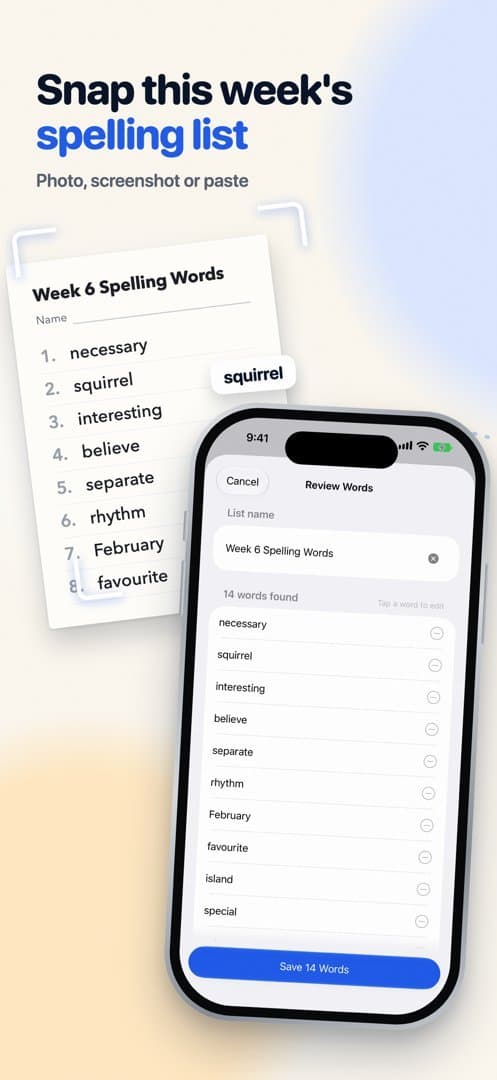
About this app
Turn your child's school spelling list into read-aloud practice on iPhone: Solo Test, Auto Dictation, Tricky Words review and a weekly report. No ads. Made by MarcX Studio, an independent studio building small, focused apps for everyday tasks. Free to download on the App Store for iPhone.
Key features
- 1Scan, photo-import, paste, or type a school spelling list, then review before saving
- 2Read-aloud practice in three modes: Solo Test, Practice Together, and Auto Dictation with screen-locked playback
- 3Tricky Words spaced review (1, 3, 7, 14 days) plus weekly parent report and per-learner profiles on Pro
Target customer profile
Drawn from the product itself, not from a survey.
Demographic
Parents of primary-school children with weekly take-home spelling lists
Pain points
Reading the same list aloud every night; kids who rush or guess; no visibility into which words actually stick
Primary needs
Fast list import, read-aloud dictation, instant checking, and a simple progress report
Demographic
ESL/EFL families whose home language isn't English
Pain points
Parents unsure of pronunciation or accent; practice limited to whoever speaks English best
Primary needs
Clear read-aloud voices, US/UK/Australian accents, and spoken-and-written practice modes
Demographic
Teachers and private tutors managing multiple learners
Pain points
Repetitive one-to-one quizzing; inconsistent follow-up on missed words; no per-child record
Primary needs
Separate learner profiles, printable practice sheets, word-status tracking, and Tricky Words review
Demographic
Students preparing for spelling tests or spelling bees
Pain points
Can't self-test without someone reading words; bee-style oral practice is hard to arrange
Primary needs
Solo Test and Auto Dictation for independent practice, plus custom-list support for bee word sets
Scout Review
Written by AI from measured evidence, scored out of 100.
Snap Spell is a focused iPhone app that solves one real problem well: the weekly spelling list comes home on paper, and the app turns it into read-aloud practice without a parent narrating every word. The app UI is native and clean, the import flow is short, and the privacy posture — on-device OCR, no ads, local storage — is a genuine differentiator for families. The website undersells all of it with a sparse hero and a nearly invisible CTA. Security headers are thin for an app handling children's data, and there's no published accessibility statement despite a 96/100 audit. The idea is well-positioned but not defensible; execution quality is what has to carry it.
Measure by measure
Usability
74Four import paths (scan, photo, paste, type) with a review-before-save step, three clearly explained practice modes, and a free tier that completes the core loop. Onboarding path from list to first test is short.
Design
71Judging the app UI: native iOS components, clean list hierarchy, and a voice picker that shows accent, size, and download state. The website is the weak half — a near-blank hero with a tiny low-contrast CTA.
Speed
68Desktop Lighthouse 97/100 but mobile 77/100 with a 4.7s LCP — the hero render is the bottleneck. CLS 0 and TBT 187ms are clean, so it's a payload problem, not a jank problem.
Security
52HTTPS enforced and privacy story is genuinely strong — on-device OCR, scans not retained, local storage by default. But headers are thin (no HSTS, CSP, frame protection, DMARC) and no audit or compliance claims exist.
Accessibility
79Lighthouse 96/100 with a single contrast failure, native iOS controls that inherit Dynamic Type and VoiceOver, and 6 store languages. No published a11y statement, which keeps it out of the 80s.
Growth
62Real problem, specific wedge: scan the paper list, hear it read aloud on-device. Spelling Shed and SpellingCity are school/web platforms; Word Club is bee-only. ESL families are an underserved angle.
Improvement areas
- Mobile Lighthouse LCP of 4.7s — heavy hero payload on a sparse page
- Thin security headers (no HSTS, CSP, frame protection, DMARC) and no published audit for a kids' app
- No accessibility statement despite a 96/100 audit and 6-language localization
- Homepage hero is >70% empty space with a tiny low-contrast CTA and inconsistent capitalization
Design & Usability
Judged on the app, not the site: the iOS UI is the strong half. Native navigation bars, rounded list cells, readable type, and a voice picker that tells you accent, file size, and download state without clutter. The import flow — scan, photo, paste, or type, then review before saving — is the right shape for a parent holding a crumpled list. Three practice modes are named and explained in plain language. The website is the opposite: a hero that's mostly empty space with a CTA small enough to miss, and inconsistent capitalization in the marketing copy. The product is better than its front door.
Speed & Security
Speed splits cleanly by device: desktop Lighthouse 97/100, mobile 77/100 with a 4.7s LCP. CLS is 0 and TBT is 187ms, so the mobile problem is payload, not jank — the hero is heavy for a page with this little on it. Security is a mixed bag with a genuinely good privacy story: HTTPS enforced, on-device text recognition, scan images not retained, lists local unless exported or iCloud-backed. But the header probe found only 5 of 12 checklist items — no HSTS, no CSP, no frame protection, no DMARC — and there's no SOC 2, ISO, or pen-test claim anywhere. For a kids' education app handling family data, that gap matters more than it would elsewhere.
Accessibility & Growth
Accessibility is close to excellent: Lighthouse 96/100, one failing contrast audit, native iOS controls that inherit Dynamic Type and VoiceOver, and six store languages. What's missing is a published accessibility statement — the work is done, the receipt isn't. Growth is the interesting one. The wedge is real and specific: the list arrives on paper, the app reads it aloud, practice happens without a parent who speaks English well. That last angle — ESL/EFL families — is genuinely underserved and the site names it explicitly. Against Spelling Shed (school game platform), SpellingCity (web-first), and Word Club (bee-only), Snap Spell is the lighter, private, iPhone-native option. The honest limit: nothing here compounds. No network effects, no data advantage, no integration lock-in. It's a good small app in a category where good small apps are copyable.
Conclusion
If you're a parent reading the same list aloud every night, this is worth the download — the free tier covers the full practice loop, and Pro's natural voices and profiles are a reasonable upsell. If you're evaluating it as a business, the wedge is sharp but shallow: scan-and-read-aloud is a feature, not a moat, and the header configuration suggests security wasn't the priority it should be for a kids' app. Fix the mobile LCP, ship HSTS and a CSP, publish an accessibility statement, and give the homepage a hero that doesn't look abandoned. The app deserves a better storefront.
Suggestions for improvement
- Cut mobile LCP from 4.7s — the hero payload is heavy for a page this sparse; compress and defer images
- Add HSTS, CSP, frame protection, and DMARC; publish a short security page for a kids' education app
- Publish an accessibility statement — the 96/100 audit and 6 languages already do the work
- Rebuild the homepage hero: larger CTA, real visual weight, consistent capitalization in marketing copy
Alternatives comparison
Named competitors, point by point. Nobody paid to appear here or to be left out.
 Snap Spell Snap Spell |  Spelling Shed Spelling Shed |  VocabularySpellingCity VocabularySpellingCity |  Word Club (Scripps National Spelling Bee) Word Club (Scripps National Spelling Bee) | |
|---|---|---|---|---|
| Primary platform | iPhone (iOS native) | Web + mobile, school-focused | Web-based | Mobile app (bee prep) |
| Custom list import (scan/photo/paste) | Yes — scan, photo, paste, or type | Teacher-assigned lists | Yes — manual list entry | Official bee word lists |
| Read-aloud dictation | Yes — Apple voices free, natural US/UK/AU on Pro | Game-based, limited dictation | Yes — audio word playback | Yes — official pronunciation audio |
| Spaced review of missed words | Yes — Tricky Words (1/3/7/14 days) | Adaptive practice, teacher-driven | Practice tests, limited spacing | Bee-style drills |
| Privacy / on-device processing | On-device OCR, no ads, local storage | Cloud account, school data | Cloud account required | Account-based |
| Pricing model | Free + Pro (monthly/yearly/one-time) | School subscription | Home + school subscriptions | Free / low-cost |
Spelling Shed
A game-based spelling platform popular in UK schools; Snap Spell is a lighter, custom-list alternative with read-aloud dictation and on-device privacy.
VocabularySpellingCity
A web-based vocabulary and spelling practice platform built around weekly school lists; Snap Spell offers a simpler iPhone-first workflow with scanning and Auto Dictation.
Word Club (Scripps National Spelling Bee)
An official app for spelling bee preparation; Snap Spell serves as a custom-list alternative for weekly school words and bee lists alike.
Comparing options? See Snap Spell alternatives, scored side by side
More Education apps
View all Education
The Stack Newsletter
92A weekly newsletter delivering curated tech jobs, intervi...

TranscriptYou
88Free YouTube transcript generator with timestamps and AI ...

Startup Science
88A unified platform replacing 12-20 disconnected tools for...

Coloring Pages Pro
87A massive collection of free printable coloring pages for...

CertWorthIt
87Data-driven tool revealing which certifications actually ...

RBQ Exam
87Online practice for the RBQ contractor licence exams in Québec: original questions, timed mock exams and lessons, in French or English.

HireVue Practice
85AI-powered HireVue practice with timed mock interviews, role-specific questions, transcripts, scoring, and actionable feedback.

Case Cub
85AI-powered law school study platform with 20,000+ case br...

Ciroexam
84All-in-one CIRO exam prep for CIRE and 8 other exams, wit...

Aptitude Test Prep
84Free timed practice for SHL, numerical, and logical tests...

PageCub
84Custom illustrated children's books created around your c...

WellWired
84AI explained simply for older adults, with safety lessons...


A platform dedicated to providing unbiased reviews of newly launched applications, analyzing everything from their features to their full potential.
info@scoutforge.net© 2026 Scoutforge. All rights reserved.
