Cycling through all six. Tap any point to stop.
Measured on six things
Merge multiple Outlook PST files into one master PST with...
Security
52HTTPS enforced, CSP, SPF and DMARC present, signed installers claimed. But no HSTS, no frame protection, no X-Content-Type-Options, Referrer-Policy or Permissions-Policy — 6/12 header checks.
Screenshots
1 / 5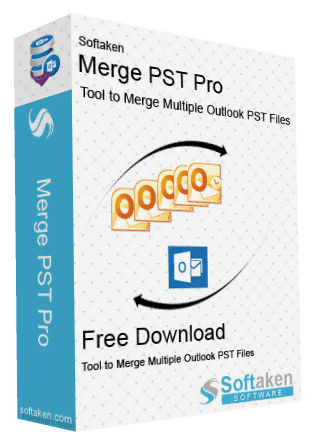


About this app
Softaken PST Merge lets the merge several Outlook PST files into one single master PST file through a simple process that does not require any technical skills or Outlook installation. It supports ANSI and Unicode formats and combines big archives into single Unicode PST. This fast method saves time and keeps your emails, attachments, dates, and folder data intact. There are different merging options to merge specified folders, contacts, inbox items, and other mailbox data. Original files stay intact, and a new PST is generated. It supports Windows 11, 10, 8.1, 8, 7, and MacOS. It supports Outlook 2024, 2021, 2019, 2016, 2013, and Microsoft 365 to access the merged file. The free trial allows you to combine up to 10 items; the full version has no restriction. It makes Outlook archive management simpler and more efficient.
Key features
- 1Merge multiple ANSI/Unicode PSTs into one master PST without installing Outlook.
- 2Five merge modes: similar folders, specific items, new/separate folder, contacts only, inbox only.
- 3ANSI-to-Unicode upgrade supporting archives up to 50 GB with folder structure preserved.
- 4Skip empty folders and include/exclude Deleted Items during merge.
- 5Windows ($29) and Mac ($49) builds; free demo merges 10 items.
Target customer profile
Drawn from the product itself, not from a survey.
Demographic
IT administrators managing enterprise Outlook archives
Pain points
Slow Outlook Import/Export wizard freezes on large mailboxes; scattered PSTs complicate backup
Primary needs
Automated bulk merge with folder hierarchy preserved and Unicode output
Demographic
Legal and compliance teams consolidating case evidence
Pain points
Need to combine many PSTs while keeping metadata and attachments intact
Primary needs
Selective merge, data integrity, skip empty folders, audit-friendly output
Demographic
Freelancers and small business owners with legacy PSTs
Pain points
Scattered ANSI and Unicode PSTs cause clutter; no Outlook installed; tight budget
Primary needs
Affordable, no-Outlook merge, trial before purchase, simple UI
Scout Review
Written by AI from measured evidence, scored out of 100.
Softaken Merge PST Pro is a competent, narrowly-scoped desktop utility for a real but aging problem: consolidating scattered Outlook PST files without opening Outlook. The site is fast (Lighthouse 100/100), the workflow is documented with screenshots and video, and the $29 Windows price is aggressive against Stellar and SysTools. Weaknesses are the 10-item demo cap, a dated vendor-template design, a half-complete security header set with no published compliance, and a category that is shrinking as organizations leave PST-based archiving behind. It does its job; the question is how many people still need the job done.
Measure by measure
Usability
66Five merge modes, skip-empty-folders, deleted-items toggle, 10-item demo, and docs with screenshots plus video. Onboarding is clear; the 10-item cap is a tight trial.
Design
58Functional vendor-style site: clear hero, OS split, five-step walkthrough, and a real screenshots page. Legible but dated — template look, no modern polish or brand craft.
Speed
88Lighthouse 100/100 on both mobile and desktop: LCP 1.5s, CLS 0, TBT 0ms, FCP 949ms. The marketing site is genuinely fast; no lag complaints found.
Security
52HTTPS enforced, CSP, SPF and DMARC present, signed installers claimed. But no HSTS, no frame protection, no X-Content-Type-Options, Referrer-Policy or Permissions-Policy — 6/12 header checks.
Accessibility
70Lighthouse a11y 94/100, but contrast and touch-target audits fail. No WCAG statement, English-only, no multi-language support observed.
Growth
52Real, narrow pain (scattered ANSI/Unicode PSTs, no Outlook) with concrete wedges: no-Outlook merge, ANSI→Unicode upgrade, $29 price. But the legacy-PST category is mature and shrinking.
Improvement areas
- 10-item demo cap is too small to validate real-world archive merges.
- Security headers incomplete (6/12): no HSTS, frame protection, or content-type sniffing protection.
- No WCAG statement, no multi-language support, and two failing accessibility audits.
- Dated vendor-template design and no published compliance or security documentation.
Design & Usability
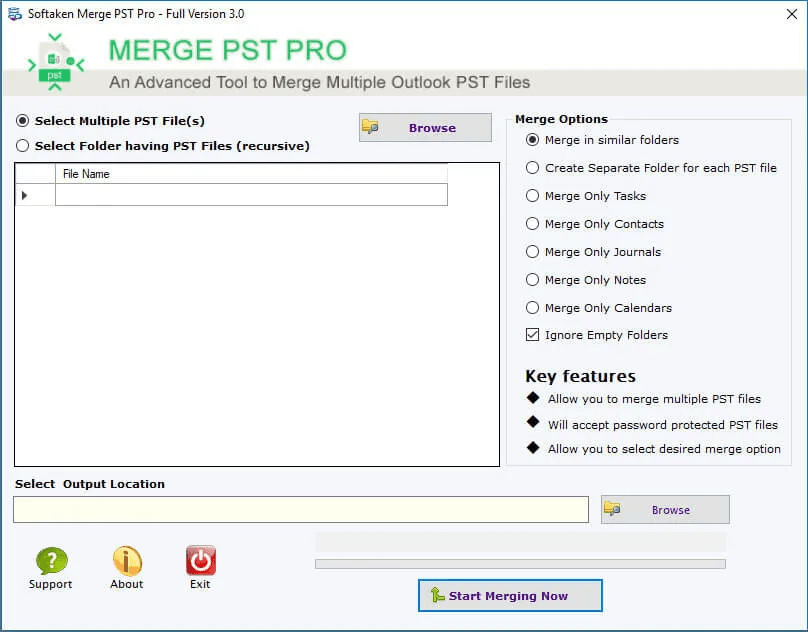
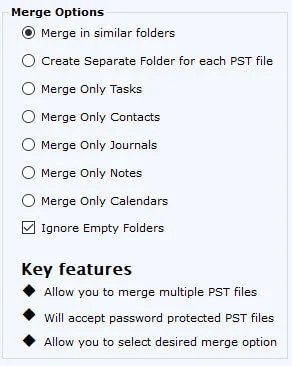
The site does the practical things right: a hero that splits Windows and Mac, a five-step walkthrough, a real screenshots page, and a demo-vs-full comparison table. The interface shown in screenshots is utilitarian — clearly a desktop utility, not a design statement — and the marketing site carries the same dated vendor template feel. Usability is stronger than design: five merge modes (similar folders, specific items, new/separate folder, contacts only, inbox only), skip-empty-folders, deleted-items toggle, and no Outlook install required. The 10-item demo cap is the weak point — enough to confirm the tool launches, not enough to trust it with a 40 GB archive.
Speed & Security
Speed is the standout: Lighthouse 100/100 on mobile and desktop, LCP 1.5s, CLS 0, TBT 0ms, FCP 949ms. The marketing site is genuinely snappy, and no user complaints about lag surfaced in the collected evidence. Security is mid: HTTPS is enforced, CSP is set, SPF and DMARC are configured, and the site claims digitally signed, antivirus-scanned installers. But the header probe found no HSTS, no frame protection, no X-Content-Type-Options, Referrer-Policy or Permissions-Policy — 6 of 12 checklist points. No SOC 2, ISO, or pen-test disclosure was found. For a desktop utility handling email archives, that's a thin public security posture.
Accessibility & Growth
Accessibility lands at 70: Lighthouse scores 94/100, but two audits fail — insufficient color contrast and touch targets too small or close together. There is no WCAG statement, no multi-language support, and the site is English-only. Growth is the harder question. The problem is real and specific — scattered ANSI and Unicode PSTs, no Outlook installed, legal and IT teams consolidating archives — and the product has genuine wedges: no-Outlook merge, ANSI→Unicode upgrade to 50 GB, five merge modes, and a $29 Windows / $49 Mac price that undercuts Stellar and SysTools. But the category is mature and structurally shrinking as organizations move off on-prem Exchange and PST-based archiving. The domain dates to 2015 and social profiles exist, but that's context, not momentum. A defensible niche, not a growth story.
Conclusion
If you're an IT admin or legal team sitting on a pile of ANSI and Unicode PSTs and no Outlook license, this is a cheap, fast, no-frills way to collapse them into one Unicode master. Test the 10-item demo on your real archive first — that's the only way to know whether the merge modes and folder handling match your structure. If you're building a long-term email management strategy, this is a bridge tool, not a destination.
Suggestions for improvement
- Raise the demo cap or offer a time-limited full trial — 10 items can't validate a 40 GB archive merge.
- Add HSTS, X-Frame-Options, X-Content-Type-Options, Referrer-Policy and Permissions-Policy to close the 6/12 header gap.
- Publish a security page: signing certificate details, antivirus scan results, and any compliance posture (even 'none claimed' is clearer than silence).
- Fix the two failing Lighthouse a11y audits — contrast ratios and touch-target sizing — and add a WCAG statement.
Alternatives comparison
Named competitors, point by point. Nobody paid to appear here or to be left out.
 Softaken Merge PST Software |  Stellar Merge Mailbox |  SysTools PST Merge | |
|---|---|---|---|
| No Outlook installation required | Yes — explicitly stated | Yes — standalone utility | Yes — standalone utility |
| Merge modes / folder options | Five modes: similar folders, specific items, new/separate folder, contacts only, inbox only | Join/merge with folder retention and preview | Join, merge, and combine modes with specific-folder selection |
| ANSI to Unicode conversion | Yes — upgrades legacy 2 GB ANSI to Unicode up to 50 GB | Supported in merge output | Supported in merge output |
| Password-protected PST support | Not stated on product page | Not stated | Yes — explicit option |
| Free trial limitation | 10 items | Limited demo (item cap) | Limited demo (item cap) |
| Platform coverage | Windows and Mac | Windows | Windows |
| Entry price | Windows from $29; Mac from $49 | Paid license (tiered) | Paid license (tiered) |
Stellar Merge Mailbox
Desktop utility to merge multiple Outlook PST files with folder retention and preview; widely used for email consolidation.
SysTools PST Merge
PST merger offering join, merge, and combine modes with options for specific folders and password-protected PSTs.
Comparing options? See Softaken Merge PST Software alternatives, scored side by side
More Productivity apps
View all Productivity
Notion
92All-in-one AI workspace for docs, projects, and knowledge...

Qamarero
92An all-in-one hospitality software for restaurants and ba...

EmbedMyReviews
92White-label reputation management software for agencies s...

StoryPad
92Privacy-first open source journal app with a continuous t...

Puzzly – B2B Lead Generation & Sales Intelligence Platform
92Puzzly is an all-in-one B2B lead generation platform that...

The Stack Newsletter
92A weekly newsletter delivering curated tech jobs, intervi...

Vibe Coding Agent Skills
92A free, open-source platform offering 110 AI agent skills...

QRBliss
91Branded QR codes with AI Brand Sync, 15 free dynamic code...

Gerty
91Private, local AI assistant for Mac that runs offline

CC Switch
91Open-source desktop app for switching AI coding providers...

username.md
90One verified handle for your online identity, readable by...

PitchWhip
90AI cold call scripts & direct dials from LinkedIn


A platform dedicated to providing unbiased reviews of newly launched applications, analyzing everything from their features to their full potential.
info@scoutforge.net© 2026 Scoutforge. All rights reserved.
