Cycling through all six. Tap any point to stop.
Measured on six things
Unlock password-protected Outlook PST files without needi...
Design
44Functional but visibly dated: XP/7-era app screenshots, a hero crammed with checkmarks and a product box render, and stacked bordered tables that read like 2012 software marketing. Clear CTAs and a legible demo-vs-full table are the bright spots.
Screenshots
1 / 4
About this app
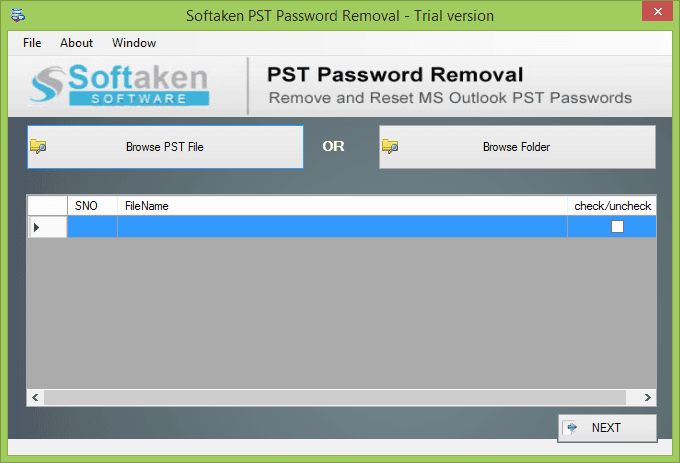
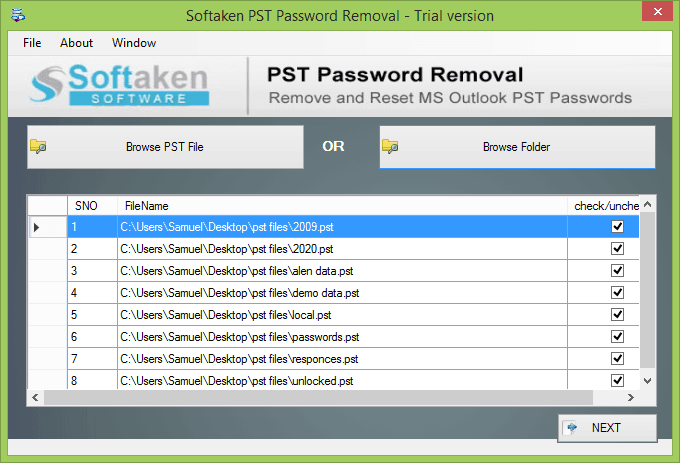
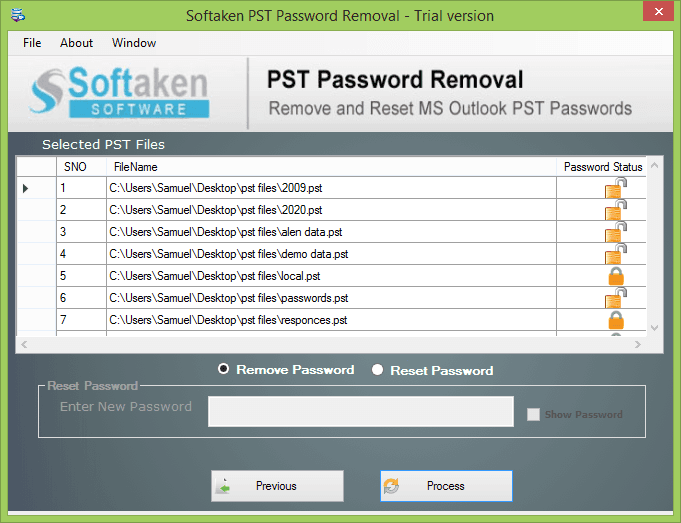
Softaken PST Password Removal Software is a dependable software to easily erase and reset Outlook PST passwords. It unlocks highly encrypted PST files with no data loss and 100% safety. Main Features: Recovers passwords for bulk PST files at once. Supports Outlook 2021 and earlier versions. Password recovery is ancient and multilingual. Supports ANSI and Unicode PST file types. Outlook does not need to be installed. Intuitive user interface for easy navigation. It is compatible with Windows 11/10/8.1/8/7, etc. A free trial version and 24/7 technical support are available.
Key features
- 1Standalone PST password removal and reset without installing Microsoft Outlook.
- 2Batch processing of multiple password-protected PST files at once.
- 3Supports ANSI and Unicode PST files across Outlook 2003–2021 and Windows 7–11.
- 4Handles lengthy and multilingual passwords; $29 one-time full license.
Target customer profile
Drawn from the product itself, not from a survey.
Demographic
IT administrators managing legacy email archives
Pain points
Multiple locked PST files with forgotten passwords blocking data migration
Primary needs
Batch unlock multiple PST files quickly without Outlook installed
Demographic
Small business owners with old Outlook backups
Pain points
Locked PST files from former employees or old systems are inaccessible
Primary needs
Affordable standalone tool to remove or reset PST passwords
Demographic
Individual users recovering personal email archives
Pain points
Forgot the password on an important PST file and need access to emails
Primary needs
Simple one-off password removal with no technical setup required
Scout Review
Written by AI from measured evidence, scored out of 100.
Softaken PST Password Removal is a competent, narrowly-scoped Windows utility with a fast marketing site and a clear core workflow, wrapped in design that hasn't been refreshed since the Obama administration. The measured evidence is split: speed is excellent (93 mobile / 100 desktop), accessibility is mediocre (81 with seven real failures), security is thin (6/12 headers, no audit claims), and design is dated by its own screenshots. Usability is decent on paper — a real docs page and numbered walkthrough — but the demo's inability to save unlocked files undercuts the trial. Growth is a real problem with a real wedge in a shrinking pond. At $29 one-time it's a fair price for a one-off job; just don't expect the polish of a modern SaaS.
Measure by measure
Usability
58The 1-2-3 screenshot flow and a real /docs/steps page make the core task obvious, and no Outlook install is required. The demo's inability to save unlocked files is a hard wall, and the hero's competing CTAs plus dense copy slow first-time orientation.
Design
44Functional but visibly dated: XP/7-era app screenshots, a hero crammed with checkmarks and a product box render, and stacked bordered tables that read like 2012 software marketing. Clear CTAs and a legible demo-vs-full table are the bright spots.
Speed
82Lighthouse mobile 93/100 (LCP 2.5s, TBT 0ms, CLS 0.105) and desktop 100/100 — a genuinely fast, lightweight marketing site with no measured lag complaints.
Security
52HTTPS enforced with CSP, SPF and DMARC in place, but HSTS, frame protection, X-Content-Type-Options, Referrer-Policy and Permissions-Policy are all missing — 6/12 checklist points. No SOC 2, ISO or audit claim found.
Accessibility
58Lighthouse accessibility 81/100, but seven failing audits: low contrast, color-only link distinction, unnamed buttons and links, small touch targets, no main landmark. No WCAG statement or a11y documentation found.
Growth
54A real, specific problem — locked PST archives blocking migration — with a genuine wedge: standalone, no Outlook, batch, $29 one-time. But legacy PST recovery is a shrinking pond, and the positioning doesn't name a segment it wins outright.
Improvement areas
- Dated UI and homepage design; XP-era screenshots undermine trust.
- Demo cannot save unlocked files, limiting trial value.
- Missing security headers (HSTS, frame protection, Referrer-Policy) and no compliance documentation.
- Seven Lighthouse accessibility failures including contrast and unnamed controls.
Design & Usability
Softaken PST Password Removal looks and feels like software from another era — literally, since the app screenshots still carry Windows XP/7 title bars and gray dialog panels. The homepage compounds it: a hero stuffed with a product box render, a five-star badge, a long green-checkmark feature list and two competing CTAs, followed by stacked bordered tables that repeat the same specs three ways. What works is the clarity of the core flow: a numbered 1-2-3 screenshot sequence and a real /docs/steps page make 'add file, remove password, save' obvious, and the demo-vs-full comparison table honestly states the trial's one limitation. That limitation is the usability problem: the free demo does everything except save the unlocked file, so the trial can't actually deliver the outcome the user came for. For a $29 one-off tool aimed at IT admins and small businesses, that's a defensible sales tactic but a poor first-run experience.
Speed & Security
Speed is the standout: Lighthouse mobile 93/100 with LCP 2.5s, TBT 0ms and CLS 0.105, and a perfect 100 on desktop. The site is lightweight and snappy, and nothing in the collected evidence suggests lag complaints. Security is middling. HTTPS is enforced, CSP is present, and SPF and DMARC are configured — real positives. But HSTS, frame protection, X-Content-Type-Options, Referrer-Policy and Permissions-Policy are all absent, landing the probe at 6/12 checklist points. There's no SOC 2, ISO 27001 or independent audit claim anywhere in the collected content, and no security page beyond a standard privacy policy. For a utility that handles password-protected email archives, that's a thin posture — not alarming, but not the level of transparency a security-conscious IT buyer would want before pointing it at a former employee's mailbox.
Accessibility & Growth
Accessibility lands at 81/100 on Lighthouse but with seven failing audits that matter: insufficient color contrast, links distinguishable only by color, buttons and links without accessible names, touch targets too small, and no main landmark. There's no WCAG statement or accessibility documentation on the site. Growth is a judgment on the idea, not the traction. The problem is real and specific — locked PST files blocking migration or access to old archives — and the wedge is genuine: standalone operation without Outlook installed, batch unlock, and a $29 one-time price versus subscription competitors. But legacy PST recovery is a shrinking category as archives age out and organizations move to cloud mail, and the site doesn't name a segment it serves better than a generic Outlook repair suite. The 2015 domain and social profiles show an established vendor, not a fast-growing one.
Conclusion
If you have a locked PST file and no Outlook, this does the job at a price that won't sting. If you're an IT admin evaluating tools for a fleet of legacy archives, the missing security headers and absent compliance documentation are worth weighing against the convenience. The demo proves the workflow but not the output — budget for the $29 license before you commit a migration to it, and keep a backup of the original PST as the docs themselves advise.
Suggestions for improvement
- Refresh the app UI screenshots and homepage to a modern aesthetic; the XP-era styling undersells the tool.
- Let the demo save at least one unlocked file so the trial proves the actual outcome, not just the click path.
- Add HSTS, X-Content-Type-Options, Referrer-Policy and Permissions-Policy to close the 6/12 header gap.
- Publish a short security/trust page and fix the seven Lighthouse a11y failures (contrast, link names, main landmark).
Alternatives comparison
Named competitors, point by point. Nobody paid to appear here or to be left out.
 Softaken PST Password Removal Tool Softaken PST Password Removal Tool | ||
|---|---|---|
| Price model | $29 one-time license; free demo (cannot save) | Not provided in app details |
| Requires Outlook installed | No — standalone engine | Not provided in app details |
| Batch unlock multiple PST files | Yes | Not provided in app details |
| Platform support | Windows 7/8/8.1/10/11; Outlook 2003–2021 | Not provided in app details |
Comparing options? See Softaken PST Password Removal Tool alternatives, scored side by side
More Productivity apps
View all Productivity
Qamarero
92An all-in-one hospitality software for restaurants and ba...

The Stack Newsletter
92A weekly newsletter delivering curated tech jobs, intervi...

EmbedMyReviews
92White-label reputation management software for agencies s...

StoryPad
92Privacy-first open source journal app with a continuous t...

Puzzly – B2B Lead Generation & Sales Intelligence Platform
92Puzzly is an all-in-one B2B lead generation platform that...

Notion
92All-in-one AI workspace for docs, projects, and knowledge...

Vibe Coding Agent Skills
92A free, open-source platform offering 110 AI agent skills...

CC Switch
91Open-source desktop app for switching AI coding providers...

username.md
90One verified handle for your online identity, readable by...

What the GIF
89Frame-perfect video-to-GIF maker that runs entirely in yo...

AuditCloser
89White-label website audits that close deals for digital a...

NudgeWin
89Automated quote follow-up for trades and service businesses.


A platform dedicated to providing unbiased reviews of newly launched applications, analyzing everything from their features to their full potential.
info@scoutforge.net© 2026 Scoutforge. All rights reserved.
