Cycling through all six. Tap any point to stop.
Measured on six things
Split oversized Outlook PST files into smaller parts with...
Design
45Dated visual language: gradient product box, drop-shadow app screenshots, and six competing CTAs above the fold. The 3x3 split-mode grid and risk panel repeat information and feel cramped.
Screenshots
1 / 4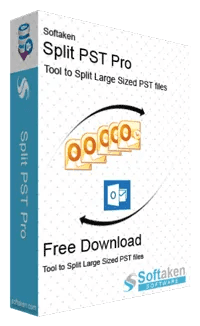
About this app
Softaken Split PST is a reliable tool to split huge Outlook PST files into smaller parts. It allows users to organize mailbox data, minimize file size, and manage Outlook data. The tool has a basic interface that is perfect for both technical and non-technical users. Main Features Split PST files of any size as per your needs. It assists in preventing data loss and ensures the integrity of data. Provides a safe and reliable splitting procedure. No Outlook installation is required. Intuitive UI for ease of use. Supports ANSI and Unicode PST formats. High level of interoperability with Outlook data. Split the PST files by size, year, or folder. Compatible with Outlook 2021 and older versions. Compatible with Windows 11, 10, 8.1, 8, 7, and other supported versions. A free demo version of the tool is available for users to try out its functions before purchasing the complete edition. It also offers 24/7 technical support to aid users with their issues and finish tasks successfully.
Key features
- 1Nine split modes: size, date/year, folder, sender, attachment size, category, item type, stacked rules.
- 2No Outlook installation required — standalone engine, ANSI and Unicode PST support.
- 3Post-split report with item count and processing time; demo video, user guide, and 24/7 support.
Target customer profile
Drawn from the product itself, not from a survey.
Demographic
IT administrators managing enterprise email archives
Pain points
Oversized PSTs slow down Outlook, complicate backups, and increase corruption risk
Primary needs
Automated splitting with audit logs and reports for compliance
Demographic
Compliance officers needing to organize emails for legal audits
Pain points
Manual sorting is error-prone and lacks traceability
Primary needs
Split by date/year/sender with detailed reporting for audits
Demographic
Small business owners with growing Outlook data files
Pain points
Limited IT resources and budget for expensive enterprise tools
Primary needs
Affordable, easy-to-use tool to split PSTs without Outlook
Scout Review
Written by AI from measured evidence, scored out of 100.
Softaken Split PST Pro is a competent, fast-loading utility for a real but shrinking problem. The site is technically excellent (100/100 mobile Lighthouse) and the docs are clear, but the design is dated, the security posture is thin for the compliance buyers it targets, and there's no accessibility statement. The nine split modes and $29 price point are genuine differentiators against SysTools and Kernel. It's a solid tool for IT admins who still wrestle with 50GB PSTs — just don't expect it to feel modern.
Measure by measure
Usability
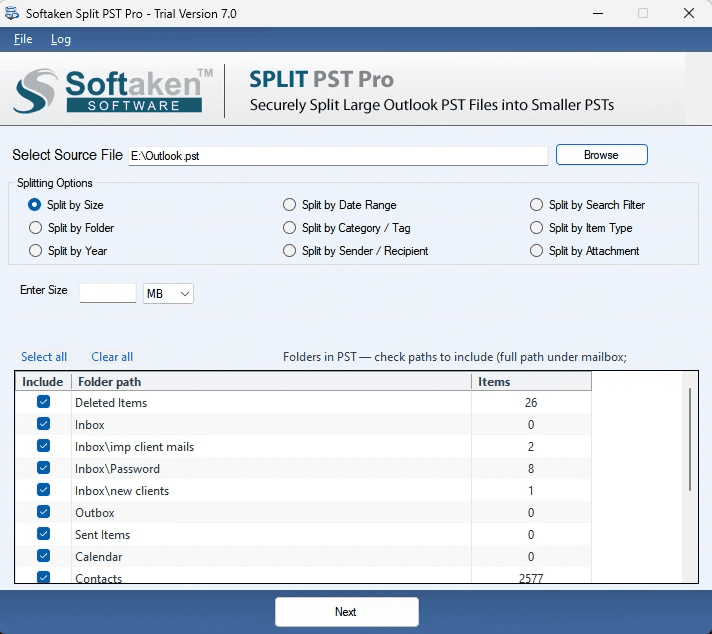
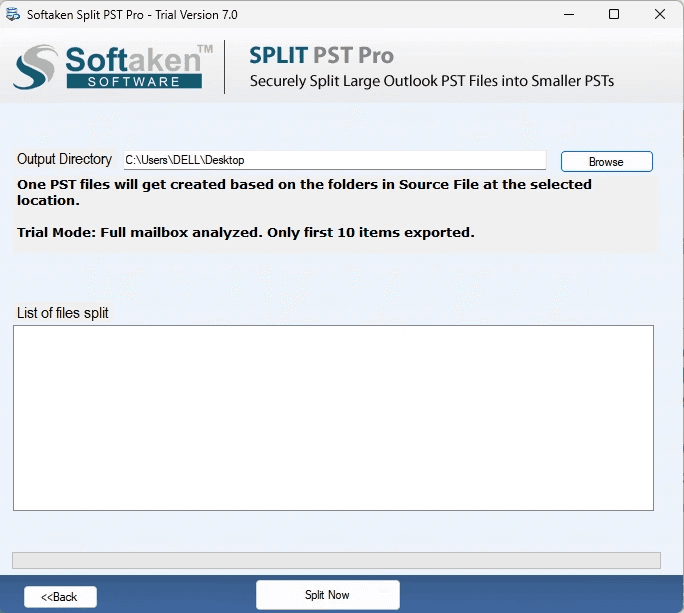
58Docs walk through launch → select PST → save in three steps, and there's a demo video plus user guide. But nine split modes with no default path and no hero-level support link slow first-run discovery.
Design
45Dated visual language: gradient product box, drop-shadow app screenshots, and six competing CTAs above the fold. The 3x3 split-mode grid and risk panel repeat information and feel cramped.
Speed
88Lighthouse mobile 100/100 (LCP 1.5s, CLS 0.002, TBT 44ms) and desktop 99/100. The marketing site is genuinely snappy; no lag complaints surfaced in collected evidence.
Security
52HTTPS enforced, CSP, SPF, DMARC, secure cookies, and a linked VirusTotal scan. But no HSTS, no frame protection, no X-Content-Type-Options, 7/13 checklist points, and no SOC 2/ISO claims.
Accessibility
68Lighthouse 93/100 with two real failures: insufficient color contrast and links without discernible names. No WCAG statement or a11y page found in collected content.
Growth
58Real problem (oversized PSTs slow Outlook, risk corruption), specific buyers (IT admins, compliance, SMBs), nine split modes and $29 pricing undercut enterprise tools. Differentiated but a narrow, shrinking niche.
Improvement areas
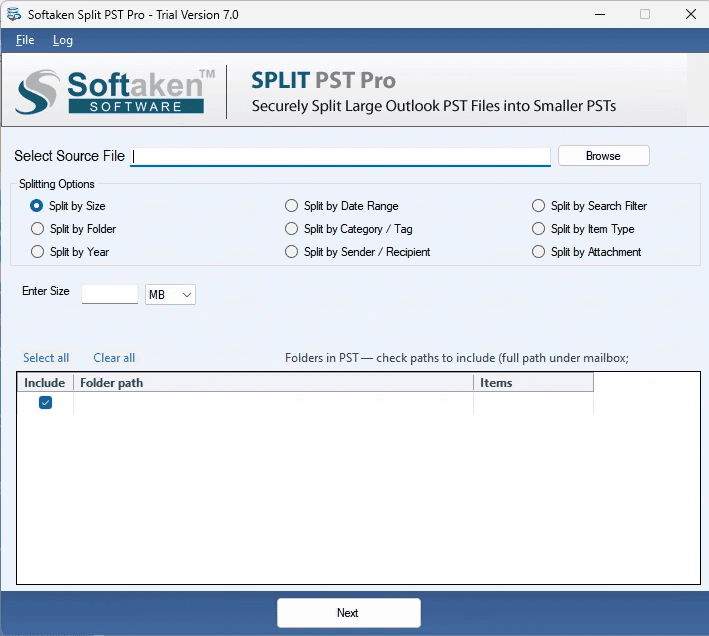
- Dated visual design with six competing CTAs and an empty-table app screenshot.
- Thin security posture (7/13 headers, no HSTS, no SOC 2/ISO) for compliance buyers.
- No accessibility statement; two Lighthouse failures (contrast, unnamed links).
- No recommended default split mode or guided first-run path for new users.
Design & Usability
The homepage is a wall of competing CTAs — Download Now, Buy Now, Free Trial, Demo — stacked above a gradient product box and a star-rating widget. The 3x3 split-mode grid is scannable but visually uneven, and the risk-awareness panel repeats the same three warnings twice. The app screenshot shows an empty folder table with no preview pane, which undersells what is actually a functional tool. Usability is stronger than design: the docs page walks through launch → select PST → save in three clean steps, and there's a demo video, user guide, and screenshots. The gap is onboarding — nine split modes with no recommended default and no support link in the hero means a first-time user has to guess where to start.
Speed & Security
Speed is the standout: Lighthouse mobile 100/100 with LCP 1.5s, CLS 0.002, and TBT 44ms, desktop 99/100. The marketing site is genuinely fast and there are no lag complaints in the collected evidence. Security is competent but thin — HTTPS enforced, CSP, SPF, DMARC, secure cookies, and a linked VirusTotal scan of the download. But no HSTS, no frame protection, no X-Content-Type-Options, and only 7 of 13 checklist points. No SOC 2, ISO 27001, or pen-test claims appear anywhere in the collected content, which is a gap for the IT-admin and compliance-officer segments the product explicitly targets.
Accessibility & Growth
Accessibility scores 93/100 on Lighthouse with two concrete failures: insufficient color contrast (the pale risk tags are the likely culprit) and links without discernible names. There's no WCAG statement or accessibility page in the collected content. Growth is a judgment call on the idea: the problem is real (oversized PSTs slow Outlook, risk corruption, complicate backups), the buyers are specific (IT admins, compliance officers, SMBs), and nine split modes plus $29 pricing genuinely differentiate from SysTools and Kernel. But the category is a narrow, legacy niche — PST splitting is a maintenance task, not a growth market, and the domain has been around since 2015 without visible breakout traction.
Conclusion
If you're an IT admin with an oversized PST and a $29 budget, this does the job and loads faster than most SaaS landing pages. If you need SOC 2 paperwork, WCAG compliance, or a UI that doesn't look like a 2014 Windows installer, look elsewhere — or budget for the migration that makes PST splitting unnecessary.
Suggestions for improvement
- Consolidate the six above-the-fold CTAs into one primary action (Free Trial) and one secondary (Buy Now).
- Add a recommended default split mode and a 'start here' path for first-time users in the app and docs.
- Publish a security page with HSTS, frame protection, and any SOC 2 / pen-test status for compliance buyers.
- Add an accessibility statement and fix the two Lighthouse failures: color contrast and unnamed links.
Alternatives comparison
Named competitors, point by point. Nobody paid to appear here or to be left out.
 Softaken Split PST Pro Softaken Split PST Pro |  SysTools Split PST SysTools Split PST |  Kernel Split PST Kernel Split PST | |
|---|---|---|---|
| Splitting modes | 9 modes (size, date/year, folder, sender, attachment, category, item type, stacked rules) | Multiple modes (size, date, year, folder) | Multiple modes, ANSI and Unicode support |
| Outlook installation required | No — standalone engine | No | No |
| Starting price | From $29 USD | Similar tier pricing | Similar tier pricing |
| Free trial / demo | Yes — demo limited to first 10 items | Yes — demo version available | Yes — demo version available |
| Post-split reporting | Yes — item count and processing time report | Not highlighted | Not highlighted |
SysTools Split PST
A popular Windows tool to split large PST files by size, date, year, folder, and more, with a similar feature set and pricing.
Kernel Split PST
Another Windows-based PST splitter that offers multiple splitting options and supports both ANSI and Unicode files, with a user-friendly interface.
Comparing options? See Softaken Split PST Pro alternatives, scored side by side
More Productivity apps
View all Productivity
Qamarero
92An all-in-one hospitality software for restaurants and ba...

The Stack Newsletter
92A weekly newsletter delivering curated tech jobs, intervi...

EmbedMyReviews
92White-label reputation management software for agencies s...

StoryPad
92Privacy-first open source journal app with a continuous t...

Puzzly – B2B Lead Generation & Sales Intelligence Platform
92Puzzly is an all-in-one B2B lead generation platform that...

Notion
92All-in-one AI workspace for docs, projects, and knowledge...

Vibe Coding Agent Skills
92A free, open-source platform offering 110 AI agent skills...

CC Switch
91Open-source desktop app for switching AI coding providers...

username.md
90One verified handle for your online identity, readable by...

What the GIF
89Frame-perfect video-to-GIF maker that runs entirely in yo...

AuditCloser
89White-label website audits that close deals for digital a...

NudgeWin
89Automated quote follow-up for trades and service businesses.


A platform dedicated to providing unbiased reviews of newly launched applications, analyzing everything from their features to their full potential.
info@scoutforge.net© 2026 Scoutforge. All rights reserved.
