Cycling through all six. Tap any point to stop.
Measured on six things
Free interactive Earth and space science models for teachers, families and curious learners.
Security
41HTTPS is enforced and SPF is set, but there's no HSTS, CSP, frame protection, Referrer-Policy or DMARC — 3/12 on the header probe. Analytics and AdSense are disclosed; no audit or security page.
Screenshots
1 / 2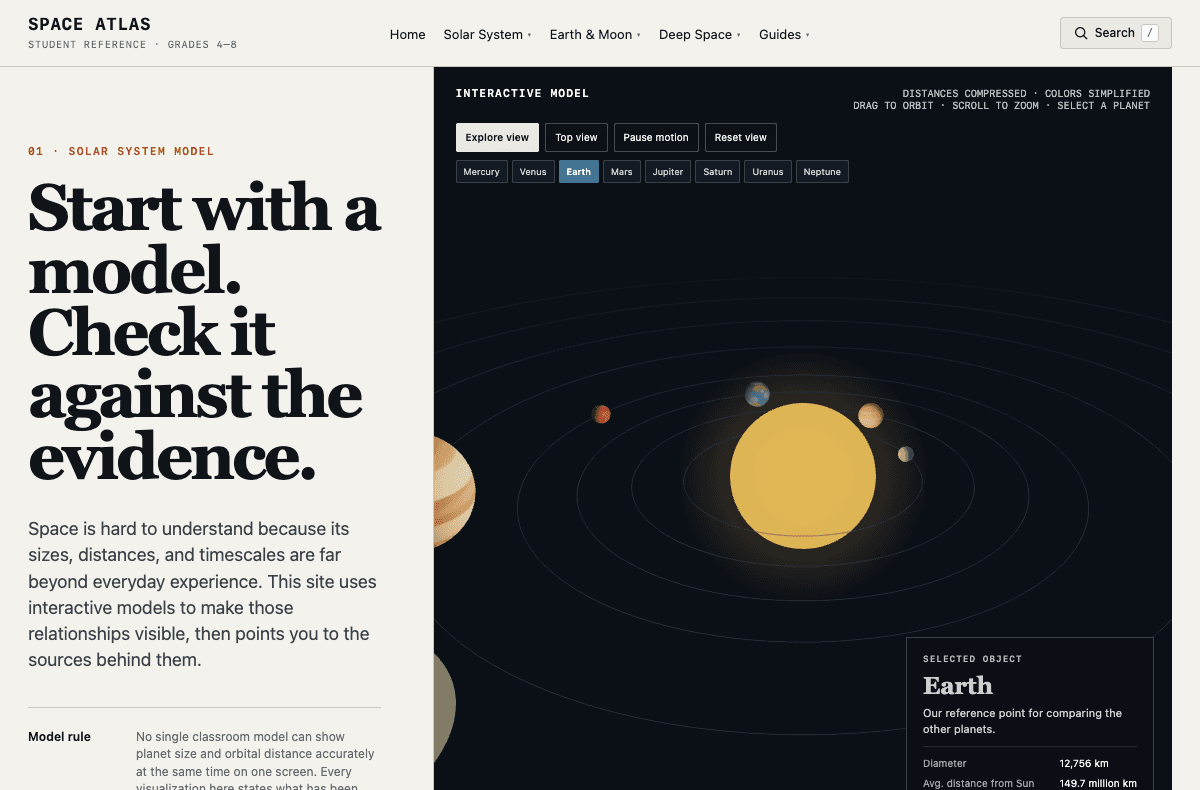
About this app
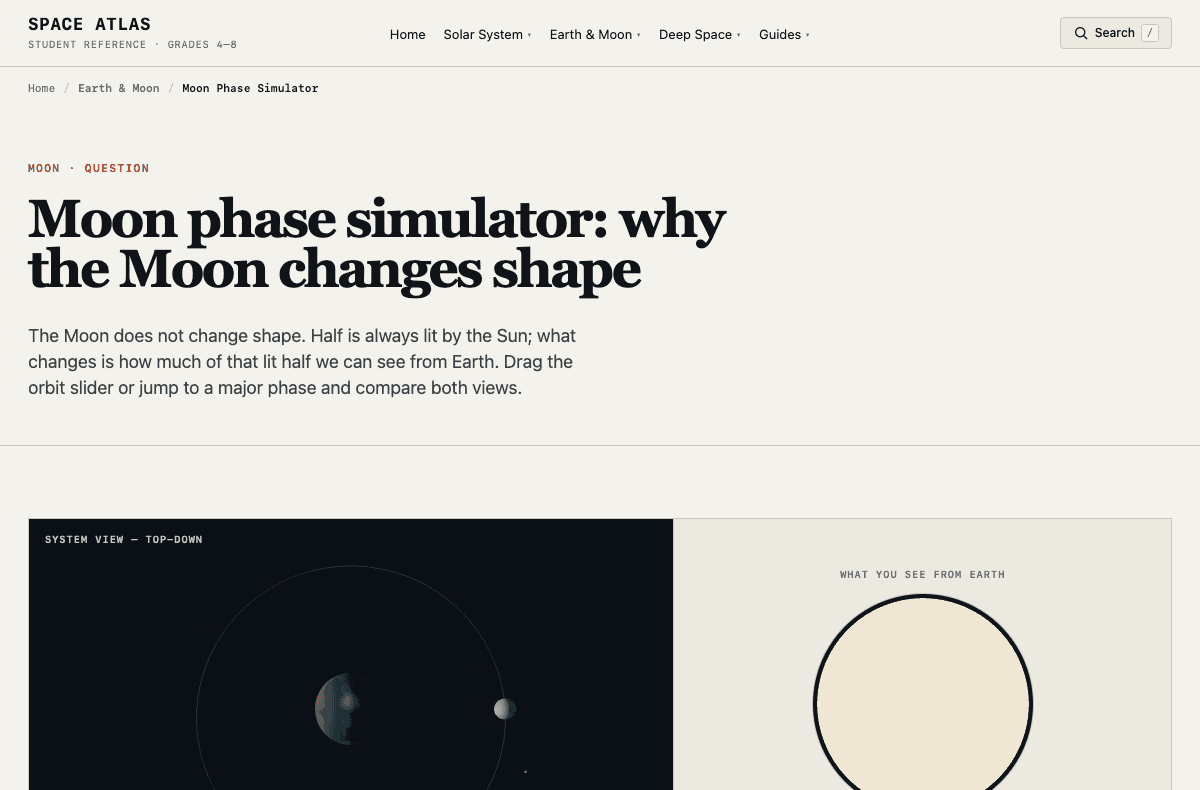
Space Atlas is an independent, free, browser-based Earth and space science learning reference featuring interactive visual models of the Moon's phases, Earth's axial tilt and seasons, planet sizes, solar-system distances and cosmic scale. Learners can predict a phenomenon, manipulate a conceptual visualization, compare perspectives and check scientific source links. The diagrams make their simplifications and limits explicit, and the existing original Moon phases activity includes a two-page printable Grade 4–8 predict–test–explain worksheet with teacher notes. No student account or paid subscription is required. The website uses Google Analytics and displays Google AdSense; teachers must evaluate school privacy and accessibility requirements. This is not a NASA-affiliated product or independently classroom-efficacy tested software. Creator: Jihun Oh, independent software developer in South Korea.
Key features
- 1Interactive solar-system model with labeled planet controls, orbit/zoom, and explicit 'not to scale' disclosures.
- 2Three-step learning pattern (Manipulate → Compare → Verify) repeated across every topic.
- 3Source-linked references to NASA Science, JPL Education, ESA and mission pages, with 'checked 2026' dates.
- 4Free printable Grade 4–8 predict–test–explain worksheet with teacher notes for the Moon phases activity.
- 5Honest labeling of observation vs. model vs. illustration, with worked examples of each.
Target customer profile
Drawn from the product itself, not from a survey.
Demographic
Parents of children in grades 4–8 (ages 9–14)
Pain points
Finding affordable astronomy visualizations that honestly explain what is simplified, with usable guidance for home learning
Primary needs
Free guided simulations and original activity sheets; families must review analytics, ads, accessibility and privacy suitability
Demographic
Middle school science teachers
Pain points
Textbook diagrams are misleading about scale, and students struggle to grasp vast distances
Primary needs
Ready-to-use visual models that explicitly address misconceptions and link to authoritative sources
Demographic
Homeschooling families
Pain points
Limited budgets for educational software and difficulty verifying the accuracy of online content
Primary needs
Free, source-linked astronomy models and adult-guided printable activities with clear ad and analytics disclosure
Scout Review
Written by AI from measured evidence, scored out of 100.
Space Atlas is a free, browser-based Earth and space science reference for grades 4–8, built by an independent developer in South Korea. It pairs interactive models (solar system, Moon phases, planet sizes, cosmic scale) with a consistent three-step learning pattern and links to NASA, JPL and ESA sources. The design is confident and the accessibility score is high; speed is fast to first paint but heavy on the main thread, and security headers are thin. It's not NASA-affiliated and hasn't been classroom-efficacy tested — the site says so plainly, which is refreshing.
Measure by measure
Usability
68Model controls are labeled and visible on load, and the three-step Manipulate/Compare/Verify pattern gives parents and teachers a clear path. Consent modal and low-contrast search add friction.
Design
71Confident hero pairing a bold headline with a live solar-system canvas, and a consistent dark-model/light-explanation rhythm. Dense reference tables and a clunky consent modal drag it down.
Speed
57LCP 295ms, FCP 271ms and CLS 0.006 are excellent, but TBT of 14.7s tanks the Lighthouse desktop score to 68. The interactive canvas is doing the damage.
Security
41HTTPS is enforced and SPF is set, but there's no HSTS, CSP, frame protection, Referrer-Policy or DMARC — 3/12 on the header probe. Analytics and AdSense are disclosed; no audit or security page.
Accessibility
79Lighthouse accessibility 97/100 with one failing audit: insufficient color contrast. Responsive layout and keyboard-reachable model controls are solid; no WCAG statement or multi-language support.
Growth
63A real, specific problem (textbook scale lies) with a clear wedge: explicit simplification disclosures and predict–test–explain worksheets that NASA Space Place and Eyes don't offer.
Improvement areas
- Security headers: add HSTS, CSP, Referrer-Policy, X-Content-Type-Options and DMARC.
- Performance: reduce 14.7s TBT by lazy-loading the interactive canvas.
- Accessibility: fix the single failing contrast audit and publish a WCAG statement.
- UX: relocate the consent modal so it doesn't interrupt the scale-lab section.
Design & Usability
The design is the strongest thing here. A big confident headline sits next to a live solar-system canvas, and the dark-model/light-explanation split gives the page a rhythm that most educational sites never find. Controls are labeled on load, and the three-step Manipulate/Compare/Verify pattern is repeated per topic so a parent or teacher always knows what to do next. The 'What to open next' sidebar is a genuinely thoughtful touch. Where it slips: the reference comparison table is dense, small-font and link-heavy, and a third-party consent modal drops into the middle of the scale-lab section — a real friction point for a site aimed at kids and their adults.
Speed & Security
Speed is a tale of two metrics. First Contentful Paint at 271ms and LCP at 295ms are excellent, and CLS of 0.006 means nothing jumps around. But Total Blocking Time of 14.7 seconds drags the Lighthouse desktop score to 68 — the interactive canvas is doing real work and the main thread pays for it. Security is the weakest dimension: HTTPS is enforced and SPF is set, but there's no HSTS, no CSP, no frame protection, no Referrer-Policy and no DMARC, landing at 3/12 on the header probe. Analytics and AdSense are disclosed in the copy, which is honest, but there's no security page, audit or bug bounty to point at.
Accessibility & Growth
Accessibility scores 97/100 on Lighthouse with exactly one failing audit — insufficient color contrast. For a site whose entire thesis is 'look carefully at the evidence,' that's an ironic miss but an easy fix. The layout is responsive and the model controls are keyboard-reachable; there's no WCAG statement or multi-language support, which is normal at this stage. Growth is a judgement on the idea: the problem is real (textbook diagrams genuinely mislead about scale), the audience is specific (grades 4–8 parents, teachers, homeschoolers), and the wedge — explicit simplification disclosures plus a predict–test–explain worksheet — is something NASA Space Place and Eyes on the Solar System don't do. It's competing with free NASA properties, which caps the ceiling, but the honesty angle is a real differentiator.
Conclusion
If you're a parent or teacher looking for a free, honest astronomy reference that doesn't pretend its diagrams are photographs, this is worth a bookmark. Go in knowing it's an indie project: no SOC 2, no a11y statement, no classroom trials, and a consent modal that will interrupt the lesson. The science framing and source-linking are the real product here, and they're done with more care than most paid alternatives.
Suggestions for improvement
- Fix the color contrast failure flagged by Lighthouse — it's the only a11y audit failing and it undercuts the site's own 'look carefully' message.
- Add HSTS, CSP and Referrer-Policy headers; GitHub Pages supports meta-tag CSP and HSTS via a custom domain.
- Reduce Total Blocking Time by deferring or lazy-loading the interactive canvas until it scrolls into view.
- Move or soften the consent modal so it doesn't interrupt the scale-lab section mid-sentence.
Alternatives comparison
Named competitors, point by point. Nobody paid to appear here or to be left out.
 Space Atlas Space Atlas |  NASA Space Place NASA Space Place | NASA's Eyes on the Solar System | |
|---|---|---|---|
| Price | Free, ad-supported | Free, no ads | Free, no ads |
| Interactive 3D scale comparison | Yes — labeled 'not to scale' with explicit simplification notes | No — games and simple explanations only | Yes — full 3D solar system with real mission data |
| Guided educational scaffolding | Yes — three-step pattern plus printable predict–test–explain worksheet | Partial — kid-friendly activities, no structured worksheet | Minimal — powerful sim, little classroom scaffolding |
| Source transparency and simplification disclosures | Explicit — every model states what is simplified, with source links and check dates | Implicit — NASA branding, fewer per-model disclosures | Implicit — real mission data, no per-view simplification notes |
| Target age range | Grades 4–8 (ages 9–14) | Elementary / younger kids | Middle school and up, plus enthusiasts |
| Ads and analytics | Google Analytics and AdSense, disclosed | No ads; standard NASA analytics | No ads; standard NASA analytics |
NASA Space Place
A kid-friendly NASA site with games, activities, and simple explanations of space and Earth science, but lacks interactive 3D scale comparisons.
NASA's Eyes on the Solar System
A powerful 3D simulation of the solar system with real mission data, but its complexity and lack of guided educational scaffolding make it less accessible for younger students.
Comparing options? See Space Atlas alternatives, scored side by side
More Education apps
View all Education
The Stack Newsletter
92A weekly newsletter delivering curated tech jobs, intervi...

TranscriptYou
88Free YouTube transcript generator with timestamps and AI ...

Startup Science
88A unified platform replacing 12-20 disconnected tools for...

Coloring Pages Pro
87A massive collection of free printable coloring pages for...

CertWorthIt
87Data-driven tool revealing which certifications actually ...

RBQ Exam
87Online practice for the RBQ contractor licence exams in Québec: original questions, timed mock exams and lessons, in French or English.

HireVue Practice
85AI-powered HireVue practice with timed mock interviews, role-specific questions, transcripts, scoring, and actionable feedback.

Case Cub
85AI-powered law school study platform with 20,000+ case br...

Ciroexam
84All-in-one CIRO exam prep for CIRE and 8 other exams, wit...

Aptitude Test Prep
84Free timed practice for SHL, numerical, and logical tests...

PageCub
84Custom illustrated children's books created around your c...

WellWired
84AI explained simply for older adults, with safety lessons...


A platform dedicated to providing unbiased reviews of newly launched applications, analyzing everything from their features to their full potential.
info@scoutforge.net© 2026 Scoutforge. All rights reserved.
