Cycling through all six. Tap any point to stop.
Measured on six things
Auto-close idle tabs and find any page again with on-devi...
Design
58The Chrome Web Store listing is clean and informative, but lacks screenshots or a demo video. No standalone site exists, so the store page is the entire brand presence.
Screenshots
1 / 1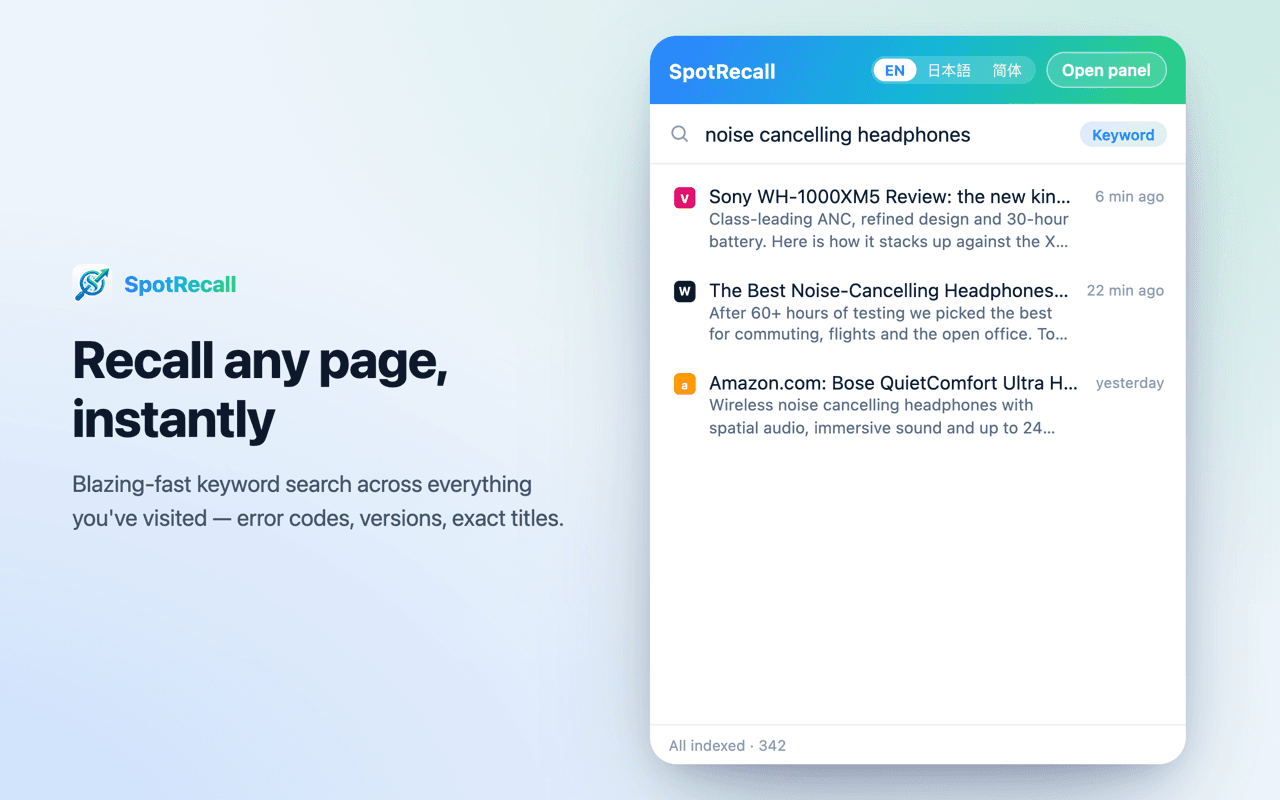
About this app
SpotRecall is a Chrome extension that tackles tab overload by automatically closing idle tabs while ensuring you can always find them again. Unlike traditional tab managers that simply close tabs, SpotRecall indexes your open tabs and recently closed ones, allowing you to search by keywords or natural language descriptions. The AI runs entirely on your device, so your browsing data never leaves your computer. It's a privacy-focused solution for anyone who struggles with too many open tabs but fears losing important pages.
Key features
- 1Auto-closes idle tabs while protecting active, pinned, grouped, audible, and form-filled tabs.
- 2On-device AI recall: search closed tabs by keyword or natural-language description, no data uploads.
- 348-hour reopen list and Cmd/Ctrl+Shift+K shortcut for quick access to recently closed pages.
Target customer profile
Drawn from the product itself, not from a survey.
Demographic
Busy professionals juggling multiple projects
Pain points
Too many tabs open, fear of losing important pages, difficulty finding previously viewed content
Primary needs
A reliable way to manage tabs without losing information, quick recall of closed tabs
Demographic
Researchers and students
Pain points
Accumulating hundreds of tabs during research, struggling to relocate sources, memory issues
Primary needs
Efficient tab organization, ability to search by vague descriptions, local data storage for privacy
Demographic
Privacy-conscious users
Pain points
Distrust of cloud-based solutions, concerns about data tracking, desire for offline functionality
Primary needs
On-device AI processing, no data uploads, open-source transparency
Scout Review
Written by AI from measured evidence, scored out of 100.
SpotRecall is a Chrome extension that auto-closes idle tabs and lets you find them again by keyword or natural-language description, with all AI running on-device. The engineering is thoughtful: safeguards for pinned, audible, and form-filled tabs; a 48-hour reopen list; and a 135 MB multilingual model that works offline after download. Security is solid for an indie tool, with HTTPS, CSP, and an open-source AGPL-3.0 codebase. Accessibility scores 100/100 on Lighthouse and supports 21 languages. The weaknesses are presentation and traction: no screenshots or demo on the store listing, no help center, and only 11 users. The idea is strong and differentiated from OneTab, Tab Manager Plus, and Workona, but the product needs visibility and support materials to match its technical care.
Measure by measure
Usability
62Auto-close safeguards (pinned, audible, form-filled tabs) and a 48-hour reopen list are thoughtful. Recall via Cmd/Ctrl+Shift+K works, but no docs or help center were found.
Design
58The Chrome Web Store listing is clean and informative, but lacks screenshots or a demo video. No standalone site exists, so the store page is the entire brand presence.
Speed
68Lighthouse mobile 82/100 (LCP 3.6s, TBT 98ms) and desktop 97/100. The 135 MB model download is a one-time cost but a heavy first-run experience.
Security
72HTTPS enforced with CSP, frame protection, and secure cookies. Missing HSTS and Referrer-Policy. Open source AGPL-3.0 with a privacy policy, but no third-party audits.
Accessibility
78Lighthouse accessibility 100/100 and 21 supported languages are strong. No WCAG statement or screen-reader-specific documentation found.
Growth
58A real problem (tab overload) with a clear wedge: on-device AI recall and automatic closing. But 11 users and no visible community suggest the idea is still unproven.
Improvement areas
- No screenshots or demo video on the Chrome Web Store listing; add visual proof of the recall workflow.
- Missing help center or documentation; users need guidance on the 135 MB model download and privacy.
- Only 11 users and zero reviews; needs distribution and social proof to validate the idea.
Design & Usability
SpotRecall's design lives entirely on its Chrome Web Store listing, which is clean but sparse: no screenshots, no demo video, no standalone site. The store page communicates the core value ('Recall any page, instantly') but gives visual learners nothing to grab onto. Usability is stronger: auto-close respects active, pinned, grouped, audible, and form-filled tabs, and the 48-hour reopen list plus Cmd/Ctrl+Shift+K recall shortcut are genuinely thoughtful. The lack of a help center or documentation is a gap, especially for a tool that changes how you browse. For a privacy-focused extension, the onboarding is minimal but functional; the 135 MB model download is the biggest friction point. Overall, the product is competent and the safeguards show care, but the presentation and support materials lag behind the engineering.
Speed & Security
Speed is a tale of two platforms: desktop Lighthouse performance is 97/100, while mobile sits at 82/100 with an LCP of 3.6s. The 135 MB on-device model download is a one-time cost but a heavy first-run experience, and the extension itself is 5.18 MiB. Security is solid for an indie extension: HTTPS enforced, CSP, frame protection, secure cookies, and a 10/13 header checklist. Missing HSTS and Referrer-Policy are minor but fixable. The open-source AGPL-3.0 code and a published privacy policy are strong trust signals, and the store listing declares data is not sold or misused. No SOC 2 or third-party audits, which is normal at this stage. The on-device AI architecture is the real security win: no browsing data leaves the machine.
Accessibility & Growth
Accessibility is a bright spot: Lighthouse scores 100/100, and the extension supports 21 languages including Arabic, Hindi, and Chinese. The keyboard shortcut for recall is a nice touch, though there's no WCAG conformance statement or screen-reader documentation. Growth potential hinges on the idea: tab overload is a real, widespread pain, and SpotRecall's wedge is automatic closing plus semantic recall, both absent from OneTab and Tab Manager Plus. Workona offers more features but requires an account and cloud sync, so SpotRecall's local-only, no-account stance is a genuine differentiator for privacy-conscious users. The category has room, but 11 users and zero reviews mean execution and distribution are unproven. The open-source model builds trust but may limit monetization. The idea can grow; the traction hasn't yet.
Conclusion
SpotRecall solves a real problem with a privacy-first approach that its competitors lack. The on-device AI recall is a genuine differentiator, and the auto-close safeguards show the developer understands the fear of losing tabs. But a Chrome Web Store listing with no screenshots and 11 users is not a growth story yet. If the developer adds a proper landing page, demo video, and documentation, and if early users start reviewing, this could carve out a loyal niche among privacy-conscious researchers and professionals. For now, it's a promising tool with solid bones and a marketing problem. Worth trying if you're drowning in tabs and don't want your browsing data in someone else's cloud.
Suggestions for improvement
- Add screenshots and a short demo video to the Chrome Web Store listing to show the recall workflow in action.
- Create a simple landing page with a help center or FAQ, especially for the 135 MB model download and privacy details.
- Add HSTS and Referrer-Policy headers to complete the security header checklist.
- Encourage early users to leave reviews and consider a free tier or trial to build traction.
Alternatives comparison
Named competitors, point by point. Nobody paid to appear here or to be left out.
 SpotRecall - Auto Tab Closer with AI Recall SpotRecall - Auto Tab Closer with AI Recall |  Tab Manager Plus Tab Manager Plus | OneTab | Workona | |
|---|---|---|---|---|
| Automatic tab closing | Yes, with safeguards for pinned, audible, and form-filled tabs | No, manual grouping and sessions only | No, converts tabs to a list manually | No, manual tab and workspace management |
| AI-powered search by description | Yes, on-device multilingual model, keyword and semantic search | No | No | No |
| Data storage and privacy | Local only, no account, no cloud sync, open source AGPL-3.0 | Local storage, no account required | Local storage, no account required | Cloud-based, requires account, uploads data |
| Reopen recently closed tabs | Yes, 48-hour list with one-click reopen | Yes, via saved sessions | Yes, all tabs saved to a list | Yes, via workspaces and history |
| Multi-language support | 21 languages including English, Japanese, Chinese, Arabic, Hindi | Multiple languages supported | Multiple languages supported | Multiple languages supported |
Tab Manager Plus
A popular extension for organizing tabs into groups and sessions, but lacks AI-powered search.
OneTab
Converts all open tabs into a list to save memory, but doesn't offer automatic closing or recall by description.
Workona
A cloud-based tab manager with collaboration features, but requires an account and uploads data.
Comparing options? See SpotRecall - Auto Tab Closer with AI Recall alternatives, scored side by side
More Productivity apps
View all Productivity
Qamarero
92An all-in-one hospitality software for restaurants and ba...

The Stack Newsletter
92A weekly newsletter delivering curated tech jobs, intervi...

EmbedMyReviews
92White-label reputation management software for agencies s...

StoryPad
92Privacy-first open source journal app with a continuous t...

Puzzly – B2B Lead Generation & Sales Intelligence Platform
92Puzzly is an all-in-one B2B lead generation platform that...

Notion
92All-in-one AI workspace for docs, projects, and knowledge...

Vibe Coding Agent Skills
92A free, open-source platform offering 110 AI agent skills...

CC Switch
91Open-source desktop app for switching AI coding providers...

username.md
90One verified handle for your online identity, readable by...

What the GIF
89Frame-perfect video-to-GIF maker that runs entirely in yo...

AuditCloser
89White-label website audits that close deals for digital a...

NudgeWin
89Automated quote follow-up for trades and service businesses.


A platform dedicated to providing unbiased reviews of newly launched applications, analyzing everything from their features to their full potential.
info@scoutforge.net© 2026 Scoutforge. All rights reserved.
