Cycling through all six. Tap any point to stop.
Measured on six things
Convert PDF bank statements to clean Excel/CSV — in-brows...
Growth
62Real problem (manual statement retyping), specific audience (bookkeepers and SMB owners), and a defensible wedge: browser-only privacy plus balance checks and accounting-format exports. Very new domain; traction unproven.
Screenshots
1 / 1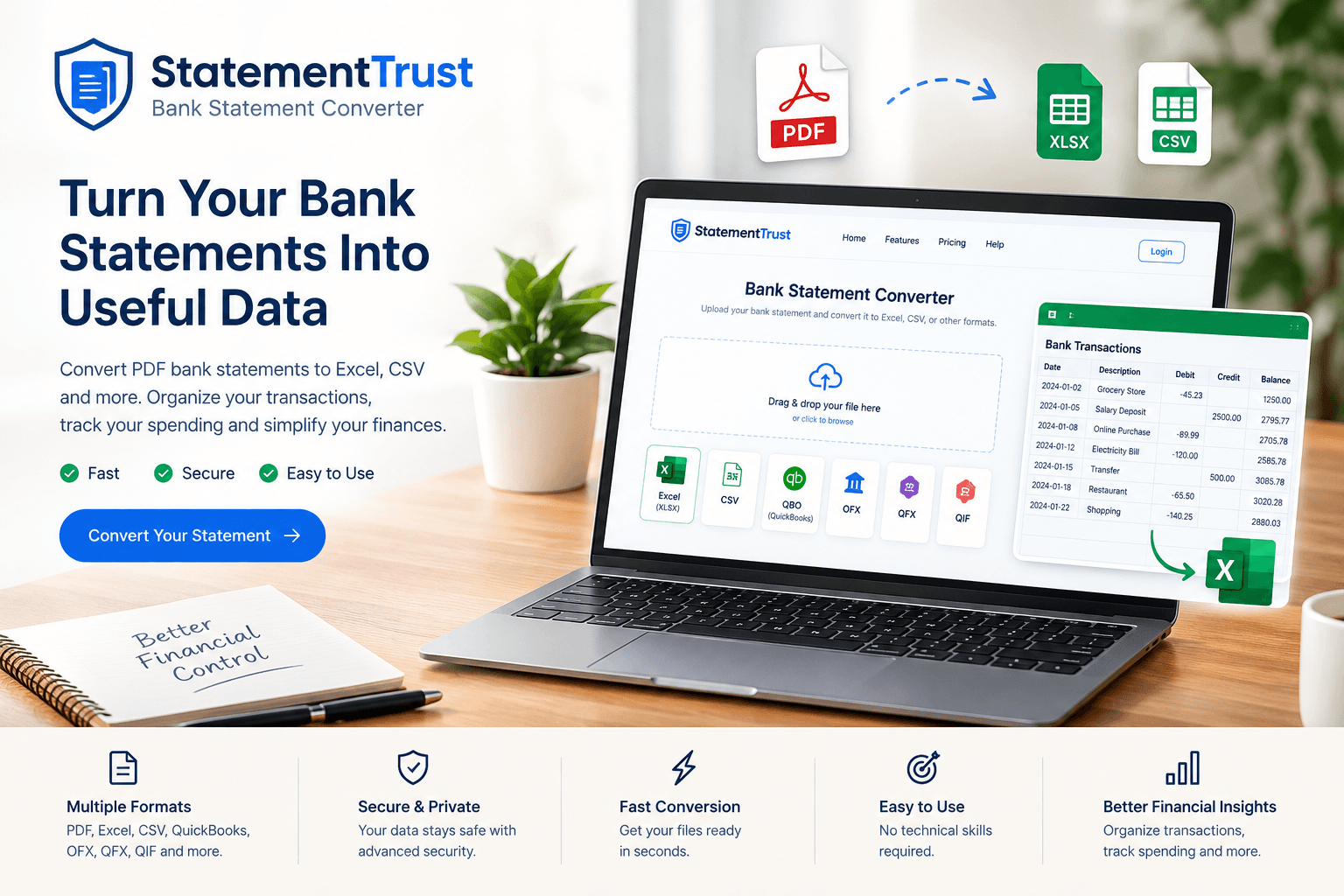
About this app
I've seen plenty of bank statement converters, but StatementTrust genuinely surprised me. It's built by Joseph Adam, a bookkeeper who got tired of retyping statements by hand, and that origin story shows in the product's DNA. The core promise is simple: drop in a PDF bank statement, and get back clean, perfectly formatted Excel or CSV files in seconds — and crucially, all the processing happens right in your browser. Nothing gets uploaded, which is a huge win for anyone handling sensitive financial data. It claims to work with thousands of banks worldwide, and it has smart layout detection so you don't need to fiddle with templates.
Key features
- 1Browser-only PDF bank statement conversion — files never leave the device
- 2Exports to Excel, CSV, QBO, Xero, Sage, FreshBooks, OFX, QIF, IIF, and Tally
- 3Balance and sum verification with a green tick when totals reconcile
- 4Pro Excel dashboard sheet: money in/out, monthly table, category breakdown, charts
- 5Guest tier (1 page, no signup) and free registered tier (5 pages)
Target customer profile
Drawn from the product itself, not from a survey.
Demographic
Small business owners who handle their own bookkeeping
Pain points
Spending hours manually typing bank statements into Excel; risk of costly errors; need for clean records for tax time.
Primary needs
Fast, error-free conversion of PDF statements to Excel/CSV; balance verification; data privacy.
Demographic
Bookkeepers and accountants managing multiple client statements
Pain points
Repetitive data entry across many clients; need for reliable, standardized formats for QuickBooks/Xero; time-consuming checks.
Primary needs
Batch processing; support for accounting formats; automated balance checks; audit-ready outputs.
Demographic
Freelancers and solo entrepreneurs preparing for tax season
Pain points
Disorganized financial records; difficulty categorizing expenses; last-minute scramble to compile statements.
Primary needs
Quick conversion from PDF to clean spreadsheets; automatic tagging for expense categories; secure, browser-based processing.
Scout Review
Written by AI from measured evidence, scored out of 100.
StatementTrust is a focused, privacy-first bank statement converter built by a bookkeeper, and it shows: the converter is the hero, the sample statement is one click away, and the output formats (Excel, CSV, QBO, Xero, Sage, Tally) are exactly what bookkeepers need. The browser-only processing is a genuine differentiator, not marketing — files never leave the device. Weak spots: mobile LCP at 4.4s, a 5-page free tier that's more demo than product, missing SPF/DMARC, no compliance page, and two real accessibility failures (contrast, table headers). The homepage also tries to do too much at once. For an early-stage tool it's well above the median — the idea is sound and the execution is competent; the polish and trust signals are what's left to earn.
Measure by measure
Usability
74Guest tier lets you convert one page with no signup, a sample statement is one click away, and the flow is drop → review rows → save. Free tier caps at 5 pages, which is tight for anyone with more than a couple of statements.
Design
72Clean card-based landing page with a real converter up top, a 4-step explainer, an Excel dashboard mock, and bank logos. Dense but coherent; the long single-page stack of 30+ format pairs is the main visual clutter.
Speed
71Desktop Lighthouse 98/100, mobile 81/100 with a 4.4s LCP — mobile first paint is the drag. CLS 0 and TBT 104ms are clean. Client-side processing means conversions don't wait on a server round-trip.
Security
78Strong header posture (HSTS, CSP, frame protection, Referrer-Policy, Permissions-Policy) and the core privacy claim is architectural: files never leave the browser. SPF and DMARC are missing, and no SOC 2/ISO page was found.
Accessibility
82Lighthouse 96/100 with two real failures: contrast on some text and `<td>` cells in a large table missing headers. Theme toggle and language selector are present; no WCAG statement published.
Growth
62Real problem (manual statement retyping), specific audience (bookkeepers and SMB owners), and a defensible wedge: browser-only privacy plus balance checks and accounting-format exports. Very new domain; traction unproven.
Improvement areas
- Mobile LCP at 4.4s — optimize first paint for phone users
- Free tier capped at 5 pages is too tight to evaluate the product properly
- Missing SPF and DMARC records; no SOC 2/ISO or security trust page
- Two Lighthouse accessibility failures: contrast and missing table headers
Design & Usability
StatementTrust's landing page does the hard part right: the converter is the hero, a sample statement is one click away, and the 4-step explainer plus Excel dashboard mock show exactly what you get. The guest tier (1 page, no signup) is the right instinct, but the free registered cap of 5 pages is tight for anyone with a year of statements to process. Visually the page is clean and the light/dark/system toggle is a nice touch, but the homepage tries to be a converter, a format-pair directory, a dashboard demo, and a testimonial wall at once — the 30+ conversion pairings buried mid-page are noise for a first-time visitor who just wants to drop a PDF.
Speed & Security
Speed is split: desktop Lighthouse 98/100 is genuinely fast, but mobile lands at 81/100 with a 4.4s LCP — on a phone the page takes its time. CLS 0 and TBT 104ms are clean, and because conversion runs client-side there's no upload wait once you're in. Security is the strongest story: HTTPS enforced, HSTS, CSP, frame protection, Referrer-Policy and Permissions-Policy all present (10/12 probe points), and the privacy claim is architectural rather than a promise — files never leave the browser, so there's no server-side statement store to leak. The gaps are SPF and DMARC (email spoofing hardening) and the absence of any SOC 2/ISO page, which matters if accountants are the buyers.
Accessibility & Growth
Accessibility scores 96/100 on Lighthouse with two concrete failures: insufficient color contrast and `<td>` cells in a large table missing headers. The theme toggle and language selector show some care, but there's no WCAG statement and the table-header miss is a real screen-reader problem on what is literally a data table. Growth is the more interesting question: the problem (retyping bank statements) is real, the audience (bookkeepers, SMB owners, freelancers at tax time) is specific, and the wedge — browser-only processing plus balance verification plus QuickBooks/Xero/Sage/Tally exports — is something Adobe Acrobat and Docparser structurally can't match without rebuilding. The domain is brand new and only a Twitter profile is listed, so traction is unproven, but the idea has room: privacy-first financial tooling is a growing need, and the accounting-format exports give it a path into bookkeeper workflows.
Conclusion
If you handle sensitive statements and don't want them on someone else's server, StatementTrust is the most honest answer in this category right now. If you need enterprise compliance paperwork or you're converting on a phone all day, wait for the next release. Either way, the free guest conversion is a real test — drop a statement in and see if the rows come out clean before you pay for anything.
Suggestions for improvement
- Raise the free registered tier from 5 pages to something that lets a user process a full quarter — 5 pages is a demo, not a trial.
- Publish SPF and DMARC records and add a short security/trust page; accountants will ask before they buy.
- Fix the two Lighthouse accessibility failures: contrast on the failing text and `<th>` headers on the data table.
- Split the homepage — move the 30+ format-pair directory to a dedicated /converters page so the hero stays focused.
Alternatives comparison
Named competitors, point by point. Nobody paid to appear here or to be left out.
 StatementTrust StatementTrust |  Adobe Acrobat Pro Adobe Acrobat Pro | Soda PDF |  Docparser Docparser | |
|---|---|---|---|---|
| Bank-statement-aware parsing (no template setup) | Yes — smart layout detection across 1,000+ banks | No — generic PDF-to-Excel, formatting often breaks | No — generic conversion, no bank-specific parsing | Partial — requires parsing rules per bank format |
| Privacy model (where files are processed) | Client-side in browser; files never uploaded | Desktop app; cloud features available | Desktop and cloud; uploads for cloud features | Cloud — documents uploaded to servers |
| Accounting-format exports (QBO, Xero, Sage, Tally) | Yes — QBO, Xero, Sage, FreshBooks, Tally, OFX, QIF, IIF | No — Excel/CSV only | No — Excel/CSV only | Yes — via integrations, requires setup |
| Balance / sum verification | Yes — green tick when totals reconcile | No | No | No |
| Free trial without signup | Yes — 1 page as guest, 5 pages registered | 7-day trial, requires account | Free tier with limits, requires account | 14-day trial, requires account |
Adobe Acrobat Pro
Can export PDFs to Excel, but formatting often breaks, requiring heavy manual cleanup. Not bank-statement aware.
Soda PDF
Offers PDF to Excel conversion but lacks specialized balance checks and bank-specific parsing, often requiring manual fixes.
Docparser
A generic document parser that can extract data from bank statements but requires setup of parsing rules for each bank format; not as turnkey.
Comparing options? See StatementTrust alternatives, scored side by side
More Finance apps
View all Finance
CalcFi
92A free, comprehensive financial calculator platform with ...

CreateMyCoin
92A no-code Solana token creator that deploys SPL tokens in...

Redstone
89Portfolio optimization and risk metrics for investors.

Stellar Staff
88A top-rated virtual assistant agency that matches busines...

Prop Firm Consistency Calculator
88Check your prop firm consistency rule and best-day percen...

Receipt Bot
88Automated bookkeeping software that extracts data from re...

BringMe Money
88AI invoice follow-up that drafts reminders and tracks next steps.

OpenBudget
87Connect your bank to AI for real answers about your money.

StockFit API
87A developer-first financial data API providing structured...

HISAB 360
87A Windows Excel add-in that pulls your ledger data into the workbook, reconciles it, and drafts the reports - all in plain English, inside Excel.

Stripdo
87Stripdo is a smart invoicing tool that automatically gene...

Credyt
87Real-time monetization infrastructure for AI products tha...


A platform dedicated to providing unbiased reviews of newly launched applications, analyzing everything from their features to their full potential.
info@scoutforge.net© 2026 Scoutforge. All rights reserved.
