Cycling through all six. Tap any point to stop.
Measured on six things
Browser-based bank statement PDF to Excel/CSV converter w...
Security
52HTTPS enforced with HSTS and local parsing uploads nothing by default; AI is opt-in with clear Qwen disclosure. But the header probe scores 5/12 — no CSP, no frame protection, no DMARC — and no SOC 2 or audit claims.
Screenshots
1 / 1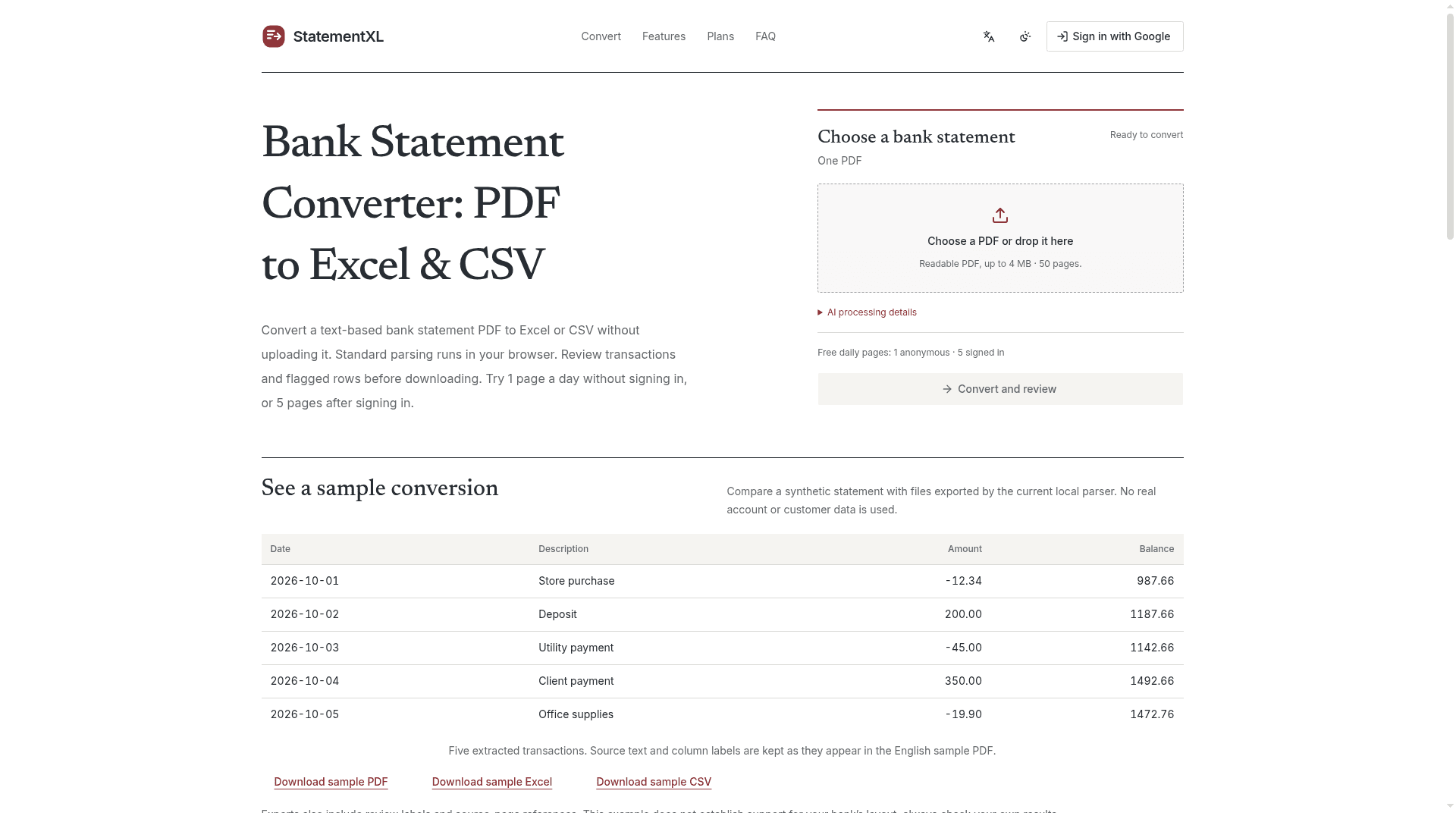
About this app
StatementXL is a privacy-conscious web app that converts text-based bank statement PDFs into Excel or CSV files without uploading the original document for standard parsing. The core parsing runs locally in your browser, which is a meaningful differentiator for anyone handling sensitive financial data. You can try it without an account for one page per day, or sign in with Google for five free pages daily. Paid plans start at $9.90/month for 500 pages, bump to $24.90 for 1,000 pages, and $39.90 for 2,000 pages. Professional and Business tiers add optional AI parsing for scanned PDFs, and the app is explicit that AI never activates automatically—you must opt in, and only then is the full PDF sent to Qwen AI Platform. The review workflow is a strong point: before downloading, you can inspect extracted transactions, balances, flagged rows, and source-page references. Exports include review labels and source citations, which helps with auditing. It also provides manual CSV import guides...
Key features
- 1Local in-browser parsing of text-based bank statement PDFs — no upload for standard conversions.
- 2Review workflow with flagged rows, balances, and source-page references before export.
- 3Excel/CSV/JSON/Markdown/TSV/HTML exports with review labels and source citations.
- 4Optional opt-in AI parsing (Qwen) for scanned PDFs on Professional and Business tiers.
- 5Detailed QuickBooks Online and Wave manual CSV import guides with format examples.
Target customer profile
Drawn from the product itself, not from a survey.
Demographic
Freelancers and solo bookkeepers
Pain points
Manual PDF data entry is slow and error-prone; bank CSV exports are often missing.
Primary needs
Quick, low-cost conversion with a free tier and local privacy.
Demographic
Small accounting firms
Pain points
Client statements arrive in mixed PDF formats; scanned files need OCR.
Primary needs
Higher page allowances, optional AI parsing, and review flags.
Demographic
Small business owners
Pain points
Monthly reconciliation requires Excel/CSV data for QuickBooks or Wave.
Primary needs
Simple export workflow and import guides without a steep learning curve.
Scout Review
Written by AI from measured evidence, scored out of 100.
StatementXL is a focused, well-built bank statement converter with a real architectural differentiator: standard parsing runs in your browser, so the PDF never leaves your machine. The review-before-download workflow, source-page citations, and detailed QuickBooks/Wave import guides are above-average for the category. Speed is excellent, accessibility is clean, and the pricing is honest about what each tier unlocks. The gaps are security hardening (missing CSP, frame protection, DMARC) and a primary CTA that visually disappears. Against Adobe Acrobat, Smallpdf, and Docparser, it wins on privacy and bank-statement specificity, and loses on breadth and enterprise trust signals.
Measure by measure
Usability
68Upload zone and free-page quota sit above the fold, sample conversion downloads let you test output without an account, and the QuickBooks CSV guide is genuinely detailed. Disclaimers are honest but small enough to be skipped.
Design
71Editorial serif-and-sans pairing with restrained maroon accent suits a financial tool; sample table previews output well. Primary CTA is a pale grey bar that undercuts the main action, and the footer is cluttered with developer artifacts.
Speed
82Lighthouse mobile 93/100 (LCP 1.2s, CLS 0, TBT 306ms) and desktop 100/100. Local in-browser parsing avoids upload round-trips for standard conversions. No lag complaints found.
Security
52HTTPS enforced with HSTS and local parsing uploads nothing by default; AI is opt-in with clear Qwen disclosure. But the header probe scores 5/12 — no CSP, no frame protection, no DMARC — and no SOC 2 or audit claims.
Accessibility
79Lighthouse accessibility audit scores a perfect 100/100, and the responsive layout with readable contrast backs it up. No WCAG statement or multi-language support found, so it sits below the top of the band.
Growth
58Real problem (manual PDF data entry, missing bank CSV exports) with a specific local-privacy wedge and review workflow that general PDF tools lack. Differentiated but a narrow, price-sensitive niche.
Improvement areas
- Primary CTA is a low-contrast grey bar that undercuts the main action.
- Security headers incomplete: no CSP, frame protection, X-Content-Type-Options, Referrer-Policy, or DMARC.
- No published security page, SOC 2, or accessibility statement despite strong underlying posture.
- Footer cluttered with developer artifacts (llms.txt, index.md, AI prompt icons) that dilute focus.
Design & Usability
StatementXL's homepage reads like a well-edited financial document: serif headline, muted sans body, restrained maroon accent, and a sample conversion table that shows date/description/amount/balance output before you upload anything. The upload card and free-page quota sit above the fold, so the core task and its limits are visible immediately, and the QuickBooks Online CSV guide is more detailed than most competitors' entire docs. The weak spot is the primary 'Convert and review' button — a pale grey bar that carries less visual weight than the secondary maroon links — plus a footer cluttered with developer artifacts (llms.txt, index.md, AI prompt icons) that dilutes focus for the actual bank-statement user.
Speed & Security
Speed is a genuine strength: Lighthouse mobile 93/100 with LCP 1.2s and CLS 0, desktop a clean 100/100, and local in-browser parsing means standard conversions never touch a server. Security is more mixed. The privacy architecture is honest and well-disclosed — local parsing uploads nothing, AI is strictly opt-in, and the Qwen disclosure is explicit about what gets sent. But the HTTP probe scores 5/12: HTTPS and HSTS are in place, yet there's no CSP, no frame protection, no X-Content-Type-Options, no Referrer-Policy, and no DMARC. No SOC 2, ISO, or pen-test claims appear anywhere.
Accessibility & Growth
Accessibility is the quiet win: a perfect 100/100 Lighthouse audit, responsive layout, readable contrast, and tabular numbers that screen readers handle well. What's missing is a published WCAG statement or multi-language support, so it lands high in the band rather than at the top. On growth, the idea holds up: manual PDF data entry is a real, recurring pain, bank CSV exports are often incomplete, and the local-privacy wedge is something Adobe Acrobat, Smallpdf, and Docparser structurally cannot match without rebuilding their architecture. The review workflow with source-page citations is a genuine differentiator for bookkeepers. The limit is the niche — price-sensitive solo operators doing this work a few times a quarter.
Conclusion
If you handle client bank statements and don't want them uploaded to a general PDF service, StatementXL is the most defensible option in this comparison set — the local-parsing architecture is a real moat, not marketing. The free tier (1 page anonymous, 5 signed in) is enough to test it properly before paying. The $9.90 Standard tier is the right entry point for solo bookkeepers; Professional at $24.90 only makes sense if you actually need AI for scanned PDFs. What would move this from 'good niche tool' to 'category leader' is a security page with real headers behind it and a CTA that looks like it wants to be clicked.
Suggestions for improvement
- Fix the primary CTA: give 'Convert and review' the maroon accent treatment so it outweighs secondary links and the logo.
- Add CSP, X-Frame-Options, X-Content-Type-Options, Referrer-Policy, and DMARC — the probe checklist is 5/12 and these are cheap wins.
- Publish a short security page documenting the local-parsing architecture, AI opt-in flow, and data handling; even without SOC 2 it builds trust.
- Add an accessibility statement noting the 100/100 audit and keyboard/screen-reader support, and consider a second language for the guides.
Alternatives comparison
Named competitors, point by point. Nobody paid to appear here or to be left out.
 StatementXL |  Adobe Acrobat |  Smallpdf |  Docparser | |
|---|---|---|---|---|
| Bank-statement-specific parsing | Yes — purpose-built for bank statement layouts with review flags and source citations | No — general PDF export, no bank-specific parsing | No — general PDF-to-Excel, no statement parsing | Configurable structured extraction, not bank-statement-specific |
| Local in-browser parsing (no upload) | Yes — standard parsing runs locally; AI is opt-in only | Desktop app processes locally; web tools upload | No — files uploaded to servers | No — server-side parsing service |
| Free tier | 1 page/day anonymous, 5 pages/day signed in | Limited free tools; full export requires subscription | Free with daily task limits | Free trial with limited documents |
| Review workflow before export | Yes — flagged rows, balances, source-page references | Manual review in PDF editor, no structured flags | No review workflow | Parsing rules review, not transaction-level flags |
| Pricing (entry paid tier) | $9.90/mo for 500 pages; $24.90 for 1,000; $39.90 for 2,000 | Acrobat Pro subscription, higher monthly cost | Pro subscription for unlimited tasks | Tiered by document volume, generally higher entry cost |
| Accounting software import guides | Detailed QuickBooks Online and Wave CSV guides | Generic export docs, no accounting-specific guides | No accounting import guidance | Integration docs for destinations, not CSV import walkthroughs |
Adobe Acrobat
PDF editing and export tool with OCR and spreadsheet export, but not bank-statement-specific.
Smallpdf
General-purpose PDF converter with PDF-to-Excel, but no bank statement parsing or review workflow.
Docparser
Document parsing service for structured extraction, more complex and not focused on local browser parsing.
Comparing options? See StatementXL alternatives, scored side by side
More Finance apps
View all Finance
CreateMyCoin
92A no-code Solana token creator that deploys SPL tokens in...

CalcFi
92A free, comprehensive financial calculator platform with ...

Flicker: Crypto & Stock Analysis
90Flicker reads any coin or stock and gives you a verdict, its reasons, and the exit before the entry.

Redstone
89Portfolio optimization and risk metrics for investors.

Receipt Bot
88Automated bookkeeping software that extracts data from re...

Stellar Staff
88A top-rated virtual assistant agency that matches busines...

BringMe Money
88AI invoice follow-up that drafts reminders and tracks next steps.

ArbPlay
88Real-time sure bets scanner for Greek bookmakers, exchang...

Prop Firm Consistency Calculator
88Check your prop firm consistency rule and best-day percen...

Stripdo
87Stripdo is a smart invoicing tool that automatically gene...

OpenBudget
87Connect your bank to AI for real answers about your money.

StockFit API
87A developer-first financial data API providing structured...


A platform dedicated to providing unbiased reviews of newly launched applications, analyzing everything from their features to their full potential.
info@scoutforge.net© 2026 Scoutforge. All rights reserved.
