Is this your app?
Claim MonsterOps to manage its page, add your badge and see your traffic — free, and it stays free.
Cycling through all six. Tap any point to stop.
Measured on six things
MonsterOps is an all-in-one Business Operating System that replaces scattered spreadsheets with connected scorecards, meetings, and accountability for growing teams.
Security
62HTTPS enforced with SPF, DMARC, and several hardening headers, plus Advanced-tier auditing and disaster recovery. Missing HSTS, CSP, and frame protection; no published audit.
Screenshots
1 / 3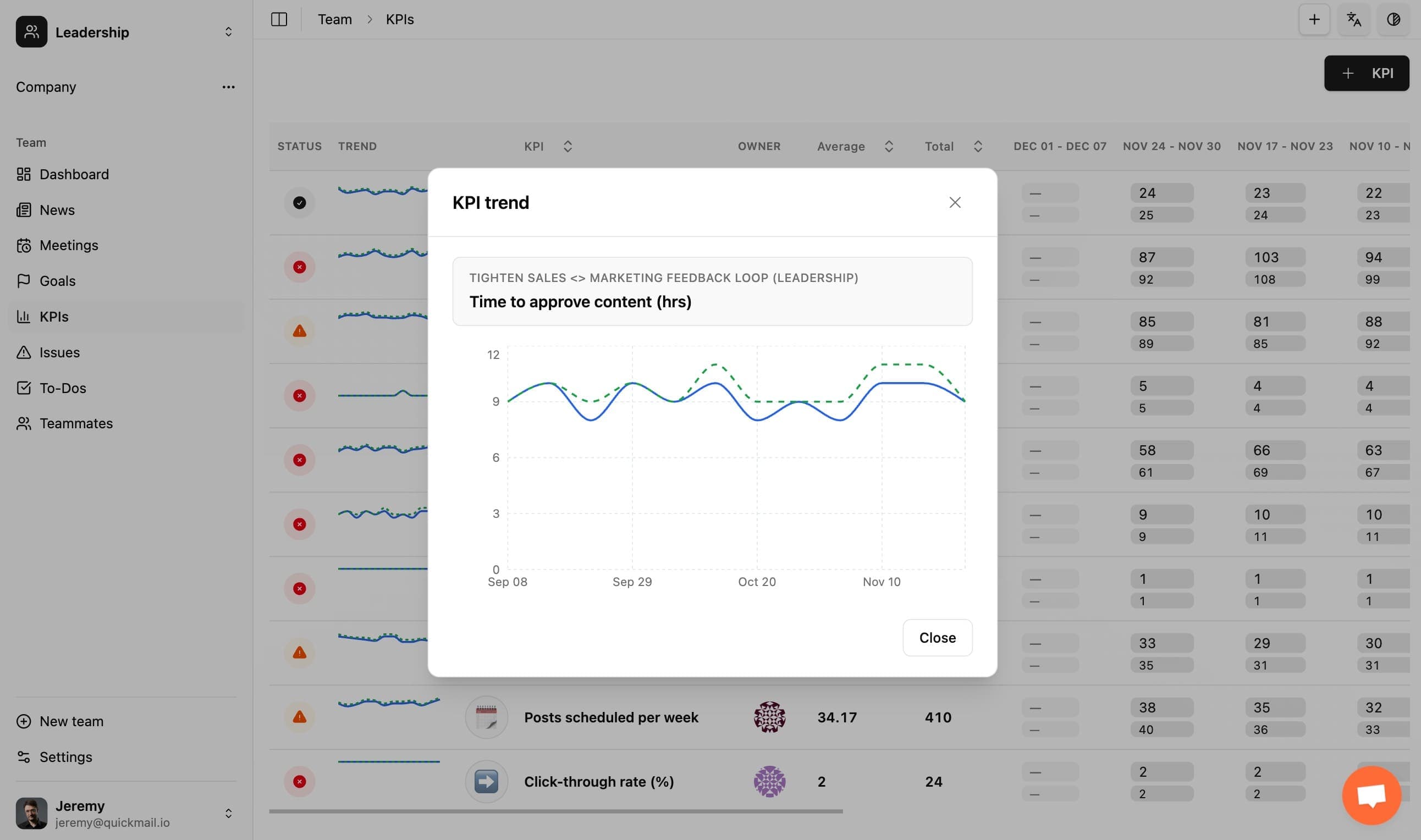
About this app
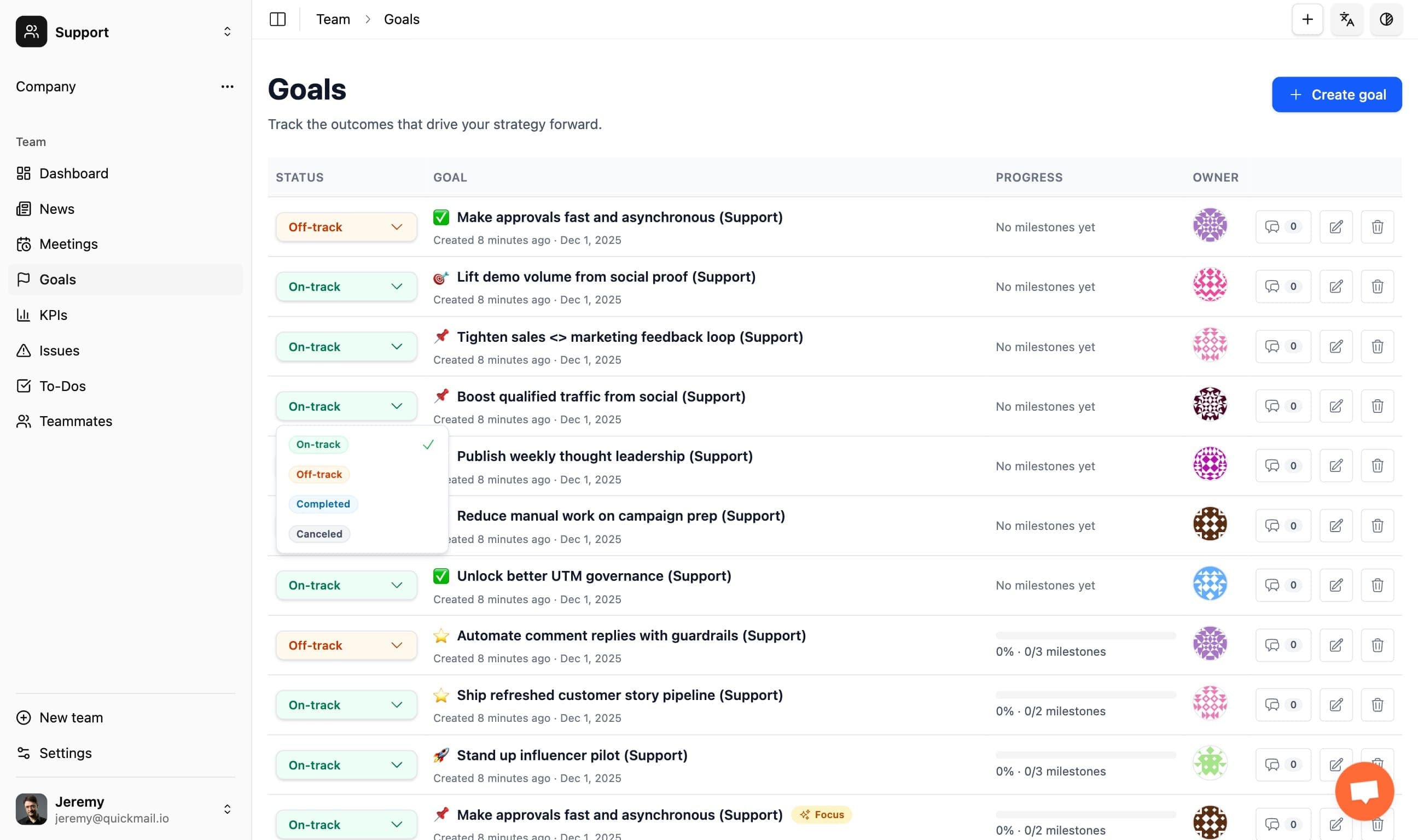
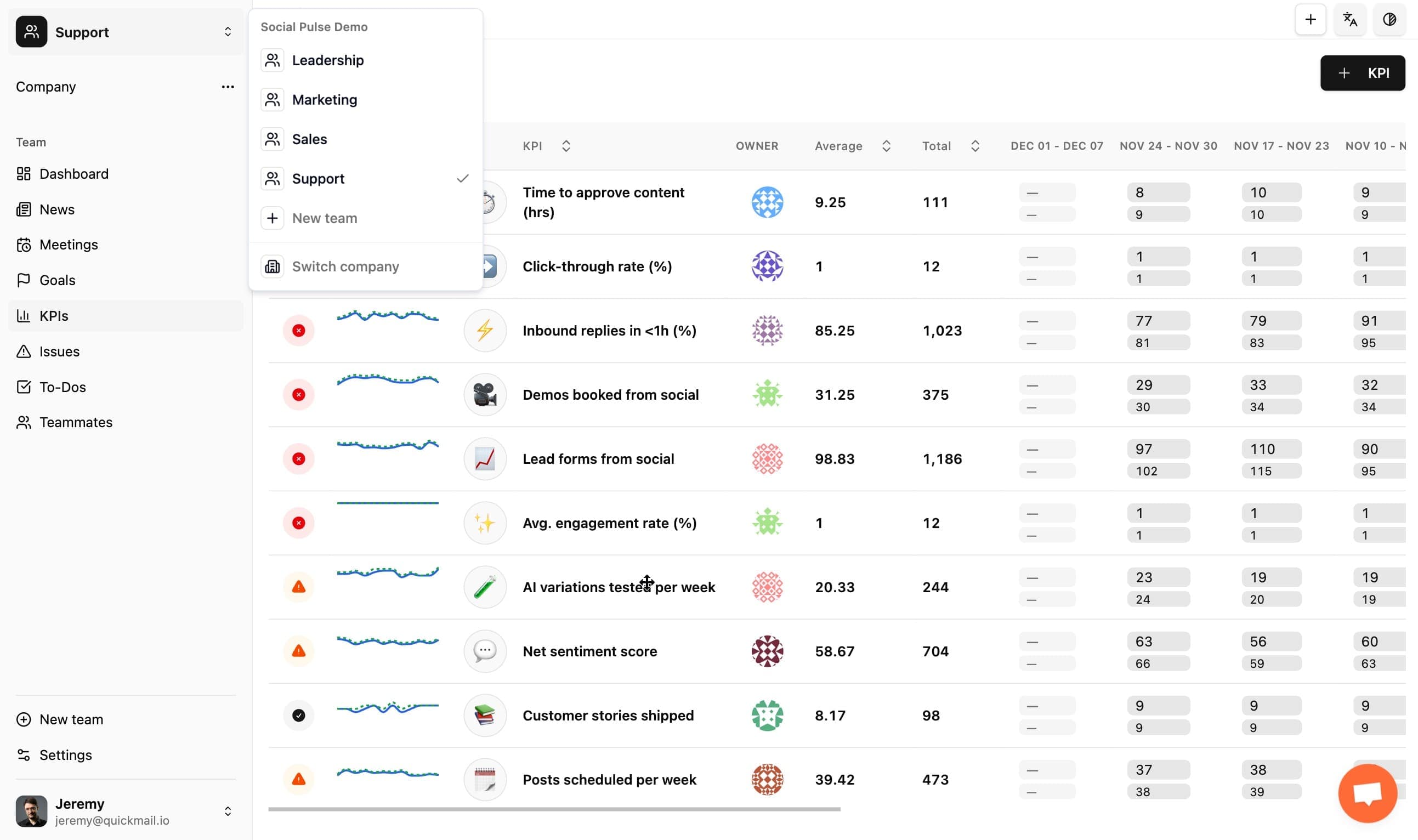
MonsterOps is a comprehensive Business Operating System designed to streamline operations for growing teams. As someone who's tried countless productivity tools, I can say MonsterOps stands out by tackling a common pain point: the chaos of scattered spreadsheets and disconnected workflows. It centralizes everything into a unified platform with connected scorecards, structured meetings, and clear accountability features. The app aims to replace fragmented tools with an integrated solution that enhances team alignment and performance tracking. From my research, it's gaining traction among small to medium-sized businesses looking to scale efficiently without the complexity of traditional enterprise systems. The conversational, tech-savvy tone makes it feel like a tool built by people who understand real-world team dynamics, not just another corporate software. SEO keywords: business operating system, team productivity, scorecards, accountability tools, growing teams, workflow management, all-in-one platform.
Key features
- 1Cascading goals and quarterly rocks with milestones, owners, and due dates tied to company objectives
- 2Business metrics with color-coded trends and weekly/monthly/quarterly/yearly views without extra data entry
- 3MonsterAI natural-language queries across rocks, to-dos, metrics, and meeting notes, plus MCP/API connectors
Target customer profile
Drawn from the product itself, not from a survey.
Demographic
Small to medium-sized business owners and managers
Pain points
Disorganized spreadsheets, lack of team accountability, inefficient meetings, difficulty tracking performance metrics
Primary needs
Centralized system for operations, clear performance tracking, streamlined team communication
Demographic
Startup founders and scaling teams
Pain points
Rapid growth leading to operational chaos, scattered tools causing inefficiencies, need for scalable processes
Primary needs
Scalable business OS, integrated workflows, real-time accountability, easy onboarding for new team members
Demographic
Remote or distributed team leaders
Pain points
Challenges in maintaining team alignment, tracking remote work productivity, coordinating meetings across time zones
Primary needs
Virtual collaboration tools, transparent performance dashboards, asynchronous meeting capabilities, remote team management
Scout Review
Written by AI from measured evidence, scored out of 100.
MonsterOps is a framework-native business operating system aimed at SMB leadership teams running EOS, OKRs, Scaling Up, or 4DX. It centralizes cascading goals, business metrics, leadership meetings, issues, and to-dos, then layers MonsterAI on top for natural-language queries across your rocks, metrics, and meeting notes. The pricing model is its sharpest edge: free for up to 10 seats, then a flat $99/mo for unlimited seats, which undercuts per-user competitors like Ninety and Strety by thousands per year at 25 users. The Advanced tier at $499/mo adds granular permissions, disaster recovery, and full auditing. Design is clean and consistent, though the hero demo table is cramped and the challenge cards feel sparse. Speed is excellent on desktop and solid on mobile. Security is competent but lacks HSTS, CSP, and any published audit. Accessibility scores 91/100 but fails contrast, heading order, and alt text. Growth potential is real: a specific segment, a concrete price wedge, and AI plus integration hooks that general project tools do not match.
Measure by measure
Usability
68Free tier for 10 seats, no credit card, framework-agnostic sections you can rename, and a claimed sub-week launch. Nested demo sidebar and thin docs visibility keep it from higher.
Design
71Clean, consistent orange-accented UI with strong hero hierarchy and scannable green/red metric pills. Held back by a cramped hero demo table and sparse challenge cards.
Speed
70Desktop Lighthouse 99/100 and mobile 83/100 with near-zero CLS. Mobile LCP of 3.4s and 247ms TBT are the drag, but the site stays responsive.
Security
62HTTPS enforced with SPF, DMARC, and several hardening headers, plus Advanced-tier auditing and disaster recovery. Missing HSTS, CSP, and frame protection; no published audit.
Accessibility
68Lighthouse a11y 91/100 with responsive layout, but failing contrast, heading order, and missing image alt attributes. No a11y statement or multi-language support found.
Growth
66A real problem (scattered ops for EOS/OKR teams) with a concrete wedge: flat $99/mo unlimited seats undercutting per-user incumbents, plus MonsterAI and MCP connectors.
Improvement areas
- Accessibility basics: fix color contrast, heading order, and missing image alt attributes flagged by Lighthouse
- Security headers: add HSTS, CSP, and frame protection to move past the 7/12 checklist score
- Hero demo table density: reduce visible date columns and enlarge tap targets for mobile visitors
Design & Usability
MonsterOps presents a polished, orange-accented homepage with clear hierarchy and scannable metric pills, and the visual audit rated the overall impression good. The hero's embedded KPI table is the weak spot: too many date columns crammed into a small panel, with tap targets that will frustrate mobile visitors. The three 'Common Challenges' cards feel sparse on plain white, and testimonial quotes wrap awkwardly under a 2x2 headshot grid. Usability is stronger on paper: a free plan for up to 10 seats with no credit card, a 14-day trial on paid tiers, framework-agnostic sections you can rename for EOS, OKRs, Scaling Up, or 4DX, and a claimed launch in under a week. The embedded demo sidebar, however, shows many nested items with small icons, which raises first-time scanning cost. For a team already fluent in a business framework, the learning curve looks shallow; for everyone else, the demo itself is the tutorial.
Speed & Security
Speed is a tale of two devices. Lighthouse desktop scores 99/100, and mobile lands at 83/100 with a near-perfect CLS of 0.007 and FCP of 2.6s. The mobile LCP of 3.4s and 247ms TBT are the real drags, meaning phone users wait noticeably longer for the hero to paint. No user complaints about lag surfaced in the collected evidence, so the measured numbers are the story. Security is competent but not hardened: HTTPS is enforced, SPF and DMARC are present, and X-Content-Type-Options, Referrer-Policy, and Permissions-Policy are set. But HSTS, CSP, and frame protection are all absent, giving a 7/12 checklist score. The Advanced tier advertises granular permissions, disaster recovery, and full auditing, which is good product-level security. What is missing is third-party validation: no SOC 2, ISO, or pen-test claim appears in the collected site content, and none was independently verified.
Accessibility & Growth
Accessibility lands at 91/100 on Lighthouse, which sounds strong until you read the failing audits: insufficient color contrast, non-sequential heading order, and images without alt attributes. Those are fixable basics, and their presence suggests accessibility was not a first-class concern during build. The site is English-only via an /en path, and no accessibility statement or WCAG claim appears in the collected content. Keyboard support and screen reader behavior were not verified. Growth is the more interesting story. MonsterOps names a real, specific problem: SMB leadership teams running EOS, OKRs, Scaling Up, or 4DX who are drowning in scattered spreadsheets and disconnected meeting notes. Its wedge is concrete: flat $99/mo for unlimited seats versus per-user incumbents like Ninety ($134.40/user) and Strety (~$156/user), plus MonsterAI and MCP/API connectors with 8,000+ Zapier integrations. Monday, ClickUp, and Asana are general work platforms, not framework-native business OS tools, so the positioning is distinct. The limit is adoption: convincing founders to abandon their spreadsheets is a sales problem, not a feature problem.
Conclusion
MonsterOps is a credible, well-priced entrant in a category dominated by per-seat pricing and general-purpose project tools. Its framework-agnostic design means teams already running EOS or OKRs can adopt it without translating their terminology, and the free tier for 10 seats removes the usual procurement friction. The flat $99/mo unlimited-seat model is a genuine differentiator that will resonate with founders tired of license math. Where it needs work: tighten the hero demo table, fix the accessibility basics (contrast, heading order, alt text), and add HSTS and CSP to the security headers. Publishing a SOC 2 or pen-test report would meaningfully raise trust for buyers handling sensitive operational data. If MonsterOps executes on those, it has a real shot at becoming the default business OS for small, framework-driven teams. For now, it is a strong value play with a few rough edges worth sanding down.
Suggestions for improvement
- Fix the three failing accessibility audits: color contrast, sequential heading order, and missing image alt attributes.
- Add HSTS, Content-Security-Policy, and frame protection headers to close the 7/12 security checklist gap.
- Simplify the hero demo table by reducing visible date columns and enlarging tap targets for mobile users.
- Publish a security page with SOC 2 or pen-test status to build trust with buyers handling operational data.
Alternatives comparison
Named competitors, point by point. Nobody paid to appear here or to be left out.
 MonsterOps MonsterOps |  Monday.com Monday.com |  ClickUp ClickUp |  Asana Asana | |
|---|---|---|---|---|
| Pricing model | Free up to 10 seats; flat $99/mo unlimited seats; Advanced $499/mo | Per-seat tiers; pricing scales with user count | Per-seat tiers with a limited free plan | Per-seat tiers; free for up to 10 users on basic plan |
| Framework-native support (EOS, OKRs, Scaling Up, 4DX) | Framework-agnostic with renameable sections for EOS, OKRs, Scaling Up, 4DX | Templates available but not framework-native | Goals and docs but no native EOS/4DX structure | Goals feature but no framework-specific meeting or rock structure |
| Integrated leadership meeting workflow | Auto-populated agendas with live scorecards, rocks, and issues during the call | Meeting notes via docs; no structured meeting agenda engine | Docs and tasks; no dedicated leadership meeting runner | Task and project tracking; no built-in meeting agenda system |
| AI assistant over company data | MonsterAI answers from rocks, to-dos, metrics, and meeting notes; MCP connector | AI features available on higher tiers | ClickUp AI available as an add-on | AI features on premium tiers |
| Business metrics and scorecards | Color-coded trends with weekly/monthly/quarterly/yearly views and off-track alerts | Dashboards and widgets; metrics require configuration | Dashboards and goals; scorecard setup is manual | Portfolios and goals; no dedicated scorecard view |
Monday.com
A popular work operating system with project management and team collaboration features, but more focused on task tracking than holistic business operations.
ClickUp
An all-in-one productivity platform offering tasks, docs, goals, and more, though it can be complex for teams needing a dedicated business OS.
Asana
A project management tool great for task and workflow management, but lacks the integrated scorecards and meeting features of a full business OS.
Comparing options? See MonsterOps alternatives, scored side by side
More Productivity apps
View all Productivity
Qamarero
92An all-in-one hospitality software for restaurants and ba...

The Stack Newsletter
92A weekly newsletter delivering curated tech jobs, intervi...

EmbedMyReviews
92White-label reputation management software for agencies s...

StoryPad
92Privacy-first open source journal app with a continuous t...

Puzzly – B2B Lead Generation & Sales Intelligence Platform
92Puzzly is an all-in-one B2B lead generation platform that...

Notion
92All-in-one AI workspace for docs, projects, and knowledge...

Vibe Coding Agent Skills
92A free, open-source platform offering 110 AI agent skills...

CC Switch
91Open-source desktop app for switching AI coding providers...

username.md
90One verified handle for your online identity, readable by...

What the GIF
89Frame-perfect video-to-GIF maker that runs entirely in yo...

AuditCloser
89White-label website audits that close deals for digital a...

NudgeWin
89Automated quote follow-up for trades and service businesses.


A platform dedicated to providing unbiased reviews of newly launched applications, analyzing everything from their features to their full potential.
info@scoutforge.net© 2026 Scoutforge. All rights reserved.
