

Usability68Design72Speed71Security52Accessibility70Growth58

Cycling through all six. Tap any point to stop.

Measured on six things

Subcontractor insurance tracking and prequalification for...

Security

52

HTTPS enforced with HSTS, SPF and DMARC present. Claims encryption at rest for documents. Missing CSP, frame protection, and several standard headers (6/12 checklist points). No SOC 2, ISO, or audit claims found.

Screenshots

1 / 1

About this app

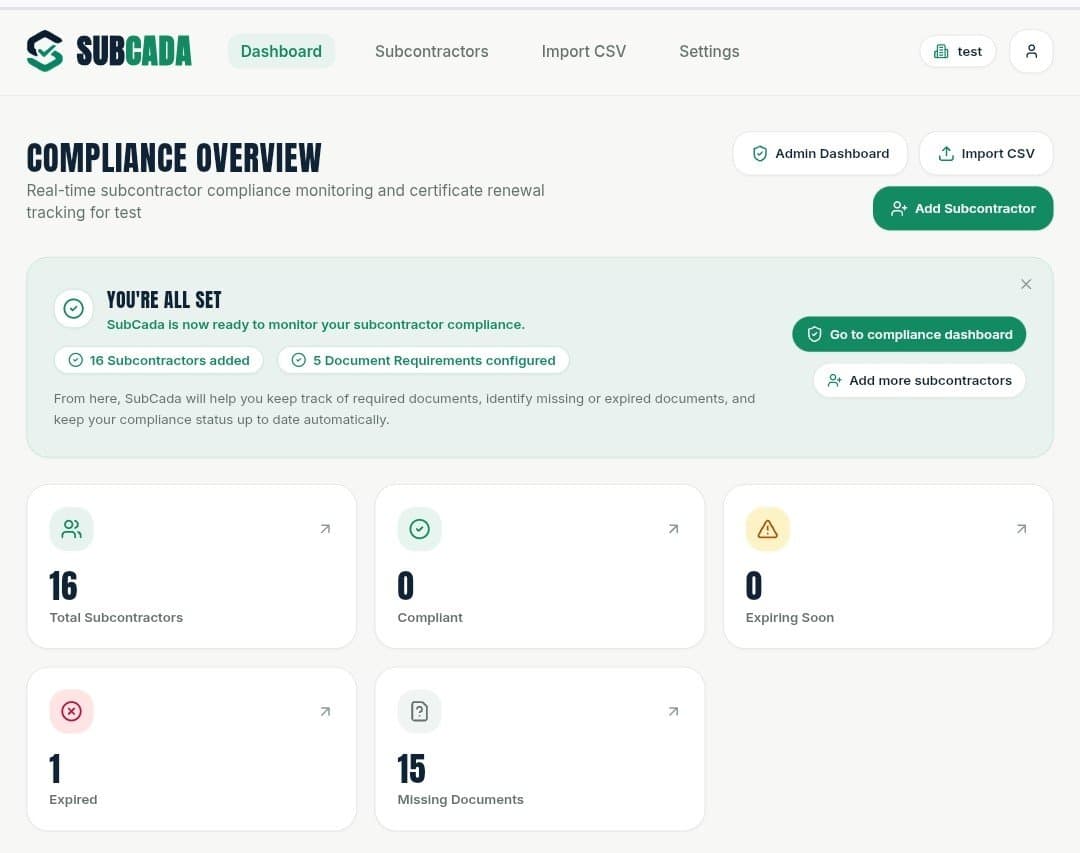
SubCada is a specialized software platform designed to streamline subcontractor insurance tracking and prequalification for general contractors and construction teams. It replaces the cumbersome spreadsheet-and-email approach with a centralized system that keeps certificates of insurance, workers’ compensation documents, W-9s, and trade licenses organized in one place. The platform automatically tracks expirations and sends timely reminders to subcontractors, who can upload updated documents via secure, account-free links. SubCada also offers a free prequalification form builder, allowing contractors to customize evaluation forms, download PDFs, or send them online. With straightforward monthly pricing starting at $29 for up to 25 active subcontractors and $49 for up to 100, SubCada is built for small to mid-sized construction businesses that want to reduce administrative overhead and ensure compliance without hiring extra staff. Its intuitive interface, CSV roster import, and docum...

Key features

  • 1Automated expiration reminders sent to subcontractors 30, 14, 7, and 1 day before certificates lapse, with secure account-free upload links.
  • 2Centralized document repository for COIs, workers' comp, W-9s, and trade licenses with version history and activity audit log.
  • 3Free prequalification form builder plus five no-login tools (compliance checklist, COI tracker, document request drafter, admin cost estimator).

Target customer profile

Drawn from the product itself, not from a survey.

Demographic

General contractors with 1-25 subcontractors

Pain points

Manual tracking in spreadsheets, missed expirations, lost certificates

Primary needs

Affordable, simple insurance tracking with automatic reminders

Demographic

Growing construction firms with 25-100 subcontractors

Pain points

Team collaboration on compliance, scalable document management

Primary needs

Multi-user access, customizable renewal schedules, priority support

Demographic

Office managers at construction companies

Pain points

Time-consuming follow-ups, disorganized paper trail, compliance risks

Primary needs

Centralized document repository, secure upload links, activity history

Human reviews

What people found in SubCada

Written by Scout Forge members. We do not verify that a reviewer purchased or installed the app.How we handle reviews

Paid review

Funded by the developer, who could not block publication — and the reviewer was paid the same either way.

10credits
Aeris

Aeris

Oct 09, 2026

I'm not a contractor, but I went through SubCada like one: the free tools first, then signup. The free tools are better than I expected. I put 40 subs, 5 docs each, 10 minutes per doc and 2 follow-ups into the cost calculator. It came back with 133 hours / about $4,700 a year, and it shows the whole calculation step by step. I checked it by hand and it's right. The checklist builder and the document request generator both gave me something I could actually send to a sub. The site also works fine on my phone, menu included. Signup is quick: email, password, then an 8-digit code by email that showed up in about a minute. Things I'd fix: - The verification email looks unfinished. The sender is "subcada email verif." and the subject is "subcada one time password", all lowercase. It's the first email a new customer gets, so it should look like it's from a real company. - If you leave the company field empty in the document request generator, the email still says "[Subcontractor Company]" and "[Your Name / Company]". Easy to send by accident. - In the checklist builder everything starts out selected, so clicking an item removes it. I clicked "Certificate of Insurance" expecting to add it and it disappeared from my checklist. - The form builder shows raw values like "short" and "yesno" in a dropdown. - A 6-character minimum password feels light for something that holds insurance documents and W-9s. Overall it looks like a focused, honest tool for a real headache. Mostly polish issues so far.

Test an app and get paid in credits

Developers fund these. You keep the credits whatever your verdict.

Scout Review

Written by AI from measured evidence, scored out of 100.

SubCada is a focused, well-priced tool for a real problem: general contractors tracking subcontractor insurance in spreadsheets. The core workflow — centralized documents, automatic expiration reminders, and account-free upload links — is exactly what the target user needs, and the $29/$49 pricing is aggressive against enterprise COI platforms. The landing page is polished, the free tools are genuinely useful, and the 14-day trial with no credit card lowers the barrier to entry. Where it falls short is depth: no public documentation, a thin security posture with no audits or compliance certifications, accessibility gaps that matter for a diverse construction workforce, and no multi-language support. It's a strong early-stage product with a clear wedge, but it needs to build out the trust and support infrastructure before it can move upmarket.

Measure by measure

Usability

68

14-day free trial with no credit card, five free tools with no login, CSV import, and account-free subcontractor uploads. Onboarding friction is low. No public help center or docs site found.

Design

72

Clean, modern SaaS aesthetic with numbered sections, a live interactive sample workspace, and consistent branding across homepage and pricing. Polished for an early-stage product, though not visually distinctive.

Speed

71

Lighthouse mobile 84/100 (LCP 3.5s, CLS 0, TBT 280ms), desktop 99/100. Solid performance for a marketing site with interactive elements; mobile LCP is the main drag.

Security

52

HTTPS enforced with HSTS, SPF and DMARC present. Claims encryption at rest for documents. Missing CSP, frame protection, and several standard headers (6/12 checklist points). No SOC 2, ISO, or audit claims found.

Accessibility

70

Lighthouse accessibility 93/100. Failing audits include color contrast, touch target sizing, and mismatched accessible names. No WCAG statement or multi-language support found. Responsive layout works on mobile.

Growth

58

Real problem (spreadsheet COI tracking), specific target (contractors with 1-100 subs), and a genuine wedge: account-free upload links plus $29/$49 pricing undercutting enterprise COI platforms. Early stage but clearly positioned.

Improvement areas

  • No public help center, knowledge base, or documentation site — support is email-only, which limits self-service for new users.
  • Thin security posture: no SOC 2, ISO, or audit claims; only 6/12 standard security headers present; no security page or bug bounty.
  • Accessibility gaps: failing contrast, touch target, and accessible name audits; no WCAG statement or multi-language support.

Design & Usability

SubCada's design is clean and purposeful — numbered sections, a live interactive sample workspace, and consistent branding across homepage and pricing. It's not visually distinctive, but it doesn't need to be; the product is a compliance dashboard, not a design portfolio. Usability is where it earns its keep: 14-day free trial with no credit card, five free tools with no email gate, CSV roster import, and — the smartest move — account-free secure upload links for subcontractors. That last one removes the single biggest friction point in COI tracking, because subs and their insurance agents will not create accounts. The gap is documentation: no public help center, no knowledge base, just email support. For a product handling compliance deadlines, that's a real limitation once you're past the trial.

Speed & Security

Speed is solid: Lighthouse mobile 84/100 with a 3.5s LCP and zero layout shift, desktop 99/100. The mobile LCP is the weak spot — likely the interactive sample table — but it's well within acceptable range for a B2B marketing site. Security is the softer dimension. HTTPS is enforced with HSTS, SPF and DMARC are in place, and the pricing page claims encryption at rest for documents. But the header probe found only 6 of 12 standard security headers, with no CSP, frame protection, or Referrer-Policy. There's no security page, no SOC 2 or ISO claim, no bug bounty, and no audit documentation. For software storing certificates of insurance, W-9s, and trade licenses, that's a thin public security posture — not disqualifying for an early-stage product, but a gap that will matter to larger contractors and their risk officers.

Accessibility & Growth

Accessibility scores 93/100 on Lighthouse's automated audit, which is above average, but the failing checks are meaningful: insufficient color contrast, touch targets too small or too close, and visible text labels without matching accessible names. There's no accessibility statement or WCAG conformance claim, and no multi-language support — a notable gap for construction crews where Spanish is common. Growth potential is genuinely interesting. SubCada names a real problem (spreadsheet-and-email COI tracking), targets a specific segment (contractors with 1-100 subs), and has a concrete wedge: account-free upload links plus pricing ($29/$49) that undercuts enterprise COI platforms like MyCOI. The free prequalification form builder and five free tools are smart lead magnets. The ceiling is real — this is a workflow feature that incumbents could copy, and the moat is pricing and simplicity rather than technology. But for a small contractor drowning in certificates, that's enough.

Conclusion

If you're a general contractor with 25 to 100 subs and you're still chasing certificates through email threads, SubCada is worth the 14-day trial. The account-free upload links alone will save you hours of back-and-forth, and the pricing won't make you wince. Just go in with clear eyes: this is an early-stage product without the security certifications or documentation depth of the enterprise players. For a small shop, that trade-off is fine. For a firm with lenders and insurers asking pointed questions, you'll want to see SOC 2 and a real help center before you commit. The foundation is solid — now it needs to grow into it.

Suggestions for improvement

  • Publish a security page with SOC 2 roadmap, data handling details, and a responsible disclosure policy to build trust with larger contractors.
  • Add a help center or knowledge base with onboarding guides, video walkthroughs, and troubleshooting for certificate uploads.
  • Fix the Lighthouse accessibility failures: color contrast, touch target sizing, and accessible name mismatches on interactive elements.
  • Add Spanish language support for the subcontractor-facing upload flow and reminder emails — construction crews are heavily bilingual.
How we score

Alternatives comparison

Named competitors, point by point. Nobody paid to appear here or to be left out.

SubCadaMyCOIJonesBilly
Pricing model$29/month for up to 25 subs; $49/month for up to 100 subs; 14-day free trial, no credit card.Enterprise pricing, typically custom-quoted; positioned as full-service COI tracking for larger organizations.Custom pricing; focused on subcontractor insurance tracking with automated reminders for construction.Custom pricing; construction insurance and compliance tracking with subcontractor management focus.
Subcontractor upload experienceSecure account-free upload links — subs and agents upload documents without creating an account or password.Typically requires vendor portal access or agent coordination; full-service model may handle uploads on behalf of clients.Automated reminders and document management; upload flow details not specified in available public material.Subcontractor management focus; upload experience details not specified in available public material.
Free tools and trial14-day free trial (no credit card) plus five free no-login tools including prequalification form builder and COI tracker.No free trial or free tools advertised; enterprise sales process with demo request.No free trial or free tools advertised in available public material.No free trial or free tools advertised in available public material.
Target customer sizeSmall to mid-sized general contractors with 1-100 active subcontractors; office managers and growing construction firms.Larger organizations and enterprises needing comprehensive, full-service COI tracking and risk management.Construction firms needing subcontractor insurance tracking; size range not specified in available material.Construction companies focused on subcontractor insurance and compliance management.
Security and compliance certificationsHTTPS with HSTS, SPF/DMARC, encryption at rest claimed; no SOC 2, ISO, or audit documentation published.Enterprise-grade security posture typical for larger COI tracking providers; specific certifications not verified in this review.Security certifications not verified in available public material.Security certifications not verified in available public material.

Comparing options? See SubCada alternatives, scored side by side

View all Productivity
Scout Forge

A platform dedicated to providing unbiased reviews of newly launched applications, analyzing everything from their features to their full potential.

info@scoutforge.net

© 2026 Scoutforge. All rights reserved.