Cycling through all six. Tap any point to stop.
Measured on six things
AI video summarizer that turns YouTube, TikTok and Instagram videos into key points, chapters and transcripts.
Security
51HTTPS and HSTS are in place and Stripe handles checkout, but the header probe found no CSP, no frame protection, no Referrer-Policy and no DMARC — 5/12 checklist points. No SOC 2, ISO or pen-test claims published. Standard for an early-stage tool, not a strength.
Screenshots
1 / 1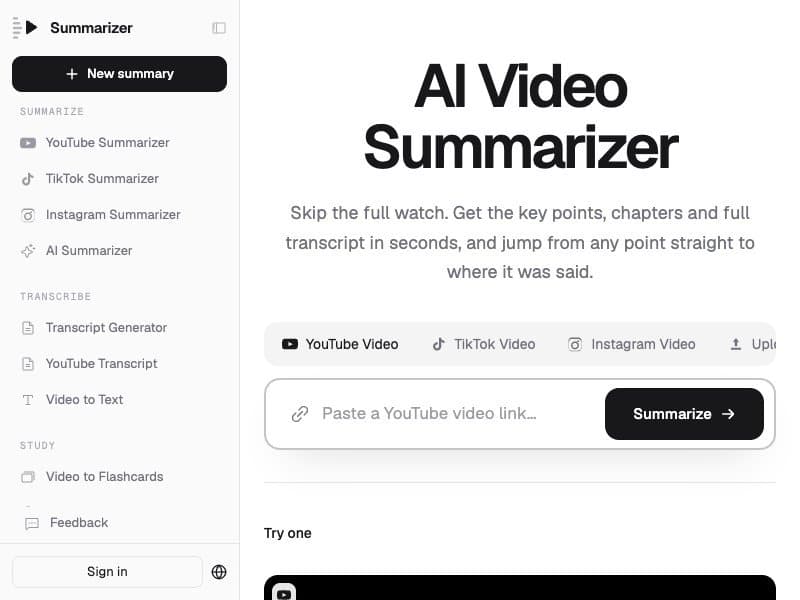
About this app
summarizer.video is an AI video summarizer: paste a YouTube, TikTok or Instagram link (or upload an mp4, mov, mp3 or wav file) and get key points, chapters and a full transcript, with every point linked to the second it came from. Choose a short gist, a brief or full notes, export Markdown notes or SRT/VTT subtitles, and ask questions that are answered only from the transcript. New accounts get 10 free credits; paid plans start at $14.90/month.
Key features
- 1Timestamped summaries: every key point links to the exact second in the video, with the matching transcript line highlighted.
- 2Three summary depths (gist, brief, full notes) plus chapters, mind map (PNG export) and flashcards (Anki/Quizlet export).
- 3Transcript-grounded Q&A that answers only from the video and says 'no' when the video doesn't cover it.
- 4Supports YouTube, TikTok, Instagram links and MP4/MOV/MP3/WAV uploads up to 100 MB, with SRT/VTT subtitle export.
Target customer profile
Drawn from the product itself, not from a survey.
Demographic
Students and graduate learners (18–30)
Pain points
Recorded lectures pile up before exams; rewatching hour-long videos is inefficient
Primary needs
Turn lectures into revision notes and flashcards, with timestamps to revisit key moments
Demographic
Researchers and analysts
Pain points
Conference talks and earnings calls are long and need citable, verifiable takeaways
Primary needs
Skim content quickly with every point linked to a timestamp they can cite
Demographic
Marketing and social media teams
Pain points
Competitor videos and audience comments are time-consuming to analyze manually
Primary needs
Extract what a competitor's video says and summarize viewer comments for content gaps
Demographic
Content creators and podcasters
Pain points
Repurposing long-form video into posts, captions, and subtitles is labor-intensive
Primary needs
Pull transcripts and summaries to repurpose video content into multiple formats
Demographic
Language learners and busy professionals
Pain points
Foreign-language videos and a crowded watch-later list feel unmanageable
Primary needs
Get summaries in their own language with the original transcript, and triage backlog videos fast
Scout Review
Written by AI from measured evidence, scored out of 100.
summarizer.video is a competent, clearly positioned AI video summarizer with a genuinely good landing page — the 'real result' mockup is the best sales asset on the site. The product surface is broad and useful: gist/brief/full notes, chapters, mind map, flashcards, SRT/VTT export and transcript-grounded Q&A, all with second-level timestamps. Pricing is credit-based and transparent about cost-before-spend, though the credit math takes a calculator to internalize. The measured weaknesses are speed (7.7s mobile LCP) and security hygiene (5/12 header checklist, no published audits). Accessibility is one contrast fix away from clean. Growth potential is real but the category is crowded, and the differentiators — TikTok/Instagram, flashcards, citations — need to be the headline, not a feature list.
Measure by measure
Usability
67Paste-or-drop input sits above the fold with clear source tabs, and the credit cost is shown before you spend. Free tier (10 credits, 1h uploads) plus open existing transcripts lowers the barrier. Outputs — notes, chapters, mind map, flashcards, SRT/VTT — cover real workflows.
Design
71Confident typographic hierarchy, monospace timestamp chips and a single blue accent give the page intent. The 'real result' mockup sells the product better than any copy. Held back by low-contrast captions and a dashboard-style sidebar crowding the hero.
Speed
58Lighthouse mobile 63/100 with a 7.7s LCP is the weak spot; desktop 79/100 and CLS 0 keep it from being bad. TBT 439ms suggests real main-thread work. No user lag complaints found, but the lab numbers are what they are.
Security
51HTTPS and HSTS are in place and Stripe handles checkout, but the header probe found no CSP, no frame protection, no Referrer-Policy and no DMARC — 5/12 checklist points. No SOC 2, ISO or pen-test claims published. Standard for an early-stage tool, not a strength.
Accessibility
79Lighthouse scores 96/100 with a single failing audit — insufficient contrast — which the visual audit independently confirmed in the result card and comparison table. No WCAG statement published. Strong automated result, one real flaw to fix.
Growth
62Real problem, specific segments, and a wedge the YouTube-only competitors don't have: TikTok/Instagram, mind maps, flashcards and transcript-only Q&A. Early (domain 0.2 years) but the idea has room.
Improvement areas
- Mobile performance: 7.7s LCP and 63/100 Lighthouse score undercut the 'skip the wait' pitch.
- Security hygiene: no CSP, frame protection, Referrer-Policy or DMARC; no published SOC 2, pen-test or security page.
- Accessibility: one failing contrast audit on gray captions in the result card and comparison table; no WCAG statement.
- Credit pricing is hard to internalize — the 'how far credits go' calculator is doing work the plan cards should do.
Design & Usability
The homepage does the hardest thing well: it shows the output. The 'real result' section renders an actual summary with timestamped bullets, a browser URL bar and a TED thumbnail, so a visitor understands the product before signing up. Type hierarchy is disciplined — one heavy display weight, muted gray body, monospace timecodes — and the single blue accent in the comparison table points at the recommended column without shouting. The weak spots are contrast (small gray captions in the result card and comparison table) and a left app sidebar that makes the marketing page read like a dashboard. On usability, the paste-or-drop input with source tabs sits above the fold, credit cost is disclosed before spending, and the free tier plus open existing transcripts lowers the barrier. Outputs cover real workflows: gist/brief/full notes, chapters, mind map, flashcards with Anki/Quizlet export, SRT/VTT subtitles, and transcript-grounded Q&A. The lower third of the page is dense with similar small text blocks and takes effort to scan.
Speed & Security
Speed is the weakest measured dimension. Lighthouse mobile scores 63/100 with a 7.7s LCP and 439ms TBT; desktop is a healthier 79/100 and CLS is a clean 0. For a product whose pitch is 'skip the wait,' a 7.7-second mobile LCP undercuts the message — the page should load faster than the video it replaces. No user complaints about lag were found, so this is a lab finding rather than a reported pain. Security sits in the same early-stage band: HTTPS is enforced with HSTS and Stripe handles checkout, but the header probe found no CSP, no frame protection, no X-Content-Type-Options, no Referrer-Policy and no DMARC — 5 of 12 checklist points. No SOC 2, ISO 27001, pen-test summary or bug bounty is published. For a tool that ingests user-uploaded media and processes transcripts, adding a security page and tightening headers would be cheap credibility.
Accessibility & Growth
Accessibility is close to clean: Lighthouse scores 96/100 with one failing audit — insufficient contrast — and the independent visual audit flagged the same low-contrast gray captions in the result card, feature list and comparison table. Two instruments, one complaint, one fix. No WCAG conformance statement is published, and multi-language output is claimed but not documented as an accessibility feature. Growth is a judgement on the idea: the problem (long video, no time) is real and the segments are named specifically — students, researchers, marketing teams, creators, language learners. The wedge against the listed alternatives is concrete: YouTube Summarized and Eightify are YouTube-only, Notta leans meeting-notes, while summarizer.video handles TikTok, Instagram, uploads, mind maps, flashcards and transcript-only Q&A. The category is crowded and the domain is 0.2 years old, but the timestamped-citation angle is a defensible position if the product leans into verifiability rather than feature count.
Conclusion
If you regularly face hour-long lectures, podcasts or competitor videos and want citable, timestamped notes rather than a chatbot's paraphrase, this is a credible pick — the transcript-only Q&A and per-second links are the parts that actually earn the subscription. If you only summarize YouTube occasionally, the free tier and the YouTube-only competitors will cover you. The product's next job is not more features; it is making the page load in under two seconds and publishing a security page so the people uploading their own lecture recordings have a reason to trust it with the files.
Suggestions for improvement
- Fix the mobile LCP: 7.7s is the single biggest drag on a product whose pitch is speed. Audit the hero image and third-party scripts.
- Add CSP, frame protection, Referrer-Policy and DMARC, and publish a short security page — cheap credibility for a tool that ingests user uploads.
- Fix the one failing contrast audit (gray captions in the result card and comparison table); it's a two-line CSS change.
- Lead the homepage with the timestamped-citation and TikTok/Instagram differentiators instead of the generic 'What is an AI video summarizer?' SEO block.
Alternatives comparison
Named competitors, point by point. Nobody paid to appear here or to be left out.
 summarizer.video | YouTube Summarized |  Notta |  Eightify | |
|---|---|---|---|---|
| Supported sources | YouTube, TikTok, Instagram, direct links, MP4/MOV/MP3/WAV uploads | YouTube only | Meetings, media files, multi-language transcription | YouTube only |
| Timestamped key points | Yes — every point links to the second, transcript line highlighted | Yes — key points with timestamps | Yes — transcript with timestamps, summary less point-linked | Yes — insights with timestamps |
| Transcript / subtitle export | Markdown notes, SRT/VTT subtitles, full transcript | Limited transcript export | Yes — transcript and subtitle export | No native transcript export |
| Mind map / flashcards | Mind map (PNG) and flashcards (Anki/Quizlet export) | No | No mind map or flashcards | No mind map or flashcards |
| Ask questions about the video | Yes — answers only from transcript, with timestamps, says 'no' when uncovered | Not a core feature | Yes — AI chat over meeting transcripts | No |
| Free tier | 10 credits for new videos (≤10 min) + 1h uploads/month; existing transcripts free | Limited free usage | Free plan with monthly transcription minutes | Limited free summaries |
| Starting paid price | $14.90/mo monthly; $8.90/mo billed yearly | Subscription-based; see site | Paid plans above free tier; see site | Subscription-based; see site |
YouTube Summarized
Chrome extension and web tool that summarizes YouTube videos with key points and timestamps; limited to YouTube and lacks flashcards or comment analysis.
Notta
AI transcription and summarization platform for meetings and media files, with multi-language support; heavier focus on meeting notes than consumer video summaries.
Eightify
AI YouTube summarizer extension providing concise key insights; simple and fast but lacks native transcript export, mind maps, and Instagram/TikTok support.
Comparing options? See summarizer.video alternatives, scored side by side
More Productivity apps
View all Productivity
Puzzly – B2B Lead Generation & Sales Intelligence Platform
92Puzzly is an all-in-one B2B lead generation platform that...

Qamarero
92An all-in-one hospitality software for restaurants and ba...

EmbedMyReviews
92White-label reputation management software for agencies s...

StoryPad
92Privacy-first open source journal app with a continuous t...

Notion
92All-in-one AI workspace for docs, projects, and knowledge...

The Stack Newsletter
92A weekly newsletter delivering curated tech jobs, intervi...

Vibe Coding Agent Skills
92A free, open-source platform offering 110 AI agent skills...

QRBliss
91Branded QR codes with AI Brand Sync, 15 free dynamic code...

Gerty
91Private, local AI assistant for Mac that runs offline

Strukchad Property Management
91Property management for Kenyan letting agents: rent invoices raised every month, M-Pesa rent prompts to tenants, arrears tracking and landlord statements.

CC Switch
91Open-source desktop app for switching AI coding providers...

PitchWhip
90AI cold call scripts & direct dials from LinkedIn


A platform dedicated to providing unbiased reviews of newly launched applications, analyzing everything from their features to their full potential.
info@scoutforge.net© 2026 Scoutforge. All rights reserved.
