Cycling through all six. Tap any point to stop.
Measured on six things
Super Agent works 24/7: it takes your requests, hands them to Claude Code, Codex or Grok on your own computers, and reports back when the work is done.
Security
29Probe found HTTPS not enforced, no HSTS, CSP, frame protection or Referrer-Policy; 1/12 checklist points. SPF present but no DMARC. No SOC 2 or security page found.
Screenshots
1 / 2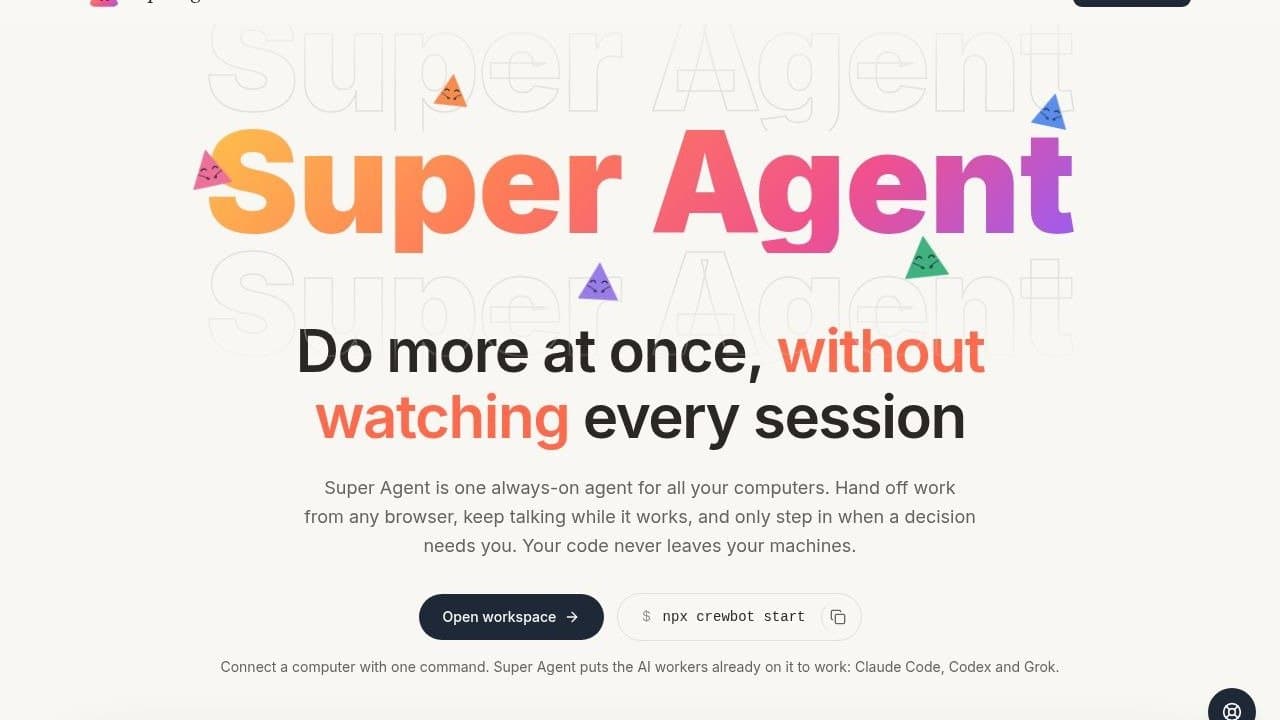
About this app
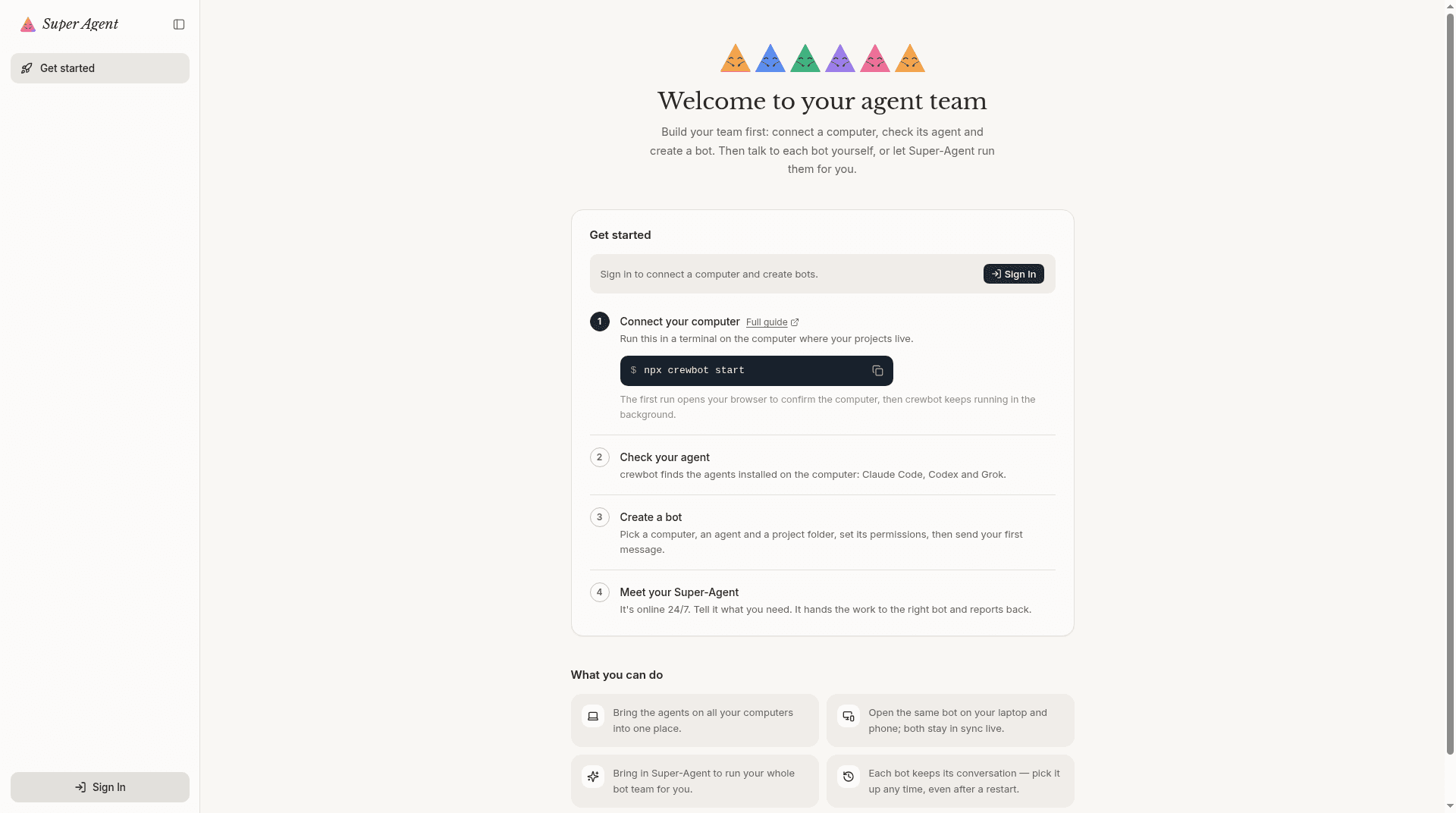
Super Agent is one always-on agent for all your computers. Hand off work from any browser, keep talking while it works, and only step in when a decision needs you. Your code never leaves your machines. Connect a computer with one command, and Super Agent puts the AI workers already on it to work: Claude Code, Codex and Grok.
Key features
- 1One always-on agent across all your computers, reachable from any browser including phone.
- 2One-command connect (npx crewbot start) that uses the Claude Code, Codex and Grok already on your machine.
- 3Approval-gated autonomy: it works alone and only pings you for decisions like file edits or commands.
Target customer profile
Drawn from the product itself, not from a survey.
Scout Review
Written by AI from measured evidence, scored out of 100.
Super Agent is a genuinely well-positioned developer tool: one always-on agent across all your computers, code never leaving your machines, and a one-command connect that puts your existing AI workers to work. The landing page is distinctive and the onboarding path is clear. The gaps are execution details — mobile performance, security headers, and small-text legibility — that matter for a product selling trust and control.
Measure by measure
Usability
64Clear path: 'Open workspace' plus a copyable npx command above the fold, and a tidy four-step onboarding. But it demands Node 22+ and a terminal before you see any value.
Design
71Distinctive gradient wordmark and a credible dark workspace mock give it real identity; consistent card grid. Held back by small low-contrast captions and hero visual noise.
Speed
58Desktop Lighthouse 97/100, but mobile drops to 71 with a 3.6s LCP and 706ms total blocking time. Fast on a laptop, sluggish on a phone.
Security
29Probe found HTTPS not enforced, no HSTS, CSP, frame protection or Referrer-Policy; 1/12 checklist points. SPF present but no DMARC. No SOC 2 or security page found.
Accessibility
79Lighthouse a11y 96/100 with a language toggle, but two real fails: insufficient color contrast and visible text labels without matching accessible names.
Growth
63Real, specific problem — attention is the bottleneck with many AI agents — and a genuine wedge: local code, one-command connect, your existing subscriptions. Early, but the idea has room.
Improvement areas
- Security headers: HTTPS not enforced, no HSTS/CSP/frame protection — 1/12 checklist points.
- Mobile performance: 71/100 with 3.6s LCP and 706ms TBT despite the 'any device' promise.
- Accessibility: contrast and accessible-name failures; small low-contrast feature captions.
Design & Usability
The homepage has actual personality — a gradient wordmark, a dark workspace mock that shows approval cards and bot status lines, and a consistent card grid that explains each claim with a mini UI fragment. The install path is visible above the fold: a dark 'Open workspace' button next to a copyable npx command, followed by a clean four-step onboarding. The friction is real, though: you need Node 22+ and a terminal before you see any value, and the feature captions are small light-gray text that fights legibility.
Speed & Security
Desktop Lighthouse lands at 97/100, but mobile drops to 71 with a 3.6s LCP and 706ms of total blocking time — fine on a laptop, sluggish on a phone, which undercuts the 'pick up on any device' pitch. Security is the weak spot: the probe found HTTPS not enforced, no HSTS, no CSP, no frame protection, and 1 of 12 checklist points. For a product whose headline promise is 'your code never leaves your machines,' the site's own transport and header hygiene should be table stakes, not an afterthought.
Accessibility & Growth
Accessibility scores well on the automated audit (96/100) and the site ships a language toggle, but it still fails on color contrast and on visible text labels without matching accessible names — small, fixable issues. Growth is the more interesting question: the problem it names is real (attention is the bottleneck when you're juggling several AI coding agents) and the wedge is specific — bring your own machines, code stays local, one-command connect, works with the Claude Code/Codex/Grok subscriptions you already pay for. It's very early, but the idea has a clear reason to exist.
Conclusion
If you're a developer already running multiple Claude Code or Codex sessions and drowning in terminal tabs, this is aimed squarely at you, and the local-first, bring-your-own-subscription angle is the right bet. Just don't expect it to hold your hand: it assumes a terminal and Node 22+, and the security posture needs to catch up to the promise. Worth a look for the target user; a hard sell for anyone else.
Suggestions for improvement
- Enforce HTTPS and add HSTS, CSP, and frame-protection headers — 1/12 on the security checklist undercuts the local-first pitch.
- Fix the two Lighthouse a11y fails: bump contrast on gray captions and add accessible names to labeled controls.
- Cut mobile TBT (706ms) and LCP (3.6s) — the 'any device' promise needs a phone that doesn't wheeze.
- Raise feature-card caption size and contrast; the mini-mockups are too small to read at current scale.
Alternatives comparison
Named competitors, point by point. Nobody paid to appear here or to be left out.
 Super Agent |  | |
|---|---|---|
| Runs on your own machines with code staying local | Yes — bring-your-own-machines, code never leaves local | Not specified in provided details |
| Works with existing AI subscriptions (Claude Code, Codex, Grok) | Yes — uses agents/subscriptions already on the computer | Not specified in provided details |
| One-command setup | Yes — npx crewbot start, Node 22+ | Not specified in provided details |
| Approval-gated autonomy for file edits and commands | Yes — inline allow/reject cards | Not specified in provided details |
Comparing options? See Super Agent alternatives, scored side by side
More Productivity apps
View all Productivity
Puzzly – B2B Lead Generation & Sales Intelligence Platform
92Puzzly is an all-in-one B2B lead generation platform that...

Qamarero
92An all-in-one hospitality software for restaurants and ba...

EmbedMyReviews
92White-label reputation management software for agencies s...

StoryPad
92Privacy-first open source journal app with a continuous t...

Notion
92All-in-one AI workspace for docs, projects, and knowledge...

The Stack Newsletter
92A weekly newsletter delivering curated tech jobs, intervi...

Vibe Coding Agent Skills
92A free, open-source platform offering 110 AI agent skills...

QRBliss
91Branded QR codes with AI Brand Sync, 15 free dynamic code...

Gerty
91Private, local AI assistant for Mac that runs offline

Strukchad Property Management
91Property management for Kenyan letting agents: rent invoices raised every month, M-Pesa rent prompts to tenants, arrears tracking and landlord statements.

CC Switch
91Open-source desktop app for switching AI coding providers...

PitchWhip
90AI cold call scripts & direct dials from LinkedIn


A platform dedicated to providing unbiased reviews of newly launched applications, analyzing everything from their features to their full potential.
info@scoutforge.net© 2026 Scoutforge. All rights reserved.
