Cycling through all six. Tap any point to stop.
Measured on six things
Repair corrupt DBF files from dBase, FoxPro, and more wit...
Design
44Dated Windows-form aesthetic with a mismatched 'Access Database' step heading, a 512 GB disk-space spec error, and a chat popup crowding the hero. Section rhythm is consistent but generic.
Screenshots
1 / 1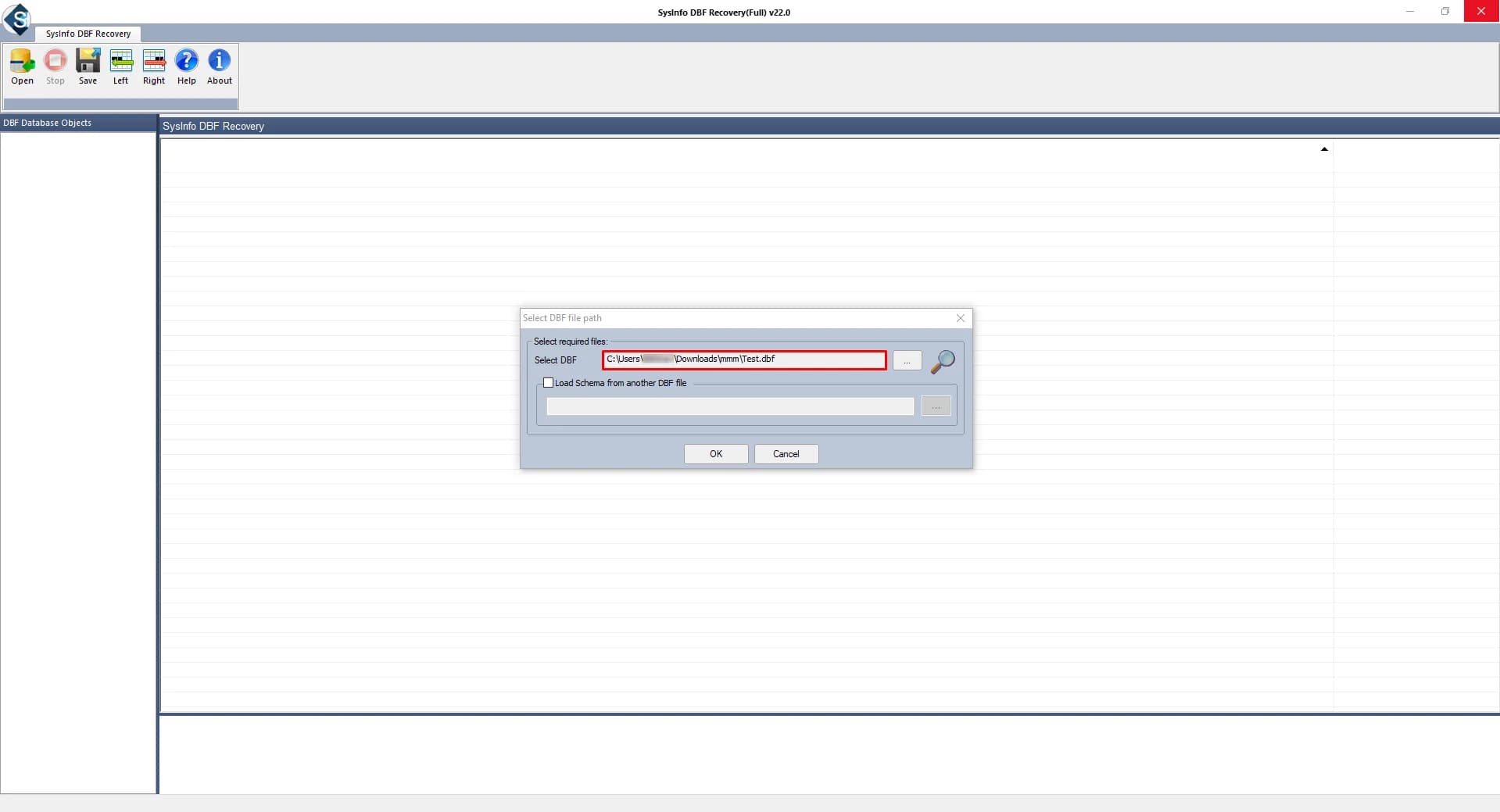
About this app
SysInfo DBF Recovery is a specialized tool designed to repair corrupt, damaged, or inaccessible DBF database files created by a wide range of database management systems, including dBase, FoxPro, Clipper, and many others. In my experience, DBF files—while robust—can easily become corrupted due to unexpected shutdowns, hardware failures, or software conflicts, putting critical business data at risk. This tool tackles that problem head-on with a fast-scanning algorithm that extracts the maximum possible data from even severely corrupted files. What I appreciate most is the ability to preview recovered items before saving, giving you confidence that your data is intact. You can save the recovered data as a healthy DBF file or convert it to MDF for use with MS Access or SQL Server, which is a handy bonus for migration projects. The interface is straightforward: add your file, scan, preview, and save. Advanced features like 'Load schema from another DBF file' and the ability to fix recor...
Key features
- 1Repairs corrupt DBF files from dBase, FoxPro, Clipper, MultiBase, CodeBase and similar systems.
- 2Preview recovered tables, indexes and data before saving to verify integrity.
- 3Save recovered data as a healthy DBF or convert to MDF for SQL Server / MS Access.
- 4Load schema from another DBF file to assist recovery of severely damaged structures.
- 530-day moneyback guarantee and free download available.
Target customer profile
Drawn from the product itself, not from a survey.
Demographic
IT professionals and database administrators managing legacy systems
Pain points
Corrupt DBF files disrupt operations and can lead to data loss; manual repair methods often fail
Primary needs
Reliable, quick repair of DBF files with data integrity and preview before saving
Demographic
Small business owners using dBase or FoxPro for inventory or accounting
Pain points
Limited technical expertise to fix corrupted databases; fear of losing critical business data
Primary needs
User-friendly tool to recover data without advanced technical skills; cost-effective solution
Demographic
Data analysts and developers working with legacy data migration
Pain points
Need to extract data from corrupt DBF files and convert to modern formats like MDF for SQL
Primary needs
Support for multiple DBF formats and saving options (DBF/MDF) to facilitate migration
Scout Review
Written by AI from measured evidence, scored out of 100.
SysInfo DBF Recovery is a competent, long-established desktop utility with a fast marketing site and a dated one. The core offer is clear: repair corrupt DBF files from dBase, FoxPro, Clipper and similar systems, preview the recovered data, then save as DBF or convert to MDF for SQL Server or Access. The site claims a 4.9/5 rating from 2,121 users and a 30-day moneyback guarantee. Execution on the web side is uneven — a wrong-product heading, a spec-sheet error, and a default-form screenshot undercut trust — while the technical fundamentals (speed, headers, accessibility) are strong. The real strategic question is whether a legacy-format repair tool can grow, and the MDF conversion path is the most credible answer.
Measure by measure
Usability
58Sticky sub-nav and clear add-scan-preview-save flow help, and a 30-day moneyback is stated. Light-gray small body copy and tiny trust badges undercut readability.
Design
44Dated Windows-form aesthetic with a mismatched 'Access Database' step heading, a 512 GB disk-space spec error, and a chat popup crowding the hero. Section rhythm is consistent but generic.
Speed
88Lighthouse mobile 100/100 with 1.1s LCP and zero CLS; desktop 99/100. The marketing site is genuinely fast and lightweight.
Security
74HTTPS enforced with HSTS, CSP, Referrer-Policy and Permissions-Policy; SPF and DMARC set. Missing X-Frame-Options and X-Content-Type-Options; no published audit or security page.
Accessibility
80Lighthouse accessibility 98/100 with only minor failures: no main landmark, role conflicts, and some visible labels lacking matching accessible names. English-only, no a11y statement.
Growth
54Real pain in a shrinking legacy niche. Preview, schema loading and DBF-to-MDF conversion are genuine differentiators, but Stellar and Recovery Toolbox offer near-identical feature sets.
Improvement areas
- Wrong-product heading in the step section ('Access Database Files') damages trust on a DBF page.
- Specification error listing 512 GB minimum disk space instead of a realistic figure.
- Default Windows-form screenshot with empty canvas fails to demonstrate the preview feature.
- Missing X-Frame-Options and X-Content-Type-Options security headers.
Design & Usability
The landing page follows a familiar long-form software template: hero with rating and dual CTAs, benefit cards, feature grid, and a sticky jump nav. It scans cleanly, but the craft is thin. The step section is titled for Access database repair on a DBF product page, the spec sheet lists 512 GB of disk space next to a Core 2 Duo, and the hero screenshot is a default Windows form with an empty canvas. A floating chat popup overlaps the product visual. Usability is better than design: the add-scan-preview-save flow is stated plainly, the jump nav works, and a 30-day moneyback is offered. But small light-gray body copy and tiny trust badges make the page harder to read than it needs to be.
Speed & Security
Speed is the standout. Lighthouse scores 100/100 on mobile with a 1.1s LCP, zero layout shift, and 30ms total blocking time; desktop lands at 99. Whatever else is true, the marketing site is lean and snappy. Security is competent rather than exceptional: HTTPS is enforced with HSTS, CSP, Referrer-Policy, Permissions-Policy, SPF and DMARC all present, earning 10 of 12 checklist points. The gaps are X-Frame-Options and X-Content-Type-Options, both trivial to add. There is no published SOC 2, ISO certification, penetration test, or dedicated security page, which is normal for a desktop utility vendor of this size but leaves third-party assurance unverified.
Accessibility & Growth
Accessibility scores 98/100 on the automated Lighthouse audit, with only three minor failures: a missing main landmark, role=presentation conflicts, and a few visible labels without matching accessible names. All are quick fixes. The site is English-only and publishes no accessibility statement. Growth is the harder question. DBF repair serves a real, painful problem — corrupt database files mean lost business records — but the audience is legacy dBase, FoxPro and Clipper users, a shrinking pool. The product's genuine wedge is the DBF-to-MDF conversion for SQL Server and Access migration, which turns a repair tool into a migration tool. Against Stellar Repair for DBF and DBF Recovery Toolbox, the feature sets are close; the differentiators are preview-before-save and schema loading from another DBF file.
Conclusion
If you are an IT admin staring at a corrupt DBF from a FoxPro inventory system, this is a plausible tool to try, especially with a moneyback guarantee and a preview step that lets you verify recovery before paying. Compare it directly against Stellar Repair for DBF and DBF Recovery Toolbox on price and on whether MDF conversion matters to you. The vendor has been around since 2010, which is a meaningful signal in a category full of fly-by-night utilities. Fix the wrong-product heading and the spec error, and the page would match the quality of the engineering underneath.
Suggestions for improvement
- Correct the step section heading — it currently advertises Access/MDB repair on a DBF product page.
- Fix the specification sheet: '512 GB minimum disk space' is almost certainly meant to be 512 MB.
- Replace the default Windows-form screenshot with one showing a real preview of recovered DBF data.
- Add X-Frame-Options and X-Content-Type-Options headers to complete the security checklist.
Alternatives comparison
Named competitors, point by point. Nobody paid to appear here or to be left out.
 SysInfo DBF Recovery |  Stellar Repair for DBF |  DBF Recovery Toolbox | |
|---|---|---|---|
| Supported DBF source applications | dBase II/IV/V, Visual FoxPro, Clipper, MultiBase, dBXL, dBFast, CodeBase, Arago | dBase, FoxPro and other DBF-based applications | DBF files from common database applications |
| Preview recovered data before saving | Yes — full preview of recovered DBF database | Yes — preview of recoverable items | Yes — preview before saving |
| Export to MDF / SQL Server format | Yes — save as DBF or convert to MDF for SQL/Access | Saves recovered data to DBF; MDF conversion not a headline feature | Saves recovered data to DBF format |
| Load schema from another DBF file | Yes — advanced schema-loading mode | Not a headline feature | Not a headline feature |
| Moneyback guarantee | 30-day moneyback stated on site | Moneyback policy offered by vendor | Trial and purchase options available |
Stellar Repair for DBF
A well-known DBF repair tool that fixes corrupt DBF files and recovers data, with a similar feature set and user-friendly interface.
DBF Recovery Toolbox
An alternative tool for repairing DBF files, offering recovery of tables, indexes, and data with preview and saving options.
Comparing options? See SysInfo DBF Recovery alternatives, scored side by side
More Productivity apps
View all Productivity
Puzzly – B2B Lead Generation & Sales Intelligence Platform
92Puzzly is an all-in-one B2B lead generation platform that...

Qamarero
92An all-in-one hospitality software for restaurants and ba...

EmbedMyReviews
92White-label reputation management software for agencies s...

StoryPad
92Privacy-first open source journal app with a continuous t...

Notion
92All-in-one AI workspace for docs, projects, and knowledge...

The Stack Newsletter
92A weekly newsletter delivering curated tech jobs, intervi...

Vibe Coding Agent Skills
92A free, open-source platform offering 110 AI agent skills...

QRBliss
91Branded QR codes with AI Brand Sync, 15 free dynamic code...

Gerty
91Private, local AI assistant for Mac that runs offline

Strukchad Property Management
91Property management for Kenyan letting agents: rent invoices raised every month, M-Pesa rent prompts to tenants, arrears tracking and landlord statements.

CC Switch
91Open-source desktop app for switching AI coding providers...

PitchWhip
90AI cold call scripts & direct dials from LinkedIn


A platform dedicated to providing unbiased reviews of newly launched applications, analyzing everything from their features to their full potential.
info@scoutforge.net© 2026 Scoutforge. All rights reserved.
