Cycling through all six. Tap any point to stop.
Measured on six things
Bulk email migration and backup tool for 5 sources with f...
Design
57Functional but dated. The source/destination matrix is genuinely useful, but dense paragraphs, unstyled blue-header tables, and annotation boxes mistaken for UI drag the homepage down to average.
Screenshots
1 / 3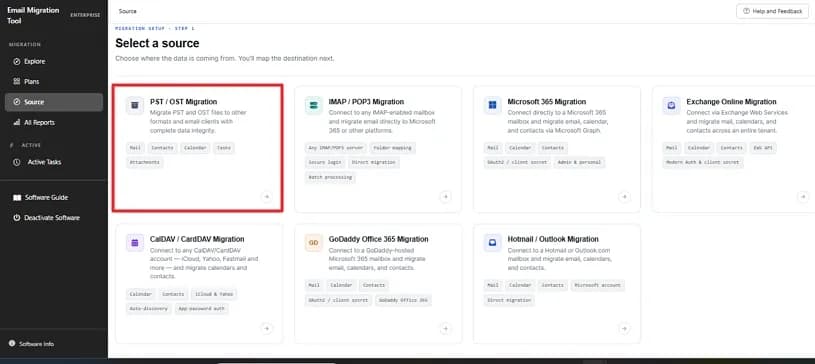
About this app
SysInfo Email Migration Tool is a comprehensive software solution designed for bulk email migration and backup across various platforms. It supports migrating from PST/OST files, IMAP/POP3 servers, Microsoft 365, GoDaddy, and Hotmail/Outlook. Key features include batch migration via CSV import, advanced filters (date range, item type, duplicate removal), multiple output formats (PST, PDF, MBOX, EML, MSG, JSON, CSV, DOC/DOCX), and direct cloud-to-cloud migration to Office 365, Google Workspace, and IMAP servers. The tool emphasizes data security with local processing, OAuth 2.0 modern authentication, and no data passing through third-party servers. It offers a live dashboard for real-time tracking and detailed reports. Ideal for IT administrators, legal teams, support desks, and business users, it ensures 100% data integrity and folder structure preservation.
Key features
- 1Migrate from PST/OST, IMAP/POP3, Microsoft 365, GoDaddy, and Hotmail to local or cloud destinations.
- 2Export to PST, PDF, MBOX, EML, MSG, JSON, CSV, DOC, and DOCX with metadata preservation.
- 3Batch migration via CSV import, date-range and item-type filters, duplicate removal, live dashboard.
Target customer profile
Drawn from the product itself, not from a survey.
Demographic
IT Administrators & MSPs
Pain points
Manual mailbox migration for multiple users is time-consuming and error-prone.
Primary needs
Bulk migration via CSV, tenant-to-tenant migration, and automation features.
Demographic
Legal Teams & Compliance Officers
Pain points
Need to export specific email data for litigation holds and audits without altering originals.
Primary needs
Date-range filtering, PDF/PST export with metadata preservation, and chain-of-custody reporting.
Demographic
Small Business Owners & Support Desks
Pain points
Migrating individual mailboxes or recovering data when employees leave is complex and costly.
Primary needs
User-friendly interface, single mailbox migration, and affordable one-time licensing.
Scout Review
Written by AI from measured evidence, scored out of 100.
SysInfo Email Migration Tool is a mature, fast, competently secured migration utility from a vendor that has been in the game since 2010. Its strongest assets are the source/destination compatibility matrix, a 96/100 mobile Lighthouse score, and a broad format and destination support list that covers PST/OST, IMAP/POP3, Microsoft 365, GoDaddy, and Hotmail. Its weakest are a dated, text-dense homepage, a diluted three-audience pitch, and accessibility gaps that automated scoring hides. For an IT admin who already knows what they need, it does the job. For a first-time buyer comparing options, the site does not make the decision easy.
Measure by measure
Usability
63Clear CTAs, a migration demo, 30-day money-back, and 24/7 support are solid. But the long feature wall before the buttons and the dense trust-signal row create decision fatigue.
Design
57Functional but dated. The source/destination matrix is genuinely useful, but dense paragraphs, unstyled blue-header tables, and annotation boxes mistaken for UI drag the homepage down to average.
Speed
88Lighthouse mobile 96/100 with 2.4s LCP and zero CLS; desktop a perfect 100/100. Genuinely fast for a content-heavy marketing page.
Security
76HTTPS with HSTS, CSP, Referrer-Policy and Permissions-Policy, plus SPF/DMARC. 10/12 header checklist. Missing frame protection and X-Content-Type-Options, and no published audit.
Accessibility
80Lighthouse a11y 98/100, but failing audits for a missing main landmark, role=presentation conflicts, and labels without matching accessible names. No WCAG statement found.
Growth
58A real, specific problem with three named segments and concrete differentiators (CSV batch, tenant-to-tenant, multi-format export). Established vendor since 2010, but the wedge is narrow against Mailstore.
Improvement areas
- Homepage is text-dense with CTAs buried below a long feature wall; needs restructuring.
- Missing frame protection and X-Content-Type-Options headers; no published SOC 2 or pen-test.
- Three failing accessibility audits (main landmark, role conflicts, label names) and no WCAG statement.
Design & Usability
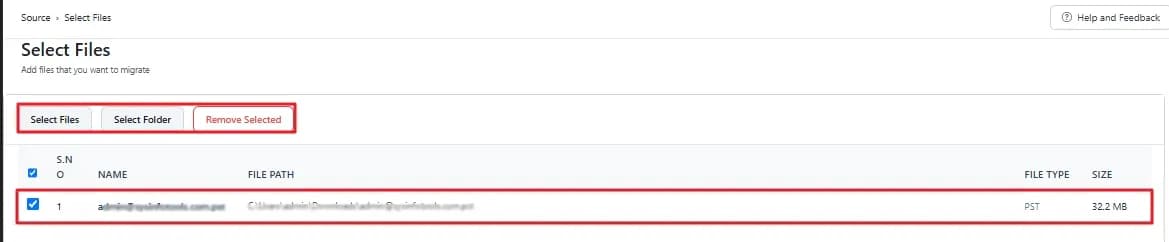
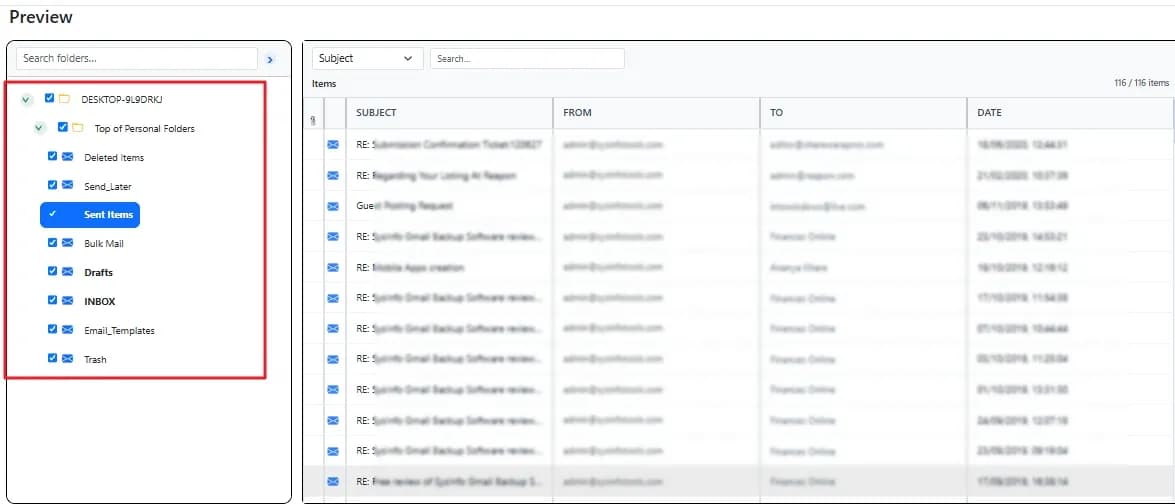
The design is workmanlike: a light-blue hero, a 4.8-star badge, and two large compatibility tables that actually answer the buyer's first question — can it move my mail from X to Y? That matrix is the best thing on the page. Everything around it is dense: five checkmark rows of paragraph text above the fold, blue-header tables with no zebra striping, and maker screenshots that still carry red editor annotations. Usability is stronger than design. CTAs are prominent, a migration demo exists, and the 30-day money-back plus 24/7 support are real trust signals. The friction is decision fatigue — the buttons sit below a long feature wall, and the trust badges are crammed into one unreadable row. A buyer who already knows what they want will convert; a browser will bounce.
Speed & Security
Speed is the standout. Lighthouse mobile scores 96/100 with a 2.4s LCP, zero cumulative layout shift, and 122ms total blocking time; desktop is a clean 100/100. For a page this text-heavy, that is genuinely well-built — no heavy SPA, no layout jank. Security is competent rather than exceptional. HTTPS is enforced with HSTS, CSP, Referrer-Policy and Permissions-Policy all present, and SPF/DMARC are configured, giving 10 of 12 header checklist points. The two gaps — frame protection and X-Content-Type-Options — are trivial to add. The product claims OAuth 2.0 modern authentication and local processing with no third-party data transit, which matters for the legal and IT-admin buyers it targets. What is missing is third-party validation: no SOC 2, ISO, or published pen-test report surfaced in the collected evidence.
Accessibility & Growth
Accessibility scores 98/100 on Lighthouse, which is excellent on automated checks, but three audits fail: no main landmark, role=presentation conflicts, and visible text labels without matching accessible names. Those are real screen-reader barriers and cheap to fix. No WCAG conformance statement was found, and the site covers Windows and Mac only. Growth is a judgement on the idea. The problem is real — bulk mailbox migration is painful, error-prone, and expensive to do manually — and the product names three credible segments: IT admins/MSPs, legal teams needing date-range exports for litigation holds, and small businesses recovering departed employees' mailboxes. The differentiators are concrete: CSV batch import, tenant-to-tenant migration, multi-format export, and a live dashboard. Against Mailstore, the wedge is narrower feature breadth but a stronger self-serve, one-time-licensing story. The limit: three audiences on one page dilutes the pitch, and the category has entrenched players. It can grow, but it needs to pick a lane.
Conclusion
If you are an IT admin or MSP with a bulk migration on the calendar, this is a credible, fast, well-secured option with a real demo and a money-back guarantee — low risk to try. If you are a legal team or small business owner, the tool likely covers your use case, but the site will not hand you the answer; you will need to book the demo. The vendor's 16-year track record is reassuring. The next step for the product is not more features — it is a homepage that picks one buyer and speaks to them.
Suggestions for improvement
- Add a main landmark and fix the three failing Lighthouse a11y audits; they are an afternoon of work.
- Add frame protection (X-Frame-Options) and X-Content-Type-Options to complete the 12/12 header checklist.
- Restructure the homepage: move CTAs above the feature wall and break the trust-signal row into scannable cards.
- Pick one primary audience (IT admins/MSPs) for the hero and demote the other two to secondary sections.
Alternatives comparison
Named competitors, point by point. Nobody paid to appear here or to be left out.
 SysInfo Email Migration Tool SysInfo Email Migration Tool |  Mailstore Mailstore | |
|---|---|---|
| Primary purpose | Bulk email migration and backup across PST/OST, IMAP/POP3, Microsoft 365, GoDaddy, Hotmail | Email archiving and migration with multi-client/server support |
| Cloud-to-cloud migration | Yes — Office 365, Google Workspace, IMAP, Exchange Online | Yes — archiving-focused with migration support |
| Batch migration via CSV | Yes — CSV import for multiple accounts | Limited — archiving-oriented, not bulk CSV migration |
| Output formats | PST, PDF, MBOX, EML, MSG, JSON, CSV, DOC, DOCX | Proprietary archive format with export options |
| Licensing model | One-time license with 30-day money-back guarantee | Subscription-based archiving license |
Mailstore
Email archiving and migration solution with support for multiple email clients and servers.
Comparing options? See SysInfo Email Migration Tool alternatives, scored side by side
More Productivity apps
View all Productivity
Qamarero
92An all-in-one hospitality software for restaurants and ba...

The Stack Newsletter
92A weekly newsletter delivering curated tech jobs, intervi...

EmbedMyReviews
92White-label reputation management software for agencies s...

StoryPad
92Privacy-first open source journal app with a continuous t...

Puzzly – B2B Lead Generation & Sales Intelligence Platform
92Puzzly is an all-in-one B2B lead generation platform that...

Notion
92All-in-one AI workspace for docs, projects, and knowledge...

Vibe Coding Agent Skills
92A free, open-source platform offering 110 AI agent skills...

CC Switch
91Open-source desktop app for switching AI coding providers...

username.md
90One verified handle for your online identity, readable by...

What the GIF
89Frame-perfect video-to-GIF maker that runs entirely in yo...

AuditCloser
89White-label website audits that close deals for digital a...

NudgeWin
89Automated quote follow-up for trades and service businesses.


A platform dedicated to providing unbiased reviews of newly launched applications, analyzing everything from their features to their full potential.
info@scoutforge.net© 2026 Scoutforge. All rights reserved.
