Cycling through all six. Tap any point to stop.
Measured on six things
Convert EML files to 15+ formats and migrate to email cli...
Design
48The design is visually noisy and dated. The homepage suffers from extreme text density in feature lists, while the application UI itself appears to use classic, unmodernized Windows Forms styling.
Screenshots
1 / 1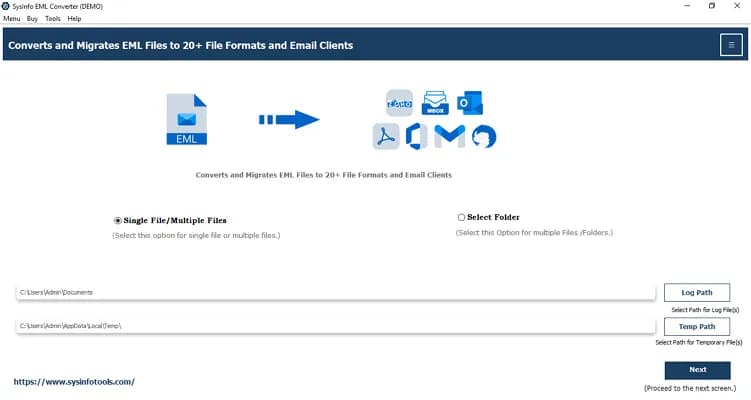
About this app
SysInfo EML Converter is a dedicated desktop utility that helps you open, preview, and convert EML and EMLX email files into formats like PST, MSG, MBOX, PDF, DOC, CSV, XLSX, OFT, WDSEML, and Thunderbird. Beyond file conversion, it can also migrate your emails directly into live mail accounts such as Office 365, Gmail, Google Workspace, Yahoo Mail, Hotmail, IMAP, iCloud, GoDaddy, and HostGator. The tool preserves headers, body content, attachments, and folder structure exactly as they appear in the source, and because it runs offline on your own machine, your data stays private. What stands out to me is how much attention it pays to cleanup and control. You get batch conversion with no file-size or message-count limits, automatic duplicate detection based on fields you choose (To, From, CC, Subject, Body), a date range filter to move only relevant emails, a 'skip previous migration' option that avoids re-copying items on repeated runs, and the ability to strip attachments if you on...
Key features
- 1Batch conversion with no file-size or message-count limits.
- 2Migration to 15+ live mail accounts (O365, Gmail, IMAP, etc.).
- 3Advanced filtering and duplicate detection based on configurable fields.
Target customer profile
Drawn from the product itself, not from a survey.
Demographic
IT admins and enterprise migration teams
Pain points
Bulk EML archives, duplicated migrations, PST size limits
Primary needs
Secure bulk conversion, PST splitting, skip-previous-migration
Demographic
Windows Live Mail users switching clients
Pain points
Corrupt mailbox files, need cross-platform email backup
Primary needs
Simple EML to PST/PDF backup without technical help
Demographic
Researchers saving EML correspondence
Pain points
Need to extract contacts and data from emails
Primary needs
Extract addresses/phones/URLs to CSV and XLSX
Demographic
Small business owners using Outlook/365
Pain points
Scattered EML files slow down their workflow
Primary needs
Offline preview and clean import to Office 365
Scout Review
Written by AI from measured evidence, scored out of 100.
SysInfo EML Converter is a highly functional, specialized desktop utility that prioritizes robust feature sets and data privacy over modern aesthetics. It excels in its core competency: handling complex, high-volume EML conversions and migrations into numerous formats and live mail accounts. The web presence is remarkably fast and secure, providing a professional gateway to the software. However, the application's UI is visibly dated, and the site's accessibility implementation is flawed. For IT admins and bulk migration teams, the feature depth and offline nature make it a powerful, reliable choice, even if it doesn't look like it was designed in the last five years.
Measure by measure
Usability
72The core functionality is robust, offering advanced features like duplicate detection and batch processing with no stated limits. The wizard is functional but lacks modern feedback loops.
Design
48The design is visually noisy and dated. The homepage suffers from extreme text density in feature lists, while the application UI itself appears to use classic, unmodernized Windows Forms styling.
Speed
91The web presence is exceptionally fast, achieving 100/100 scores on both mobile and desktop performance benchmarks with minimal load times.
Security
78The site demonstrates good basic security hygiene (HTTPS, HSTS, CSP). Furthermore, the tool emphasizes offline operation and supports modern authentication for cloud migration.
Accessibility
58The automated audit flagged several critical issues, including poor color contrast, missing main landmarks, and ARIA role conflicts, pulling the score below the solid mid-range.
Growth
68The idea is solid, targeting specific, painful enterprise/IT migration workflows. Its niche is well-defined, though it competes with established open-source tools.
Improvement areas
- Modernize the application UI and visual design language.
- Improve accessibility compliance, especially color contrast and ARIA roles.
- Improve the visual presentation of features on the landing page for better scannability.
Design & Usability
SysInfo EML Converter presents a dichotomy: a blazing-fast, modern web presence contrasted sharply with a decidedly dated application interface. The website achieves near-perfect performance scores, making the initial research and download process seamless. However, the visual execution of the site itself is cluttered, relying on dense, low-resolution feature lists that overwhelm the user. The application UI, judging by screenshots, appears to be built on classic Windows Forms, lacking any modern visual polish or contemporary design language. On the usability side, the tool excels at its core function—offering powerful features like batch processing, duplicate detection, and extensive format conversion (PST, MBOX, CSV, etc.)—which is exactly what its target audience (IT admins) needs. The workflow is logical for a utility, but the lack of modern UI polish detract from the professional perception of the software.
Speed & Security
The speed of the web platform is exceptional, scoring 100/100 on both mobile and desktop benchmarks, which is a major positive for user experience before installation. Security-wise, the tool demonstrates a strong commitment to data privacy by operating offline and implementing standard web security headers like HSTS and CSP. This combination of a fast, secure download portal and an offline processing engine is highly effective for its niche. The security claims are backed by technical signals, though no external audits (like SOC 2) are publicly listed, which is typical for this type of utility. The combination of speed and security provides a reliable foundation for a tool handling sensitive email data.
Accessibility & Growth
The category for EML conversion utilities is mature, with established players like Thunderbird and Microsoft Outlook. SysInfo's wedge is its comprehensive, offline, bulk migration and conversion capability, specifically targeting the limitations of native tools (e.g., Outlook's manual drag-and-drop or Thunderbird's lack of enterprise workflow). The idea is strong because it solves complex, painful migration scenarios (like PST splitting or large-scale duplicate removal) that simpler tools ignore. While the product has been around for over a decade, its niche remains relevant for users dealing with legacy EML archives. Its growth potential is limited to the specific segment of users who require this level of offline, high-volume, cross-format conversion.
Conclusion
Ultimately, SysInfo EML Converter is a workhorse. It sacrifices slick, modern design for raw, reliable functionality—a trade-off that its target audience seems willing to accept. If you need to move massive, messy EML archives without trusting a cloud-based solution, this tool delivers the heavy lifting. Just be prepared for an interface that feels like it belongs in a digital archive from the early 2000s.
Suggestions for improvement
- Modernize the application UI to match the high performance and security of the web portal.
- Address the accessibility failures identified in the Lighthouse audit, particularly color contrast and ARIA implementation.
- Streamline the homepage feature presentation to move away from dense bullet points toward clearer, scannable value propositions.
- Provide clearer in-app progress indicators and validation feedback within the conversion wizard.
Alternatives comparison
Named competitors, point by point. Nobody paid to appear here or to be left out.
 SysInfo EML Converter |  Thunderbird | Mozilla Thunderbird + ImportExportTools NG |  Outlook (Microsoft 365) | |
|---|---|---|---|---|
| Core Functionality (Batch Conversion/Migration) | Dedicated offline utility with extensive format support and live migration. | Free, open-source client; requires add-ons and lacks dedicated batch workflow. | Extension for Thunderbird; useful for individuals but limited for enterprise migration. | Native client; relies on manual drag-and-drop and lacks advanced filters/bulk conversion. |
| Data Extraction (CSV/XLSX) | Built-in feature to extract contacts, addresses, and data directly to CSV/XLSX. | Requires manual export/add-ons; not a primary feature. | Dependent on add-on capabilities. | Possible via manual copy/paste or advanced export features. |
Thunderbird
Free, open-source email client with add-ons that can import and handle EML files, though it lacks a dedicated batch conversion and migration workflow.
Mozilla Thunderbird + ImportExportTools NG
An extension for Thunderbird that adds EML import/export and folder management, useful for individuals but limited for large enterprise migrations.
Outlook (Microsoft 365)
Native Outlook can handle EML files but relies on manual drag-and-drop and lacks the filters, duplicate removal, and bulk conversion this tool offers.
Comparing options? See SysInfo EML Converter alternatives, scored side by side
More Productivity apps
View all Productivity
Notion
92All-in-one AI workspace for docs, projects, and knowledge...

Qamarero
92An all-in-one hospitality software for restaurants and ba...

EmbedMyReviews
92White-label reputation management software for agencies s...

StoryPad
92Privacy-first open source journal app with a continuous t...

Puzzly – B2B Lead Generation & Sales Intelligence Platform
92Puzzly is an all-in-one B2B lead generation platform that...

The Stack Newsletter
92A weekly newsletter delivering curated tech jobs, intervi...

Vibe Coding Agent Skills
92A free, open-source platform offering 110 AI agent skills...

QRBliss
91Branded QR codes with AI Brand Sync, 15 free dynamic code...

Gerty
91Private, local AI assistant for Mac that runs offline

CC Switch
91Open-source desktop app for switching AI coding providers...

username.md
90One verified handle for your online identity, readable by...

PitchWhip
90AI cold call scripts & direct dials from LinkedIn


A platform dedicated to providing unbiased reviews of newly launched applications, analyzing everything from their features to their full potential.
info@scoutforge.net© 2026 Scoutforge. All rights reserved.
