Cycling through all six. Tap any point to stop.
Measured on six things
Migrate IMAP emails to other accounts & formats on Linux.
Design
46Functional but dated: light-cyan gradients, generic blue icons, and dense repeated bullet lists. The app screenshot shows a usable dark-sidebar layout, but the marketing page buries it under text noise.
Screenshots
1 / 1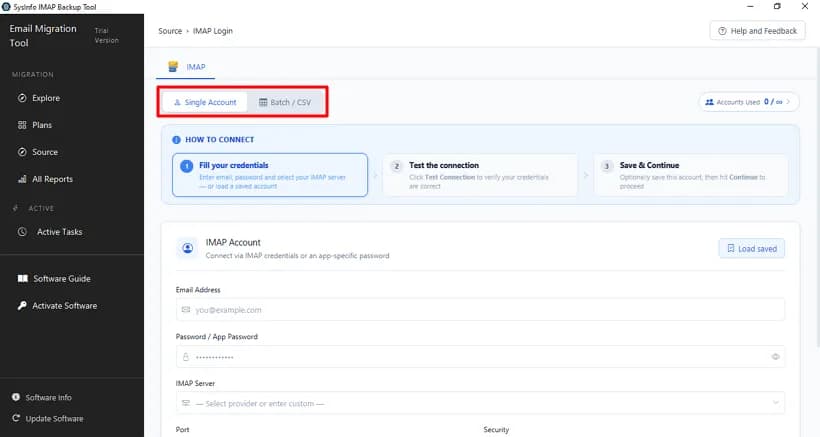
About this app
The SysInfo Linux IMAP Migration Tool is a specialized utility designed to migrate emails from any IMAP server to other IMAP accounts, email clients like Office 365, Gmail, and Google Workspace, or local file formats such as PST, PDF, EML, MSG, CSV, DOC, DOCX, and MBOX on Linux systems. It supports large mailboxes, multiple account migration via CSV, date range filters, duplicate removal, and runs on major Linux distributions like Ubuntu, Fedora, Debian, FreeBSD, and OpenBSD. The tool offers a user-friendly GUI and a free demo version that migrates 50 emails per folder for evaluation. With its comprehensive features, it's ideal for Linux users needing to backup, transfer, or consolidate IMAP emails efficiently and securely.
Key features
- 1Migrate IMAP mailboxes to other IMAP accounts, Office 365, Gmail, or Google Workspace on Linux.
- 2Backup IMAP emails to PST, PDF, EML, MSG, CSV, DOC, DOCX, and MBOX formats.
- 3CSV batch import for multiple IMAP accounts, date-range filters, and duplicate removal.
- 4Runs on Ubuntu, Fedora, Debian, FreeBSD, and OpenBSD; free demo migrates 50 emails per folder.
Target customer profile
Drawn from the product itself, not from a survey.
Demographic
Linux system administrators in enterprises
Pain points
Migrating large IMAP mailboxes between domains or to Office 365 without data loss; limited native tools on Linux.
Primary needs
Reliable batch migration with CSV import, date filters, and support for all Linux versions.
Demographic
Small business owners using Linux for email management
Pain points
Changing business domains or backing up IMAP emails to local storage; technical complexity of manual migration.
Primary needs
An easy-to-use GUI tool to migrate emails to another IMAP or save as PDF/PST for backup.
Demographic
IT support technicians managing multiple IMAP accounts
Pain points
Migrating multiple IMAP accounts simultaneously; removing duplicates; preserving attachments.
Primary needs
Efficient bulk migration with deduplication and selective migration options.
Scout Review
Written by AI from measured evidence, scored out of 100.
SysInfo Linux IMAP Migration Tool is a focused utility for a genuinely underserved job: moving IMAP mailboxes on Linux to another IMAP account, Office 365, Gmail, or local PST/PDF/MBOX. The feature set is credible for admins — CSV batch import, date-range filters, duplicate removal, attachment handling, and a 50-email-per-folder free demo. The marketing site is fast (Lighthouse 100 mobile) but visually dated and text-heavy, with repeated bullet copy and a hero that buries the CTA. Security headers are solid at 10/12 but there's no published audit. Accessibility is 93/100 with fixable ARIA and landmark failures. The idea has a real wedge over Thunderbird but a narrow ceiling.
Measure by measure
Usability
58Real admin features — CSV batch import, date filters, dedupe, 50-email free demo — but the page never explains Single vs Batch/CSV upfront and buries the CTA under a wall of repeated feature copy.
Design
46Functional but dated: light-cyan gradients, generic blue icons, and dense repeated bullet lists. The app screenshot shows a usable dark-sidebar layout, but the marketing page buries it under text noise.
Speed
86Lighthouse mobile 100/100 (LCP 1.1s, CLS 0, TBT 62ms) and desktop 99/100. The marketing site is genuinely fast; no lag complaints in collected evidence.
Security
74HTTPS enforced with HSTS, CSP, Referrer-Policy, Permissions-Policy, SPF and DMARC — 10/12 on the header probe. Missing frame protection and X-Content-Type-Options; no published audit or SOC 2 found.
Accessibility
70Lighthouse a11y 93/100, but four failing audits: ARIA role children missing, no main landmark, role=none conflicts, and visible labels without matching accessible names. No WCAG statement found.
Growth
58A real, specific niche — Linux IMAP migration to IMAP/O365/Gmail or local PST/PDF/MBOX — with CSV batch, date filters, and dedupe as a genuine wedge over Thunderbird. Headroom is real but narrow.
Improvement areas
- Dated, text-heavy landing page with repeated feature copy and a buried CTA.
- No published security audit, SOC 2, or credential-handling documentation.
- Four Lighthouse accessibility failures: main landmark, ARIA role children, role=none conflicts, label/name mismatch.
- Missing X-Frame-Options and X-Content-Type-Options headers.
Design & Usability
The homepage is a wall of text wearing a light-cyan gradient. Six blue checkmarks each drag a paragraph that repeats 'Linux' and 'IMAP' until the words stop meaning anything, and the floating orange chat bubble overlaps the product image like it's trying to leave. The actual app screenshot is the best thing on the page — a dark left sidebar cleanly separating Migration, Explore, Plans, and Active Tasks — but it's buried under the noise. Usability is stronger than the marketing: CSV batch import, date-range filters, duplicate removal, and a 50-email-per-folder free demo are real admin features. The gap is explanation — the page never tells you what Single vs Batch/CSV means before you're staring at the tabs.
Speed & Security
Speed is the standout. Lighthouse mobile 100/100 with a 1.1s LCP, zero CLS, and 62ms TBT; desktop 99/100. The marketing site is genuinely snappy and no lag complaints surfaced in the collected evidence. Security is competent but not exceptional: HTTPS enforced with HSTS, CSP, Referrer-Policy, Permissions-Policy, SPF, and DMARC — 10 of 12 header checks. The two misses are frame protection and X-Content-Type-Options, both cheap to add. There's no published SOC 2, ISO, pen-test, or bug bounty, so the '100% Safe & Secure' badge is a claim, not a certification. For a tool that handles email credentials and mailbox contents, that gap matters more than on a typical SaaS site.
Accessibility & Growth
Accessibility lands at 93/100 on the automated Lighthouse audit, but the failing list is instructive: no main landmark, ARIA roles missing required children, role=none/presentation conflicts, and visible text labels without matching accessible names. Those are exactly the issues automated tools catch and humans fix. No WCAG statement or multi-language evidence was found. Growth is a judgment on the idea: Linux IMAP migration is a real, underserved niche — native tooling on Linux is thin, and the listed alternative is Thunderbird, an email client rather than an automated migrator. The wedge is concrete: CSV batch import, date-range filters, dedupe, and broad distro support (Ubuntu, Fedora, Debian, FreeBSD, OpenBSD). The limit is the ceiling — this is a task people do occasionally, not daily, so the market is real but narrow and the product has to win on reliability and price rather than habit.
Conclusion
If you're a Linux admin staring down a domain change or an Office 365 migration with thousands of mailboxes, this is the kind of tool that earns its price in one afternoon. The free demo — 50 emails per folder — is enough to prove it works on your server before you pay, and the 30-day moneyback lowers the risk further. What it needs is a marketing page that respects the reader: explain Single vs Batch/CSV upfront, cut the repeated feature copy, and publish a real security statement for a tool that touches credentials. The bones are solid; the presentation is holding it back.
Suggestions for improvement
- Add a short 'Single vs Batch/CSV' explainer near the top of the page — the app labels both modes but the marketing copy never defines them.
- Publish a security page covering credential handling, data retention, and any audit or pen-test results; '100% Safe & Secure' is not a certification.
- Fix the four Lighthouse a11y failures: add a main landmark, correct ARIA role children, resolve role=none conflicts, and align visible labels with accessible names.
- Add X-Frame-Options and X-Content-Type-Options headers to close the two remaining gaps in the 10/12 security header score.
Alternatives comparison
Named competitors, point by point. Nobody paid to appear here or to be left out.
 SysInfo Linux IMAP Migration Tool |  Thunderbird | |
|---|---|---|
| Automated IMAP-to-IMAP migration | Yes — dedicated migration workflow with source/destination IMAP credentials | No — manual copy/filter between accounts; not an automated migration tool |
| Batch migration of multiple accounts via CSV | Yes — CSV import for multiple IMAP accounts | No — one account at a time, manual setup |
| Export to PST / PDF / MBOX / EML / MSG | Yes — PST, PDF, EML, MSG, CSV, DOC, DOCX, MBOX | Partial — mbox/eml via add-ons; no native PST export |
| Date-range filter and duplicate removal | Yes — both built in | Partial — filters exist; dedupe requires add-ons |
| Free evaluation | Free demo — 50 emails per folder | Fully free and open source |
| Linux desktop support | Ubuntu, Fedora, Debian, FreeBSD, OpenBSD | Yes — native Linux client |
Comparing options? See SysInfo Linux IMAP Migration Tool alternatives, scored side by side
More Productivity apps
View all Productivity
Notion
92All-in-one AI workspace for docs, projects, and knowledge...

Qamarero
92An all-in-one hospitality software for restaurants and ba...

EmbedMyReviews
92White-label reputation management software for agencies s...

StoryPad
92Privacy-first open source journal app with a continuous t...

Puzzly – B2B Lead Generation & Sales Intelligence Platform
92Puzzly is an all-in-one B2B lead generation platform that...

The Stack Newsletter
92A weekly newsletter delivering curated tech jobs, intervi...

Vibe Coding Agent Skills
92A free, open-source platform offering 110 AI agent skills...

QRBliss
91Branded QR codes with AI Brand Sync, 15 free dynamic code...

Gerty
91Private, local AI assistant for Mac that runs offline

CC Switch
91Open-source desktop app for switching AI coding providers...

username.md
90One verified handle for your online identity, readable by...

PitchWhip
90AI cold call scripts & direct dials from LinkedIn


A platform dedicated to providing unbiased reviews of newly launched applications, analyzing everything from their features to their full potential.
info@scoutforge.net© 2026 Scoutforge. All rights reserved.
