Cycling through all six. Tap any point to stop.
Measured on six things
Repair corrupt MDF/NDF files and recover SQL Server data ...
Design
46Dated but functional Windows-tool landing page. The 3D product-box hero is the one polished element; four competing accent colours, overlapping chat widgets and mismatched card art drag it down.
Screenshots
1 / 1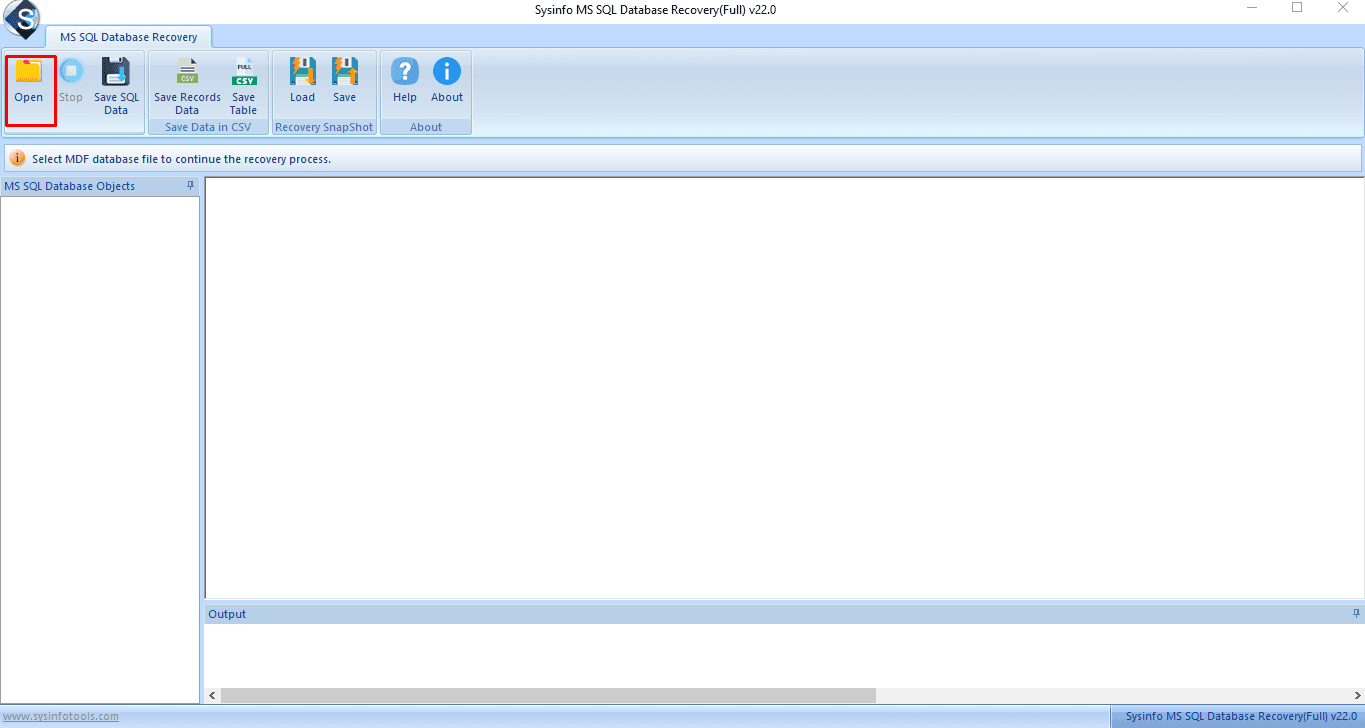
About this app
SysInfo MS SQL Database Recovery is a Windows-based tool that repairs corrupt MDF and NDF files from any SQL Server version and recovers tables, views, stored procedures, triggers, indexes, and deleted records. It offers two recovery modes—Standard for minor corruption and Advanced for severe cases—and supports previewing recovered data before saving. You can export to a live SQL Server database (using Windows or SQL Server authentication), generate SQL scripts, or save schema only. The tool preserves original data structure, handles compressed tables, and works read-only so your source files stay untouched. It’s ideal for DBAs and IT teams facing suspect databases, I/O errors, or page-level corruption. A free demo lets you scan and preview, while the full version unlocks saving. Overall, it’s a practical, no-frills solution for SQL Server disaster recovery.
Key features
- 1Repairs corrupt MDF and NDF files from SQL Server 2000–2019 with Standard and Advanced recovery modes.
- 2Preview recovered tables, views, procedures, triggers and deleted records before saving.
- 3Export to a live SQL Server (Windows or SQL Server auth), generate SQL scripts, or save schema only.
- 4Read-only operation keeps source files untouched; handles compressed tables and preserves data structure.
- 5Free demo scans and previews; full version unlocks saving.
Target customer profile
Drawn from the product itself, not from a survey.
Demographic
Database administrators (DBAs) managing SQL Server environments
Pain points
Corrupt MDF files, suspect databases, and I/O errors causing downtime
Primary needs
Fast, reliable recovery without data loss and ability to export to live server
Demographic
IT support teams in small to mid-sized businesses
Pain points
Limited budget for enterprise recovery tools and lack of in-house expertise
Primary needs
Affordable, easy-to-use software with preview and selective recovery
Demographic
Developers and testers working with SQL Server databases
Pain points
Accidental data corruption during development or testing
Primary needs
Quick repair of MDF files and export to SQL scripts for rebuilding
Scout Review
Written by AI from measured evidence, scored out of 100.
SysInfo MS SQL Database Recovery is a no-frills Windows utility for repairing corrupt MDF/NDF files and recovering tables, views, procedures, triggers and deleted records, with Standard and Advanced modes, preview-before-save, and export to a live SQL Server or SQL script. The site is fast and the pitch is clear, but the design is dated and the copy is dense. It's a competent, narrowly-scoped tool for DBAs in a bind — not a category leader, but a practical option when a database is marked SUSPECT and you need your data back.
Measure by measure
Usability
58Clear primary CTAs, a sensible tab nav and a free scan-and-preview demo make the path to value obvious. Dense, unbroken error-code walls and keyword-stuffed copy slow down the DBA who actually needs it.
Design
46Dated but functional Windows-tool landing page. The 3D product-box hero is the one polished element; four competing accent colours, overlapping chat widgets and mismatched card art drag it down.
Speed
88Lighthouse mobile 100/100 with LCP 1.2s, CLS 0 and TBT 36ms; desktop also 100/100. The page is genuinely snappy, which is rare for a vendor site this old.
Security
74HTTPS enforced with HSTS, CSP, Referrer-Policy and Permissions-Policy, plus SPF/DMARC (10/12 header checks). Missing X-Frame-Options and X-Content-Type-Options; no published audit or bug bounty found.
Accessibility
80Lighthouse a11y 95/100. Failing audits include insufficient colour contrast, a missing main landmark and label/name mismatches. English-only with no published WCAG statement, but the automated baseline is strong.
Growth
54A real, painful problem (corrupt MDF files, suspect databases) with a specific DBA buyer and concrete differentiators — dual modes, live-server export, read-only safety. But it's a niche, one-time-purchase utility in a crowded repair-tool field.
Improvement areas
- Dated landing page with four competing accent colours and an overlapping chat popup.
- Dense, unbroken error-code and feature copy with no subheadings or searchable index.
- Missing X-Frame-Options and X-Content-Type-Options headers; no published audit or bug bounty.
- Failing a11y audits (contrast, main landmark, accessible names) and English-only with no WCAG statement.
Design & Usability
The landing page does the job a vendor page must do: big Download and Purchase buttons up top, a tab row to Features/Specification/Guide/Screenshots/Video, and a free demo that scans and previews before you pay. The app screenshot even tells you the first step. Where it stumbles is craft and clarity under pressure — four competing accent colours, a chat popup parked over the hero, mismatched card illustrations, and long unbroken error-code lists with no subheadings. A DBA hunting error 824 at 2am has to read a wall of text to find their case. Functional, not refined.
Speed & Security
Speed is the standout: Lighthouse mobile 100/100 with LCP 1.2s, CLS 0 and TBT 36ms, desktop also 100/100 — genuinely snappy for a site this old. Security is solid-but-incomplete: HTTPS enforced with HSTS, CSP, Referrer-Policy and Permissions-Policy plus SPF/DMARC (10/12 header checks), but X-Frame-Options and X-Content-Type-Options are missing and there's no published audit or bug bounty. For a tool that opens your corrupt production database, the header hygiene is reassuring; the missing hardening and absent third-party assurance are the gaps.
Accessibility & Growth
Accessibility scores 95/100 on Lighthouse, but the failing audits are the ones users feel: insufficient colour contrast, no main landmark, role=presentation conflicts and visible labels without matching accessible names. It's English-only with no WCAG statement. Growth is a judgement on the idea: corrupt MDF/NDF files and suspect databases are a real, expensive problem, and the tool names a specific buyer (DBAs, SMB IT) with concrete differentiators — dual Standard/Advanced modes, export to a live SQL Server, SQL scripts, schema-only, read-only safety. The limit is structural: a niche one-time-purchase utility against free built-in SQL repair and a crowded field. Real wedge, modest ceiling.
Conclusion
If your MDF file is corrupt and you need a preview-first, read-only repair tool that won't touch the source, this does the job at a fraction of enterprise pricing. Go in expecting a dated interface and dense docs, lean on the free demo to confirm it can see your data before you buy, and keep a real backup strategy so you never need it twice.
Suggestions for improvement
- Add subheadings and a searchable error-code index so a DBA can jump straight to their specific error.
- Publish a security page with header hardening (X-Frame-Options, nosniff) and any audit or pen-test results.
- Fix the failing a11y audits: colour contrast, a <main> landmark, and matching accessible names on labelled controls.
- Tighten the landing page: one primary accent colour, remove the overlapping chat popup, and unify the card illustrations.
Alternatives comparison
Named competitors, point by point. Nobody paid to appear here or to be left out.
 SysInfo MS SQL Database Recovery |  EaseUS Todo Backup | |
|---|---|---|
| Primary purpose | Dedicated SQL Server MDF/NDF corruption repair and recovery | General backup and recovery suite with some SQL database support |
| Recovery modes | Standard (minor corruption) and Advanced (severe corruption) | Backup restore; not a corruption-specific dual-mode repair |
| Export to live SQL Server | Yes — Windows or SQL Server authentication, plus SQL script and schema-only | Restores backups rather than exporting repaired objects to a live instance |
| Preview before saving | Yes — free demo scans and previews recovered content | Backup preview/browse varies by product; not corruption-repair focused |
| Read-only source safety | Yes — works read-only, original files untouched | Backup/restore operations; source safety depends on workflow |
| Target user | DBAs and IT teams facing corrupt MDF/NDF, suspect databases, I/O errors | Broad consumer/SMB backup users, including some SQL environments |
Comparing options? See SysInfo MS SQL Database Recovery alternatives, scored side by side
More Productivity apps
View all Productivity
Puzzly – B2B Lead Generation & Sales Intelligence Platform
92Puzzly is an all-in-one B2B lead generation platform that...

Qamarero
92An all-in-one hospitality software for restaurants and ba...

EmbedMyReviews
92White-label reputation management software for agencies s...

StoryPad
92Privacy-first open source journal app with a continuous t...

Notion
92All-in-one AI workspace for docs, projects, and knowledge...

The Stack Newsletter
92A weekly newsletter delivering curated tech jobs, intervi...

Vibe Coding Agent Skills
92A free, open-source platform offering 110 AI agent skills...

QRBliss
91Branded QR codes with AI Brand Sync, 15 free dynamic code...

Gerty
91Private, local AI assistant for Mac that runs offline

Strukchad Property Management
91Property management for Kenyan letting agents: rent invoices raised every month, M-Pesa rent prompts to tenants, arrears tracking and landlord statements.

CC Switch
91Open-source desktop app for switching AI coding providers...

PitchWhip
90AI cold call scripts & direct dials from LinkedIn


A platform dedicated to providing unbiased reviews of newly launched applications, analyzing everything from their features to their full potential.
info@scoutforge.net© 2026 Scoutforge. All rights reserved.
