Cycling through all six. Tap any point to stop.
Measured on six things
Split oversized Outlook OST files into smaller, manageabl...
Design
44Dated Windows Forms app UI and a cramped, text-heavy homepage. Strong CTAs and a numbered flow help, but typography and overlapping sections drag it down.
Screenshots
1 / 1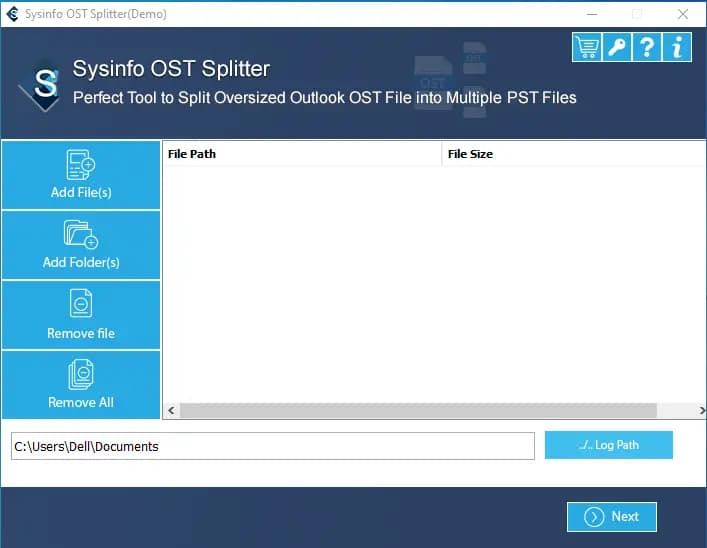
About this app
SysInfo OST Splitter is a dedicated Windows utility built to tackle one very specific but frustrating problem: bloated Outlook OST files that slow down your mailbox or trigger size-related errors. Unlike all-in-one converter suites that try to do everything, this tool stays in its lane and does one job well — it breaks a large OST into smaller, more manageable PST files. You can split by file size (in MB or GB), by date or year, by folder, or even by sender email ID, which is surprisingly handy when you want to archive a noisy client's entire thread history separately. The tool lets you add single files, multiple files, or an entire folder, and it preserves the original folder hierarchy and metadata (To, Cc, Bcc, etc.) along the way. There are a few nice touches: an option to ignore duplicate emails, password protection for the output PST files, a date filter, and a choice between creating one consolidated file or separate PSTs per selected folder. It handles both ANSI and Unicode O...
Key features
- 1Split OST files by size (MB/GB), date, year, folder, sender email ID, or category.
- 2Preserves original folder hierarchy and metadata (To, Cc, Bcc) during splitting.
- 3Options to ignore duplicate emails and password-protect output PST files.
- 4Batch handling: add single files, multiple files, or an entire folder at once.
Target customer profile
Drawn from the product itself, not from a survey.
Demographic
IT administrators and helpdesk teams in mid-to-large organizations
Pain points
Users hit mailbox size errors; OST files grow to tens of GB and cause Outlook slowdowns
Primary needs
A reliable, repeatable way to split large OST files by size or date without data loss
Demographic
Outlook power users and consultants managing multiple mailboxes
Pain points
Manual archiving is tedious and doesn't split by sender or folder cleanly
Primary needs
Granular splitting by folder, sender, or date to create organized archive PSTs
Demographic
SMBs migrating or archiving email data on Windows desktops
Pain points
Limited budget for enterprise eDiscovery tools; need local, offline processing
Primary needs
Affordable, one-time-purchase tool with password protection and batch file handling
Scout Review
Written by AI from measured evidence, scored out of 100.
SysInfo OST Splitter is a focused, long-established Windows utility (domain registered 2010) that does one job: breaking bloated OST files into manageable PSTs. It splits by size, date, year, folder, sender email ID, and category, preserves folder hierarchy and metadata, and adds duplicate-ignoring and password protection. The site is fast (Lighthouse 100/100) and reasonably secure (10/12 headers), but visually dated and text-heavy, with a free tier capped at 50 items per folder. Against GainTools it competes on the sender-split feature rather than price or polish. A competent niche tool that would benefit from a UI refresh and a clearer free trial.
Measure by measure
Usability
60Clear CTAs, a numbered usage flow, and a real screenshot make the basics workable. The 50-item free cap and long scroll-to-demo hurt the signup-to-value path.
Design
44Dated Windows Forms app UI and a cramped, text-heavy homepage. Strong CTAs and a numbered flow help, but typography and overlapping sections drag it down.
Speed
88Lighthouse 100/100 on both mobile and desktop, LCP 1.1s, CLS 0, TBT 72ms. Genuinely snappy for a marketing page with this much text.
Security
74HTTPS enforced with HSTS, CSP, SPF and DMARC in place (10/12 header checks). Missing frame protection and X-Content-Type-Options; no published audit or compliance claims.
Accessibility
80Lighthouse a11y 98/100. Minor fails: no main landmark, role=presentation conflicts, and some visible labels without matching accessible names. No WCAG statement published.
Growth
58Real, specific pain (bloated OST files) with a genuine differentiator: split by sender email ID. But GainTools offers similar splitting at budget price, capping the wedge.
Improvement areas
- Free tier caps at 50 items per OST folder — too restrictive to evaluate the tool.
- Dated Windows Forms UI and cramped, repetitive homepage typography.
- No published security audit, SOC 2, or ISO certification despite handling mailbox data.
- Missing frame protection and X-Content-Type-Options security headers.
Design & Usability
SysInfo OST Splitter's homepage is functional but frozen in time. The visual audit calls it dated, and the app screenshot confirms it: flat blue Windows Forms buttons, no icons, tight line spacing, and long unbroken paragraphs. Three sections (Benefits, When to Use, Salient Features) restate the same points, and a floating orange chat bubble overlaps the hero graphic. On usability the basics land — Free Download and Purchase Now are prominent, and a numbered step-by-step flow pairs with a real screenshot. But the free tier caps at 50 items per OST folder, and the actual demo sits well below the fold after a lot of scrolling. It works; it just doesn't feel like 2024.
Speed & Security
Speed is the standout: Lighthouse reports 100/100 on both mobile and desktop, with LCP 1.1s, CLS 0, and TBT 72ms. For a page this text-heavy that's genuinely impressive and points to a lean, well-cached build. Security is solid but not exceptional: HTTPS is enforced with HSTS, CSP, Referrer-Policy, Permissions-Policy, SPF, and DMARC all present — 10 of 12 header checks pass. The gaps are frame protection and X-Content-Type-Options. There's no SOC 2, ISO, or third-party audit claim anywhere on the site, and the '100% Safe & Secure' badge is marketing, not certification. For a local Windows utility handling mailbox data, that's a reasonable posture but not a verified one.
Accessibility & Growth
Accessibility scores 98/100 on Lighthouse's automated audit — strong. The failing items are minor: no main landmark, role=presentation conflicts, and a few visible labels without matching accessible names. No WCAG statement is published, so keyboard and screen-reader support beyond automated checks is unverified. Growth is the interesting one. The problem is real and specific: OST files balloon to tens of GB and trigger Outlook size errors. The differentiator — splitting by sender email ID — is a genuinely useful workflow for archiving a noisy client's thread history, and password-protected output PSTs plus batch folder handling are nice touches. But GainTools OST Splitter covers size, date, and folder splitting at a budget price, so the wedge is narrow. The category has room, but this product's edge is one feature deep.
Conclusion
If you're an IT admin staring down a 40GB OST file and a mailbox-size error, this tool names your problem precisely and offers granular splitting that most all-in-one converters bury. The sender-based split is the standout. But the dated interface, the 50-item free cap, and the lack of published security audits mean you're buying on faith and a 30-day money-back guarantee. Download the free version, split one folder, and see if the workflow fits before you pay. It's a specialist tool for a specialist problem — judge it on that, not on how pretty the landing page is.
Suggestions for improvement
- Publish a real free trial (e.g. 30 days or 500 items) instead of the 50-items-per-folder cap.
- Add a WCAG/accessibility statement and fix the main-landmark and label-name audit failures.
- Refresh the app UI and homepage typography — break up paragraphs, add icons, modernize spacing.
- Add frame protection and X-Content-Type-Options headers; consider a third-party security audit.
Alternatives comparison
Named competitors, point by point. Nobody paid to appear here or to be left out.
 SysInfo OST Splitter |  GainTools OST Splitter | |
|---|---|---|
| Split by file size | Yes — MB and GB ranges | Yes |
| Split by sender email ID | Yes | Not listed |
| Split by date/year | Yes | Yes |
| Split by folder | Yes | Yes |
| Password-protect output PST | Yes | Not listed |
| Free version limit | 50 items per OST folder | Trial available |
Comparing options? See SysInfo OST Splitter alternatives, scored side by side
More Productivity apps
View all Productivity
Notion
92All-in-one AI workspace for docs, projects, and knowledge...

Qamarero
92An all-in-one hospitality software for restaurants and ba...

EmbedMyReviews
92White-label reputation management software for agencies s...

StoryPad
92Privacy-first open source journal app with a continuous t...

Puzzly – B2B Lead Generation & Sales Intelligence Platform
92Puzzly is an all-in-one B2B lead generation platform that...

The Stack Newsletter
92A weekly newsletter delivering curated tech jobs, intervi...

Vibe Coding Agent Skills
92A free, open-source platform offering 110 AI agent skills...

QRBliss
91Branded QR codes with AI Brand Sync, 15 free dynamic code...

Gerty
91Private, local AI assistant for Mac that runs offline

CC Switch
91Open-source desktop app for switching AI coding providers...

username.md
90One verified handle for your online identity, readable by...

PitchWhip
90AI cold call scripts & direct dials from LinkedIn


A platform dedicated to providing unbiased reviews of newly launched applications, analyzing everything from their features to their full potential.
info@scoutforge.net© 2026 Scoutforge. All rights reserved.
