Cycling through all six. Tap any point to stop.
Measured on six things
Bulk-extract attachments from Outlook PST files into a se...
Design
44Dated blue-and-white template with a consistent card grid, but the only product screenshot shows a different tool ('PST Converter Tool Demo') with an 'Activate Windows' watermark. Keyword-stuffed headings and XP-era system specs undercut trust.
Screenshots
1 / 1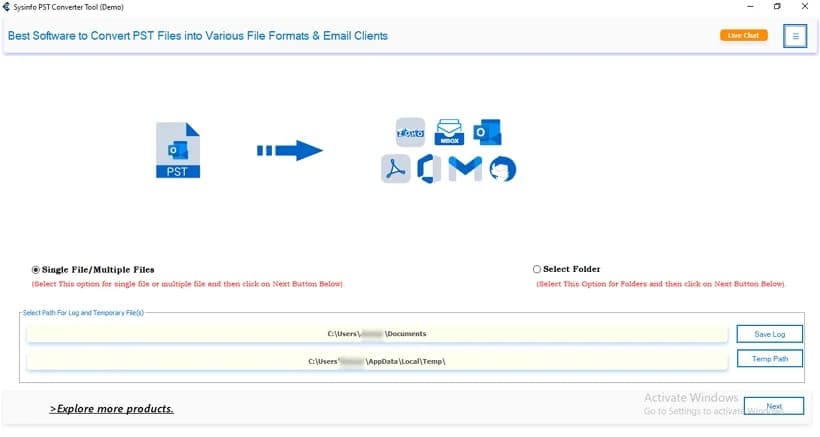
About this app
SysInfo Outlook Attachment Extractor is a Windows desktop utility that pulls embedded attachments out of Outlook PST files—without exporting the email bodies. You add a PST, choose specific folders or messages, and direct the tool to save attachments either alongside their parent emails as PDF, DOC, or EML, or into one shared folder on your local drive. It handles large files and bulk extraction across multiple PSTs, preserves every attachment intact, and offers a preview before saving. The interface is friendly enough for office managers with basic IT skills, yet the tool still delivers granular control—selective message picking, custom destination paths, and support for all Windows versions including Windows 11. The free version caps you at 50 emails per folder; the licensed edition removes that limit. A 30-day money-back guarantee and 24/7 support round out the package. It's a focused, no-nonsense helper for email hygiene and archiving.
Key features
- 1Bulk extraction of attachments from multiple Outlook PST files into one folder, without exporting email bodies.
- 2Selective extraction from specific emails or folders, with preview before saving and custom destination paths.
- 3Handles large attachments and preserves files intact; supports all Windows versions including Windows 11.
- 4Free tier capped at 50 emails per folder; licensed edition removes the limit with a 30-day money-back guarantee.
Target customer profile
Drawn from the product itself, not from a survey.
Demographic
IT administrators and email administrators
Pain points
Manually saving attachments from hundreds of PST files is error-prone and time-consuming.
Primary needs
Bulk extraction of attachments across multiple PST files with intact metadata and folder structure.
Demographic
Legal and compliance teams
Pain points
Need to preserve email attachments as separate records for audits, without the email body.
Primary needs
Selective extraction of attachments from specific emails, plus options to save as PDF or DOC.
Demographic
Small business owners and office managers
Pain points
No dedicated IT support; struggling to declutter mailboxes while keeping important files.
Primary needs
An easy-to-use GUI to extract attachments from selected emails and save them to a local folder.
Scout Review
Written by AI from measured evidence, scored out of 100.
SysInfo Outlook Attachment Extractor is a focused Windows utility for a real, unglamorous job: pulling attachments out of Outlook PST files without dragging the email bodies along. The marketing site explains the workflow clearly, the spec table and FAQ are easy to parse, and the page loads at a genuine 100/100 on Lighthouse. The problems are trust and differentiation. The only product screenshot shows a different tool with an 'Activate Windows' watermark. The platform selector offers Mac for a Windows-only product. The copy is keyword-stuffed to the point of incoherence. And against eSoftTools and Emailchemy, the page never makes the case for choosing it. Security is solid on headers but silent on audits — a gap that matters for the compliance teams it targets.
Measure by measure
Usability
58Clear breadcrumbs and sticky anchor nav make the long page navigable, and the spec table and FAQ parse well. But the 'Windows Mac' selector lies about platform support, there's no live demo, and justified narrow paragraphs hurt scanning.
Design
44Dated blue-and-white template with a consistent card grid, but the only product screenshot shows a different tool ('PST Converter Tool Demo') with an 'Activate Windows' watermark. Keyword-stuffed headings and XP-era system specs undercut trust.
Speed
88Lighthouse mobile and desktop both score 100/100, with LCP 1.1s, CLS 0 and TBT 85ms. The marketing site is genuinely fast; no lag complaints surfaced in the collected evidence.
Security
74HTTPS enforced with HSTS, CSP, Referrer-Policy and Permissions-Policy, plus SPF and DMARC — 10/12 on the header probe. Missing X-Frame-Options and X-Content-Type-Options; no SOC 2, ISO or bug bounty published.
Accessibility
82Lighthouse accessibility 98/100, with only minor fails: no main landmark, role=presentation conflicts, and some visible labels without matching accessible names. No WCAG statement and English-only, but the automated baseline is strong.
Growth
52A real, narrow problem — bulk PST attachment extraction without email bodies — aimed at IT admins and compliance teams. But eSoftTools and Emailchemy already cover the same ground, and nothing on the page explains why to pick this one.
Improvement areas
- Replace the mismatched 'PST Converter Tool (Demo)' screenshot with a real, readable capture of the extractor UI.
- Remove the Mac option from the platform selector or ship a Mac build to match the claim.
- Publish a security/compliance page (SOC 2, ISO, data handling, disclosure contact) for legal and IT buyers.
- De-stuff the keyword-heavy headings and add a direct comparison table against eSoftTools and Emailchemy.
Design & Usability
The site is a classic 2010s software-vendor template: pale-blue gradient hero, green Free Download next to blue Purchase Now, a card grid of features, and a numbered step timeline. It's orderly and the CTAs are unmissable, but the craft isn't there. The single product screenshot shows a different tool ('Sysinfo PST Converter Tool (Demo)') at unreadable size with an 'Activate Windows' watermark, and headings repeat 'PST Attachment Extractor' until the copy stops meaning anything. Usability is better than design: breadcrumbs and a sticky anchor bar make the long page navigable, the spec table and FAQ are clean, and the workflow is explained step by step. Against that, the 'Available for: Windows Mac' selector advertises a platform the product doesn't support, there's no live demo, and the free tier's 50-emails-per-folder cap is a hard wall for anyone with real volume.
Speed & Security
Speed is the standout: Lighthouse scores 100/100 on both mobile and desktop, with LCP 1.1s, CLS 0 and TBT 85ms. Whatever else is dated about this page, the delivery isn't — it loads instantly and stays stable. Security is competent but unremarkable: HTTPS is enforced with HSTS, CSP, Referrer-Policy and Permissions-Policy, and SPF and DMARC are configured, giving 10/12 on the header probe. The gaps are X-Frame-Options and X-Content-Type-Options, both cheap to add. More importantly, there's no published SOC 2, ISO 27001, penetration test or bug bounty — for a tool that handles legal and compliance teams' email attachments, that absence is the real story. Nothing suggests a breach or broken TLS, but nothing proves diligence either.
Accessibility & Growth
Accessibility lands at 98/100 on Lighthouse, with only three minor fails: no main landmark, role=presentation conflicts, and a few visible labels without matching accessible names. There's no WCAG conformance statement and the site is English-only, but the automated baseline is genuinely strong for a vendor of this vintage. Growth is the harder question. The problem is real — pulling attachments out of PST files without exporting email bodies is a genuine pain for IT admins, legal teams and office managers — and the target customer is specific. But the alternatives list tells the story: eSoftTools ships a dedicated Outlook attachment extractor with batch PST/EML/MSG support, and Emailchemy covers conversion and extraction cross-platform. Nothing on the page explains why SysInfo wins that comparison beyond a money-back guarantee and a self-reported 4.8-star rating. The 16-year-old domain shows staying power, not momentum.
Conclusion
If you're an IT admin with a stack of PSTs and a compliance deadline, this will probably do the job — the feature list is credible and the 30-day money-back guarantee lowers the risk of finding out. But go in knowing you're buying from a vendor that hasn't updated its presentation in a decade, and that the free tier's 50-emails-per-folder cap will force a purchase fast. Compare against eSoftTools before you commit; the feature sets overlap heavily and the deciding factor will be price and support responsiveness, not capability. The site's speed and header hygiene suggest the team can execute when it wants to — the missing piece is showing the actual product and proving it's secure.
Suggestions for improvement
- Replace the 'PST Converter Tool (Demo)' screenshot with a real, high-resolution capture of the attachment extractor UI — no watermarks.
- Remove the Mac option from the 'Available for' selector or ship a Mac build; the current mismatch erodes trust immediately.
- Publish a security page with SOC 2 or ISO status, data-handling details, and a vulnerability disclosure contact for compliance buyers.
- Rewrite headings to drop the repeated 'PST Attachment Extractor' keyword stuffing and add a direct comparison table vs. eSoftTools and Emailchemy.
Alternatives comparison
Named competitors, point by point. Nobody paid to appear here or to be left out.
 SysInfo Outlook Attachment Extractor | Emailchemy |  Outlook Attachment Extractor by eSoftTools | |
|---|---|---|---|
| Bulk attachment extraction from PST files | Yes — extracts attachments from multiple PSTs into one folder | Yes — exports attachments alongside email conversion | Yes — batch extraction from PST, EML and MSG |
| Platform support | Windows only (site shows a Mac option that isn't real) | Cross-platform | Windows |
| Supported input formats | PST | PST and many other email formats | PST, EML, MSG |
| Preview before saving | Yes — preview attachments before saving | Not specified on site | Not specified on site |
| Free tier / trial | Free version capped at 50 emails per folder | Trial available per vendor site | Trial/demo version available |
| Money-back guarantee | 30-day money-back guarantee | Not stated on site | Not stated on site |
Emailchemy
Emailchemy is a cross-platform email conversion and extraction tool that can export attachments from Outlook PST files along with other email formats.
Outlook Attachment Extractor by eSoftTools
eSoftTools offers a dedicated Outlook attachment extractor that supports batch extraction of attachments from PST, EML, and MSG files.
Comparing options? See SysInfo Outlook Attachment Extractor alternatives, scored side by side
More Productivity apps
View all Productivity
Puzzly – B2B Lead Generation & Sales Intelligence Platform
92Puzzly is an all-in-one B2B lead generation platform that...

Qamarero
92An all-in-one hospitality software for restaurants and ba...

EmbedMyReviews
92White-label reputation management software for agencies s...

StoryPad
92Privacy-first open source journal app with a continuous t...

Notion
92All-in-one AI workspace for docs, projects, and knowledge...

The Stack Newsletter
92A weekly newsletter delivering curated tech jobs, intervi...

Vibe Coding Agent Skills
92A free, open-source platform offering 110 AI agent skills...

QRBliss
91Branded QR codes with AI Brand Sync, 15 free dynamic code...

Gerty
91Private, local AI assistant for Mac that runs offline

Strukchad Property Management
91Property management for Kenyan letting agents: rent invoices raised every month, M-Pesa rent prompts to tenants, arrears tracking and landlord statements.

CC Switch
91Open-source desktop app for switching AI coding providers...

PitchWhip
90AI cold call scripts & direct dials from LinkedIn


A platform dedicated to providing unbiased reviews of newly launched applications, analyzing everything from their features to their full potential.
info@scoutforge.net© 2026 Scoutforge. All rights reserved.
