Cycling through all six. Tap any point to stop.
Measured on six things
Convert Outlook PST files to 10+ formats and migrate to c...
Design
45Dated early-2010s template styling: text-heavy hero with a star rating, five bullets, platform checkboxes and two competing CTAs. The desktop app is a plain Windows form with no modern chrome.
Screenshots
1 / 3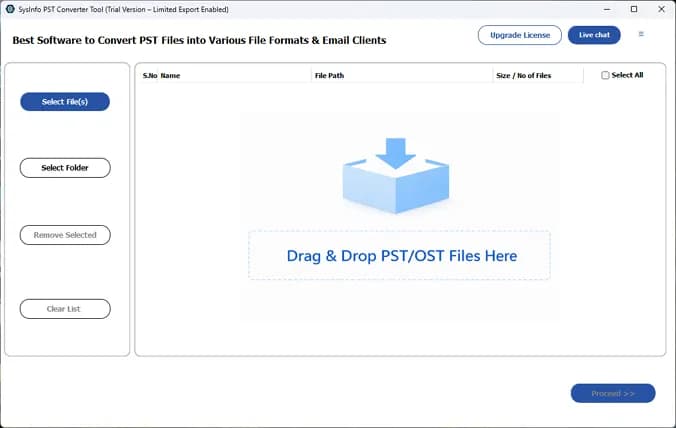
About this app
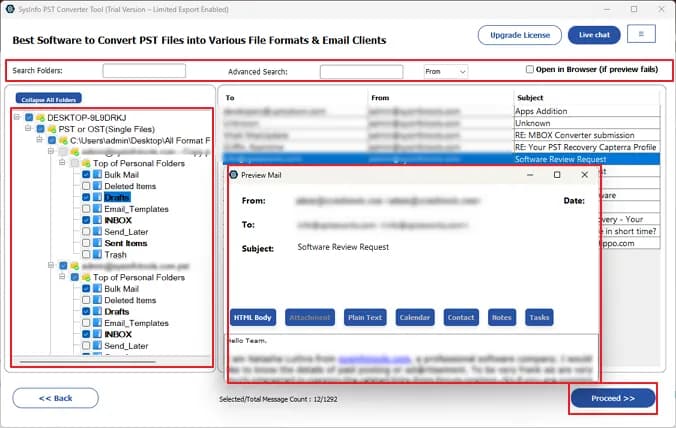
SysInfo PST Converter is a specialized utility that converts Outlook PST and OST files into PDF, EML, MSG, MBOX, CSV, VCF, ICS, JSON, PNG, and other formats. It also supports direct migration to Office 365, Google Workspace, IMAP, and more. The tool is completely standalone, meaning it works without Microsoft Outlook installed. Key features include batch conversion, preservation of folder hierarchy and metadata, advanced filtering, duplicate removal, and corruption handling. It is compatible with all Outlook versions and Windows OS, with additional support for Mac and Linux. I found the interface intuitive and the conversion process reliable, making it a solid choice for enterprise migrations, legal compliance, and everyday data management.
Key features
- 1Converts PST/OST to PDF, EML, MSG, MBOX, CSV, VCF, ICS, JSON and PNG without Microsoft Outlook installed.
- 2Direct migration to Office 365, Google Workspace and IMAP, with batch conversion and folder hierarchy preservation.
- 3Advanced filtering by date, duplicate removal, corruption handling, and attachment management before conversion.
Target customer profile
Drawn from the product itself, not from a survey.
Demographic
IT Administrators and Enterprise IT Teams
Pain points
Complex and risky email migration from on-premise Exchange to cloud platforms; need to maintain data integrity and compliance.
Primary needs
Reliable batch conversion of PST files to multiple formats and direct cloud migration with minimal downtime and zero data loss.
Demographic
Legal Professionals and Compliance Officers
Pain points
Requirement to access and archive PST files without Outlook; need for searchable, standardized formats for eDiscovery and audits.
Primary needs
Conversion of PST to PDF, CSV, and other formats with metadata preservation and audit-ready logs for legal compliance.
Demographic
Small Business Owners and Individuals
Pain points
Difficulty accessing old PST files after switching email clients; need for affordable and easy-to-use conversion tool.
Primary needs
Simple, standalone conversion of PST files to MBOX, EML, or other formats for use in Thunderbird, Gmail, or other platforms.
Scout Review
Written by AI from measured evidence, scored out of 100.
SysInfo PST Converter is a competent, long-running utility with a genuinely fast site and a clear core workflow: drop a PST or OST, preview, convert to PDF/EML/MBOX/CSV/JSON/PNG or migrate straight to Office 365, Google Workspace or IMAP, all without Outlook installed. Batch conversion, duplicate removal, date filtering and hierarchy preservation are all there. What holds it back is presentation — a dated template homepage, a plain Windows-form app, competing CTAs, and accessibility gaps that a compliance-focused buyer will notice. It works; it just doesn't look or read like the enterprise tool it's pitching itself as.
Measure by measure
Usability
58Free demo download, software guide, screenshots and video give real onboarding paths, and drag-and-drop plus a file list make the core flow obvious. Dense nav and competing CTAs add friction.
Design
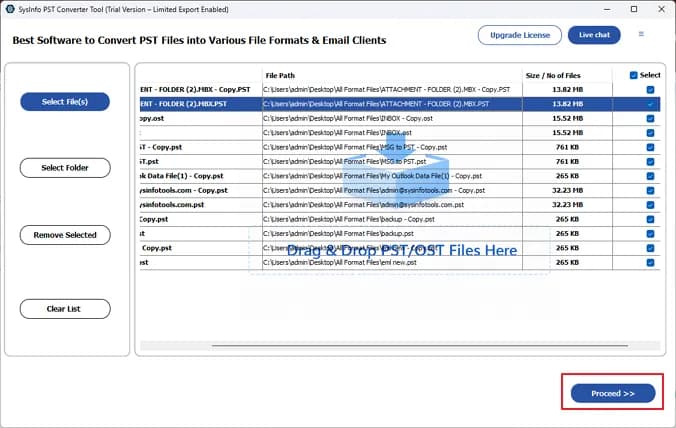
45Dated early-2010s template styling: text-heavy hero with a star rating, five bullets, platform checkboxes and two competing CTAs. The desktop app is a plain Windows form with no modern chrome.
Speed
88Lighthouse mobile 95/100 and desktop 99/100, with LCP 2.7s, CLS 0 and TBT 111ms. The marketing site is genuinely fast and stable, among the quicker pages in this category.
Security
72HTTPS enforced with HSTS, CSP, Referrer-Policy, Permissions-Policy, SPF and DMARC (10/12 header checks). Frame protection and X-Content-Type-Options are missing; no published audit found.
Accessibility
58Lighthouse accessibility 86/100, but contrast failures, a missing main landmark, invalid aria-* values and role conflicts remain. No WCAG statement found; Windows, Mac and Linux coverage is a plus.
Growth
58A real, recurring problem — PST lock-in and Exchange-to-cloud migrations — with a broad format list and direct cloud targets. Differentiation versus Stellar is thin; the wedge is breadth, not depth.
Improvement areas
- Dated landing page and plain Windows-form app UI with competing CTAs and no visual hierarchy.
- Missing X-Frame-Options and X-Content-Type-Options headers; no published SOC 2/ISO audit or compliance page.
- Failing accessibility audits (contrast, main landmark, invalid aria-* values) and no WCAG statement.
Design & Usability
The landing page reads like a 2013 software template: a light-blue header, dropdown nav, and a hero that stacks a 4.9-star badge, a long paragraph, five checkmark bullets, three OS checkboxes and two blue CTAs with no visual priority. The desktop app is a plain Windows form — a left sidebar of buttons, a dashed drag-and-drop zone, and a file table with name/path/size columns. Functionally the flow is clear: drop a PST, preview, pick a format, convert. Onboarding is better than the design deserves, with a free demo, software guide, screenshots and video. The friction is density — too many competing CTAs and live-chat pills on both the site and the app header.
Speed & Security
Speed is the standout: Lighthouse mobile 95/100 and desktop 99/100, LCP 2.7s, CLS 0, TBT 111ms. Whatever else is dated here, the marketing site is not slow. Security is solid-but-unremarkable: HTTPS enforced with HSTS, CSP, Referrer-Policy, Permissions-Policy, SPF and DMARC — 10 of 12 header checks — but frame protection and X-Content-Type-Options are absent. The '100% Safe & Secure' badge is a claim, not an audit; no SOC 2, ISO 27001 or bug bounty surfaced in the collected evidence. For a tool handling mailbox data for legal and enterprise customers, a published compliance posture would matter more than another checkmark bullet.
Accessibility & Growth
Accessibility lands at 86/100 on Lighthouse, which sounds better than it is: contrast failures, a missing main landmark, invalid aria-* values and role conflicts all remain, and there is no WCAG statement anywhere on the site. Cross-platform coverage (Windows, Mac, Linux) is a genuine plus. On growth, the problem is real and recurring — PST lock-in, Exchange-to-cloud migrations, eDiscovery — and the product names three distinct segments. But the differentiation against Stellar Converter for PST is breadth of output formats and direct cloud targets, which is copyable. The strongest wedge is legal/compliance archival, where audit-ready logs and metadata preservation actually matter; the site mentions them but doesn't lead with them.
Conclusion
If you need to get PST data out of Outlook and into something else, this will do it, and the free demo lets you confirm that before paying. If you're buying for a legal or enterprise team, ask for the compliance documentation directly — the site doesn't publish it. The 30-day money-back window softens the risk. The honest verdict: reliable engine, dated wrapper.
Suggestions for improvement
- Rebuild the hero around one CTA and one proof point; move the star rating, bullets and OS checkboxes below the fold.
- Add X-Frame-Options and X-Content-Type-Options headers, then publish a security/compliance page with any audit status.
- Fix the failing Lighthouse a11y audits: contrast ratios, a main landmark, and the invalid aria-* values and role conflicts.
- Lead the legal/compliance pitch with audit-ready logs and metadata preservation instead of a format-count checklist.
Alternatives comparison
Named competitors, point by point. Nobody paid to appear here or to be left out.
 SysInfo PST Converter SysInfo PST Converter |  Stellar Converter for PST Stellar Converter for PST | |
|---|---|---|
| Output formats | PDF, EML, MSG, MBOX, CSV, VCF, ICS, JSON, PNG, HTML | PDF, HTML, EML, MSG and more |
| Cloud migration targets | Office 365, Google Workspace, IMAP, Hotmail | Office 365 migration supported |
| Works without Outlook installed | Yes, fully standalone | Yes, standalone |
| Deleted email recovery | Corruption handling; recovery via separate PST Recovery tool | Built-in recovery of deleted emails |
| Platform support | Windows, Mac, Linux | Windows |
| Free trial / demo | Free download demo with limited export; 30-day money-back | Free trial version available |
Comparing options? See SysInfo PST Converter alternatives, scored side by side
More Productivity apps
View all Productivity
Qamarero
92An all-in-one hospitality software for restaurants and ba...

The Stack Newsletter
92A weekly newsletter delivering curated tech jobs, intervi...

EmbedMyReviews
92White-label reputation management software for agencies s...

StoryPad
92Privacy-first open source journal app with a continuous t...

Puzzly – B2B Lead Generation & Sales Intelligence Platform
92Puzzly is an all-in-one B2B lead generation platform that...

Notion
92All-in-one AI workspace for docs, projects, and knowledge...

Vibe Coding Agent Skills
92A free, open-source platform offering 110 AI agent skills...

CC Switch
91Open-source desktop app for switching AI coding providers...

username.md
90One verified handle for your online identity, readable by...

What the GIF
89Frame-perfect video-to-GIF maker that runs entirely in yo...

AuditCloser
89White-label website audits that close deals for digital a...

NudgeWin
89Automated quote follow-up for trades and service businesses.


A platform dedicated to providing unbiased reviews of newly launched applications, analyzing everything from their features to their full potential.
info@scoutforge.net© 2026 Scoutforge. All rights reserved.
