Cycling through all six. Tap any point to stop.
Measured on six things
Convert ANSI PST to Unicode & vice versa with ease.
Design
46Dated Win32-style desktop UI and a cluttered homepage with two competing CTAs, overlapping chat widgets, and justified grey body text. Specifications table is the cleanest element.
Screenshots
1 / 1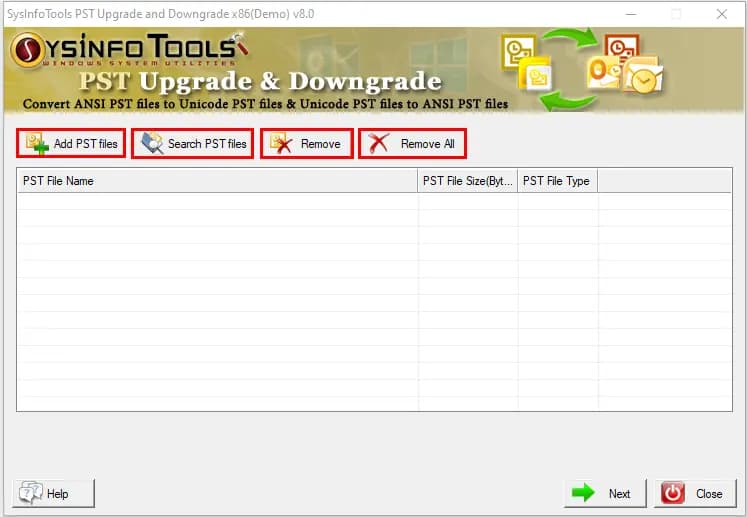
About this app
SysInfo PST Upgrade & Downgrade is a Windows utility designed to convert Outlook PST files between ANSI and Unicode formats. It enables upgrading from older Outlook versions to newer ones by converting ANSI PST to Unicode, and downgrading from newer to older versions by converting Unicode PST to ANSI. The tool supports batch conversion, auto-search for PST files, and options to remove duplicates and exclude deleted items. It preserves metadata and original file integrity. With an intuitive interface, it caters to both technical and non-technical users. It supports all Outlook versions and Windows OS, including Windows 11.
Key features
- 1Converts ANSI PST to Unicode and Unicode PST to ANSI for Outlook version upgrades and downgrades.
- 2Batch conversion of multiple PST files with metadata preservation and original file integrity.
- 3Auto-search for PST files, remove duplicates, and exclude deleted items in output.
Target customer profile
Drawn from the product itself, not from a survey.
Demographic
IT administrators managing legacy Outlook systems
Pain points
Need to migrate large mailboxes from ANSI to Unicode without data loss
Primary needs
Batch conversion and preservation of metadata
Demographic
Small business owners upgrading Outlook
Pain points
2GB size limit of ANSI PST files causing storage issues
Primary needs
Seamless upgrade to Unicode PST to increase mailbox size
Demographic
Users needing to downgrade Outlook for compatibility
Pain points
Unicode PST files not opening in older Outlook versions
Primary needs
Conversion from Unicode to ANSI PST without altering original data
Scout Review
Written by AI from measured evidence, scored out of 100.
SysInfo PST Upgrade & Downgrade is a competent, fast-loading Windows utility for a real but narrow problem: converting Outlook PST files between ANSI and Unicode formats. The site is dated and cluttered, the app UI looks like it shipped with Windows XP, and there's no published security audit. But the page loads in 1.1 seconds, the accessibility baseline is strong, and the tool does exactly what it claims. It's a solid choice for IT admins managing legacy Outlook migrations — just don't expect a modern SaaS experience.
Measure by measure
Usability
58Sticky anchor bar and clear above-the-fold CTAs help, but the app's empty file list gives no onboarding cue and dense paragraphs slow scanning. Self-instructive claim is plausible but unverified.
Design
46Dated Win32-style desktop UI and a cluttered homepage with two competing CTAs, overlapping chat widgets, and justified grey body text. Specifications table is the cleanest element.
Speed
88Lighthouse mobile and desktop both score 100/100 with LCP 1.1s, CLS 0, and TBT 38ms. Genuinely fast, lightweight page with no measured performance issues.
Security
74HTTPS enforced with HSTS, CSP, Referrer-Policy, Permissions-Policy, SPF, and DMARC. Missing X-Frame-Options and X-Content-Type-Options. No published audits or bug bounty found.
Accessibility
80Lighthouse a11y 98/100 with only minor failures: missing main landmark, role=presentation conflicts, and some unlabeled visible text. No WCAG statement found, but automated checks are strong.
Growth
58Real, specific pain point (ANSI 2GB limit, Unicode/ANSI compatibility) with a clear wedge, but the market is niche and shrinking as legacy Outlook fades. Established vendor since 2010.
Improvement areas
- Dated Win32-style app UI and cluttered homepage with competing CTAs and overlapping widgets.
- Missing X-Frame-Options and X-Content-Type-Options security headers; no published audits.
- No onboarding cue in the app's empty file list; dense paragraphs slow scanning.
Design & Usability
The homepage is a long vertical stack of centered-heading sections with a dated visual language: Win32-style app screenshots, justified grey body text, and two saturated CTAs (green Free Download, blue Purchase Now) competing for the same click. A chat bubble and query popup overlap the hero. The sticky anchor bar is a genuine usability win, but the app's empty file list offers no onboarding cue — first-time users must guess that 'Add PST files' is the start. Information density is high, with paragraph-length feature descriptions that slow scanning. The specifications table is the most orderly element on the page.
Speed & Security
Speed is the standout: Lighthouse scores 100/100 on both mobile and desktop, with LCP 1.1s, CLS 0, and TBT 38ms. The page is lightweight and snappy. Security is solid but not exceptional: HTTPS enforced with HSTS, CSP, Referrer-Policy, Permissions-Policy, SPF, and DMARC all present. Missing X-Frame-Options and X-Content-Type-Options headers leave minor gaps. No SOC 2, ISO 27001, or bug bounty program was found, which is typical for a small utility vendor but limits enterprise trust.
Accessibility & Growth
Accessibility scores 98/100 on Lighthouse with only minor failures: no main landmark, role=presentation conflicts, and some visible text labels without matching accessible names. No WCAG statement was found, but the automated baseline is strong. Growth is a judgment call: the product addresses a real, specific pain point — the ANSI PST 2GB limit and Unicode/ANSI compatibility for Outlook migrations — with a clear wedge (batch conversion, metadata preservation, duplicate removal). But the market is niche and shrinking as legacy Outlook versions fade. The vendor has operated since 2010, suggesting staying power, but the addressable audience is aging out.
Conclusion
If you're an IT admin staring down a pile of ANSI PST files that won't open in Outlook 2016, this tool will get the job done without drama. The batch conversion, metadata preservation, and duplicate removal are genuinely useful. But the dated interface, missing security certifications, and shrinking market mean this is a utility, not a platform. Buy it for the one migration you need, not as a long-term strategic investment.
Suggestions for improvement
- Add X-Frame-Options and X-Content-Type-Options headers to close the remaining security gaps.
- Publish a WCAG accessibility statement and fix the missing main landmark and unlabeled buttons.
- Redesign the homepage with a single primary CTA and remove the overlapping chat/query widgets from the hero.
- Add an onboarding cue in the app's empty file list (e.g., a 'Start here: Add PST files' tooltip).
Alternatives comparison
Named competitors, point by point. Nobody paid to appear here or to be left out.
 SysInfo PST Upgrade & Downgrade |  Stellar Converter for PST |  Aid4Mail | |
|---|---|---|---|
| ANSI to Unicode PST conversion | Yes | Yes | Yes |
| Unicode to ANSI PST downgrade | Yes | Partial | Yes |
| Batch conversion | Yes | Yes | Yes |
| Remove duplicates / exclude deleted items | Yes | Yes | No |
| Auto-search for PST files | Yes | No | No |
| Free trial / demo available | Free download | Free trial | Free trial |
Stellar Converter for PST
A tool to convert PST files to various formats, including ANSI and Unicode.
Aid4Mail
An email conversion tool that supports PST conversion and migration.
Comparing options? See SysInfo PST Upgrade & Downgrade alternatives, scored side by side
More Productivity apps
View all Productivity
Puzzly – B2B Lead Generation & Sales Intelligence Platform
92Puzzly is an all-in-one B2B lead generation platform that...

Qamarero
92An all-in-one hospitality software for restaurants and ba...

EmbedMyReviews
92White-label reputation management software for agencies s...

StoryPad
92Privacy-first open source journal app with a continuous t...

Notion
92All-in-one AI workspace for docs, projects, and knowledge...

The Stack Newsletter
92A weekly newsletter delivering curated tech jobs, intervi...

Vibe Coding Agent Skills
92A free, open-source platform offering 110 AI agent skills...

QRBliss
91Branded QR codes with AI Brand Sync, 15 free dynamic code...

Gerty
91Private, local AI assistant for Mac that runs offline

Strukchad Property Management
91Property management for Kenyan letting agents: rent invoices raised every month, M-Pesa rent prompts to tenants, arrears tracking and landlord statements.

CC Switch
91Open-source desktop app for switching AI coding providers...

PitchWhip
90AI cold call scripts & direct dials from LinkedIn


A platform dedicated to providing unbiased reviews of newly launched applications, analyzing everything from their features to their full potential.
info@scoutforge.net© 2026 Scoutforge. All rights reserved.
