Cycling through all six. Tap any point to stop.
Measured on six things
Open, view & export Outlook PST files without Outlook.
Design
46Dated Windows-form UI with equal-weight toolbar buttons and an empty table that greets you with 'No content in table'. The marketing page is dense, repetitive and visually flat, though the platform checkboxes and comparison table are scannable.
Screenshots
1 / 3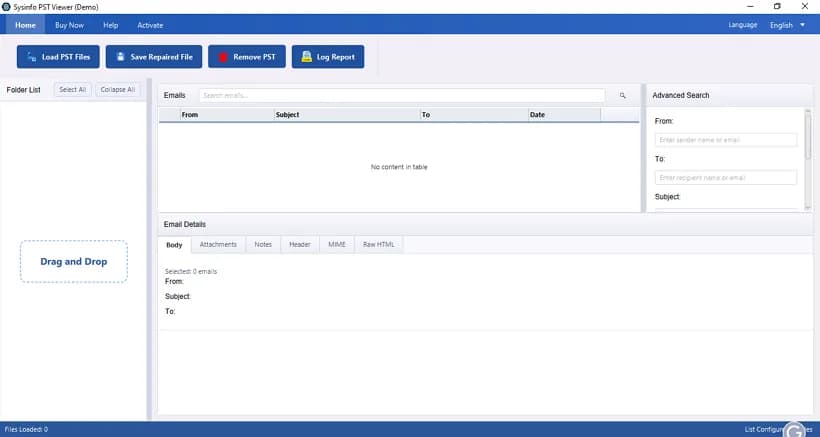
About this app
SysInfo PST Viewer is a standalone Windows, Mac, and Linux utility that opens and previews healthy, corrupted, orphaned, oversized, or password-protected Outlook PST and OST files without requiring Microsoft Outlook to be installed. It renders the full folder tree — emails, contacts, calendars, tasks, notes, journals, RSS feeds, drafts, and attachments — with metadata, message headers, MIME/HTML, and hex views preserved, plus an advanced multi-criteria search (From, To, Subject, Date Range, Has Attachments). Users can verify file health, then export or migrate data to Office 365 (OAuth 2.0 / admin impersonation) or save to PST, EML, MSG, MBOX, PDF, and CSV, with duplicate removal, date/text filters, attachment handling, large-PST splitting, and skip/resume for interrupted jobs. Operations are read-only and offline, so originals are never altered and data never leaves the local machine, backed by a 30-day money-back policy and a free demo that allows viewing and exporting up to 100 e...
Key features
- 1Opens healthy, corrupt, orphaned, oversized and password-protected PST/OST files without Microsoft Outlook installed.
- 2Read-only, fully offline operation — originals never altered, no cloud uploads, suited to forensic chain-of-custody work.
- 3Exports to Office 365 (OAuth 2.0), PST, EML, MSG, MBOX, PDF and CSV with duplicate removal, date filters and skip/resume.
Target customer profile
Drawn from the product itself, not from a survey.
Demographic
IT admins, system engineers & MSP technicians managing large mailboxes
Pain points
No Outlook license or broken install; oversized/corrupt PSTs; mailbox migrations
Primary needs
Offline PST access, bulk preview, Office 365 migration, skip/resume exports
Demographic
Digital forensics investigators & cybersecurity analysts
Pain points
Need verifiable evidence from corrupt archives; must preserve chain of custody
Primary needs
Read-only viewing, raw header/MIME/hex inspection, filtered PDF export
Demographic
Legal, HR, compliance officers & auditors
Pain points
eDiscovery deadlines; proving emails weren't altered; regulatory reporting
Primary needs
Date-range search, duplicate removal, audit logs, standardized PDF copies
Demographic
Individuals, freelancers & archivists recovering old email backups
Pain points
Outlook won't launch; orphaned PSTs; need long-term portable archives
Primary needs
Free preview, export to MBOX/EML/MSG, no technical setup required
Scout Review
Written by AI from measured evidence, scored out of 100.
SysInfo PST Viewer is a competent, long-lived utility (domain registered 2010, 1M+ downloads claimed) that does one unglamorous job well: reading PST and OST files without Outlook. Its strongest asset is architectural — read-only, fully offline processing that never touches the original file — which is exactly what forensic and legal buyers need. The marketing site is fast (95 mobile / 99 desktop Lighthouse) and the security headers are mostly in place. What holds it back is presentation and polish: a legacy Windows UI with ambiguous button hierarchy, an empty-state table that offers no guidance, six failing accessibility audits, and no published compliance certifications to back the '100% Secure' badge. Against free ScanPST and Aid4Mail, it wins on format breadth and O365 migration but not on trust signals or interface craft.
Measure by measure
Usability
58Free demo (100 mails per folder) and a 30-day moneyback lower the risk of trying it, and the site links a guide, screenshots and video. But the toolbar gives no visual cue which button is primary versus destructive, and onboarding relies on you already knowing PST workflows.
Design
46Dated Windows-form UI with equal-weight toolbar buttons and an empty table that greets you with 'No content in table'. The marketing page is dense, repetitive and visually flat, though the platform checkboxes and comparison table are scannable.
Speed
90Lighthouse mobile 95/100 (LCP 2.9s, CLS 0, TBT 56ms) and desktop 99/100 — the marketing site is genuinely snappy. No lag complaints surfaced in the collected evidence; the desktop app's own performance is not measured here.
Security
74HTTPS enforced with HSTS, CSP, Referrer-Policy and Permissions-Policy, scoring 10/12 on the header probe. Missing frame protection and nosniff headers, and no published SOC 2/ISO or pen-test evidence was found in the collected material.
Accessibility
58Lighthouse a11y 87/100, dragged down by low-contrast text, images missing alt attributes, unnamed links, no main landmark and mismatched accessible names. Multi-language support is claimed in-app, but no WCAG statement or a11y documentation was found.
Growth
62A real, narrow problem — opening PST/OST without Outlook — aimed at IT admins, forensic investigators and legal teams, with offline read-only operation and O365 migration as a wedge. 16.8-year-old domain and 1M+ claimed downloads show staying power, but the category is crowded.
Improvement areas
- Legacy Windows UI with no visual hierarchy between primary and destructive toolbar actions.
- Six failing Lighthouse accessibility audits: contrast, alt text, link names, main landmark.
- No published SOC 2/ISO certification or security audit to back the '100% Secure' marketing claim.
Design & Usability
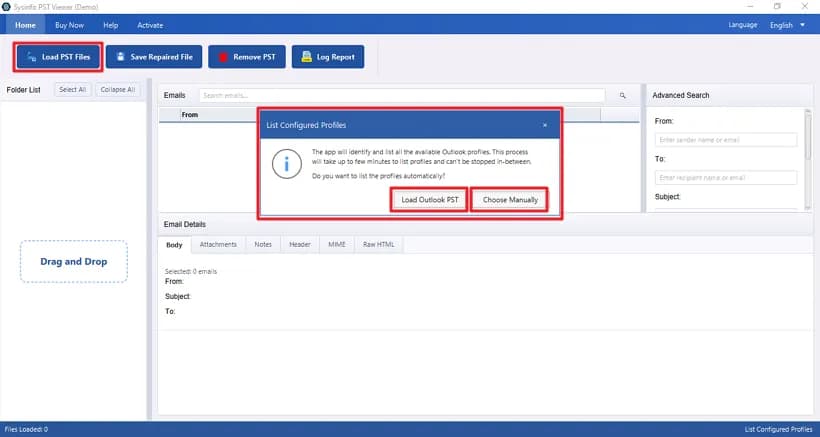
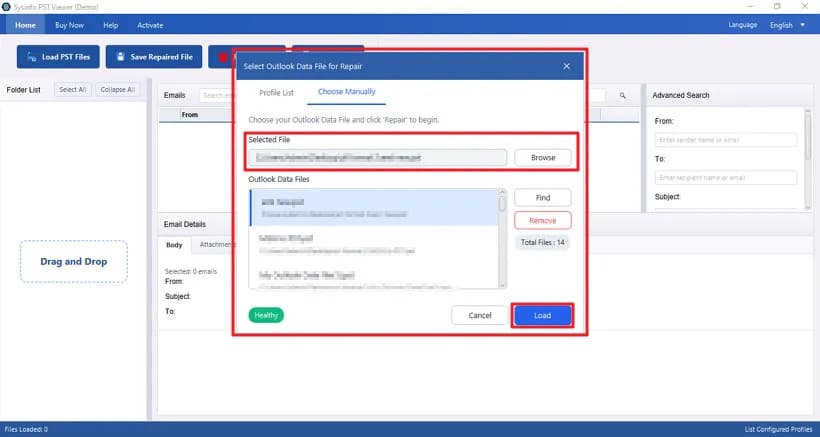
The interface is a classic Windows form: a blue title bar, four toolbar buttons of identical size and color, and a data table that opens empty with the words 'No content in table' as your only guidance. There is no visual distinction between loading a file and removing one, which is a genuinely risky ambiguity in a tool that touches irreplaceable mailboxes. The marketing site is dense and repetitive — five blue checkmark bullets in a single column, three identical white feature cards — though the platform checkboxes and comparison table are scannable. Usability is helped by a free demo capped at 100 mails per folder, a 30-day moneyback, and linked guide/screenshots/video, which lower the cost of trying it. But onboarding assumes you already speak PST, and nothing in the UI walks a first-timer through what to do after the drop zone.
Speed & Security
Speed is the standout: Lighthouse mobile 95/100 with LCP 2.9s, CLS 0 and TBT 56ms, and desktop 99/100. The marketing site is lightweight and snappy, and no lag complaints surfaced in the collected evidence — though the desktop application's own performance is not measured by any of this. Security is solid but not exceptional: HTTPS is enforced with HSTS, CSP, Referrer-Policy and Permissions-Policy, landing 10 of 12 checklist points. Frame protection and X-Content-Type-Options are missing. The product's core security story — read-only, fully offline, no cloud uploads, originals never altered — is a genuine architectural strength for forensic and legal users, but it is a claim on the page, not a published audit. No SOC 2, ISO 27001 or pen-test report was found in the collected material.
Accessibility & Growth
Accessibility scores 87/100 on Lighthouse, but the failing audits are the ones that matter to real users: insufficient color contrast, images without alt attributes, links with no discernible name, no main landmark, and visible text labels that don't match accessible names. For a tool marketed partly at compliance and legal users, that is an awkward gap. Multi-language switching is claimed inside the app, but there is no WCAG statement or accessibility documentation. Growth is a more interesting story: the problem — opening healthy, corrupt, orphaned or oversized PST/OST files without an Outlook license — is real and recurring, and the targeting is unusually specific (IT admins and MSPs, forensic investigators needing chain of custody, legal/HR teams on eDiscovery deadlines, archivists with orphaned backups). The wedge is offline read-only operation plus hex/MIME/header inspection and OAuth 2.0 Office 365 migration. The limit is competition: Microsoft's free ScanPST and Aid4Mail already occupy this space, and the differentiators are features a competitor can copy.
Conclusion
If you are an IT admin staring at a 40GB corrupt PST and no Outlook license, this does the job and the free demo lets you confirm that before paying. If you are a compliance officer who needs a vendor with a SOC 2 report on file, keep looking — the offline read-only design is reassuring but undocumented by any third party. The 30-day moneyback softens the risk either way. The product's real ceiling is not capability, it is credibility: publish an audit, fix the contrast and alt-text failures, and give the empty table state something to say, and this moves from 'solid niche tool' to 'the obvious pick.'
Suggestions for improvement
- Publish a SOC 2 Type II or ISO 27001 report to substantiate the '100% Secure' claim for legal and forensic buyers.
- Fix the six failing Lighthouse a11y audits: contrast ratios, alt attributes, link names, and a main landmark.
- Redesign the toolbar so destructive actions (Remove PST) are visually distinct from primary actions (Load Files).
- Replace the 'No content in table' empty state with a short guided prompt or illustration for first-time users.
Alternatives comparison
Named competitors, point by point. Nobody paid to appear here or to be left out.
 SysInfo PST Viewer SysInfo PST Viewer |  Microsoft ScanPST.exe (Inbox Repair Tool) Microsoft ScanPST.exe (Inbox Repair Tool) |  Aid4Mail Aid4Mail | |
|---|---|---|---|
| Works without Microsoft Outlook installed | Yes — core selling point | No — requires Outlook install | Yes — standalone converter |
| Preview email content and attachments | Yes — full folder tree, headers, MIME, hex | No — repair only, no preview | Yes — with eDiscovery-style search |
| Export formats | PST, EML, MSG, MBOX, PDF, CSV, Office 365 | None — repairs in place only | Multiple formats incl. PST/OST/MBOX |
| Handles oversized / corrupt PST files | Yes — claims 100s of GB, corrupt and oversized | Limited — struggles above ~2 GB | Yes — commercial forensic suite |
| Pricing model | Free demo (100 mails/folder); paid licences, 30-day moneyback | Free with Outlook | Commercial licence |
Microsoft ScanPST.exe (Inbox Repair Tool)
Built-in Outlook repair utility that scans and fixes PST corruption but cannot preview emails, export data, or handle files over ~2 GB well.
Aid4Mail
Commercial email conversion and forensic suite for PST/OST/MBOX that supports eDiscovery-style search and multiple export formats.
Comparing options? See SysInfo PST Viewer alternatives, scored side by side
More Productivity apps
View all Productivity
Qamarero
92An all-in-one hospitality software for restaurants and ba...

The Stack Newsletter
92A weekly newsletter delivering curated tech jobs, intervi...

EmbedMyReviews
92White-label reputation management software for agencies s...

StoryPad
92Privacy-first open source journal app with a continuous t...

Puzzly – B2B Lead Generation & Sales Intelligence Platform
92Puzzly is an all-in-one B2B lead generation platform that...

Notion
92All-in-one AI workspace for docs, projects, and knowledge...

Vibe Coding Agent Skills
92A free, open-source platform offering 110 AI agent skills...

CC Switch
91Open-source desktop app for switching AI coding providers...

username.md
90One verified handle for your online identity, readable by...

What the GIF
89Frame-perfect video-to-GIF maker that runs entirely in yo...

AuditCloser
89White-label website audits that close deals for digital a...

NudgeWin
89Automated quote follow-up for trades and service businesses.


A platform dedicated to providing unbiased reviews of newly launched applications, analyzing everything from their features to their full potential.
info@scoutforge.net© 2026 Scoutforge. All rights reserved.
