Cycling through all six. Tap any point to stop.
Measured on six things
Recover lost data from RAID 0/1/5 HDDs and VHDs with ease.
Design
44Dated, cluttered landing page: a boxed-software mockup, Windows 95/NT/98 in the spec table, mismatched icons, and stray 'systems.preview.webp' text leaking into the copy. Functional but visibly behind modern recovery-tool peers.
Screenshots
1 / 1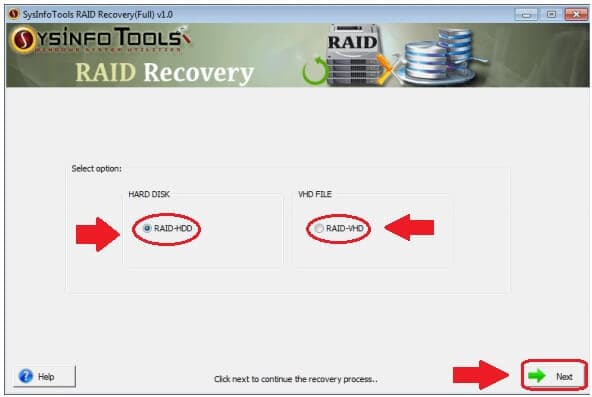
About this app
SysInfo RAID Recovery is a specialized Windows utility designed to rescue data from corrupt or inaccessible RAID arrays, including RAID 0, RAID 1, and RAID 5. Whether your RAID setup uses physical hard drives (RAID-HDD) or virtual hard disks (RAID-VHD), this tool offers a lifeline when standard recovery methods fail. It supports all major file systems—FAT, exFAT, HFS+, and EXT—making it versatile across Windows, Mac, and Linux environments. Key features include the ability to add missing disks, adjust partition offsets, and handle multiple rotating parity options for RAID 5. With dual scanning modes (Standard and Advanced) and three recovery modes (Standard, Advanced, Deep), you can tailor the process to the severity of corruption. The software also boasts a tree-structure preview, auto-search for specific files, and RAW recovery for over 70 file types. Compatible with Windows 11 and earlier, it’s a go-to solution for IT professionals and individuals facing RAID data loss.
Key features
- 1RAID 0/1/5 recovery from physical RAID-HDD arrays and virtual RAID-VHD files, with add-missing-disk and partition-offset controls.
- 2Dual scanning (Standard/Advanced) and three recovery modes (Standard/Advanced/Deep) plus RAW recovery for 70+ file types.
- 3Tree-structure preview, auto-search for specific files, and support for FAT, exFAT, HFS+, and EXT file systems.
Target customer profile
Drawn from the product itself, not from a survey.
Demographic
IT professionals and system administrators managing RAID servers
Pain points
RAID corruption due to disk failure, power outages, or human error
Primary needs
Quick, reliable recovery of critical data from RAID arrays without downtime
Demographic
Small business owners with RAID storage for company data
Pain points
Data loss from RAID failures causing operational disruption and financial loss
Primary needs
Cost-effective, user-friendly recovery tool that doesn’t require expert knowledge
Demographic
Tech-savvy individuals using RAID for personal backups or media storage
Pain points
Accidental deletion or corruption of irreplaceable files (photos, videos, documents)
Primary needs
Affordable software with preview and selective recovery to avoid overwriting good data
Scout Review
Written by AI from measured evidence, scored out of 100.
SysInfo RAID Recovery is a capable, long-standing Windows utility for rescuing data from RAID 0/1/5 arrays, including RAID-VHD and missing-disk scenarios. The technical feature set is real and specific. The marketing site, however, is dated and cluttered — boxed-software mockup, Windows 95 in the spec table, mismatched icons, leaked filenames — and it does little to differentiate the product from EaseUS, Stellar or DiskInternals. Speed and security fundamentals are strong; accessibility is good on automated checks; growth is limited by a crowded niche and a pitch that doesn't name a segment it wins.
Measure by measure
Usability
62Clear anchor nav and a linear RAID-HDD/RAID-VHD wizard make the flow legible for non-experts, but a chat popup overlaps the hero and the wizard needs annotation overlays to explain itself. Competent, not polished.
Design
44Dated, cluttered landing page: a boxed-software mockup, Windows 95/NT/98 in the spec table, mismatched icons, and stray 'systems.preview.webp' text leaking into the copy. Functional but visibly behind modern recovery-tool peers.
Speed
78Lighthouse mobile 90/100 (LCP 2.0s, TBT 44ms) and desktop 99/100 — genuinely fast. CLS 0.152 is the one blemish, likely from the chat popup shifting the hero on load.
Security
72Solid header hygiene — HTTPS enforced, HSTS, CSP, Referrer-Policy, Permissions-Policy, SPF and DMARC all present (10/12 probe points). Missing frame protection and X-Content-Type-Options; no published audits or security page found.
Accessibility
80Lighthouse a11y 97/100 with only minor structural fails (heading order, missing main landmark, role conflicts, label/name mismatches). No WCAG statement or a11y page found, so the score reflects automated checks plus a clean, readable layout.
Growth
58Real, high-stakes problem with concrete differentiators (RAID-VHD, missing-disk add, rotating parity, three recovery modes) — but the RAID-recovery niche is crowded and the site gives no segment it serves better than EaseUS or Stellar.
Improvement areas
- Dated landing page: boxed-software mockup, Windows 95/NT/98 in spec table, mismatched icons, leaked 'systems.preview.webp' text.
- No published security certifications (SOC 2/ISO) or accessibility statement despite handling sensitive recovery data.
- No clear differentiation page vs EaseUS, Stellar or DiskInternals — the RAID-VHD and rotating-parity advantages aren't sold.
Design & Usability
The page is a time capsule. A dark navy boxed-software mockup sits beside a spec table that still lists Windows 95, NT and 98 — on a page whose headline promises Windows 11 support. Copy leaks a stray filename ('systems.preview.webp') and typos ('reparsing'), and the three benefit cards use three different illustration styles. Usability is better than design: the anchor bar (Features, Specification, Software Guide, Screenshots, Video) gives real wayfinding, and the RAID-HDD/RAID-VHD wizard is a clear linear flow. But the chat popup overlaps the hero with a tiny close target, and the wizard only makes sense because someone drew arrows on the screenshot. Competent bones, dated skin.
Speed & Security
Speed is the standout: Lighthouse mobile 90/100 with a 2.0s LCP and 44ms TBT, desktop 99/100. The only real ding is CLS 0.152, above the 0.1 'good' threshold — likely the chat popup shifting the hero on load. Security is solid on the fundamentals: HTTPS enforced, HSTS, CSP, Referrer-Policy, Permissions-Policy, plus SPF and DMARC, for 10/12 probe points. Missing frame protection and X-Content-Type-Options are easy fixes. There's no published SOC 2, ISO, pen-test or bug bounty, which is normal for a vendor at this stage but worth noting for IT buyers evaluating a tool that touches their most sensitive data.
Accessibility & Growth
Accessibility scores 97/100 on Lighthouse, with only minor structural fails: non-sequential headings, no main landmark, role=none/presentation conflicts, and visible text labels without matching accessible names. No WCAG statement or a11y page exists, so the score rests on automated checks plus a readable, high-contrast layout. Growth is the harder call. RAID corruption is a genuine, high-stakes problem, and the product names real differentiators — RAID-VHD support, add-missing-disk, partition offset, rotating parity options for RAID 5, dual scan and three recovery modes. But the category is crowded with EaseUS, Stellar and DiskInternals, and nothing on the page explains why a buyer picks SysInfo over them. The 16-year-old domain and claimed 4.8/1784 ratings show longevity, not a wedge.
Conclusion
If you're an IT pro with a corrupt RAID array and you've already tried the big names, SysInfo is a legitimate option worth a trial — the RAID-VHD and rotating-parity features are not universal. If you're comparing on first impressions, the site will lose you to EaseUS before you ever see the wizard. The product deserves a landing page that doesn't look like it shipped alongside Windows 98.
Suggestions for improvement
- Rebuild the landing page: drop the boxed-software mockup, unify the icon system, and remove Windows 95/NT/98 from the spec table.
- Fix the copy leaks — remove 'systems.preview.webp', correct 'reparsing', and standardize on one brand name (SysInfo vs SysInfoTools).
- Add X-Frame-Options and X-Content-Type-Options headers to close the last two probe gaps.
- Publish a comparison page vs EaseUS, Stellar and DiskInternals naming the RAID-VHD and rotating-parity advantages explicitly.
Alternatives comparison
Named competitors, point by point. Nobody paid to appear here or to be left out.
 SysInfo RAID Recovery |  EaseUS Data Recovery Wizard |  Stellar Data Recovery |  DiskInternals RAID Recovery | |
|---|---|---|---|---|
| RAID levels supported | RAID 0, 1, 5 (HDD and VHD) | RAID 0, 1, 5, 6, 10 (via RAID recovery add-on) | RAID 0, 1, 5, 6 (RAID Recovery module) | RAID 0, 1, 5, 6, 10, JBOD, and more |
| Virtual RAID / disk image support | Yes — RAID-VHD files supported | Limited; primarily physical disks | Yes — virtual RAID and disk images | Yes — reconstructs virtual RAID from disk images |
| Preview before recovery | Tree-structure preview with auto-search | Yes — preview before recovery | Yes — preview before recovery | Yes — preview before recovery |
| File systems supported | FAT, exFAT, HFS+, EXT | NTFS, FAT, exFAT, HFS+, APFS, EXT, and more | NTFS, FAT, exFAT, HFS+, APFS, EXT, and more | NTFS, FAT, exFAT, HFS+, EXT, ReiserFS, XFS |
| Free trial / demo | Free download with preview; paid to save | Free trial with 2GB recovery limit | Free trial with preview and limited save | Free trial with preview; paid to save |
EaseUS Data Recovery Wizard
A popular data recovery tool that supports RAID recovery along with standard disk recovery, known for its intuitive interface and broad file system support.
Stellar Data Recovery
Professional-grade recovery software that includes RAID recovery capabilities, offering deep scans and a wide range of supported file types.
DiskInternals RAID Recovery
Specializes in RAID recovery with support for various RAID levels and the ability to reconstruct virtual RAID arrays from disk images.
Comparing options? See SysInfo RAID Recovery alternatives, scored side by side
More Productivity apps
View all Productivity
Puzzly – B2B Lead Generation & Sales Intelligence Platform
92Puzzly is an all-in-one B2B lead generation platform that...

Qamarero
92An all-in-one hospitality software for restaurants and ba...

EmbedMyReviews
92White-label reputation management software for agencies s...

StoryPad
92Privacy-first open source journal app with a continuous t...

Notion
92All-in-one AI workspace for docs, projects, and knowledge...

The Stack Newsletter
92A weekly newsletter delivering curated tech jobs, intervi...

Vibe Coding Agent Skills
92A free, open-source platform offering 110 AI agent skills...

QRBliss
91Branded QR codes with AI Brand Sync, 15 free dynamic code...

Gerty
91Private, local AI assistant for Mac that runs offline

Strukchad Property Management
91Property management for Kenyan letting agents: rent invoices raised every month, M-Pesa rent prompts to tenants, arrears tracking and landlord statements.

CC Switch
91Open-source desktop app for switching AI coding providers...

PitchWhip
90AI cold call scripts & direct dials from LinkedIn


A platform dedicated to providing unbiased reviews of newly launched applications, analyzing everything from their features to their full potential.
info@scoutforge.net© 2026 Scoutforge. All rights reserved.
