Cycling through all six. Tap any point to stop.
Measured on six things
Cross-tenant SharePoint migration with built-in deduplica...
Design
56Functional legacy-style marketing page: clear hero CTAs and scannable app cards, but text-heavy repeated sections and an annotated screenshot shipped as marketing drag it to average.
Screenshots
1 / 3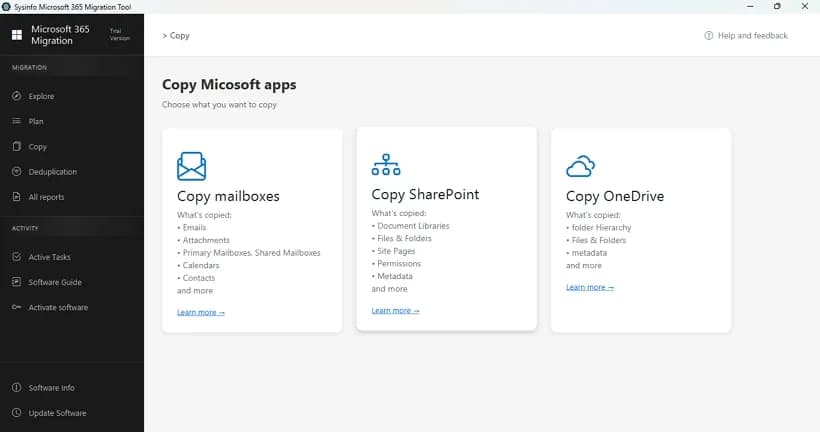
About this app
SysInfo SharePoint Migration Tool is a desktop application that migrates SharePoint sites, drives, document libraries, generic lists, and metadata across Microsoft 365 tenants. It uses the Microsoft Graph API with OAuth 2.0 modern authentication and optional Entra ID admin impersonation, eliminating the need for PowerShell scripting or legacy ACS credentials. Standout features include a three-phase deduplication engine that detects duplicate files by hash or name before or after migration, quick site mapping for batch transfers during M&A, skip-previously-migrated logic for incremental syncs, and granular filters by file size, extension, content type, and date range. The tool provides real-time progress tracking in an Active Tasks dashboard, detailed migration reports for auditing, and supports Windows and macOS. It is designed for IT admins, M&A enterprise teams, compliance officers, and MSPs who need secure, accurate SharePoint tenant-to-tenant migrations without data loss.
Key features
- 1Cross-tenant SharePoint migration via Microsoft Graph API with OAuth 2.0 modern auth and optional Entra ID admin impersonation.
- 2Three-phase deduplication engine plus skip-previously-migrated logic for incremental, resumable syncs.
- 3Batch site mapping, granular filters by size/extension/content type/date, Active Tasks dashboard and audit reports.
Target customer profile
Drawn from the product itself, not from a survey.
Demographic
IT and SharePoint administrators at SMBs and enterprises
Pain points
PowerShell scripting is complex and error-prone; native tools lack selective filtering; manual migrations risk data loss
Primary needs
A GUI-driven migrator with batch processing, site mapping, and live progress tracking without scripting
Demographic
M&A and enterprise IT teams consolidating tenants
Pain points
Tenant consolidation after acquisitions is time-consuming; duplicate content bloats storage and slows transfers
Primary needs
Bulk mapping, deduplication before migration, and incremental syncs to migrate only new or changed data
Demographic
Compliance and security officers in regulated industries
Pain points
Legacy authentication and password storage expose sensitive data; audit trails are hard to produce
Primary needs
OAuth 2.0 modern auth with no stored passwords, plus detailed migration reports for GDPR, HIPAA, and CCPA audits
Demographic
IT consultants and managed service providers (MSPs)
Pain points
Managing client migrations on separate machines with limited licenses; affordability is a concern
Primary needs
A single-license, cross-platform tool with automation and 100% data preservation for client SharePoint migrations
Scout Review
Written by AI from measured evidence, scored out of 100.
SysInfo SharePoint Migration Tool is a GUI-driven tenant-to-tenant migrator built on Microsoft Graph and OAuth 2.0, aimed at admins who'd rather click than script. The core feature set is credible: site mapping, granular filters, deduplication, incremental sync, live task tracking and audit reports. The website undersells it with a dated, repetitive layout and thin documentation, and the security story lacks third-party certification. Performance is strong and accessibility is close. A solid mid-market option that needs polish on the outside to match the engineering on the inside.
Measure by measure
Usability
63GUI-driven migration with site mapping, filters, Active Tasks and reports is a genuine step up from PowerShell. Docs are thin (a guide and a video) and no live demo is offered.
Design
56Functional legacy-style marketing page: clear hero CTAs and scannable app cards, but text-heavy repeated sections and an annotated screenshot shipped as marketing drag it to average.
Speed
71Lighthouse desktop 98 and mobile 87 with CLS 0 and TBT 94ms — genuinely snappy. Mobile LCP of 3.4s is the weak spot, dragged by a heavy text-and-image marketing page.
Security
76Strong header hygiene (HSTS, CSP, Referrer-Policy, Permissions-Policy, SPF, DMARC) and OAuth 2.0 with no stored passwords. Missing frame protection and X-Content-Type-Options; no SOC 2 or audit published.
Accessibility
70Lighthouse a11y 94/100 with real but fixable failures: low contrast text, out-of-order headings, no main landmark, and mismatched accessible names. No WCAG statement published.
Growth
62Real, specific pain (M&A tenant consolidation) with a genuine wedge — built-in deduplication and incremental sync that ShareGate and free SPMT don't match. Crowded category caps the ceiling.
Improvement areas
- No SOC 2, ISO 27001 or penetration test published despite handling tenant admin credentials.
- Documentation is thin (a guide link and a video) and there is no live demo or sandbox to evaluate before buying.
- Accessibility failures remain: low contrast, non-sequential headings, no main landmark, mismatched accessible names.
Design & Usability
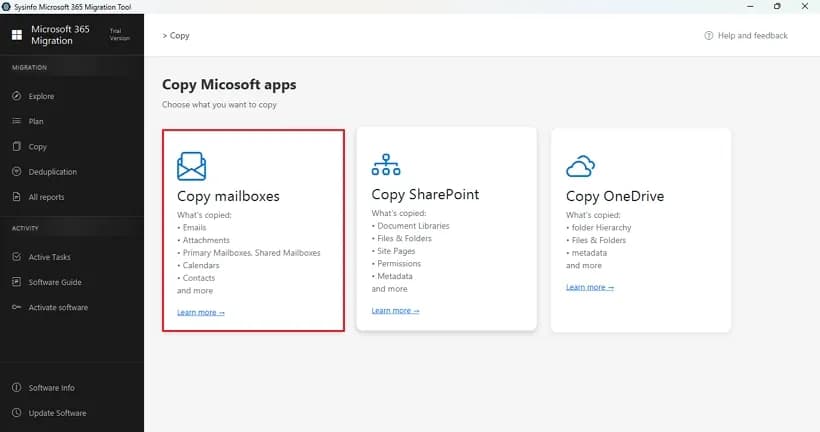
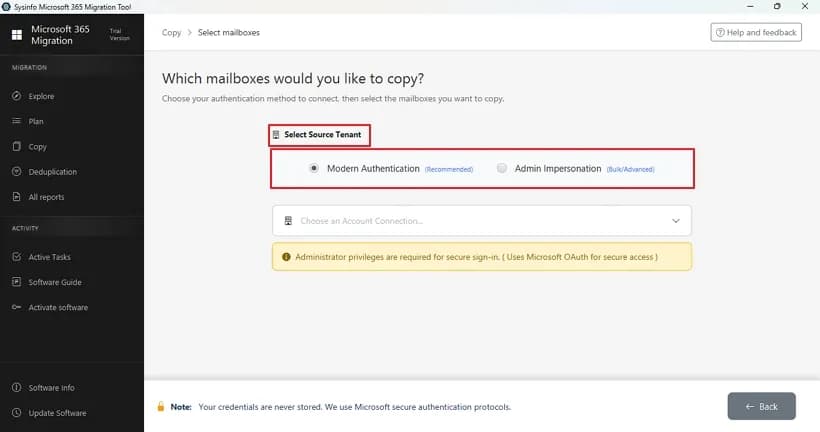
The product itself looks competent: a dark-sidebar desktop app with clear cards for SharePoint, OneDrive and mailbox copy targets, and a workflow built around site mapping, filters and an Active Tasks dashboard. That's a sensible answer to PowerShell fatigue. The marketing site is where it stumbles — a pale cyan hero, two CTAs, then an endless stack of near-identical bullet lists that bury the actual differentiators. One screenshot is literally the same image with a red annotation box drawn on it. Usability claims are strong (no scripting, batch mapping, skip-previously-migrated) but the documentation is a guide link and a video, and there's no live demo, so evaluating it means downloading and hoping.
Speed & Security
Speed is a genuine strength: Lighthouse desktop 98, mobile 87, CLS 0 and TBT 94ms. The only blemish is a 3.4s mobile LCP, which is a content-weight problem, not an engineering one. Security is above average for the category — HTTPS enforced, HSTS, CSP, Referrer-Policy, Permissions-Policy, SPF and DMARC all present, 10 of 12 header checks passing. The gaps are X-Frame-Options and X-Content-Type-Options, both trivial fixes. The bigger question is assurance: the site leans hard on OAuth 2.0, MFA compliance and TLS transfers, but publishes no SOC 2, ISO 27001 or penetration test summary. For a tool that touches tenant admin credentials, that's the missing receipt.
Accessibility & Growth
Accessibility scores 94/100 on Lighthouse, which is respectable, but the failing audits are the usual suspects: insufficient color contrast, non-sequential heading order, no main landmark, and visible labels that don't match accessible names. None are hard to fix; none are fixed. There's no WCAG conformance statement either. Growth is the more interesting story. Tenant-to-tenant SharePoint migration during M&A is a real, expensive, recurring problem, and SysInfo's wedge — a three-phase deduplication engine plus skip-previously-migrated incremental sync — is something ShareGate doesn't advertise and free SPMT can't do cross-tenant. Against Quest's enterprise cloud suite it competes on price and simplicity. The category is crowded and Microsoft keeps improving its free tooling, which caps how far this goes, but the positioning is honest and specific.
Conclusion
If you're an IT admin staring down a tenant consolidation and you don't want to hand-write Graph API scripts, this is worth a download and a test migration. Just budget time to validate it yourself — there's no demo environment and the docs won't hold your hand. Ask the vendor directly for their security posture before you feed it admin credentials, and check whether the deduplication engine behaves the way you need on your actual file mix. The bones are good; the presentation is the project.
Suggestions for improvement
- Publish a SOC 2 Type II or ISO 27001 report, or at minimum a pen-test summary, given the tool handles tenant admin credentials.
- Replace the repetitive homepage feature stacks with a single scannable feature grid and a real product tour or interactive demo.
- Fix the accessibility failures: contrast ratios, heading hierarchy, a main landmark, and matching accessible names on labeled controls.
- Add X-Frame-Options and X-Content-Type-Options headers, and publish a WCAG 2.1 AA conformance statement.
Alternatives comparison
Named competitors, point by point. Nobody paid to appear here or to be left out.
 SysInfo SharePoint Migration Tool SysInfo SharePoint Migration Tool |  ShareGate ShareGate |  Microsoft SharePoint Migration Tool (SPMT) Microsoft SharePoint Migration Tool (SPMT) |  Metalogix Essentials for Office 365 (now Quest On Demand Migration) Metalogix Essentials for Office 365 (now Quest On Demand Migration) | |
|---|---|---|---|---|
| Cross-tenant SharePoint Online to SharePoint Online migration | Yes — built for tenant-to-tenant via Microsoft Graph API | Yes — core strength, cross-tenant migration | No — primarily on-prem to SharePoint Online | Yes — enterprise cross-tenant migration |
| Built-in pre-migration deduplication engine | Yes — three-phase dedup by hash or name | Not advertised as a built-in engine | No | Limited; not a headline feature |
| No-scripting GUI workflow | Yes — point-and-click, Windows and macOS | Yes — polished GUI | Partial — PowerShell required for many scenarios | Yes — cloud-based console, more complex setup |
| Incremental / skip-previously-migrated sync | Yes — toggle to resume interrupted migrations | Yes — incremental copy supported | Limited | Yes — incremental migration supported |
| Deployment model and pricing posture | Desktop app, single license, 30-day moneyback | Desktop app, premium pricing | Free, first-party | Cloud SaaS, enterprise pricing |
ShareGate
A popular SharePoint and Microsoft 365 migration tool with a polished interface, offering cross-tenant migration, reporting, and governance features—though it comes at a higher price point and lacks a built-in pre-migration deduplication engine like SysInfo's.
Microsoft SharePoint Migration Tool (SPMT)
Microsoft's free first-party migration tool designed primarily for migrating on-premises SharePoint to SharePoint Online. It is not built for cross-tenant SharePoint Online-to-SharePoint Online migrations and requires PowerShell for many scenarios.
Metalogix Essentials for Office 365 (now Quest On Demand Migration)
An enterprise-grade migration suite from Quest that covers SharePoint, OneDrive, Exchange, and Teams. It offers robust cross-tenant migration but is cloud-based, more complex to set up, and priced for large enterprises.
Comparing options? See SysInfo SharePoint Migration Tool alternatives, scored side by side
More Productivity apps
View all Productivity
Qamarero
92An all-in-one hospitality software for restaurants and ba...

The Stack Newsletter
92A weekly newsletter delivering curated tech jobs, intervi...

EmbedMyReviews
92White-label reputation management software for agencies s...

StoryPad
92Privacy-first open source journal app with a continuous t...

Puzzly – B2B Lead Generation & Sales Intelligence Platform
92Puzzly is an all-in-one B2B lead generation platform that...

Notion
92All-in-one AI workspace for docs, projects, and knowledge...

Vibe Coding Agent Skills
92A free, open-source platform offering 110 AI agent skills...

CC Switch
91Open-source desktop app for switching AI coding providers...

username.md
90One verified handle for your online identity, readable by...

What the GIF
89Frame-perfect video-to-GIF maker that runs entirely in yo...

AuditCloser
89White-label website audits that close deals for digital a...

NudgeWin
89Automated quote follow-up for trades and service businesses.


A platform dedicated to providing unbiased reviews of newly launched applications, analyzing everything from their features to their full potential.
info@scoutforge.net© 2026 Scoutforge. All rights reserved.
