Cycling through all six. Tap any point to stop.
Measured on six things
Repair corrupt SQLite files and recover data to SQLite or...
Design
44Dated early-2010s download-portal styling: gradient hero, split primary CTAs, Windows-7-era app screenshot, and specs listing Windows 98/NT. Functional but visually behind peers.
Screenshots
1 / 1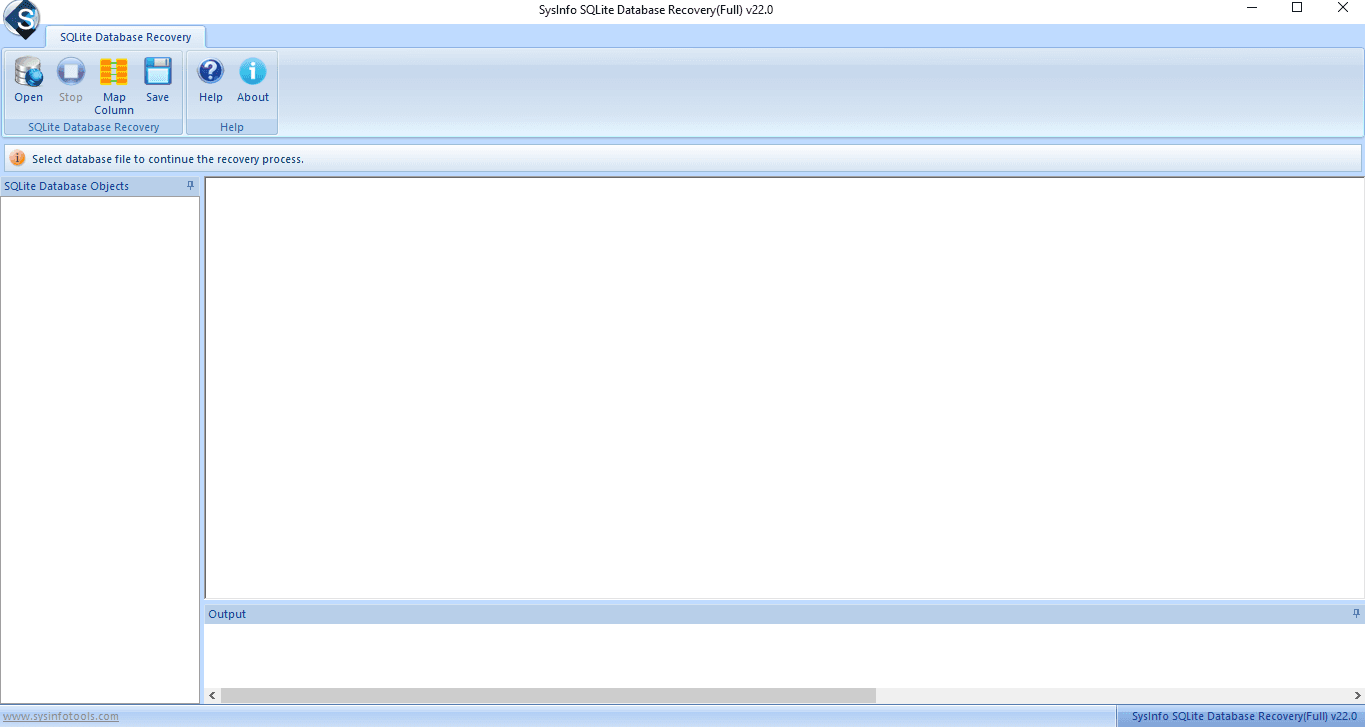
About this app
SysInfo SQLite Database Recovery is a Windows-based utility designed to repair corrupt or damaged SQLite database files and recover their contents. It supports databases created by SQLite2 and SQLite3, and can restore tables, indexes, views, triggers, and other objects. The tool offers a tree-structure preview of recoverable data, auto-detects file information (version, encoding, page size), and provides column mapping when exporting to MDB format. Users can save recovered data back to SQLite (including upgrading from SQLite2 to SQLite3) or to a new MDB file. The interface is user-friendly, making it accessible to both technical and non-technical users. It supports UTF-8 and UTF-16 encodings and runs on all major Windows versions, including Windows 11. A free demo version allows previewing recoverable data, while the full version enables saving. The software is positioned as a solution for common SQLite errors such as 'database is locked' or 'file is encrypted or is not a database'.
Key features
- 1Repairs corrupt SQLite2 and SQLite3 database files and restores tables, indexes, views and triggers.
- 2Tree-structure preview of recoverable objects, with auto-detected version, encoding and page size.
- 3Exports recovered data back to SQLite (with SQLite2→SQLite3 upgrade) or to MDB with column mapping.
Target customer profile
Drawn from the product itself, not from a survey.
Demographic
Database administrators and IT professionals managing SQLite databases
Pain points
Corrupt SQLite files causing data loss and application downtime
Primary needs
Reliable recovery of all database objects with minimal data loss
Scout Review
Written by AI from measured evidence, scored out of 100.
SysInfo SQLite Database Recovery is a competent, long-running Windows utility for a real problem — corrupt SQLite files — wrapped in a website that looks a decade older than it is. The measured evidence is genuinely good on the technical side: 96/100 mobile performance, 100/100 desktop, 98/100 accessibility, and 10/12 security headers. The design is the weak link: split CTAs, dated app chrome, and a spec table advertising Windows 98 support undercut trust. Usability is better than the visuals suggest, with a clear four-step walkthrough and a free preview demo. Growth is limited by a niche category and a free open-source alternative, but the SQLite2→3 upgrade and MDB export give it a defensible wedge for IT pros who need more than the free tool offers.
Measure by measure
Usability
62Clear anchor nav, a four-step recovery walkthrough with matching screenshot, and a free preview demo make the flow legible. Dense justified grey body copy drags it down.
Design
44Dated early-2010s download-portal styling: gradient hero, split primary CTAs, Windows-7-era app screenshot, and specs listing Windows 98/NT. Functional but visually behind peers.
Speed
88Lighthouse mobile 96/100 (LCP 1.3s, CLS 0, TBT 27ms) and desktop 100/100. The site itself is genuinely fast; no lag complaints found.
Security
74HTTPS enforced with HSTS, CSP, Referrer-Policy, Permissions-Policy, SPF and DMARC — 10/12 header checks. Missing frame and content-type protection; no published audits.
Accessibility
80Lighthouse a11y 98/100. Minor fails: missing main landmark, role=presentation conflicts, and some visible labels without matching accessible names. No WCAG statement.
Growth
54Real, specific problem (corrupt SQLite → data loss) with a genuine wedge: SQLite2→3 upgrade, MDB export, column mapping. But the category is niche and free tools cover the basics.
Improvement areas
- Dated visual design: split hero CTAs, Windows-7-era app screenshot, and Windows 98/NT 95 in the spec table.
- Missing X-Frame-Options and X-Content-Type-Options headers; no published SOC 2, ISO or pen-test report.
- No main landmark and accessible-name mismatches on the site; no WCAG statement or multi-language support.
Design & Usability
The site is a time capsule. Gradient hero, glossy green and blue buttons, an app screenshot with Windows-7 ribbon chrome, and a spec table that lists Windows 98 and NT 95 as supported platforms — all of it reads like a 2012 download portal that never got the memo. Two equally weighted primary CTAs (Free Download, Purchase Now) split the hero's intent, and an orange chat bubble plus a 'Click Here for Queries' popup crowd the top-right corner. Usability is better than the design suggests: an anchor bar jumps to Features, Specification, Guide, Screenshots and Video; a four-step walkthrough pairs a numbered timeline with a matching screenshot; and a free demo lets you preview recoverable data before paying. The weak spot is the feature grid, where small justified grey paragraphs make long-form reading a chore.
Speed & Security
Speed is the standout. Lighthouse mobile performance lands at 96/100 with LCP 1.3s, CLS 0 and TBT 27ms; desktop hits a perfect 100/100. For a page this long and image-heavy, that's genuinely well-built — no lag complaints surfaced in the collected evidence. Security is solid but not exceptional: HTTPS is enforced with HSTS, CSP, Referrer-Policy and Permissions-Policy, SPF and DMARC are published, and the header probe scores 10/12. The two misses are X-Frame-Options and X-Content-Type-Options, both cheap to add. No SOC 2, ISO 27001 or pen-test report is published, which is normal for a vendor of this size but leaves enterprise buyers without a compliance paper trail.
Accessibility & Growth
Accessibility scores 98/100 on the Lighthouse audit — strong for a page this dense. The remaining fails are small but real: no main landmark, role=presentation conflicts, and a few visible labels without matching accessible names. There's no WCAG statement or multi-language support, so the audit is the only a11y evidence available. Growth is a judgement on the idea: corrupt SQLite files causing data loss and downtime is a real, specific problem, and the product has a genuine wedge over the free SQLite Recovery Tool — SQLite2→SQLite3 upgrade, MDB export with column mapping, and a GUI preview. But the category is niche, the free alternative covers the basics, and the 2010-registered domain signals a long-running vendor rather than a category with visible headroom.
Conclusion
If you're an IT pro staring at a corrupt SQLite file and the free tool won't cut it, this is a reasonable paid option — the preview demo lets you verify recovery before you buy, and the SQLite2→SQLite3 upgrade plus MDB export are real differentiators. If you're evaluating it for a modern team, the dated presentation and missing compliance certifications will raise eyebrows. The product works; the marketing just needs to catch up to the engineering.
Suggestions for improvement
- Pick one primary CTA in the hero — 'Free Download' or 'Purchase Now', not both side by side.
- Refresh the app screenshot and spec table; drop Windows 98/NT 95 and show a modern Windows 11 UI.
- Add X-Frame-Options and X-Content-Type-Options headers to close the last two security gaps.
- Add a main landmark and fix accessible-name mismatches to push the a11y audit toward 100.
Alternatives comparison
Named competitors, point by point. Nobody paid to appear here or to be left out.
 SysInfo SQLite Database Recovery |  SQLite Recovery Tool | |
|---|---|---|
| Repairs corrupt SQLite2 and SQLite3 files | Yes — both SQLite2 and SQLite3 | Yes — SQLite3 primarily |
| Free preview of recoverable data before purchase | Yes — free demo previews recoverable data | Yes — free and open-source |
| SQLite2 → SQLite3 upgrade on export | Yes — supported | Not advertised |
| Export to MDB with column mapping | Yes — column mapping to MDB | Not advertised |
| Pricing model | Paid, with free demo and 30-day moneyback | Free and open-source |
| GUI with tree-structure preview | Yes — interactive GUI with tree preview | Basic interface, fewer features |
Comparing options? See SysInfo SQLite Database Recovery alternatives, scored side by side
More Productivity apps
View all Productivity
Puzzly – B2B Lead Generation & Sales Intelligence Platform
92Puzzly is an all-in-one B2B lead generation platform that...

Qamarero
92An all-in-one hospitality software for restaurants and ba...

EmbedMyReviews
92White-label reputation management software for agencies s...

StoryPad
92Privacy-first open source journal app with a continuous t...

Notion
92All-in-one AI workspace for docs, projects, and knowledge...

The Stack Newsletter
92A weekly newsletter delivering curated tech jobs, intervi...

Vibe Coding Agent Skills
92A free, open-source platform offering 110 AI agent skills...

QRBliss
91Branded QR codes with AI Brand Sync, 15 free dynamic code...

Gerty
91Private, local AI assistant for Mac that runs offline

Strukchad Property Management
91Property management for Kenyan letting agents: rent invoices raised every month, M-Pesa rent prompts to tenants, arrears tracking and landlord statements.

CC Switch
91Open-source desktop app for switching AI coding providers...

PitchWhip
90AI cold call scripts & direct dials from LinkedIn


A platform dedicated to providing unbiased reviews of newly launched applications, analyzing everything from their features to their full potential.
info@scoutforge.net© 2026 Scoutforge. All rights reserved.
