Cycling through all six. Tap any point to stop.
Measured on six things
Split or merge VCF/vCard contact files safely without dat...
Design
46Dated marketing page: competing green/blue hero CTAs, overlapping chat and query popups, and copy errors ('Split OST File By Date' on a VCF tool). The app UI itself is a clean, legible three-zone utility.
Screenshots
1 / 1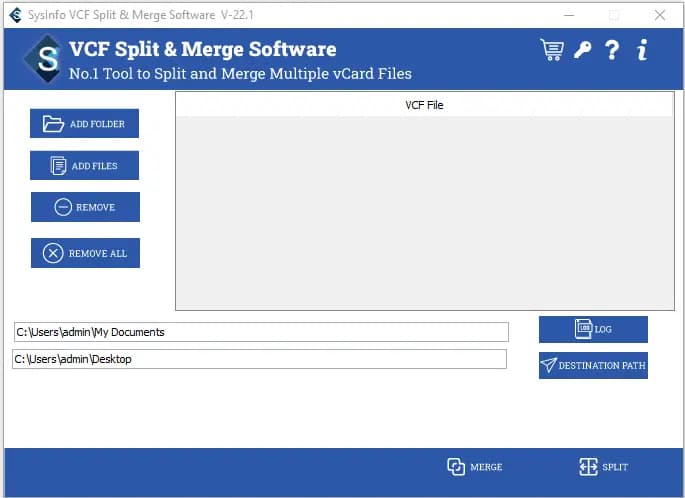
About this app
SysInfo VCF Split & Merge is a Windows desktop utility that does exactly what the name promises: it takes oversized vCard (VCF) files and breaks them into manageable chunks, or it takes several VCF files and fuses them into one clean contact book. I've spent time with this tool, and what stands out is how many painless details it gets right. There's no cap on file size, so those giant phone-book exports from Outlook, iCloud, or Android don't scare it. Version 22.8 supports vCard 2.1, 3.0, and 4.0, which covers virtually every contact format you'll encounter in 2025. The workflow is straightforward — add files or whole folders, preview the contacts, pick a destination path, then hit Split or Merge. You can even generate a log report so you know exactly what happened. It's compatible with Windows 11, 10, 8.1, 8, 7, and older server builds (32- and 64-bit), and the free demo lets you process two VCF files per folder to genuinely test-drive it before buying. If your job involves migrati...
Key features
- 1Split oversized VCF/vCard files into multiple smaller files with no size cap.
- 2Merge bulk VCF files into a single consolidated contact book.
- 3Supports vCard 2.1, 3.0 and 4.0 across Windows 11 through 7 and server builds.
- 4Generates a log report of the split/merge process.
- 5Free demo processes 2 VCF files per folder for evaluation.
Target customer profile
Drawn from the product itself, not from a survey.
Demographic
IT administrators and system migration specialists
Pain points
Bulk contact exports from Exchange/Outlook produce huge, unwieldy VCF files
Primary needs
Batch splitting and merging with preserved data integrity and audit logs
Demographic
Small business owners and sales teams
Pain points
Contacts scattered across multiple VCF exports from different phones/CRMs
Primary needs
One consolidated vCard file that imports cleanly into any address book
Demographic
Everyday smartphone and email users upgrading devices
Pain points
Phone manufacturers cap VCF import size, causing failed contact transfers
Primary needs
Quick, safe splitting of large VCF files into import-friendly parts
Scout Review
Written by AI from measured evidence, scored out of 100.
SysInfo VCF Split & Merge is a long-standing Windows utility (the domain dates to 2010) that does one narrow job competently: chopping oversized vCard files into import-friendly pieces or fusing several into one, with no size cap, vCard 2.1/3.0/4.0 support and log reports. The website is the problem child — dated layout, competing CTAs, overlapping widgets and copy errors that undercut trust in a paid tool. Speed is excellent (Lighthouse 100/100), security headers are solid (10/12), and accessibility is near-clean at 98/100. The free demo's 2-file limit is hidden where buyers won't see it. Against freeware alternatives, the value proposition rests on batch folder processing and audit logs.
Measure by measure
Usability
58Core download is above the fold and a steps walkthrough plus sticky tabs guide a technical task well. But the 2-file demo limit is buried in the feature grid, and dense text blocks slow scanning.
Design
46Dated marketing page: competing green/blue hero CTAs, overlapping chat and query popups, and copy errors ('Split OST File By Date' on a VCF tool). The app UI itself is a clean, legible three-zone utility.
Speed
88Lighthouse 100/100 on both mobile and desktop: LCP 1.1s, CLS 0, TBT 88ms. The marketing site is genuinely fast, and no lag complaints surfaced in the collected evidence.
Security
74Strong header hygiene: HTTPS enforced, HSTS, CSP, Referrer-Policy, Permissions-Policy, plus SPF and DMARC (10/12 checks). Missing frame protection and X-Content-Type-Options; no published audit found.
Accessibility
80Lighthouse 98/100 with only minor failures: no main landmark, role=presentation conflicts, and some visible labels lacking matching accessible names. No WCAG statement or multi-language support found.
Growth
54Real, specific problem (oversized VCF files breaking imports) with named segments and a genuine no-size-cap wedge. But freeware and free browser splitters cap what anyone will pay.
Improvement areas
- Dated marketing page with competing CTAs, overlapping widgets and copy errors.
- Free demo limit buried deep in the feature grid instead of near the download.
- No published security audit or data-handling page for contact data.
- No accessibility statement or multi-language support.
Design & Usability
The marketing page is the weak link. The hero pits a green Free Download against a blue Purchase Now at equal weight, floating chat and query widgets cover the top-right, and the copy has real errors — 'Split OST File By Date' sits under a VCF product, and 'perming' appears in a bullet. The app UI shown in the mockup is actually tidy: a file list, left-column actions, and a bottom split/merge bar that matches the job. Usability is better than the page suggests. Download is above the fold, sticky tabs and a steps walkthrough guide the workflow, and the tool claims vCard 2.1/3.0/4.0 plus Windows 11 down to 7. The miss is disclosure: the 2-file demo cap is buried deep in the feature grid instead of next to the download button.
Speed & Security
Speed is the standout. Lighthouse returns 100/100 on both mobile and desktop, with LCP 1.1s, CLS 0 and TBT 88ms — the site is lean and snappy, and nothing in the collected evidence suggests lag complaints. Security is above average for an indie Windows utility vendor: HTTPS enforced, HSTS, CSP, Referrer-Policy and Permissions-Policy all present, plus SPF and DMARC, for 10 of 12 header checks. The gaps are frame protection and X-Content-Type-Options, both trivial to add. What's missing is the deeper layer — no published SOC 2 or ISO audit, no bug bounty, no security page detailing how contact data is handled during processing. For a tool that ingests entire address books, a short data-handling note would go a long way.
Accessibility & Growth
Accessibility scores 98/100 on Lighthouse, with only three failing checks: no main landmark, role=presentation conflicts, and visible labels without matching accessible names. All are quick fixes. There's no WCAG conformance statement and the site is English-only, so the automated score flatters the real picture slightly. Growth is a judgement call on the idea. The problem is real and specific — oversized VCF exports from Outlook, iCloud or Android fail to import, and this splits or merges them with no size cap, version support and log reports. The segments are named: IT admins, migration specialists, sales teams, device upgraders. But the category is crowded with free options — Birdie's freeware splitter and free browser-based tools — which caps what a paid utility can charge. The wedge is real; the ceiling is modest.
Conclusion
If you're an IT admin staring down a 400MB VCF that no phone will import, this does the job and the free demo lets you prove it on two files first. Just know the demo cap before you download, and weigh the price against Birdie's freeware and free browser splitters. The product is fine; the storefront needs a designer and a proofreader.
Suggestions for improvement
- Pick one primary CTA color in the hero and demote the secondary action to a text link.
- Move the 2-file demo limit next to the Free Download button so buyers see it before downloading.
- Fix the copy errors: remove 'Split OST File By Date', replace 'perming' and 'competent enough'.
- Add a short data-handling/security page explaining how contact data is processed locally.
Alternatives comparison
Named competitors, point by point. Nobody paid to appear here or to be left out.
 SysInfo VCF Split & Merge Software | Birdie VCF Split & Merge |  VCard Splitter (free online tools) | |
|---|---|---|---|
| Price model | Paid, with a 2-file free demo and 30-day moneyback | Freeware | Free browser tools |
| File size limit | No size cap claimed | Basic; limits not specified | Limited by upload size |
| Batch folder processing | Yes, add whole folders and split/merge in batch | Drag-and-drop, basic | Typically one file at a time |
| vCard version support | 2.1, 3.0, 4.0 | Standard vCard support | Varies by tool |
| Privacy / data handling | Desktop app, local processing | Desktop app, local processing | Contacts uploaded to third-party servers |
| Log / audit report | Yes, downloadable process report | Not advertised | Not advertised |
Birdie VCF Split & Merge
A simple freeware utility that splits and combines vCard files with basic drag-and-drop support.
VCard Splitter (free online tools)
Browser-based vCard splitter services; convenient but limited by upload size and privacy concerns.
Comparing options? See SysInfo VCF Split & Merge Software alternatives, scored side by side
More Productivity apps
View all Productivity
Puzzly – B2B Lead Generation & Sales Intelligence Platform
92Puzzly is an all-in-one B2B lead generation platform that...

Qamarero
92An all-in-one hospitality software for restaurants and ba...

EmbedMyReviews
92White-label reputation management software for agencies s...

StoryPad
92Privacy-first open source journal app with a continuous t...

Notion
92All-in-one AI workspace for docs, projects, and knowledge...

The Stack Newsletter
92A weekly newsletter delivering curated tech jobs, intervi...

Vibe Coding Agent Skills
92A free, open-source platform offering 110 AI agent skills...

QRBliss
91Branded QR codes with AI Brand Sync, 15 free dynamic code...

Gerty
91Private, local AI assistant for Mac that runs offline

Strukchad Property Management
91Property management for Kenyan letting agents: rent invoices raised every month, M-Pesa rent prompts to tenants, arrears tracking and landlord statements.

CC Switch
91Open-source desktop app for switching AI coding providers...

PitchWhip
90AI cold call scripts & direct dials from LinkedIn


A platform dedicated to providing unbiased reviews of newly launched applications, analyzing everything from their features to their full potential.
info@scoutforge.net© 2026 Scoutforge. All rights reserved.
