Cycling through all six. Tap any point to stop.
Measured on six things
Securely split large CSV files by size or rows & offline
Design
46Dated Windows Forms-era UI and a dense 12-bullet homepage wall with inconsistent bolding. Functional but visually behind modern SaaS peers; the app screenshot shows an empty gray pane and plain buttons.
Screenshots
1 / 3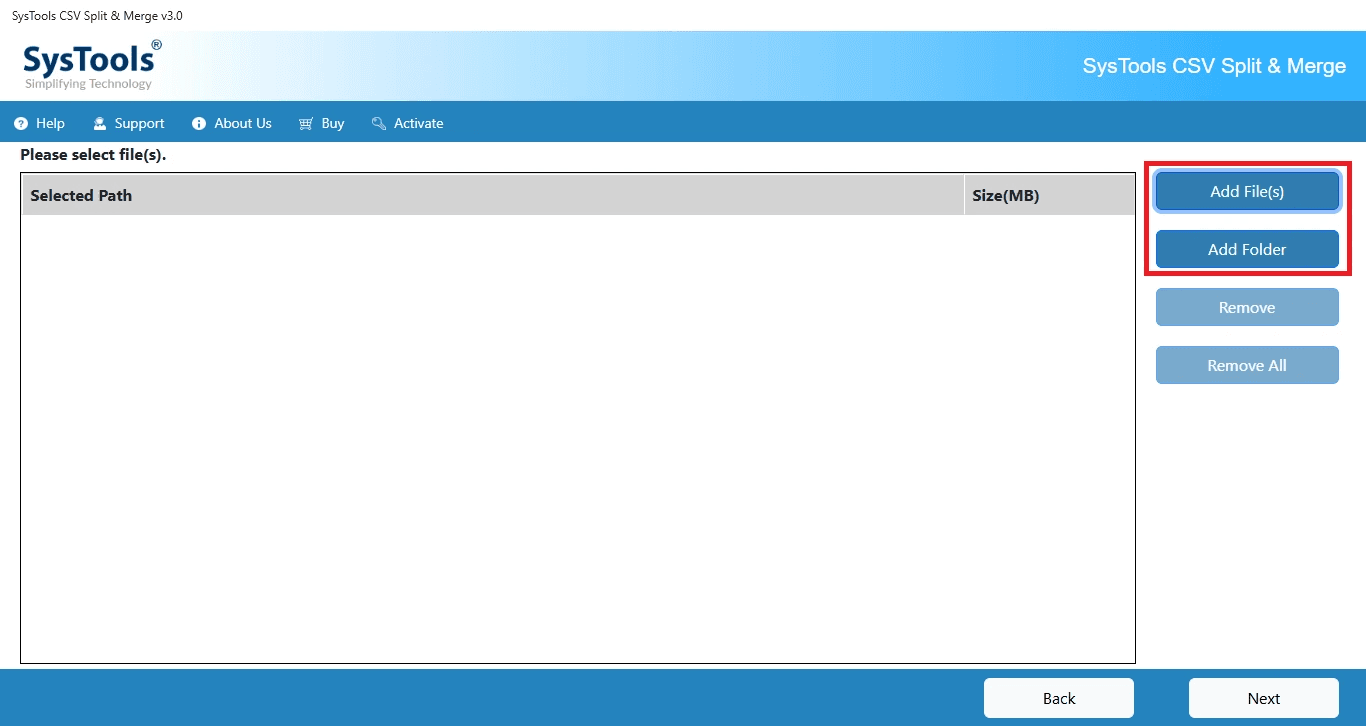
About this app
SysTools CSV Splitter is a powerful and reliable utility designed to split large CSV files into smaller, manageable files without altering the original data. Whether you're dealing with oversized CSV files that exceed Microsoft Excel's row limitations, importing data into databases, or processing massive datasets, the software provides a fast and secure way to divide CSV files while maintaining complete data integrity. It is an ideal solution for data analysts, database administrators, marketers, developers, researchers, and businesses handling large volumes of CSV data.
Key features
- 1Split CSV by record count or file size (10 KB to 2 GB) while preserving headers and formatting
- 2100% offline desktop processing — no signup, no upload, data never leaves the machine
- 3Batch processing with Add File(s) / Add Folder for large CSV datasets on Windows and Mac
Target customer profile
Drawn from the product itself, not from a survey.
Demographic
Data Analysts & BI Professionals
Pain points
Excel row limits cause crashes; large CSVs slow down analysis
Primary needs
Split CSV by rows for smooth import into Power BI/Tableau
Demographic
Email Marketers & CRM Managers
Pain points
Upload limits on marketing platforms; risk of data loss
Primary needs
Divide large contact lists while preserving headers
Demographic
IT & Database Admins
Pain points
Timeout errors during data migration; memory issues
Primary needs
Break CSV by size for seamless database import
Scout Review
Written by AI from measured evidence, scored out of 100.
SysTools CSV Splitter is a competent, offline desktop utility for a real problem: breaking oversized CSVs into chunks that Excel, Power BI, or a database will actually accept. It splits by record count or file size (10 KB to 2 GB), preserves headers and formatting, and never uploads your data anywhere — a legitimate security edge over the free browser tools. The weaknesses are cosmetic and structural: a dated Windows Forms UI, a homepage that's a dense bullet wall, a heavy marketing site (Lighthouse 60, TBT 998ms), and no published security audits. Against free alternatives like csvsplitter.com and splitcsv.com, the pitch is privacy and offline reliability — which is real, but only worth paying for if your data can't touch a server.
Measure by measure
Usability
58Clear 8-step docs, free demo, and a simple add-file → pick-method → split flow. On-screen guidance is thin and the destination field offers no drag-and-drop, but the core task is easy to complete.
Design
46Dated Windows Forms-era UI and a dense 12-bullet homepage wall with inconsistent bolding. Functional but visually behind modern SaaS peers; the app screenshot shows an empty gray pane and plain buttons.
Speed
56Lighthouse mobile 60/100 with LCP 3.5s and TBT 998ms — the marketing site is heavy on main-thread work. The desktop app itself is offline and local, so actual splitting speed isn't reflected here.
Security
76Full 12/12 header checklist (HSTS, CSP, frame protection, Referrer-Policy, Permissions-Policy) plus SPF/DMARC. Offline processing means data never leaves the machine — a real security advantage over browser tools. No published audits.
Accessibility
80Lighthouse 95/100 with only four failing audits: contrast, missing main landmark, SVG alt text, and table headers. No WCAG statement or multi-language UI, but the automated baseline is strong.
Growth
54Real problem (Excel row limits, import timeouts) with a specific offline wedge against browser tools. But the category is crowded with free alternatives and the desktop-only model caps reach.
Improvement areas
- Dated Windows Forms-era UI and a dense, hierarchy-free homepage feature wall
- No published security audits (SOC 2, ISO, pen-test) despite 'safe & secure' marketing
- Marketing site performance: Lighthouse 60/100, TBT 998ms, LCP 3.5s
Design & Usability
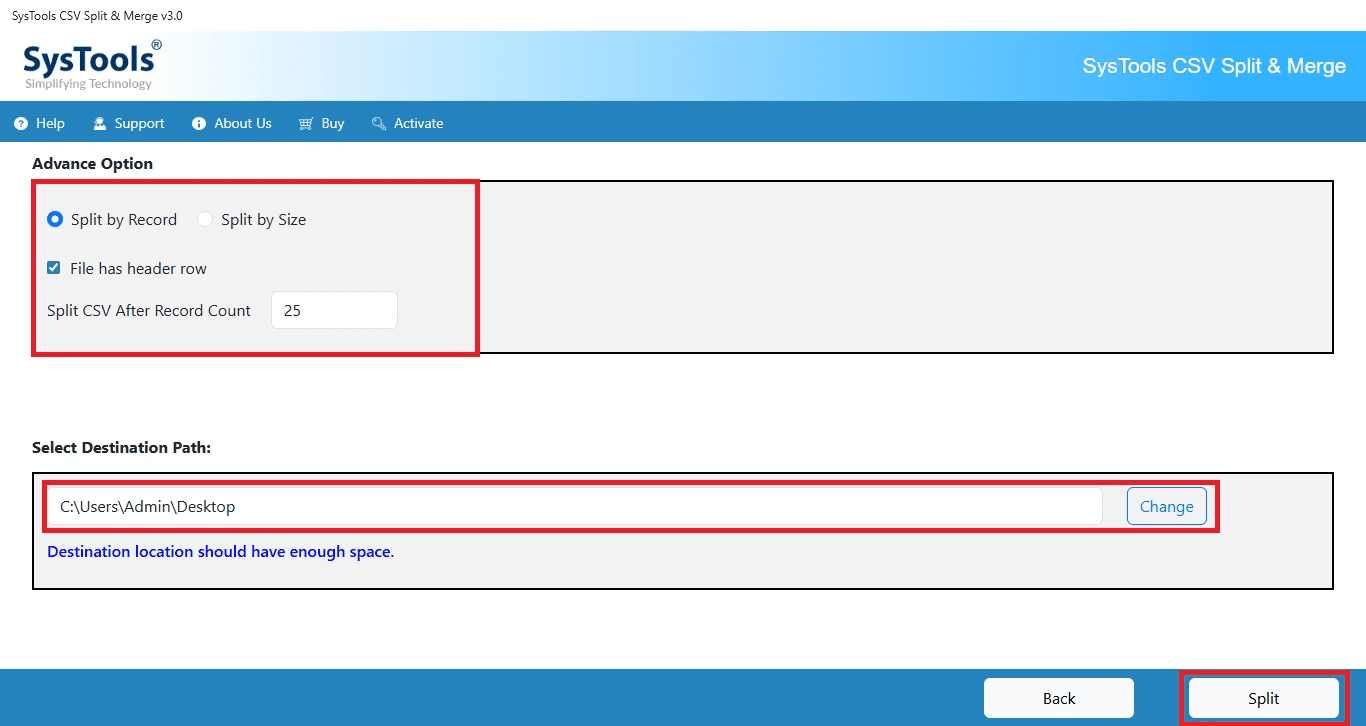
The homepage is a wall of twelve green-check bullets with inconsistent bolding and no visual hierarchy, and the app screenshot reveals a plain gray header, an empty file list pane, and buttons that look a decade old. It works, but it looks like enterprise software from 2012. Usability is better than the visuals suggest: the docs page lays out an eight-step split flow, a free demo exists, and the core path (add files, choose split by records or size, set destination, split) is genuinely simple. The gaps are on-screen guidance and a destination field with no drag-and-drop or recent-location cues.
Speed & Security
Lighthouse mobile performance lands at 60/100 with LCP 3.5s and TBT 998ms — the marketing site is doing too much main-thread work for a page selling a file utility. The desktop app itself runs offline and local, so real splitting speed isn't captured by the lab run. Security is the standout: a full 12/12 header checklist (HSTS, CSP, frame protection, Referrer-Policy, Permissions-Policy) plus SPF and DMARC, and the offline model means your CSV never leaves your machine — a genuine advantage over the browser-based alternatives. What's missing is any published audit, SOC 2, or pen-test page to back the 'safe & secure' claim.
Accessibility & Growth
Accessibility scores 95/100 on Lighthouse with only four failing audits: insufficient color contrast, a missing main landmark, SVG img-role elements without alt text, and a large table with headerless cells. There's no WCAG statement or multi-language UI, but the automated baseline is strong. Growth is a judgment call on the idea: the problem is real (Excel's 1,048,576-row limit, import timeouts, upload caps on marketing platforms) and the offline wedge is a concrete differentiator against csvsplitter.com and splitcsv.com. But the category is crowded with free tools, and a desktop-only, paid model caps how far it can reach. The 18-year-old domain and 3,633 claimed reviews show an established vendor, not a growth rocket.
Conclusion
If your CSVs contain anything you wouldn't paste into a random website — customer lists, payment data, HR records — the offline model is the whole argument, and it holds up. If you just need to chop a file once, the free browser tools will do it in a tab. Buy it for the privacy guarantee and the batch processing, not for the interface.
Suggestions for improvement
- Publish a security page with SOC 2 or a pen-test summary to back the 'safe & secure' badge.
- Rebuild the homepage feature section with visual hierarchy instead of twelve flat green-check bullets.
- Add drag-and-drop and recent-location shortcuts to the destination path field.
- Fix the four Lighthouse a11y failures: contrast, main landmark, SVG alt text, table headers.
Alternatives comparison
Named competitors, point by point. Nobody paid to appear here or to be left out.
 SysTools CSV Splitter SysTools CSV Splitter | CSV Splitter | SplitCSV | |
|---|---|---|---|
| Processing model | Offline desktop app (Windows/Mac) | Browser-based, uploads file to server | Browser-based, uploads file to server |
| Pricing | Paid license with free demo, 30-day money-back | Free | Free with file size limits |
| Split methods | By records or by size (10 KB–2 GB) | By rows or size | Basic splitting, size-limited |
| Batch processing | Yes — Add File(s) / Add Folder | Limited | Limited |
| Data privacy | Data never leaves the machine | File uploaded to server | File uploaded to server |
CSV Splitter
A free online tool to split CSV files by rows or size, but requires uploading data to a server.
SplitCSV
An online CSV splitting service that offers basic splitting features but has file size limitations.
Comparing options? See SysTools CSV Splitter alternatives, scored side by side
More Productivity apps
View all Productivity
Qamarero
92An all-in-one hospitality software for restaurants and ba...

The Stack Newsletter
92A weekly newsletter delivering curated tech jobs, intervi...

EmbedMyReviews
92White-label reputation management software for agencies s...

StoryPad
92Privacy-first open source journal app with a continuous t...

Puzzly – B2B Lead Generation & Sales Intelligence Platform
92Puzzly is an all-in-one B2B lead generation platform that...

Notion
92All-in-one AI workspace for docs, projects, and knowledge...

Vibe Coding Agent Skills
92A free, open-source platform offering 110 AI agent skills...

CC Switch
91Open-source desktop app for switching AI coding providers...

username.md
90One verified handle for your online identity, readable by...

What the GIF
89Frame-perfect video-to-GIF maker that runs entirely in yo...

AuditCloser
89White-label website audits that close deals for digital a...

NudgeWin
89Automated quote follow-up for trades and service businesses.


A platform dedicated to providing unbiased reviews of newly launched applications, analyzing everything from their features to their full potential.
info@scoutforge.net© 2026 Scoutforge. All rights reserved.
