Cycling through all six. Tap any point to stop.
Measured on six things
Remove Duplicate Emails from MBOX, MBX, MBS Files
Design
44Dated marketing page with a broken demo video embed, five competing zones in the hero column, justified text rivers, and a brown/green CTA palette fighting the blue brand. The specifications table and product UI are functional but the whole thing reads like a 2015 template.
Screenshots
1 / 3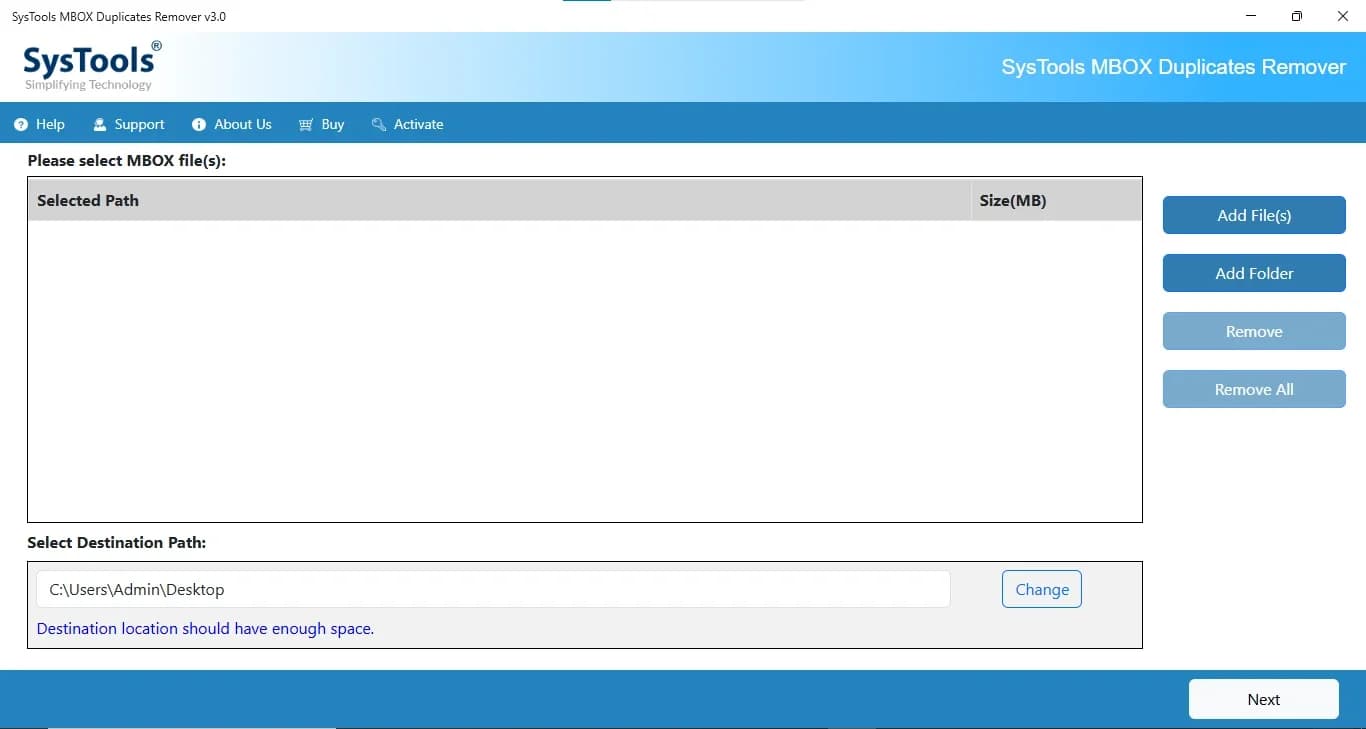
About this app
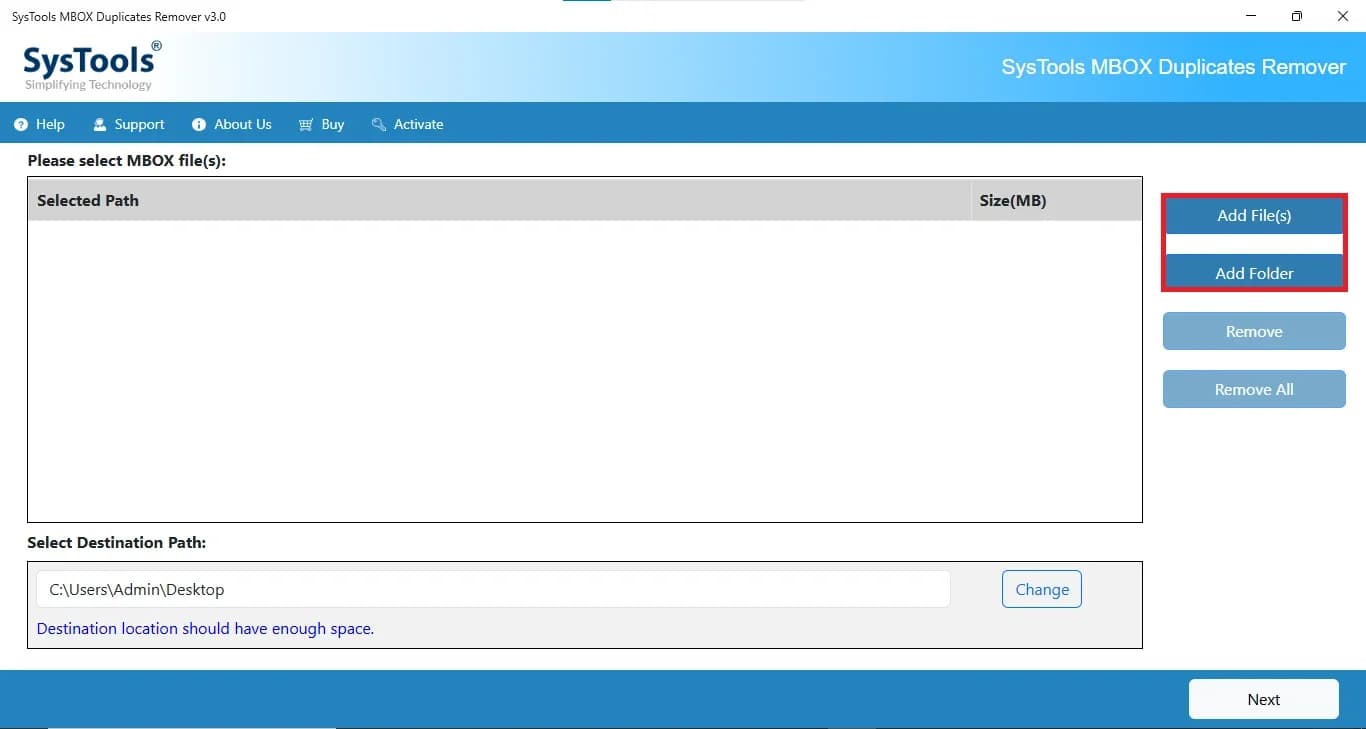
SysTools MBOX Duplicate Remover is a professional utility designed to detect and eliminate duplicate emails from MBOX files without compromising data integrity. Whether your mailbox contains duplicate messages due to repeated imports, synchronization issues, email migration, or backup merges, the software accurately identifies redundant emails and removes them while preserving the original mailbox structure, metadata, and attachments. It supports MBOX files created by more than 20 popular email clients, including Thunderbird, Apple Mail, Eudora, SeaMonkey, Entourage, Postbox, Opera Mail, Spicebird, and many others.
Key features
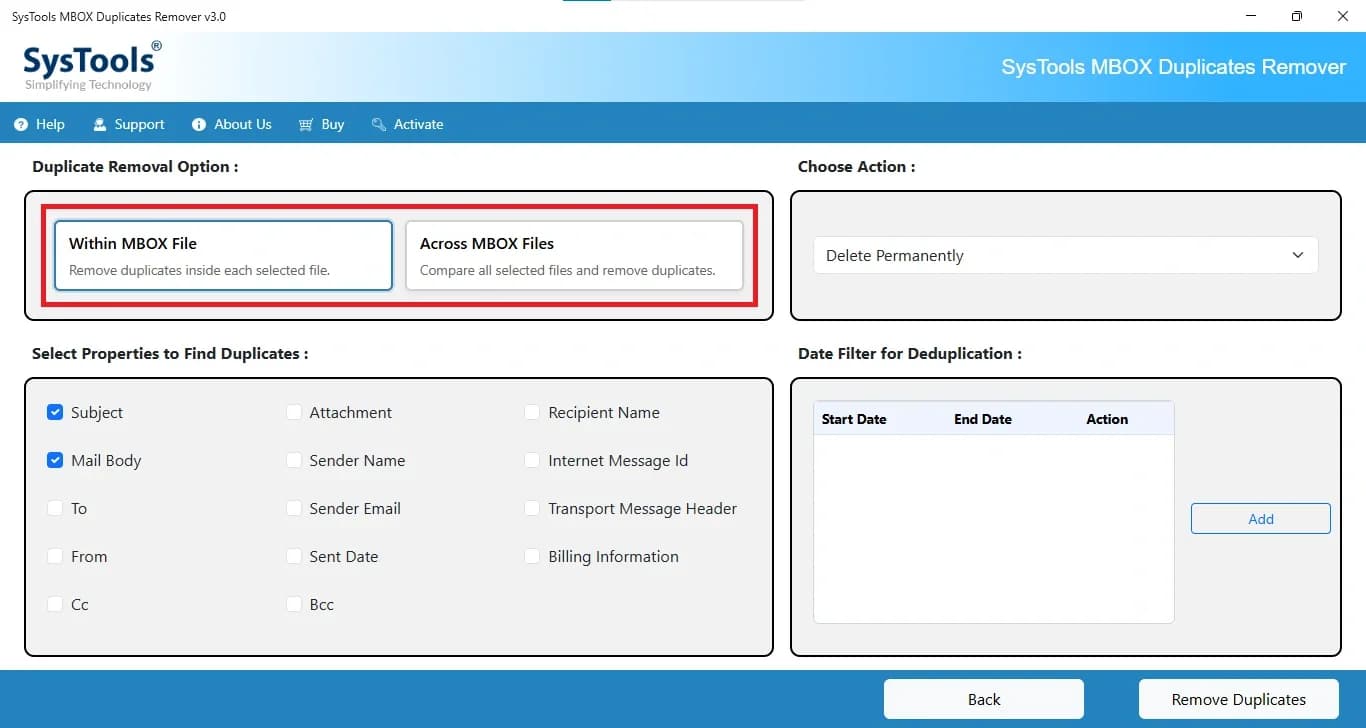
- 1Dual dedup modes: within a single MBOX file or across multiple MBOX files
- 2Four removal actions: delete permanently, move to new MBOX, flag, or mark as expired
- 314+ matching parameters (Subject, From, To, Cc, Bcc, date, body) plus date-range filtering
- 4CSV audit report export for deleted duplicates — useful for forensic and legal workflows
- 5Works standalone without Thunderbird installed; supports 20+ MBOX-producing clients
- 6Batch processing across multiple MBOX files with attachments preserved
Target customer profile
Drawn from the product itself, not from a survey.
Demographic
IT administrators and email server managers
Pain points
Managing large MBOX files with thousands of duplicate emails causing storage bloat and confusion
Primary needs
A bulk, automated solution to remove duplicates across multiple MBOX files without affecting data integrity
Demographic
Thunderbird and Apple Mail users with large local archives
Pain points
Duplicate emails accumulating over years of use, making it hard to find important messages and slowing down email clients
Primary needs
A user-friendly tool to clean up duplicates within specific folders or date ranges without technical hassle
Demographic
Forensics and legal professionals handling email evidence
Pain points
Need to deduplicate MBOX files for analysis while preserving original data and maintaining a clear audit trail
Primary needs
A tool that offers multiple removal actions (like flagging or moving) and generates reports for documentation
Scout Review
Written by AI from measured evidence, scored out of 100.
SysTools MBOX Duplicate Remover is a functional, well-specified utility wrapped in a dated marketing site. The feature set is genuinely solid — dual within/across-file modes, four removal actions, date filters, 14+ matching parameters, CSV audit reports, Windows and Mac builds, and a free demo. The guide is thorough. Security headers are complete. But the homepage undermines all of it: a broken demo video, a cluttered hero, inconsistent visual language, and no compliance documentation for a tool that handles email evidence. It works; it just doesn't look like it wants to be bought.
Measure by measure
Usability
62CTAs above the fold, a working anchor bar, a 13-step guide, free demo, and a self-explanatory empty state make the flow legible. The Rosetta warning and 'Free Live Demo' caveat are small and easy to miss, and the broken video removes the fastest path to understanding the tool.
Design
44Dated marketing page with a broken demo video embed, five competing zones in the hero column, justified text rivers, and a brown/green CTA palette fighting the blue brand. The specifications table and product UI are functional but the whole thing reads like a 2015 template.
Speed
58Lighthouse mobile 72/100 with LCP 2.7s and CLS 0.064 are acceptable, but TBT of 791ms and a desktop score of 59/100 show heavy main-thread work. The page loads, it just doesn't feel snappy on weaker hardware.
Security
76Full security header suite (HSTS, CSP, frame protection, Referrer-Policy, Permissions-Policy), plus SPF and DMARC — 12/12 on the probe. No SOC 2, ISO, pen-test, or bug bounty claims found, which caps it below the top of the band for a vendor handling email data.
Accessibility
82Lighthouse a11y 95/100 is strong. Remaining fails are real but fixable: contrast, missing main landmark, SVG img roles without alt text, and a large table without headers. No WCAG statement or a11y page found, and content is English-only.
Growth
58A real, specific pain (MBOX duplicate bloat) with a clear wedge: GUI vs Dedupeless CLI, cross-file and non-Thunderbird dedup vs the add-on, plus CSV audit reports for legal/forensic users. Niche market with limited ceiling as cloud email dominates.
Improvement areas
- Broken demo video embed on the homepage undermines trust at the exact moment of evaluation
- No SOC 2, ISO 27001, pen-test summary, or bug bounty page despite handling email archives
- Accessibility gaps: table without headers, SVG icons without alt text, contrast failures
- Hero layout overloaded with five competing zones; brown/green CTA palette clashes with brand blue
Design & Usability
The homepage is stuck in an earlier era: a broken demo video, a hero column with five competing zones, justified text rivers, and a brown/green CTA pairing that fights the blue brand. The specifications table and product UI are the competent parts. Usability is better than design — CTAs sit above the fold, the anchor bar works, and the 13-step guide is genuinely thorough. But the fastest path to understanding the tool (the video) is dead, and the Rosetta warning plus 'Free Live Demo' caveat are tucked where nobody will read them. A buyer lands, sees a black error box where the demo should be, and has to trust the copy instead.
Speed & Security
Speed is mid: mobile Lighthouse 72/100 with LCP 2.7s and CLS 0.064 is fine, but 791ms TBT and a desktop score of 59/100 mean the page drags on weaker hardware. Nothing broken, nothing impressive. Security is the strongest measured dimension — HTTPS enforced, HSTS, CSP, frame protection, Referrer-Policy, Permissions-Policy, SPF, and DMARC all present, 12/12 on the probe. What's missing is the paperwork: no SOC 2, ISO 27001, pen-test summary, or bug bounty anywhere on the site. For a tool that ingests people's email archives — including forensic and legal users — that's a gap worth closing.
Accessibility & Growth
Accessibility scores well on automation (95/100) but the failing audits are the kind that matter: insufficient contrast, no main landmark, SVG img roles without alt text, and a large table with no headers. No WCAG statement, no a11y page, English-only. Growth is a judgment call on the idea: MBOX duplicate removal is a real, specific problem with a clear wedge over the alternatives — GUI vs Dedupeless's CLI, cross-file and non-Thunderbird dedup vs the Thunderbird add-on, plus CSV audit reports for legal and forensic users. The category is niche and shrinking as cloud email eats local archives, so the ceiling is real but low. A competent product in a small pond.
Conclusion
If you're an IT admin or forensic analyst with a bloated MBOX archive and no patience for command-line scripts, this does the job and the audit reports are a genuine differentiator. If you're comparing on polish or compliance paperwork, it's behind. The product is more competent than its homepage suggests — which is exactly the problem.
Suggestions for improvement
- Fix the broken demo video embed — it's the single highest-leverage repair on the page.
- Publish a security/compliance page: SOC 2 status, pen-test summary, data handling for email archives.
- Add table headers and alt text for SVG icons; fix contrast to clear the remaining Lighthouse fails.
- Simplify the hero: one primary CTA, move the Rosetta notice and platform grid below the fold.
Alternatives comparison
Named competitors, point by point. Nobody paid to appear here or to be left out.
 SysTools MBOX Duplicate Remover Software |  Dedupeless |  Thunderbird Duplicate Remover | |
|---|---|---|---|
| Interface | GUI desktop app (Windows & Mac) | Command-line script, no GUI | Thunderbird add-on UI |
| Cross-file deduplication | Yes — within and across MBOX files | Yes, script-based across files | No — within Thunderbird only |
| Requires Thunderbird installed | No — standalone | No — standalone script | Yes — runs inside Thunderbird |
| Removal actions | Delete, move, flag, mark expired | Delete only | Delete only |
| Audit / CSV report | Yes — CSV export of deleted duplicates | No | No |
| Price | Paid, 30-day money back; free demo | Free, open source | Free |
Dedupeless
A free, open-source script for removing duplicates from MBOX files, but requires command-line usage and lacks a GUI.
Thunderbird Duplicate Remover
A free add-on for Thunderbird that removes duplicates within the client, but only works within Thunderbird and lacks cross-file deduplication.
Comparing options? See SysTools MBOX Duplicate Remover Software alternatives, scored side by side
More Productivity apps
View all Productivity
Puzzly – B2B Lead Generation & Sales Intelligence Platform
92Puzzly is an all-in-one B2B lead generation platform that...

Qamarero
92An all-in-one hospitality software for restaurants and ba...

EmbedMyReviews
92White-label reputation management software for agencies s...

StoryPad
92Privacy-first open source journal app with a continuous t...

Notion
92All-in-one AI workspace for docs, projects, and knowledge...

The Stack Newsletter
92A weekly newsletter delivering curated tech jobs, intervi...

Vibe Coding Agent Skills
92A free, open-source platform offering 110 AI agent skills...

QRBliss
91Branded QR codes with AI Brand Sync, 15 free dynamic code...

Gerty
91Private, local AI assistant for Mac that runs offline

Strukchad Property Management
91Property management for Kenyan letting agents: rent invoices raised every month, M-Pesa rent prompts to tenants, arrears tracking and landlord statements.

CC Switch
91Open-source desktop app for switching AI coding providers...

PitchWhip
90AI cold call scripts & direct dials from LinkedIn


A platform dedicated to providing unbiased reviews of newly launched applications, analyzing everything from their features to their full potential.
info@scoutforge.net© 2026 Scoutforge. All rights reserved.
