Cycling through all six. Tap any point to stop.
Measured on six things
Remove Duplicate Emails, Contacts, Calendars, Tasks, & Attachments in Outlook PST/OST Files
Design
44Dated 2010s utility aesthetic: flat blue hero box shot, 15+ green checkmarks in two columns, cramped typography, and a stock WinForms app UI with default fonts and gray buttons. Functional but visually behind peers.
Screenshots
1 / 1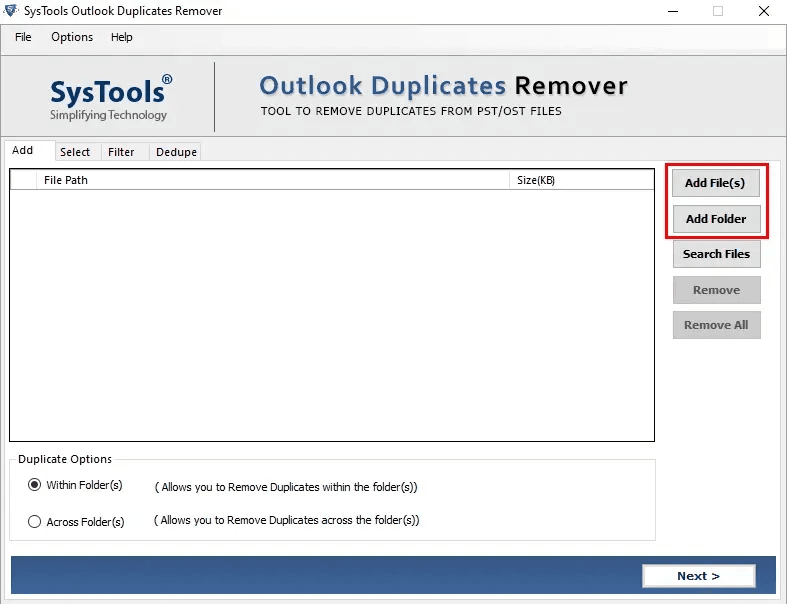
About this app
SysTools Outlook Duplicate Remover provides multiple duplicate removal options to meet different user requirements. Users can permanently delete duplicate items, move them to a separate folder, flag them for review, or mark them as expired instead of deleting them immediately. This flexibility allows organizations and individual users to manage duplicate Outlook items safely without risking accidental data loss.
Key features
- 1Removes duplicates from PST, OST, and BAK files with five actions: delete, move to folder, flag, mark expired, or export.
- 2Works without Outlook installed and supports password-protected files, batch processing, and 14+ property-level duplicate criteria.
- 3Free live demo, 30-day money-back guarantee, and a 13-step screenshot guide for onboarding.
Target customer profile
Drawn from the product itself, not from a survey.
Demographic
IT Administrators and Email Server Managers
Pain points
Managing multiple user mailboxes with duplicate emails causing storage bloat and performance degradation
Primary needs
Batch processing multiple PST files with centralized duplicate management and detailed reporting
Demographic
Business Professionals and Corporate Employees
Pain points
Outlook running slowly due to years of accumulated duplicate emails, contacts, and calendar entries
Primary needs
Quick, reliable deduplication that preserves important data while improving Outlook performance
Demographic
Legal and Compliance Officers
Pain points
Need to maintain clean email archives for eDiscovery and regulatory compliance without losing critical data
Primary needs
Precise duplicate identification with audit trails and the ability to review before permanent deletion
Demographic
Small Business Owners
Pain points
Growing Outlook data files becoming unmanageable and causing sync issues across devices
Primary needs
Affordable, easy-to-use solution that doesn't require technical expertise or Outlook installation
Scout Review
Written by AI from measured evidence, scored out of 100.
SysTools Outlook Duplicate Remover is a workmanlike utility that does exactly what it says: finds and removes duplicate Outlook items across PST, OST, and BAK files with granular control over what gets deleted, moved, flagged, or marked expired. The feature set is genuinely deep — 14 email properties, 13+ calendar properties, password-protected file support, batch processing, and the ability to run without Outlook installed. The free demo and 30-day money-back guarantee lower the risk of trying it. But the product wears its age openly: a dated 2010s homepage, a stock WinForms interface, Lighthouse mobile performance at 57/100, and accessibility gaps that automated audits catch but nobody has fixed. Security headers are excellent (12/12), but there's no SOC 2 or ISO certification for a tool handling sensitive email archives. Against DupInOut's in-Outlook integration and Outlook Duplicate Email Remover's lower price, SysTools wins on depth and flexibility but loses on polish and modern UX. It's a solid choice for IT admins who need the job done and don't care how the tool looks doing it.
Measure by measure
Usability
58Free demo, 30-day money-back, screens/video/guide/docs tabs, and a 13-step screenshot guide make onboarding workable. But the homepage buries the workflow under dense feature lists and competing CTAs.
Design
44Dated 2010s utility aesthetic: flat blue hero box shot, 15+ green checkmarks in two columns, cramped typography, and a stock WinForms app UI with default fonts and gray buttons. Functional but visually behind peers.
Speed
46Lighthouse mobile 57/100 (LCP 3.5s, TBT 1.2s), desktop 61/100. The heavy feature-grid homepage and embedded media drag LCP well past the 2.5s good threshold.
Security
76Full 12/12 header checklist: HTTPS enforced, HSTS, CSP, frame protection, Referrer-Policy, Permissions-Policy, plus SPF and DMARC. No SOC 2, ISO, or bug bounty found, but the transport and email hygiene are solid.
Accessibility
70Lighthouse a11y 92/100, but failing audits include insufficient color contrast, missing main landmark, unnamed progressbar, SVG without text alternative, and a large table without headers. No WCAG statement found.
Growth
58Real, specific pain (Outlook PST/OST bloat) with concrete differentiators: no Outlook install needed, password-protected file support, 5 removal actions, batch processing. But the category is crowded and the wedge is narrow.
Improvement areas
- No SOC 2, ISO 27001, or bug bounty program — a compliance gap for legal and enterprise buyers.
- Dated 2010s homepage design and stock WinForms app UI undermine trust with modern buyers.
- Lighthouse mobile performance 57/100 (LCP 3.5s) and accessibility gaps (contrast, landmarks, table headers) need fixing.
Design & Usability
SysTools Outlook Duplicate Remover looks and feels like enterprise utility software from a decade ago — and for its target buyer, that may be fine. The homepage is a dense wall of green checkmarks and bullet points that technically communicates every feature but does so with zero visual hierarchy. The app UI is stock WinForms: gray buttons, system fonts, no theming. Usability is stronger than design: a free live demo, 30-day money-back guarantee, and a 13-step screenshot guide lower the barrier to entry considerably. The Within Folder vs Across Folder scope toggle is clear, and the five removal actions (delete, move, flag, mark expired, export) give users real control. The main friction is the homepage itself — you have to scan 30+ feature bullets before you understand what the tool actually does. For IT admins who just want the job done, that's tolerable. For anyone evaluating against a modern SaaS competitor, it's a rough first impression.
Speed & Security
Speed is the weakest measured dimension: Lighthouse mobile 57/100 with LCP 3.5s and TBT 1.2s, desktop 61/100. The heavy feature-grid homepage and embedded media are the likely culprits. For a tool that markets itself on improving Outlook performance, the website's own performance is an awkward contradiction. Security is a genuine bright spot: the HTTP probe returned a perfect 12/12 on headers — HTTPS enforced, HSTS, CSP, frame protection, X-Content-Type-Options, Referrer-Policy, Permissions-Policy — plus SPF and DMARC records. That's better transport hygiene than many modern SaaS products bother with. What's missing is the compliance layer: no SOC 2, no ISO 27001, no bug bounty, no dedicated security page. For a tool handling password-protected PST files and legal eDiscovery archives, that gap matters. The headers say 'we care'; the absence of audits says 'we haven't been asked yet.'
Accessibility & Growth
Accessibility lands at 70: Lighthouse scores 92/100 on automated checks, but the failing audits are meaningful — insufficient color contrast, no main landmark, an unnamed progressbar, SVGs without text alternatives, and a large table without headers. There's no WCAG conformance statement anywhere on the site. For a Windows desktop utility, screen reader support is largely inherited from the OS, but the marketing site itself has real gaps. Growth is a judgment call on the idea: the problem is real and specific (Outlook PST/OST bloat from years of duplicates), and the differentiators are concrete — works without Outlook installed, handles password-protected files, five removal actions, 14 email properties, batch PST/OST/BAK processing. But the category is crowded: DupInOut lives inside Outlook with real-time detection, and Outlook Duplicate Email Remover undercuts on price. SysTools' wedge is 'more features, more file types, no Outlook dependency' — a real advantage for IT admins managing multiple mailboxes, but not a moat. The 18-year-old domain and single YouTube channel suggest a mature, steady business rather than a growth rocket. Score reflects a competent, clearly positioned product in a crowded category with a narrow but real wedge.
Conclusion
If you're an IT admin staring down a 50GB PST file full of triplicate calendar invites, SysTools will get you out of that hole. The five removal actions, the property-level duplicate criteria, and the no-Outlook-required workflow are real advantages over simpler competitors. But if you're evaluating this against modern SaaS tools or need compliance certifications for a legal hold, the missing SOC 2 and dated interface are real friction. Try the free demo first — the 30-day money-back guarantee means the only thing you're risking is the time it takes to read the homepage. And seriously, back up your PST before you click Export. The docs say it; believe them.
Suggestions for improvement
- Publish a SOC 2 Type II or ISO 27001 report — for a tool handling password-protected PST files and legal eDiscovery archives, the absence of third-party audit is a real sales blocker.
- Redesign the homepage: cut the 30+ bullet feature list to a scannable 6-8 item grid with a clear workflow diagram and a single primary CTA.
- Fix the Lighthouse accessibility failures: add a main landmark, table headers, accessible names for progressbars, and SVG text alternatives; publish a WCAG conformance statement.
- Improve mobile LCP below 2.5s by deferring non-critical media, compressing hero assets, and reducing the feature-grid DOM weight.
Alternatives comparison
Named competitors, point by point. Nobody paid to appear here or to be left out.
 SysTools Outlook Duplicate Remover Software SysTools Outlook Duplicate Remover Software | Outlook Duplicate Email Remover |  DupInOut DupInOut | |
|---|---|---|---|
| Works without Outlook installed | Yes — explicitly supported | Not specified; likely requires Outlook | No — requires Outlook installed and running |
| Removal actions beyond permanent delete | 5 actions: delete, move, flag, mark expired, export | Basic scan and removal only | Real-time detection and removal |
| Password-protected file support | Yes — supported | Not specified | Not specified |
| Batch processing multiple files | Yes — multiple PST/OST/BAK at once | Limited; focused on email dedup | Within Outlook session |
| Free trial / demo | Free live demo + 30-day money-back | Trial available | Free trial available |
Outlook Duplicate Email Remover
A simpler tool focused primarily on email deduplication, offering basic scanning and removal features at a lower price point but with fewer customization options
DupInOut
An Outlook add-in that works directly within the application, providing real-time duplicate detection and removal but requiring Outlook to be installed and running
Comparing options? See SysTools Outlook Duplicate Remover Software alternatives, scored side by side
More Productivity apps
View all Productivity
Qamarero
92An all-in-one hospitality software for restaurants and ba...

The Stack Newsletter
92A weekly newsletter delivering curated tech jobs, intervi...

EmbedMyReviews
92White-label reputation management software for agencies s...

StoryPad
92Privacy-first open source journal app with a continuous t...

Puzzly – B2B Lead Generation & Sales Intelligence Platform
92Puzzly is an all-in-one B2B lead generation platform that...

Notion
92All-in-one AI workspace for docs, projects, and knowledge...

Vibe Coding Agent Skills
92A free, open-source platform offering 110 AI agent skills...

CC Switch
91Open-source desktop app for switching AI coding providers...

username.md
90One verified handle for your online identity, readable by...

What the GIF
89Frame-perfect video-to-GIF maker that runs entirely in yo...

AuditCloser
89White-label website audits that close deals for digital a...

NudgeWin
89Automated quote follow-up for trades and service businesses.


A platform dedicated to providing unbiased reviews of newly launched applications, analyzing everything from their features to their full potential.
info@scoutforge.net© 2026 Scoutforge. All rights reserved.
