Cycling through all six. Tap any point to stop.
Measured on six things
Talkdown is an iOS voice-to-notes app that instantly tran...
Growth
65Targets busy professionals, students, researchers, and content creators effectively. Strong differentiation via voice editing and auto-organization. Currently limited availability (web + iOS soon) and no public user stats, testimonials, or growth metrics visible. Early-stage potential but needs wider rollout.
Screenshots
1 / 3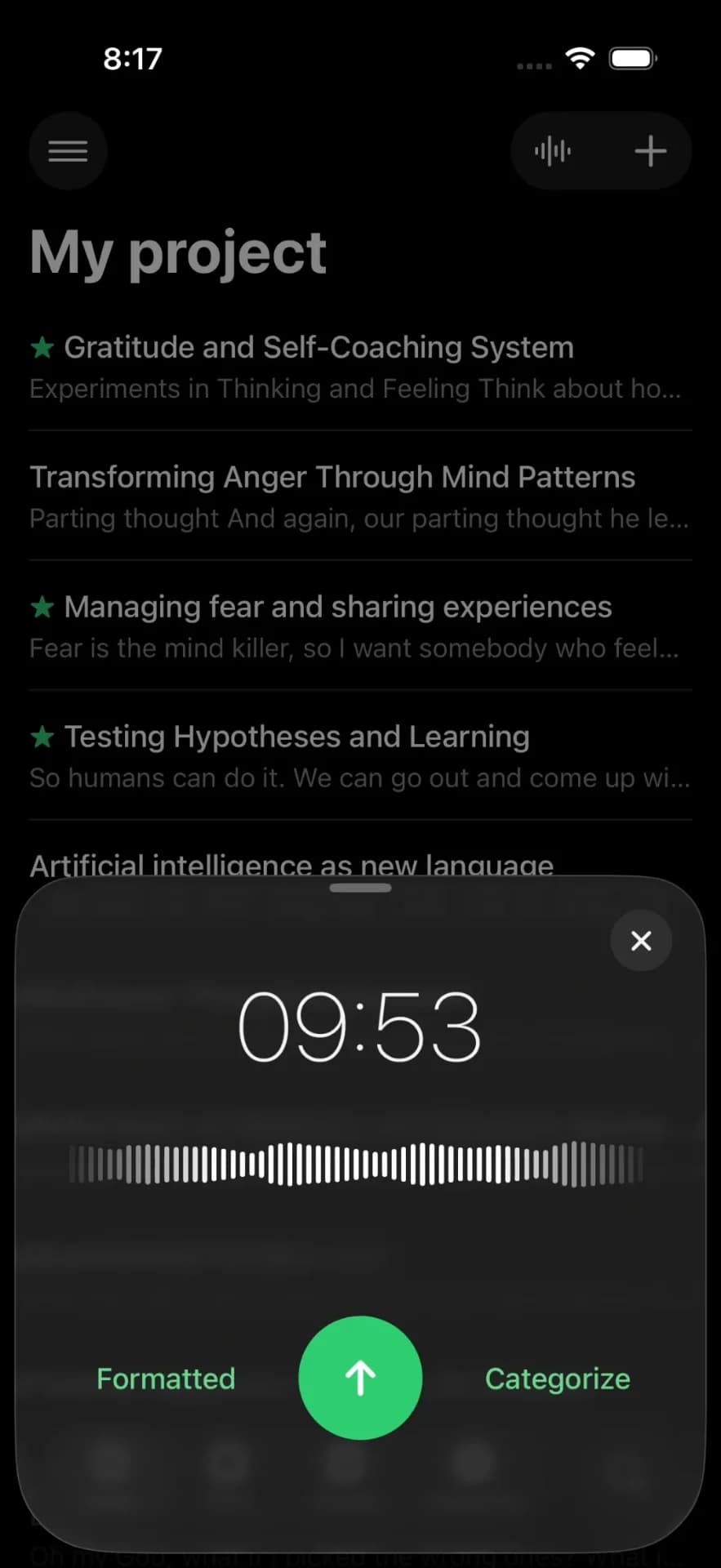
About this app
Your voice, your notes! Stop typing, start talking. Talkdown turns every thought into a polished note before you forget it.
Key features
- 1One-tap recording with real-time transcription, auto-formatting, punctuation, smart titles & categories in <10 seconds
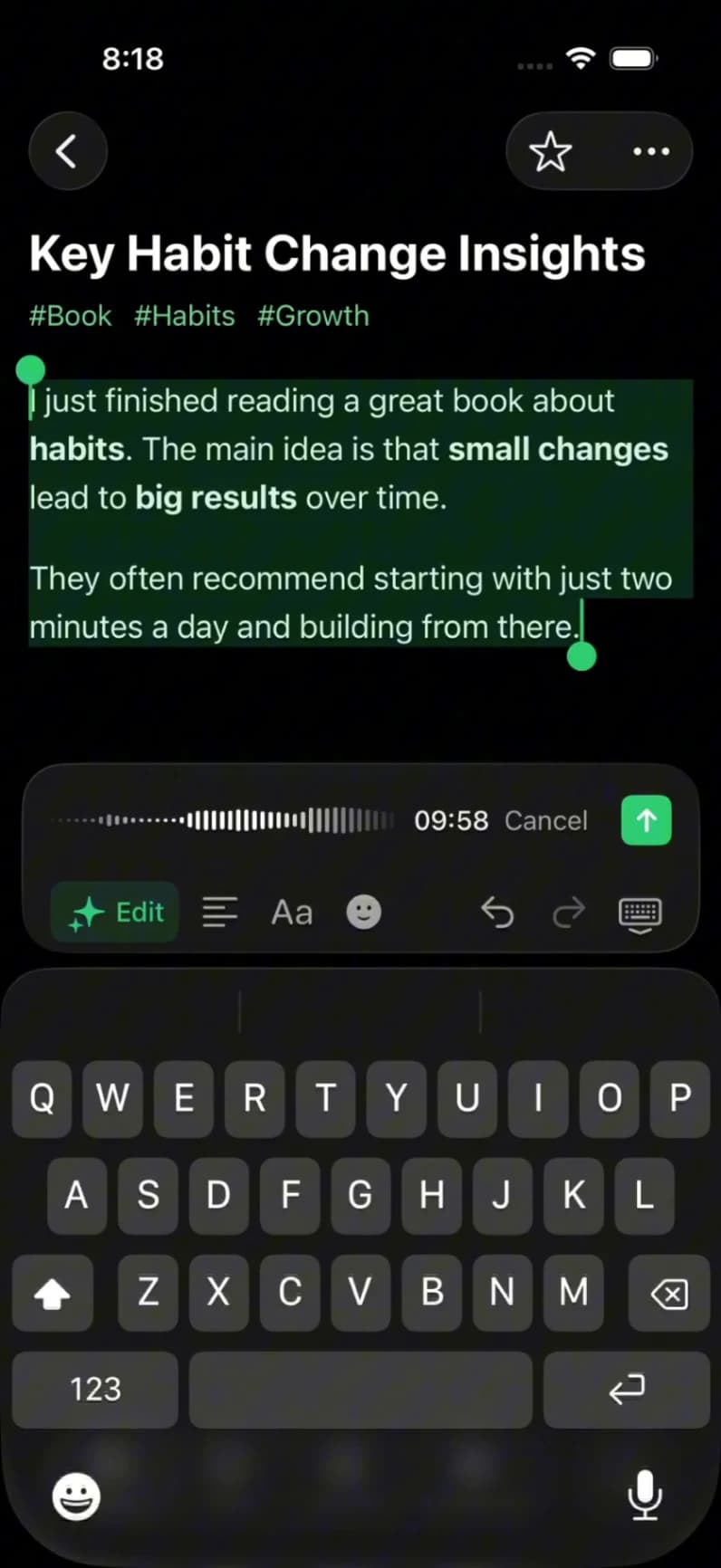
- 2Voice editing: rephrase, fix grammar, extract action items, change tone, translate, or restructure using voice commands
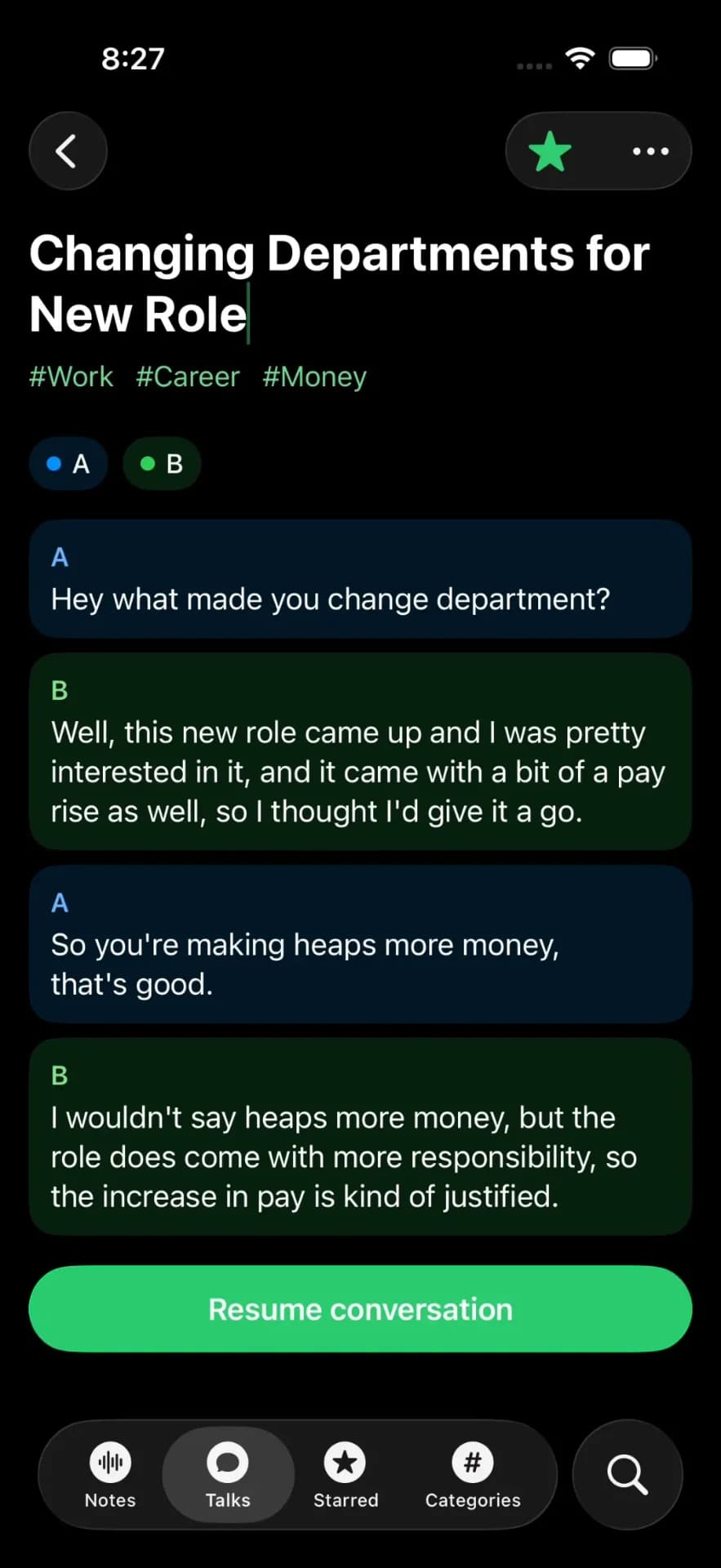
- 3Conversations with automatic speaker identification (editable), rich-text editor, smart searchable library with auto-categorization
Target customer profile
Drawn from the product itself, not from a survey.
Demographic
Busy professionals (e.g., managers, consultants, freelancers)
Pain points
Struggle to type notes during meetings or while multitasking; lose ideas due to slow capture methods
Primary needs
Fast, accurate transcription; automated organization; privacy and security for sensitive information
Demographic
Students and researchers
Pain points
Time-consuming manual note-taking; difficulty capturing lectures or interviews accurately
Primary needs
Multi-language support; speaker identification for group discussions; searchable note library
Demographic
Content creators and writers
Pain points
Creative blocks when typing; inefficient editing processes for voice drafts
Primary needs
Voice editing capabilities; rich-text formatting; inspiration capture on the fly
Scout Review
Written by AI from measured evidence, scored out of 100.
Talkdown is a refreshing take on voice-to-notes that goes beyond basic transcription. Its combination of instant capture, automatic smart formatting/organization, voice-driven editing, and a clean searchable library makes it genuinely useful for busy professionals, students, and creators. Strengths in speed, multi-language support, and reducing manual work justify a solid score. It feels like the tool you'd actually want to use during meetings instead of pretending to type. Areas for improvement include fuller mobile availability, more transparent security details, and proven real-world accuracy metrics. If you're tired of losing brilliant thoughts to slow thumbs, this is worth trying.
Measure by measure
Usability
85One-tap recording with real-time transcription, voice editing commands, speaker ID for conversations, and a smart searchable library with auto-categorization. Rich-text editing plus voice commands for rephrasing, extracting action items, or changing tone make it highly intuitive for busy users.
Design
82Clean, minimalist interface focused on one-tap recording and a full rich-text editor with formatting toolbar. Automatic titles, categories, and structured output give it a polished, professional feel. iOS app coming soon suggests modern but currently web-first design.
Speed
88Claims under 10 seconds from recording a 60-second clip to fully formatted, titled, and categorized note. Real-time transcription with advanced LLMs handling punctuation, structure, and jargon. Background recording supported.
Security
75100% private by design. Notes sync via iCloud with secure audio processing. No mention of SOC 2, end-to-end encryption details, or enterprise compliance. Strong focus on privacy for sensitive professional information.
Accessibility
7250+ languages for transcription and voice commands. Speaker identification helps in group settings. Rich-text formatting and voice editing improve editing flow. No explicit WCAG mentions or screen reader optimizations noted.
Growth
65Targets busy professionals, students, researchers, and content creators effectively. Strong differentiation via voice editing and auto-organization. Currently limited availability (web + iOS soon) and no public user stats, testimonials, or growth metrics visible. Early-stage potential but needs wider rollout.
Improvement areas
- Full native iOS and Android apps instead of web-first with 'coming soon' disclaimers
- Transparent pricing plans, independent accuracy benchmarks, and detailed security/compliance certifications
- More integrations (calendar, CRM, export options) and public user testimonials or usage metrics
Design & Usability
Talkdown nails the 'stop typing, start talking' promise with a clean design centered on instant capture and a powerful rich-text editor. One-tap recording flows into real-time transcription with smart formatting, auto-titles, and categories. The voice editing feature — where you literally talk to your notes to rephrase, extract actions, change tone, or translate — is a genuine innovation that feels like having a smart assistant inside your notebook. Usability shines for meetings via speaker lanes and editable transcripts. The smart library's auto-categorization and full-text search reduce the usual post-meeting cleanup drudgery. It's clearly built for the target users: professionals who lose ideas while multitasking and creators who get blocked staring at blank pages. Minor deduction for the app still being partially vaporware on mobile.
Speed & Security
Speed is one of Talkdown's biggest flexes — sub-10 seconds to polished notes on short recordings, powered by advanced LLMs that handle punctuation, structure, and technical terms without manual cleanup. Background recording and real-time text appearance keep the flow natural. Security is decent with iCloud sync and 'secure processing,' emphasizing privacy for sensitive work. However, it lacks detailed compliance info (no SOC 2, GDPR specifics, or enterprise SSO mentions) that competitors like Otter provide. For freelancers and consultants handling client info, the privacy pitch lands well, but larger teams might want more reassurance. Overall, the performance feels snappy where it counts, though real-world results on long lectures or poor audio will vary.
Accessibility & Growth
Support for 50+ languages across transcription and voice commands makes it accessible for global users, students, and researchers capturing lectures or interviews. Speaker identification aids group discussions, and voice-based editing lowers the barrier for those with typing difficulties. The searchable library and auto-organization help users find past ideas quickly. Growth potential is high given the pain points it solves — slow manual note-taking, creative blocks, lost thoughts. Differentiation through voice editing and automated structure sets it apart from basic recorders. Current limitations (web-focused, iOS pending, no public metrics) cap the score, but with execution it could grow fast among professionals tired of clunky tools. Strong foundation for a loyal user base if they expand platforms quickly.
Conclusion
Your voice deserves better than a half-assed voice memo app. Talkdown turns rambling thoughts into polished, organized, searchable notes with minimal effort. It's not perfect yet, but the voice editing and automation are ahead of most competitors. Give it a spin before your next meeting — you might actually remember what the hell everyone said.
Suggestions for improvement
- Launch the iOS app immediately and add Android support to capture the full mobile professional market.
- Publish independent transcription accuracy benchmarks, especially for noisy environments and technical content.
- Add detailed security whitepapers, SOC 2 compliance, and enterprise features like SSO to win bigger teams.
- Introduce affordable pricing tiers with usage-based options since none are currently listed on the site.
Alternatives comparison
Named competitors, point by point. Nobody paid to appear here or to be left out.
 Talkdown |  Otter.ai |  Notion |  Rev Voice Recorder | |
|---|---|---|---|---|
| Real-time Transcription & Auto-Formatting | Real-time with advanced LLM auto-formatting, punctuation, titles & categories | Real-time transcription + AI summaries, strong but less automatic rich formatting | AI Meeting Notes (beta) transcribes & finds action items; requires more manual structure | Basic recording + paid transcription; limited real-time or auto-formatting |
| Voice-Driven Editing & Commands | Unique voice editing to rephrase, rewrite tone, extract items, translate via speech | Limited voice features; primarily text-based editing and AI chat with transcripts | Notion AI can edit/summarize but not full voice-command editing of content | No significant voice editing capabilities |
| Speaker Identification | Automatic with editable speaker names & separate lanes; resume conversations | Strong speaker ID, especially in paid plans; collaboration-focused | Basic identification in AI Meeting Notes; less emphasis on lanes | Limited or no automatic speaker differentiation |
| Organization & Search | Smart auto-categorization, auto-titles, full-text search, favorites, topic browsing | Good search, folders, and sharing; more manual organization than Talkdown | Powerful databases & search but requires more manual organization | Basic library; lacks smart auto-categorization or advanced search |
| Platforms & Availability | Web-focused; iOS app coming soon. 50+ languages | Mature iOS, Android, web, integrations with Zoom/Teams | Web, desktop, mobile apps with deep workspace integration | Mobile recorder app with transcription add-on |
Otter.ai
A popular voice transcription app with real-time meeting notes and collaboration features, but may lack Talkdown's advanced formatting automation.
Notion
A versatile workspace app with voice-to-text features, though it requires more manual organization compared to Talkdown's auto-categorization.
Rev Voice Recorder
A simple recording app with transcription services, but lacks the integrated smart library and voice editing tools of Talkdown.
Comparing options? See Talkdown alternatives, scored side by side
Sources
What the review was written against. A verdict with no sources is an opinion.
More Productivity apps
View all Productivity
Puzzly – B2B Lead Generation & Sales Intelligence Platform
92Puzzly is an all-in-one B2B lead generation platform that...

Qamarero
92An all-in-one hospitality software for restaurants and ba...

EmbedMyReviews
92White-label reputation management software for agencies s...

StoryPad
92Privacy-first open source journal app with a continuous t...

Notion
92All-in-one AI workspace for docs, projects, and knowledge...

The Stack Newsletter
92A weekly newsletter delivering curated tech jobs, intervi...

Vibe Coding Agent Skills
92A free, open-source platform offering 110 AI agent skills...

QRBliss
91Branded QR codes with AI Brand Sync, 15 free dynamic code...

Gerty
91Private, local AI assistant for Mac that runs offline

Strukchad Property Management
91Property management for Kenyan letting agents: rent invoices raised every month, M-Pesa rent prompts to tenants, arrears tracking and landlord statements.

CC Switch
91Open-source desktop app for switching AI coding providers...

PitchWhip
90AI cold call scripts & direct dials from LinkedIn


A platform dedicated to providing unbiased reviews of newly launched applications, analyzing everything from their features to their full potential.
info@scoutforge.net© 2026 Scoutforge. All rights reserved.
