Cycling through all six. Tap any point to stop.
Measured on six things
Create expiring links and QR codes to control access to s...
Design
58Dark navy homepage with a clean gradient CTA and tidy use-case grid. Hero copy is dense — four paragraphs before the form — and the feature pills are low-contrast. Competent, not distinctive.
Screenshots
1 / 1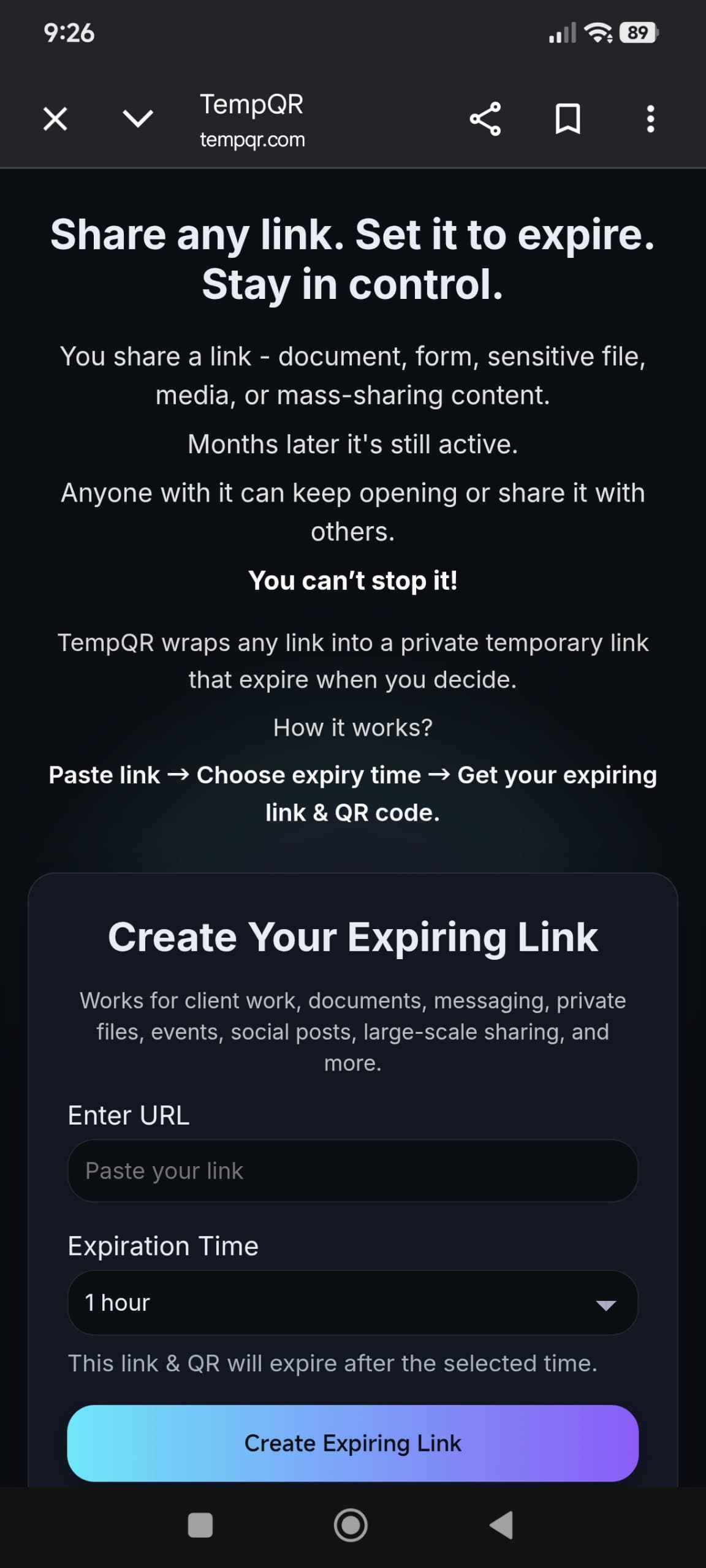
About this app
TempQR is a web-based tool that transforms any URL into a temporary link and QR code that automatically expires after a specified time. It's designed for individuals and businesses who need to share sensitive or time-sensitive information without leaving it accessible indefinitely. Key features include: - Instant link expiration: Choose from preset durations (1 hour) or custom times. - No signup required: Start using immediately without creating an account. - Privacy-first: No tracking or history stored. - QR code generation: Easily share links via QR codes that expire. - Custom duration: Unlock custom expiry times for a one-time fee of $6.99 per link. Use cases: client work handoffs, form submissions with deadlines, private file sharing, event promotions, and more.
Key features
- 1Instant expiring links and QR codes with no signup required.
- 2Preset 1-hour expiry plus custom durations unlocked for $6.99 per link.
- 3Privacy-first: no tracking, no saved history, original URL hidden behind TempQR link.
Target customer profile
Drawn from the product itself, not from a survey.
Demographic
Freelancers and consultants
Pain points
Sharing sensitive client files that remain accessible indefinitely.
Primary needs
Secure, expiring links for client deliverables and handoffs.
Demographic
Event organizers
Pain points
QR codes for events that continue to work after the event ends.
Primary needs
Temporary QR codes that expire after the event.
Demographic
Marketing professionals
Pain points
Promotional links that stay active beyond campaign periods.
Primary needs
Auto-expiring links for time-limited promotions.
Scout Review
Written by AI from measured evidence, scored out of 100.
TempQR does one thing and does it cleanly: paste a URL, pick an expiry, get a link and QR that dies on schedule. No signup, no tracking, no history — the privacy pitch is consistent with the product. The measured numbers back it up: 99/100 desktop Lighthouse, 98/100 accessibility, HTTPS with HSTS and most security headers in place. Where it stumbles is depth. The hero buries the form under four paragraphs of copy, custom duration costs $6.99 per link with no subscription option, and there's no docs, FAQ, or help page anywhere on the site. The domain is barely a year old, so traction signals are thin — but the idea itself is well-positioned against Bitly and TinyURL, which both gate expiry behind accounts or paid tiers. It's a competent, honest utility that needs a second act to keep power users from drifting to a subscription competitor.
Measure by measure
Usability
62Zero-signup flow is genuinely fast: paste URL, pick 1-hour default, get link and QR. But custom duration is paywalled at $6.99 per link and there's no docs, FAQ, or help page anywhere.
Design
58Dark navy homepage with a clean gradient CTA and tidy use-case grid. Hero copy is dense — four paragraphs before the form — and the feature pills are low-contrast. Competent, not distinctive.
Speed
72Lighthouse desktop 99/100 and mobile 89/100 with TBT 0ms and CLS 0.019. Mobile LCP of 3.2s is the only soft spot on an otherwise snappy, lightweight page.
Security
74HTTPS enforced with HSTS, frame protection, Referrer-Policy and Permissions-Policy all set (9/12 checklist). Missing CSP and DMARC, and no SOC 2, ISO, or pen-test claims published.
Accessibility
80Lighthouse accessibility 98/100 with one failing audit: no main landmark. No a11y statement or WCAG claim, and the site is English-only. Strong automated score, thin on stated commitment.
Growth
58Real, specific problem — links that outlive their purpose — with a no-signup wedge Bitly and TinyURL gate behind accounts or paid tiers. Niche is narrow but the positioning is honest.
Improvement areas
- No docs, FAQ, or help center — users have nowhere to turn when something breaks.
- Custom duration is paywalled per-link with no subscription option for heavy users.
- Missing CSP header and DMARC record; no security page or compliance claims.
Design & Usability
TempQR's homepage is a dark navy card with a gradient button and a six-tile use-case grid — clean, modern, and instantly legible as a utility. The problem is the hero: four paragraphs of copy about links that 'you can't stop!' sit between the visitor and the only thing they came to do. Once you reach the form, the flow is genuinely good — URL field, a pre-filled '1 hour' dropdown, and a single button that returns a link plus downloadable QR in PNG and SVG. No signup, no email, no friction. The catch arrives the moment you want anything other than one hour: custom duration is $6.99 per link, one-time, no subscription. That's a defensible indie pricing choice, but there's no docs page, no FAQ, no help center, and no contact link in the footer — so a user who hits a snag has nowhere to go. The product is fast to use and slow to explain itself.
Speed & Security
On speed, TempQR is genuinely strong. Lighthouse gives it 99/100 on desktop and 89/100 on mobile, with a Total Blocking Time of 0ms and a Cumulative Layout Shift of 0.019 — the page is essentially static and it shows. The only soft metric is mobile LCP at 3.2s, which is fine but not exceptional. Security is a mixed but respectable picture for an indie tool: HTTPS is enforced with HSTS, and frame protection, X-Content-Type-Options, Referrer-Policy, and Permissions-Policy are all present, giving a 9/12 checklist score. What's missing is a Content-Security-Policy header and a DMARC record — both easy wins the maker hasn't taken. There's no SOC 2, no ISO, no pen-test report, and no dedicated security page, which is normal for a product at this stage but means enterprise buyers have nothing to point at. The 'no tracking, no saved history' claim is the product's core security pitch and it's consistent with what the site actually does.
Accessibility & Growth
Accessibility is the quiet strength here: Lighthouse scores 98/100, with a single failing audit — the document lacks a main landmark. That's a one-line fix. Beyond the automated score, there's no accessibility statement, no WCAG conformance claim, and no multi-language support, so the commitment is implied rather than stated. On growth, the idea is sharper than the execution suggests. The problem — links shared for client handoffs, form deadlines, and event QR codes that stay live long after they should — is real and specific. The wedge is no-signup expiring links with QR output, which Bitly and TinyURL gate behind accounts or paid tiers, and QR Code Generator gates behind dynamic-code plans. The honest limit is pricing: $6.99 per custom link is a per-use model that will push heavy users toward a subscription competitor the moment their volume justifies it. The category has room, but TempQR needs a reason for power users to stay.
Conclusion
If you need a link that dies in an hour and you don't want to hand over an email to get it, TempQR is the shortest path from A to B on the internet right now. The execution is tight, the measurements are real, and the privacy claim isn't contradicted by anything on the page. What it isn't yet is a product with a reason to come back. One preset duration, a per-link fee for anything custom, and zero documentation means the ceiling is 'useful tool I forget about' rather than 'tool I build a workflow around.' The foundation is solid enough that the next version could change that — a subscription tier, a real docs page, and a <main> tag would do more for this product than any redesign.
Suggestions for improvement
- Add a subscription tier alongside the $6.99 per-link option — heavy users will leave for Bitly otherwise.
- Publish a docs or FAQ page; right now the only help is a warning to save your link before leaving.
- Add a Content-Security-Policy header and a DMARC record — both are quick wins on the 9/12 checklist.
- Wrap the page content in a <main> landmark to clear the single failing Lighthouse accessibility audit.
Alternatives comparison
Named competitors, point by point. Nobody paid to appear here or to be left out.
 TempQR TempQR |  Bitly Bitly |  TinyURL TinyURL |  QR Code Generator QR Code Generator | |
|---|---|---|---|---|
| Expiring links available without an account | Yes — no signup, instant expiry | No — account required; expiry on premium plans | Partial — account needed for custom durations | No — account required for dynamic/expiring codes |
| QR code generation with expiry | Yes — PNG and SVG download, expires with link | Yes — QR codes on paid plans | Limited — QR support varies by plan | Yes — dynamic QR codes with expiry on paid tiers |
| Pricing model | Free for 1-hour links; $6.99 one-time per custom link | Free tier; premium subscription for expiry features | Free; paid plans for advanced features | Free tier; subscription for dynamic/expiring codes |
| Privacy / tracking stance | No tracking, no saved history, no account | Click analytics and tracking are core features | Basic click stats; account-linked history | Scan analytics on paid plans |
Bitly
Link management platform with expiring links feature (available on premium plans).
TinyURL
URL shortener that offers expiring links with custom durations.
QR Code Generator
Generates QR codes with optional expiration for dynamic codes.
Comparing options? See TempQR alternatives, scored side by side
More Productivity apps
View all Productivity
StoryPad
92Privacy-first open source journal app with a continuous t...

Puzzly – B2B Lead Generation & Sales Intelligence Platform
92Puzzly is an all-in-one B2B lead generation platform that...

Qamarero
92An all-in-one hospitality software for restaurants and ba...

Notion
92All-in-one AI workspace for docs, projects, and knowledge...

EmbedMyReviews
92White-label reputation management software for agencies s...

The Stack Newsletter
92A weekly newsletter delivering curated tech jobs, intervi...

Vibe Coding Agent Skills
92A free, open-source platform offering 110 AI agent skills...

CC Switch
91Open-source desktop app for switching AI coding providers...

username.md
90One verified handle for your online identity, readable by...

What the GIF
89Frame-perfect video-to-GIF maker that runs entirely in yo...

AuditCloser
89White-label website audits that close deals for digital a...

NudgeWin
89Automated quote follow-up for trades and service businesses.


A platform dedicated to providing unbiased reviews of newly launched applications, analyzing everything from their features to their full potential.
info@scoutforge.net© 2026 Scoutforge. All rights reserved.
