

A platform dedicated to providing unbiased reviews of newly launched applications, analyzing everything from their features to their full potential.
info@scoutforge.net© 2026 Scoutforge. All rights reserved.
A platform dedicated to providing unbiased reviews of newly launched applications, analyzing everything from their features to their full potential.
info@scoutforge.net© 2026 Scoutforge. All rights reserved.
A platform dedicated to providing unbiased reviews of newly launched applications, analyzing everything from their features to their full potential.
info@scoutforge.net© 2026 Scoutforge. All rights reserved.
Cycling through all six. Tap any point to stop.
Measured on six things
Estimate Tesla home and Supercharger charging costs by mo...
HTTPS enforced with HSTS, but CSP, frame protection, X-Content-Type-Options, Referrer-Policy and Permissions-Policy are all missing, and no SPF or DMARC records were detected. Checklist 4/12. No published audits or bug bounty found.
Let me be honest — before I found this tool, I was doing Tesla charging math in a messy spreadsheet I half-understood, plugging in whatever numbers I guessed from my monthly utility bill. The Tesla Charging Cost Calculator at teslachargingcost.org cleans all of that up in one screen, and after poking at it for a while, it's earned a spot in my bookmarks. It's a free, no-account web calculator that breaks down exactly how much it costs to charge a Tesla, whether you're plugging in at home or pulling up to a Supercharger. What genuinely impressed me is how it separates two things most calculators mash together: the cost of a single charging session and the long-term cost of actually driving the car. You pick your Tesla — Model 3, Model Y, Model S, Model X, or Cybertruck — dial in your starting and target battery percentage, enter your local electricity rate (with official EIA state averages preloaded, from 11.51¢ in North Dakota to a painful 42.86¢ in Hawaii), and the numbers update l...
Drawn from the product itself, not from a survey.
Demographic
Prospective Tesla buyers weighing EV vs. gas ownership
Pain points
Unclear real-world charging costs compared to gasoline fill-ups
Primary needs
Side-by-side monthly and annual energy cost comparison
Demographic
New Tesla owners on their first electric vehicle
Pain points
Confused by kWh, wall-side vs. battery-side energy, and charging loss
Primary needs
Simple per-session, per-mile, and per-month cost breakdowns
Demographic
Budget-conscious owners in high-rate states like Hawaii or California
Pain points
High electricity prices making home vs. Supercharger choices expensive
Primary needs
Accurate local rate inputs and home-vs-Supercharger mix modeling
Demographic
Homeowners planning Level 2 charger installation
Pain points
Unknown one-time installation costs plus recurring charging costs
Primary needs
Installation estimator paired with ongoing home charging math
Written by AI from measured evidence, scored out of 100.
The Tesla Charging Cost Calculator is a free, no-account web tool that does one thing well: it tells you what charging your Tesla actually costs, at home and at a Supercharger, with editable local rates and a home-vs-Supercharger mix model. The four-step wizard is genuinely educational, with tooltips that explain wall-side vs battery-side energy and charging loss — concepts most calculators hand-wave. EIA state averages are preloaded for every state, and the preset link shares model data without leaking your rates or state of charge. Speed is excellent (95 mobile, 100 desktop Lighthouse). The weaknesses are real but bounded: the hero sits below the fold on desktop, security headers are mostly missing (4/12 checklist, no DMARC), and the accessibility audit flagged contrast and ARIA issues. It's a competent, useful tool for a narrow audience, and it earns its bookmark.
Four-step wizard with genuinely useful inline tooltips on kWh, wall-side vs battery-side energy, and charging loss. EIA state averages preloaded for all 50 states plus DC. No account, and a preset link that shares model but not rates. Clear, competent, above average for the category.
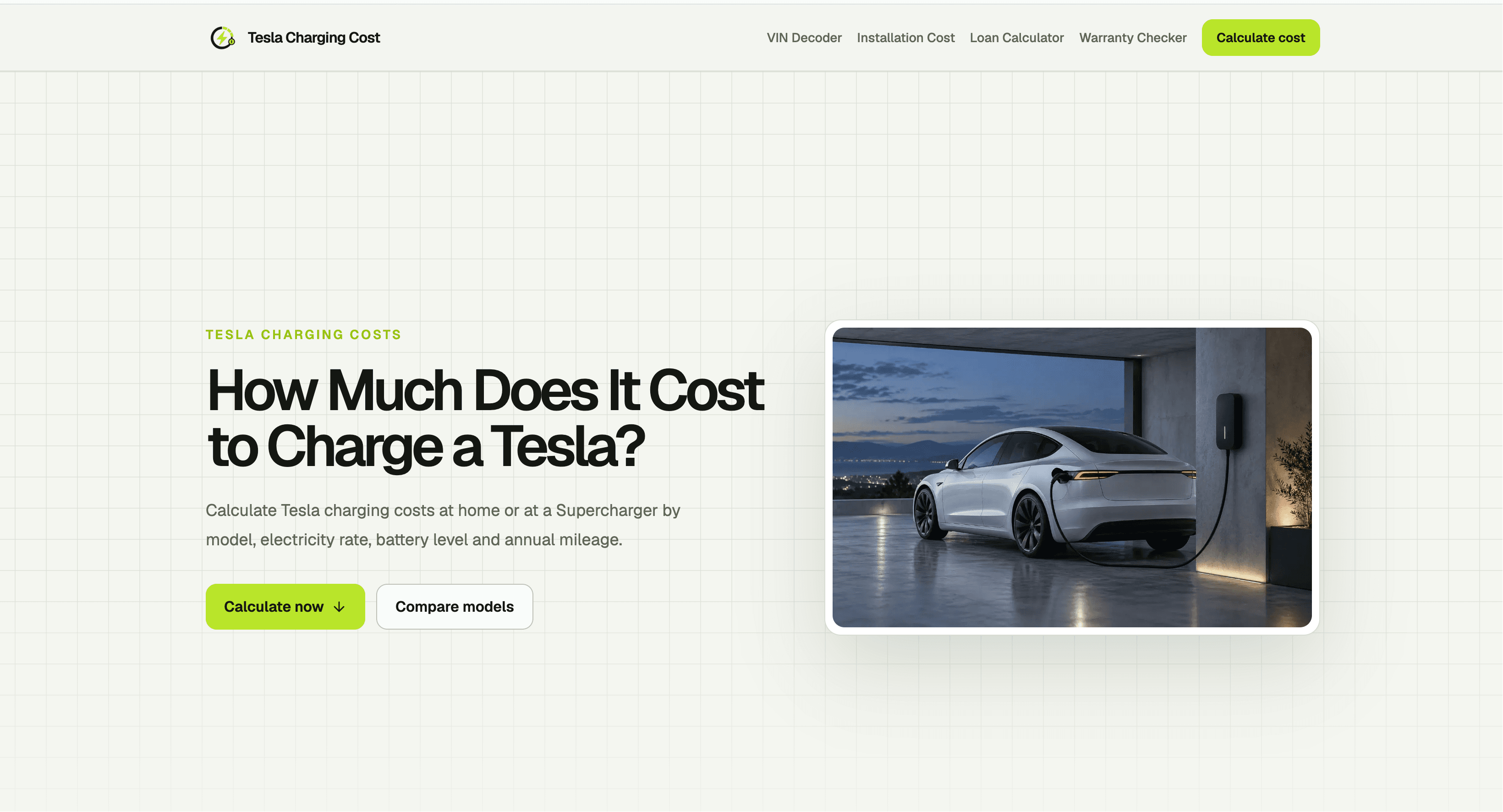
Clean grid background and a strong Tesla garage photo, but the hero sits below the fold on desktop, leaving the top of the viewport empty. Two CTAs ('Calculate cost' vs 'Calculate now') compete with inconsistent wording, and no calculator UI appears in the captured screenshots.
Lighthouse mobile 95/100 with LCP 2.6s, CLS 0, TBT 8ms, FCP 966ms; desktop a perfect 100/100. The page is lightweight and snappy, well ahead of typical calculator sites weighed down by ad scripts and heavy frameworks.
HTTPS enforced with HSTS, but CSP, frame protection, X-Content-Type-Options, Referrer-Policy and Permissions-Policy are all missing, and no SPF or DMARC records were detected. Checklist 4/12. No published audits or bug bounty found.
Lighthouse accessibility 93/100, with prohibited ARIA attributes and insufficient color contrast as the failing audits. No accessibility statement, WCAG claim, or multi-language support found. Solid automated score but the contrast issue affects the low-contrast 'Compare models' button.
Real problem, specific wedge: editable local rates plus home-vs-Supercharger mix modeling that Tesla's official tool, EVgo, and the EPA comparison all lack. Domain is brand new (registered 2026-09-24), so traction is context only. Differentiated but the category is narrow.
The design is competent but has a real flaw: on desktop the hero content sits below the fold, leaving the top of the viewport as empty grid. Two CTAs with inconsistent wording ('Calculate cost' in nav, 'Calculate now' in hero) split attention, and the captured screenshots show no calculator interface at all — you have to scroll to find the actual product. Usability is where this tool earns its keep. The four-step wizard walks through vehicle and battery, local electricity rate, charging method, and mileage with inline tooltips that actually explain kWh, wall-side vs battery-side energy, and charging loss. EIA state averages are preloaded for all 50 states plus DC and the national average, so you're not hunting for your utility rate. No account required, and the preset link shares model/year/trim/mileage while deliberately excluding rates and state of charge — a thoughtful privacy choice. The nav bar, though, dumps four unrelated tools (VIN Decoder, Installation Cost, Loan Calculator, Warranty Checker) with no grouping or hierarchy.
Speed is the standout. Lighthouse mobile performance scored 95/100 with LCP 2.6s, CLS 0, TBT 8ms, and FCP 966ms; desktop hit a perfect 100/100. The page is lightweight and static, with no heavy SPA framework or ad scripts dragging it down. For a calculator site, that's genuinely excellent and well ahead of category norms. Security is the weak spot. HTTPS is enforced with HSTS, which is good, but CSP, frame protection, X-Content-Type-Options, Referrer-Policy, and Permissions-Policy are all absent, and no SPF or DMARC DNS records were detected — the checklist came back 4/12. No published SOC 2, ISO certification, penetration test, or bug bounty was found. For a free, no-account calculator that collects no personal data, the risk is limited, but the missing email authentication records mean the domain is spoofable, and the absent headers leave the site more exposed than it needs to be.
Accessibility scored 93/100 on the Lighthouse audit, which is solid, but the two failing audits are meaningful: prohibited ARIA attributes and insufficient color contrast. The low-contrast 'Compare models' button is a visible example. No accessibility statement, WCAG conformance claim, or multi-language support was found. Automated checks only cover part of WCAG, so the real-world experience for screen reader and keyboard users is unverified. Growth potential is moderate. The product names a real problem — Tesla owners genuinely don't know their real charging costs — and it has a specific wedge: editable local electricity rates combined with home-vs-Supercharger mix modeling. The listed alternatives don't combine these: Tesla's official tool shows Supercharger pricing but no long-term projection, EVgo and ChargePoint focus on public charging, and the EPA tool lacks editable local rates. That's a genuine differentiator. But the category is narrow, the domain is brand new (registered 2026-09-24), and Tesla could ship the same feature in its own app. The wedge is real but small.
Conclusion
If you're a prospective Tesla buyer trying to compare EV vs gas costs, or a new owner staring at your first electric bill wondering what happened, this tool answers the question cleanly and fast. It won't replace your utility bill or Tesla's app for real-time Supercharger pricing, but it does the long-term math those tools skip. The missing security headers and below-the-fold hero are fixable in an afternoon. For a free calculator with no signup, the value-to-friction ratio is high. Bookmark it, use it before you buy, and check back after a few months of real charging data to see if the estimates hold up.
Named competitors, point by point. Nobody paid to appear here or to be left out.
 Tesla Charging Cost Calculator Tesla Charging Cost Calculator |  Tesla Supercharger Map and Cost Tesla Supercharger Map and Cost |  EVgo or ChargePoint Cost Estimators EVgo or ChargePoint Cost Estimators |  EPA Fuel Economy EV Comparison Tool EPA Fuel Economy EV Comparison Tool | |
|---|---|---|---|---|
| Editable local electricity rate input | Yes — full manual entry plus EIA state averages preloaded for all 50 states and DC | No — shows current Supercharger per-kWh pricing only, no home rate input | No — network-specific session pricing, no editable home electricity rate | No — uses standardized MPGe and national averages, no editable local rate modeling |
| Home vs Supercharger cost comparison | Yes — slider sets an 80/20 or custom mix and shows per-session, per-mile, and monthly costs for both | No — Supercharger pricing only, no home charging comparison | No — public charging network pricing only, no home comparison | Partial — compares EV vs gasoline energy costs but not home vs public charging |
| Long-term driving cost projection (monthly/annual) | Yes — monthly and annual driving budget based on entered mileage and charging mix | No — session and location pricing only, no long-term projection | No — per-session cost estimation only | Yes — standardized annual fuel/energy cost estimates, but not editable for local rates |
| Account required | No — free, no account, no telemetry connection | Tesla account required for app-based pricing; web page is public | Account required for network pricing and charging sessions | No — public government tool, no account required |
| Vehicle model selection (Tesla-specific) | Yes — Model 3, Model Y, Model S, Model X, Cybertruck with year and trim options | No — location and pricing focused, not model-specific cost modeling | No — network pricing, not Tesla model-specific | Yes — all vehicle models including Tesla, but not Tesla-specific charging cost focus |
Tesla Supercharger Map and Cost
Tesla's official site and app show current Supercharger locations and per-kWh pricing, but offer no long-term driving cost projection.
EVgo or ChargePoint Cost Estimators
Network apps let you calculate charging session prices at their own stations, focused on public charging rather than home electricity comparisons.
EPA Fuel Economy EV Comparison Tool
U.S. government tool compares EV and gasoline vehicle energy costs using standardized MPGe figures, but lacks editable local rate modeling.
Comparing options? See Tesla Charging Cost Calculator alternatives, scored side by side

A free, comprehensive financial calculator platform with ...

A no-code Solana token creator that deploys SPL tokens in...

Automated bookkeeping software that extracts data from re...

AI invoice follow-up that drafts reminders and tracks next steps.

A top-rated virtual assistant agency that matches busines...

Connect your bank to AI for real answers about your money.

A developer-first financial data API providing structured...

Stripdo is a smart invoicing tool that automatically gene...

Real-time monetization infrastructure for AI products tha...

A Windows Excel add-in that pulls your ledger data into the workbook, reconciles it, and drafts the reports - all in plain English, inside Excel.

Screen stocks using 30+ value disciplines. Receive an email when your investment thesis breaks.

Business workspace for solo founders and small teams.
A platform dedicated to providing unbiased reviews of newly launched applications, analyzing everything from their features to their full potential.
info@scoutforge.net© 2026 Scoutforge. All rights reserved.
