Cycling through all six. Tap any point to stop.
Measured on six things
Share text, images, screenshots and files across devices using a free online clipboard.
Growth
62A real, specific problem — moving a snippet between devices without an account — with a clear no-signup, auto-expiring wedge against AirDrop, email and cloud storage. Category is crowded but the friction it removes is genuine.
Screenshots
1 / 1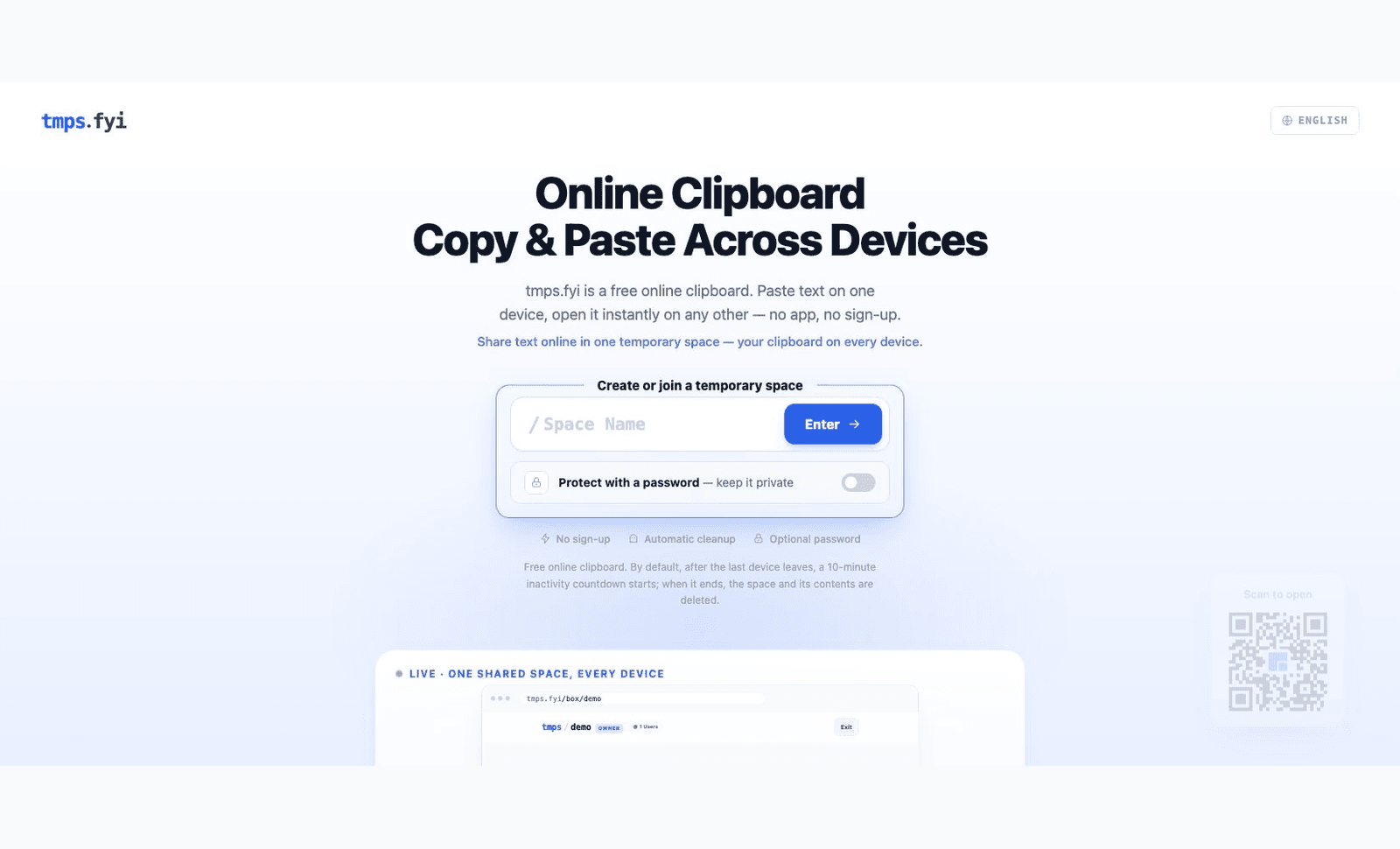
About this app
tmps.fyi is a free online clipboard for sharing text, images, screenshots and files between devices. Open the same temporary space in a browser on your phone, tablet or computer. No app installation or account is required. An optional password can restrict access. After the last device leaves, a 10-minute inactivity countdown begins; when it ends, the space and its contents are deleted. Connections use HTTPS. The service is not end-to-end encrypted and is not intended for highly sensitive information.
Key features
- 1No sign-up or app install — open a named space in any modern browser on any device.
- 2Real-time sync of text, images, screenshots and small files across phone, tablet and desktop.
- 3Optional per-space password to restrict who can join a temporary space.
- 4Automatic deletion 10 minutes after the last device leaves the space.
- 5HTTPS with HSTS, CSP and full security-header coverage; explicitly not end-to-end encrypted.
Target customer profile
Drawn from the product itself, not from a survey.
Demographic
Remote workers & digital nomads
Pain points
Switching between devices and apps to share links or snippets feels slow.
Primary needs
Instant, no-friction text and file transfer across devices without installing software.
Demographic
Developers & IT professionals
Pain points
Testing code snippets or error messages on multiple devices requires manual copying.
Primary needs
A quick, browser-based clipboard to move text and small files between machines.
Demographic
Students & educators
Pain points
Sharing screenshots or lecture notes between phone and laptop is cumbersome.
Primary needs
A simple, temporary space to exchange images and text without sign-up.
Scout Review
Written by AI from measured evidence, scored out of 100.
tmps.fyi is a focused, fast, no-account online clipboard that does one job cleanly: open a named space on two devices and move text, images or files between them, with automatic deletion ten minutes after the last device leaves. The engineering basics are strong — a perfect mobile Lighthouse score and near-complete security headers — and the landing page communicates the core action without friction. The weaknesses are presentation-level: low-contrast supporting text that hides the auto-deletion promise, a cropped product preview, a missing DMARC record, and no accessibility statement. It is honest about not being end-to-end encrypted, which is the right posture. For quick, low-sensitivity transfers it is a competent, genuinely pleasant tool.
Measure by measure
Usability
68Onboarding is a single field and an Enter key — about as fast as signup-to-value gets. Password toggle is well placed, but the auto-deletion explanation is too faint to notice before committing.
Design
70Clean, tool-like landing page with a dominant create/join card and consistent monospace branding. Held back by low-contrast feature chips and a faded, cropped product preview.
Speed
88Lighthouse mobile 100/100 with LCP 941ms, CLS 0 and TBT 19ms; desktop 99/100. A genuinely featherweight page that loads near-instantly on any connection.
Security
74Strong header hygiene — HSTS, CSP, frame protection, Referrer and Permissions policies all set, 11/12 probe points. DMARC missing, and the site honestly states it is not end-to-end encrypted.
Accessibility
80Lighthouse accessibility 95/100 with only two failing audits: a contrast issue and a missing main landmark. Language selector and a 17-question FAQ help, but no published WCAG statement.
Growth
62A real, specific problem — moving a snippet between devices without an account — with a clear no-signup, auto-expiring wedge against AirDrop, email and cloud storage. Category is crowded but the friction it removes is genuine.
Improvement areas
- Low-contrast feature chips and auto-deletion disclaimer hide key trust information.
- Missing DMARC record despite SPF being configured.
- Two failing accessibility audits: text contrast and missing main landmark.
- Cropped, unreadable 'LIVE' product preview weakens the how-it-works section.
Design & Usability
tmps.fyi's homepage does the hard part well: the create/join card is unmistakably the main action, the monospace wordmark gives it a developer-tool voice, and the whole flow is one field plus Enter. The password toggle sits inside the form so the optional security step is visible before you commit. What drags it down is typography discipline at the small end — the feature chips and the auto-deletion disclaimer are set in a grey so light they nearly vanish, which is a problem when the disclaimer is the thing telling users their data will be deleted. The 'LIVE' product preview is cropped at the fold and its UI text is unreadable, so the how-it-works section teaches less than it should. Fix the contrast and the preview and this jumps a tier.
Speed & Security
Speed is the standout: Lighthouse mobile 100/100 with a 941ms LCP, zero layout shift and 19ms total blocking time, desktop 99/100. For a tool whose entire value proposition is 'open it and go,' that snappiness is the product working as advertised. Security is solid on the transport layer — HTTPS enforced, HSTS, CSP, frame protection, Referrer-Policy and Permissions-Policy all present, 11 of 12 probe checks passing. The gap is DMARC, which is absent despite SPF being configured. More importantly, the site is candid that it is not end-to-end encrypted and warns against sharing highly sensitive information, which is the right call for a temporary clipboard but means the optional password is access control, not confidentiality. No published audits or bug bounty were found.
Accessibility & Growth
Accessibility scores 95/100 on Lighthouse with just two failing audits: insufficient contrast on some text and a missing main landmark. Both are quick fixes, and the site already offers a language selector and a 17-question FAQ. There is no published WCAG conformance statement, which is normal for a tool this young. On growth, the idea holds up: the problem — moving a link, screenshot or snippet between two devices without signing in — is real and named specifically, and the site positions directly against emailing yourself, AirDrop, cloud storage and USB cables. The no-signup, 10-minute auto-cleanup wedge is concrete and the category has room, though it is crowded with free defaults like messaging yourself. The domain is roughly a year old; traction is early and unscored here.
Conclusion
If your use case is 'get this snippet from my laptop to my phone right now without installing anything,' tmps.fyi delivers with almost no ceremony and near-instant load times. It is not a replacement for cloud storage or a secure channel for passwords and recovery codes — the site says so itself. The highest-leverage improvements are small: raise the contrast on the disclaimer and feature chips, fix the two accessibility audits, add DMARC, and make the product preview legible. None of those are hard, and together they would move this from a good utility to a polished one.
Suggestions for improvement
- Raise contrast on the feature chips and the auto-deletion disclaimer so the data-expiry promise is readable before users create a space.
- Fix the two Lighthouse accessibility failures: text contrast and the missing main landmark.
- Add a DMARC record to complete the email-authentication setup alongside the existing SPF.
- Make the 'LIVE' product preview larger and uncropped so the how-it-works section actually demonstrates cross-device sync.
Alternatives comparison
Named competitors, point by point. Nobody paid to appear here or to be left out.
 tmps.fyi |  Pushbullet | |
|---|---|---|
| Account required | No — open a named space instantly | Yes — account and app install required |
| App installation | None — browser only | Yes — mobile and desktop apps |
| Cross-platform support | Any modern browser on Windows, macOS, iOS, Android | Android, iOS, Windows, macOS, browser extension |
| File and image transfer | Text, images, screenshots and small files | Files, links, notifications and clipboard sync |
| Automatic data deletion | Yes — 10 min after last device leaves | No — data persists in account history |
| End-to-end encryption | No — HTTPS only, optional space password | No — transport encryption, account-based |
| Pricing | Free | Free tier with paid Pro plan |
Comparing options? See tmps.fyi alternatives, scored side by side
More Productivity apps
View all Productivity
Puzzly – B2B Lead Generation & Sales Intelligence Platform
92Puzzly is an all-in-one B2B lead generation platform that...

Qamarero
92An all-in-one hospitality software for restaurants and ba...

EmbedMyReviews
92White-label reputation management software for agencies s...

StoryPad
92Privacy-first open source journal app with a continuous t...

Notion
92All-in-one AI workspace for docs, projects, and knowledge...

The Stack Newsletter
92A weekly newsletter delivering curated tech jobs, intervi...

Vibe Coding Agent Skills
92A free, open-source platform offering 110 AI agent skills...

QRBliss
91Branded QR codes with AI Brand Sync, 15 free dynamic code...

Gerty
91Private, local AI assistant for Mac that runs offline

Strukchad Property Management
91Property management for Kenyan letting agents: rent invoices raised every month, M-Pesa rent prompts to tenants, arrears tracking and landlord statements.

CC Switch
91Open-source desktop app for switching AI coding providers...

PitchWhip
90AI cold call scripts & direct dials from LinkedIn


A platform dedicated to providing unbiased reviews of newly launched applications, analyzing everything from their features to their full potential.
info@scoutforge.net© 2026 Scoutforge. All rights reserved.
