Cycling through all six. Tap any point to stop.
Measured on six things
A fast, no-fuss hub of online generators, checkers, and c...
Security
52HTTPS enforced with frame protection, X-Content-Type-Options, Referrer-Policy, and Permissions-Policy. Missing HSTS, CSP, SPF, and DMARC (6/12 checks); no published audits or security page — normal for an early-stage tool.
Screenshots
1 / 1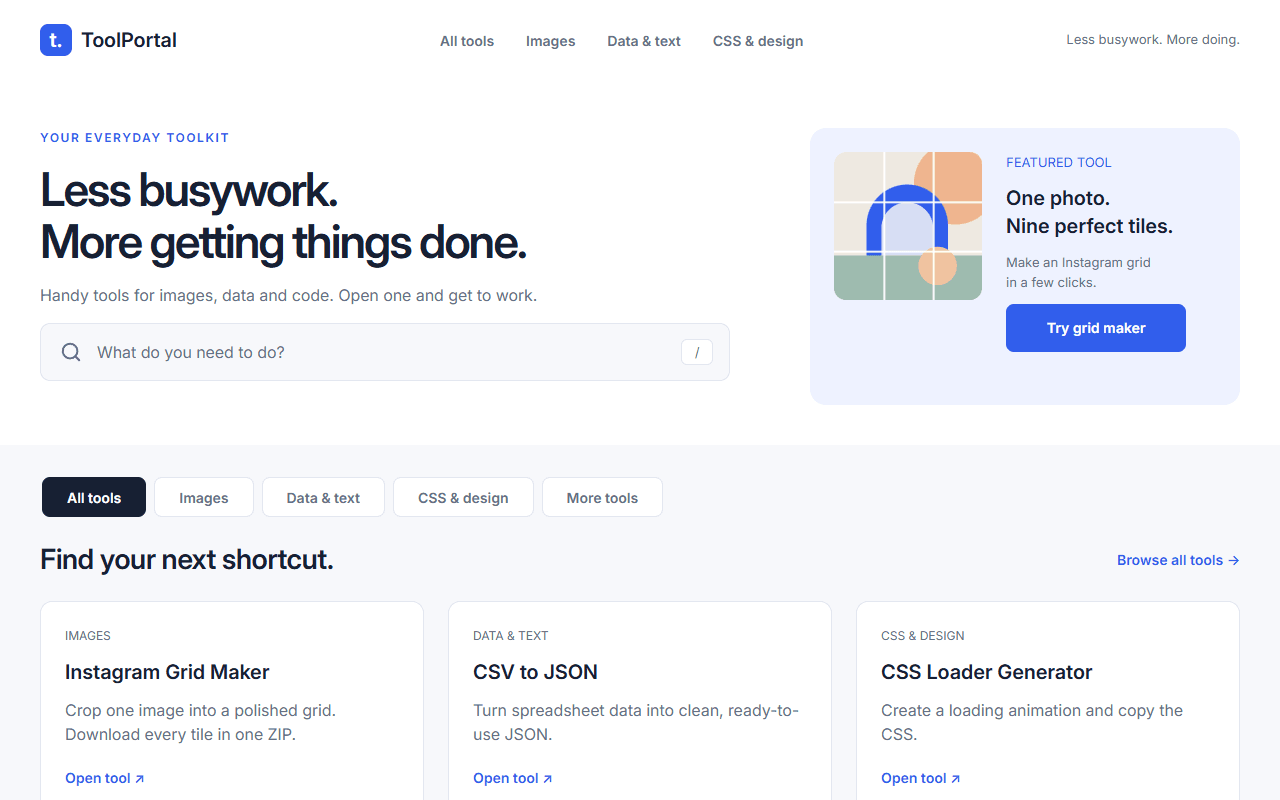
About this app
ToolPortal.org is a practical web-based toolbox that brings together a wide range of everyday utilities for images, data, and code. Instead of juggling a dozen bookmarked sites, you get one clean portal with fast keyword search and even task-description matching, so you can just describe what you need and jump straight to the right tool. The collection covers popular jobs like cropping images, converting CSV to JSON, formatting messy JSON, comparing text with a diff checker, generating CSS loaders, converting inches to pixels at any DPI, extracting text from screenshots locally, and turning a DOI into BibTeX. Most text and utility flows run right in your browser, which keeps things snappy and avoids unnecessary uploads. The interface is refreshingly simple—no bloat, no sign-up walls, just open a tool and get to work. It’s clearly aimed at developers, designers, students, and anyone who regularly wrangles digital content and wants to save a few minutes here and there.
Key features
- 1Search-first homepage with keyword and task-description matching plus a '/' keyboard shortcut.
- 2Browser-side processing for most text and utility flows, reducing uploads and keeping interaction fast.
- 3Broad tool catalogue: image cropper, Instagram grid maker, CSV/JSON converters, diff checker, CSS loader, DPI calculator, screenshot-to-text, DOI-to-BibTeX.
Target customer profile
Drawn from the product itself, not from a survey.
Demographic
Web developers and programmers
Pain points
Wasting time hunting for reliable online converters and formatters
Primary needs
Quick access to JSON formatter, diff checker, CSS generator, and CSV converter
Demographic
Graphic and social media designers
Pain points
Clunky image cropping and grid creation tools that require heavy software
Primary needs
Simple Instagram grid maker, image cropper, and pixel/DPI conversion tools
Demographic
Students and academic researchers
Pain points
Manual citation formatting and tedious data cleanup
Primary needs
DOI to BibTeX converter, screenshot to text, and JSON/CSV utilities
Scout Review
Written by AI from measured evidence, scored out of 100.
ToolPortal is a clean, fast, well-organized utility hub that does the boring things right: a search-first homepage, a disciplined card grid, and Lighthouse scores of 93 mobile / 100 desktop. Its browser-side processing claim is backed by real speed numbers, and accessibility is a perfect 100 on automated checks. The gaps are in the details — an orphaned grid card, faint card text, a clipped footer, missing security headers (no HSTS, CSP, SPF, DMARC), and a crowded category where its task-description search is the main thing setting it apart. For developers and designers who want a fast, no-signup toolbox, it's a solid pick; for anyone comparing against CyberChef's depth or SmallSEOTools' breadth, the wedge is convenience and speed, not feature count.
Measure by measure
Usability
68Search-first hero with a '/' shortcut and dual filter/browse paths make finding a tool fast. Cards lack previews or usage hints, and the FAQ hides behind a disclosure, so first-timers get little context.
Design
70Clean, confident editorial hero with a disciplined three-column tool grid and one consistent blue accent. Undermined by an orphaned 11th card, low-contrast grey card text, and a clipped footer.
Speed
82Lighthouse mobile 93/100 (LCP 2.6s, CLS 0, TBT 16ms) and desktop 100/100. Browser-side processing for most text/utility flows keeps interaction snappy and avoids upload round-trips.
Security
52HTTPS enforced with frame protection, X-Content-Type-Options, Referrer-Policy, and Permissions-Policy. Missing HSTS, CSP, SPF, and DMARC (6/12 checks); no published audits or security page — normal for an early-stage tool.
Accessibility
80Lighthouse accessibility audit scores a perfect 100/100. One failing audit flags visible text labels without matching accessible names. No published a11y statement or multi-language support, but the automated baseline is strong.
Growth
58A real, recurring problem (tool-hunting) with a genuine wedge: task-description search plus local browser-side processing. But the utility-hub category is crowded and the differentiator is copyable.
Improvement areas
- Missing security headers (HSTS, CSP, SPF, DMARC) — 6/12 on the checklist.
- Layout details: orphaned 11th card, faint grey card text, clipped footer.
- Thin onboarding context: no card previews or usage hints, FAQ hidden behind a disclosure.
Design & Usability
ToolPortal's homepage is genuinely well-crafted for a utility hub: a confident editorial hero, a search field with a '/' shortcut, and a disciplined three-column card grid with one consistent blue accent. The category pills and 'Browse all tools' link give two clear paths into the catalogue. Where it slips is the details — an 11-card grid leaves the final card orphaned on its own row, card descriptions use faint grey text that hurts scannability, and the footer text clips at the bottom edge. Usability is strong on the search side but thin on guidance: every card is an identical 'Open tool ↗' with no preview or usage hint, and the FAQ hides behind a collapsed disclosure, leaving first-timers without context.
Speed & Security
Speed is the standout: Lighthouse mobile 93/100 with LCP 2.6s, CLS 0, and TBT 16ms, and a perfect 100 on desktop. The site's claim that most text and utility flows run browser-side is consistent with that — no upload round-trips, no server rendering bottleneck. Security is the weak flank. HTTPS is enforced and frame protection, X-Content-Type-Options, Referrer-Policy, and Permissions-Policy are all present, but HSTS, CSP, SPF, and DMARC are all missing — 6/12 on the header checklist. There's no published SOC 2, ISO, pen-test, or security page, which is normal for an early-stage free tool but leaves the compliance story empty. For a site that processes pasted data and screenshots, a CSP and HSTS are cheap wins.
Accessibility & Growth
Accessibility is a genuine strength: Lighthouse scores a perfect 100/100, with one failing audit flagging visible text labels that lack matching accessible names — a small, fixable gap. There's no published accessibility statement or multi-language support, but the automated baseline is among the better ones in this category. Growth is the harder question. The problem ToolPortal names — hunting across a dozen bookmarked converter sites — is real and recurring, and the task-description search plus local browser-side processing are a genuine wedge over SmallSEOTools and OnlineTools.com. But the utility-hub category is crowded, the differentiator is copyable, and the domain is under a year old. It can grow, but it needs to lean on the search-and-privacy angle rather than competing on tool count.
Conclusion
ToolPortal earns its place as a fast, no-friction toolbox for everyday image, data, and code chores. The speed and accessibility numbers are real, the search-first design is thoughtful, and the local-processing approach is the right call for privacy-conscious users. To move from 'nice utility site' to 'the one I bookmark,' it needs to fix the layout details, add the missing security headers, and make the task-description search the headline feature rather than a footnote. It's early, it's competent, and it has a clear enough wedge to be worth watching.
Suggestions for improvement
- Add HSTS, CSP, SPF, and DMARC headers — they're cheap and close the 6/12 security gap.
- Fix the 11-card grid so the final card doesn't sit orphaned; add a 12th tool or rebalance the layout.
- Darken card description and category label text to meet contrast guidance and improve scannability.
- Surface the task-description search more prominently — it's the real differentiator over SmallSEOTools.
Alternatives comparison
Named competitors, point by point. Nobody paid to appear here or to be left out.
 ToolPortal |  SmallSEOTools |  OnlineTools.com |  CyberChef | |
|---|---|---|---|---|
| Free to use without sign-up | Yes — no sign-up walls | Yes — free with ads | Yes — free | Yes — free, open source |
| Task-description search (describe the job, get the tool) | Yes — keyword plus task-description matching | Keyword search only | Category browse, limited search | No — operation-based UI |
| Browser-side / local processing | Most text/utility flows run locally | Server-side processing | Server-side processing | Yes — fully client-side |
| Breadth of tool catalogue | 11+ tools across images, data, CSS | Very broad — hundreds of SEO/text/image tools | Broad directory of simple utilities | Deep data-manipulation operations, not everyday utilities |
| Image tools (cropper, grid maker, DPI) | Yes — cropper, Instagram grid maker, DPI calculator | Yes — image resizer, cropper, converters | Limited image utilities | No dedicated image editing tools |
| Developer/data tools (JSON, CSV, diff) | Yes — JSON formatter, CSV to JSON, diff checker | Yes — JSON formatter, converters | Yes — converters and formatters | Yes — deep data manipulation and conversion |
SmallSEOTools
A broad collection of free online tools for SEO, text, and image tasks.
OnlineTools.com
A directory of simple web utilities for developers and everyday users.
CyberChef
A powerful web app for data manipulation and conversion, though more technical.
Comparing options? See ToolPortal alternatives, scored side by side
More Productivity apps
View all Productivity
Puzzly – B2B Lead Generation & Sales Intelligence Platform
92Puzzly is an all-in-one B2B lead generation platform that...

Qamarero
92An all-in-one hospitality software for restaurants and ba...

EmbedMyReviews
92White-label reputation management software for agencies s...

StoryPad
92Privacy-first open source journal app with a continuous t...

Notion
92All-in-one AI workspace for docs, projects, and knowledge...

The Stack Newsletter
92A weekly newsletter delivering curated tech jobs, intervi...

Vibe Coding Agent Skills
92A free, open-source platform offering 110 AI agent skills...

QRBliss
91Branded QR codes with AI Brand Sync, 15 free dynamic code...

Gerty
91Private, local AI assistant for Mac that runs offline

Strukchad Property Management
91Property management for Kenyan letting agents: rent invoices raised every month, M-Pesa rent prompts to tenants, arrears tracking and landlord statements.

CC Switch
91Open-source desktop app for switching AI coding providers...

PitchWhip
90AI cold call scripts & direct dials from LinkedIn


A platform dedicated to providing unbiased reviews of newly launched applications, analyzing everything from their features to their full potential.
info@scoutforge.net© 2026 Scoutforge. All rights reserved.
